











So I’ve had this raspberry pi 3 laying around in my closet for a year or a bit more now. While I thought I’d use it for automating something such as monitoring our plants for changes in soil moisture that did not come to fruition. With the start of this blog and the increase in tooling around it, I really needed something to run any sort of CI platform. I tend to host everything under AWS so that everything is under one roof. Issue there is that it might become rather expensive if you start spinning many instances. And CI is something that you might not want to run on the same machine as your services. So I thoguht to myself maybe I can get my jenkins on ec2-nano? That would probably set me back 5$ a month. Then a cheaper option came to mind - why not use the RPI3 for my Jenkins?
The setup process was rather easy. Just ran this bash script on my raspbian terminal.
# install docker
curl -sSL https://get.docker.com | sh
# install jenkins
wget -q -O - https://pkg.jenkins.io/debian/jenkins.io.key | sudo apt-key add -
sudo sh -c 'echo deb http://pkg.jenkins.io/debian-stable binary/ > /etc/apt/sources.list.d/jenkins.list'
sudo apt-get update
sudo apt-get install jenkins
Now what I needed to do is get the generated admin password for jenkins. Just run this:
sudo cat /var/lib/jenkins/secrets/initialAdminPassword
I then ran into an issue where jenkins could not connect to the internet. To fix it
sudo nano /var/lib/jenkins/hudson.model.UpdateCenter.xml`
# (I know I'm a scrub for not using vim)
# change the https://updates.jenkins.io/update-center.json to http://updates.jenkins.io/update-center.json.
Once that is done, I could do everything I’d normally do on jenkins. The intent for my jenkins instance has always been to build docker images and push them to AWS registry, where I could use ECS to run them on one of my isntances. Once I tried doing that, I noticed that there was an issue where jenkins could not reach docker. To fix it, run this on the raspberry sudo usermod -a -G docker jenkins && sudo service jenkins restart. With this, everything works as expected.
As expected, the raspberry is not a quick beast. Due to the meager cpu and the slow drive(32gb sd card) the raspberry is nowhere near a proper dedicated instance. Just to give you an example a build that runs 22 seconds on my Mac Pro with an i7, takes around 2.5 to 3 minutes to complete on the raspberry. Since I’m in no rush the build times are acceptable. Especially since I don’t build that often and the raspberry is powered 24/7. I’m still rather impressed that it manages to do what it does with the limited resources it has. Here’s a snap of what the top looks like while performing a go build:
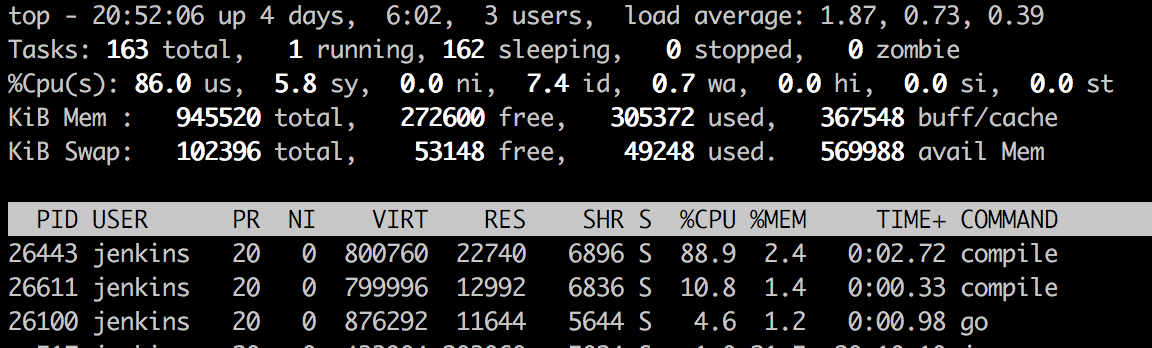
It seems to be able to squeeze every single bit out of the tiny machine.
Not all is well though. Raspberry runs on ARM. This is a particular pain for the types of work I’m using it for. If I build an image, I have to cross compile the binaries to AMD64. It’s all good an well with GO but if I end up using a more complex Dockerfile all hell breaks loose. It’s either exec errors when running commands while building the image or when running the image on AMD64. Qemu might be the answer here. I tried using it but to no avail. I ended up making the decision to rewrite everything to GO instead, since I like it so much. If you’ve got an idea how to make this work - let me know in the comments below.
The other limitation with this approach is that my jenkins is not reachable from the outside of my local home network. This means no hooks to trigger builds. Back to good old polling. It’s possible to expose it to the internet but since my IP is dynamic, I feel it would be too much work for little benefit.
Either way - I’m pretty damn happy about my new jenkins server. The question remains if the raspberry’s electricity bill is going to be less than 5$ a month though…
EDIT: I’ve since moved away from both the raspberry and the Jenkins towards a beefier machine. You can read about it here.
What do you guys use your raspberries for?
此内容由惯性聚合(RSS阅读器)自动聚合整理,仅供阅读参考。 原文来自 — 版权归原作者所有。