


Valve was kind enough to send Steam Deck devkits to Arch Linux maintainers and developers which gave us an opportunity to mess around with the device.
Personally I find it a bit fun to mess around with video streaming, thus one of the first things I wanted to try figure out was how I could stream the gamemode on the Steam Deck. Installing the OBS flatpak and adding it to the menu doesn’t actually work so we sadly have to be a bit more clever.
Essentially the goal is to run an RTMP server locally which OBS can read from using the “Media Source” layer, and figure out a way to have the Steam Deck to stream towards that.
Lets setup the RTMP stream first and check that it works.
We are going to use a quick docker container for this so we don’t have to deal with nginx directly.
λ ~ » podman run -d -p 1935:1935 --name rtmp-stream alfg/nginx-rtmpThis is going to give us a rtmp-stream container which will be serving us RTMP
streams on port 1935. It accepts arbitrary path names with the prefix stream
so for the purpose of this post we are going to use /stream/deck as our RTMP
stream.
To test the stream we can simply use ffmpeg with a special testsrc input.
Shamelessly stolen from Stack Overflow.
λ ~ » ffmpeg -r 30 -f lavfi -i testsrc  -vf scale=1280:960 -vcodec libx264 \
     -profile:v baseline -pix_fmt yuv420p  -f flv rtmp://localhost/stream/deck
To validate that this works we can just open the RTMP stream in vlc or mpv
and get some test output back.
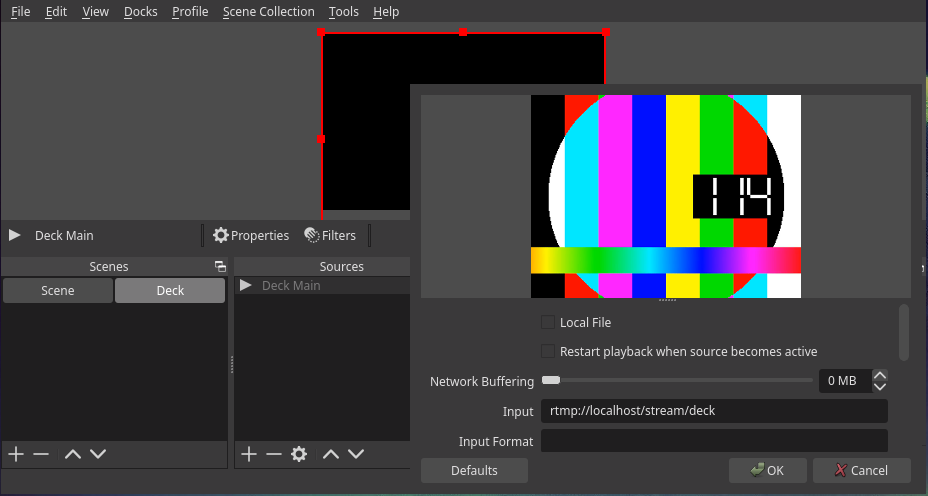
λ ~ » mpv rtmp://localhost/stream/deckNow we can also make an OBS source for this. We are using the “Media Source” unhooking “Local File”. Add the RTMP source as “Input” and you should see the same test image in OBS.
For the next stems you need to figure out the local IP of your machine. This can
be done by looking at ip -br addr, and for the purpose of this post the IP is
192.168.1.4 but this is going to be different on your system.
This setup assumes you have sshd running on your Steam Deck. The easiest way to
get this done is to get into the Desktop Mode (Power Button -> Desktop Mode).
Open konsole, set a password on the deck user with passwd and start ssh with systemctl start sshd.
Then you can run ip -br addr and find the IP of the wlan0 device and login with ssh deck@<localip>
Keep in mind that everything we do beyond this point is not going to be persistent and we need to rerun several of these steps after updating the Steam Deck.
Ffmpeg is the bread and butter of modern video processing. It’s used everywhere and does any kind of media conversion and processing you can think of.
The first thing I tried was to get ffmpeg to stream from the Deck. There is a
gist
with instruction on how to use kmsgrab. But it overcomplicates a few things by
trying to use obs-kmsgrab instead of having an outgoing RTMP stream.
For using the RTMP stream one could do the following
(deck@steamdeck ~)$ sudo ffmpeg -f kmsgrab -i - -vaapi_device /dev/dri/renderD128 \
-vf hwmap=derive_device=vaapi,scale_vaapi=format=nv12 -c:v h264_vaapi -bf 1 \
-f flv rtmp://192.168.1.4/stream/deck
The issue is that gamescope seems to change the byte layout of the buffer
whenever you change from the gamemode UI to any games. ffmpeg seems expects
this to never change. The “solution” to this is to wrap the ffmpeg command in
a while loop so you restart the stream whenever it crashes, but you are still
going to be left with green artifacts in the menu and some staggering.
The entire setup is less than stellar.
I made an issue on gamescope,
but I don’t see how it’s going to be solved on their end. However, someone
comments that gstreamer might work better. I gave that a shot instead.
gstreamer is essentially a framework for video and audio where you can make
pipelines. It’s super powerful and offers a bit more flexibility then the
command line of ffmpeg.
First off we are going to install packages on the Deck. The first step to do this is to disable the readonly attribute of the system.
(deck@steamdeck ~)$ sudo steamos-readonly disable
(deck@steamdeck ~)$ sudo pacman -S gstreamer-vaapi gst-plugin-pipewire
We are using the vaapi plugins as we want hardware accelerated encoding, then the
pipewire plugin for fetching the video itself.
Note that any changes to /etc is persistent, but since / is ephemeral it
will actually loose track of any files pacman has written to this directory.
If you install the above packages after an update you’ll find several file
conflicts. You can ignore these by adding --overwrite='*' to pacman.
You might also need to initialize the pacman keyring if you see keyring error.
(deck@steamdeck ~)$ sudo pacman-key --init
(deck@steamdeck ~)$ sudo pacman-key --populate
The gstreamer pipeline itself took me a few days to figure out. We fetch the
video from pipewiresrc and convert it to a h264 stream. We mux this with the
pulseaudio sound source of the speakers. We encode this with aac and throw it
towards the FLV muxer and onwards to the RTMP sink.
(deck@steamdeck ~)$ gst-launch-1.0 -e \
    pipewiresrc do-timestamp=True \
        ! queue \
        ! videoconvert \
        ! queue \
        ! vaapih264enc \
        ! h264parse \
        ! mux. \
    audiomixer name=mixer
        ! fdkaacenc bitrate=32000 \
        ! queue
        ! mux.
    pulsesrc device="alsa_output.pci-0000_04_00.5-platform-acp5x_mach.0.HiFi__hw_acp5x_1__sink.monitor" \
        ! queue \
        ! mixer.sink_0 \
    pulsesrc device="MIX THING HERE" \
        ! queue \
        ! mixer.sink_1 \
    flvmux name=mux streamable=True \
        ! rtmpsink location='rtmp://192.168.1.4/stream/deck live=1'
gst-launch-1.0 -e mp4mux name=mux ! filesink location=test.mp4
videotestsrc is-live=true ! nvvidconv ! nvv4l2h264enc ! h264parse ! queue ! mux.video_0
audiomixer name=mixer ! voaacenc ! queue ! mux.audio_0
audiotestsrc wave=sine ! queue ! mixer.sink_0
audiotestsrc wave=ticks ! queue ! mixer.sink_1
This seems works on my end. There seems to be some performance impact when doing this, even with vaapi. But it is probably negligible unless you are playing performance heavy games like Cyberpunk or Elden Ring.
And for the demonstration:
There are probably several ways to make this easier to use. Asking people to deal with the terminal and ssh isn’t very approachable for non-Linux users. Someone on reddit added the script as a library application which can probably be a handy way of starting and stopping the stream.
It would also be neat to see if it would be possible to offload the encoding of the stream to the remote device and do less on the Deck itself.
This is a little bit of progress to enable streaming on the steam deck. Hopefully someone finds this useful! Thanks again to Valve for sending Devkits and thanks to folks on IRC for entertaining my cluelessness around gstreamer :)
此内容由惯性聚合(RSS阅读器)自动聚合整理,仅供阅读参考。 原文来自 — 版权归原作者所有。