


Eaglercraft is an open-source project that lets you play Minecraft Java Edition (versions 1.5.2, 1.8.8, and 1.12.2) directly in your web browser—no download, no installation, no paid account required. Built using TeaVM to compile Java to JavaScript and WebAssembly, it runs on virtually any device with a modern browser, from school Chromebooks to smartphones.
Quick answer: If you want an Eaglercraft server online fast, you have two realistic paths: Docker if you want full control and don't mind Linux setup, or Sealos App Store if you want a public
wss://URL, SSL, and a working server in a few minutes.
Last verified: March 9, 2026
| Question | Short answer |
|---|---|
| Can you still host an Eaglercraft server? | Yes, but expect a fragmented ecosystem and changing public links |
| What do most players actually need? | A stable server, a browser-friendly wss:// address, and a private setup they control |
| What is the main risk? | Public infrastructure, mirrors, and community links change frequently, and the legal gray area has not gone away |
| What is the fastest practical setup? | Use Sealos if you want speed and a public browser-ready URL; use Docker if you want lower-level control |
If you came here from search, the core answer is simple: this page is most useful when you want to host your own private Eaglercraft server instead of relying on unstable public links.
| If you want to... | Best path | Time to launch | Best next step |
|---|---|---|---|
| Get a private server online as fast as possible | Sealos App Store | ~1-5 minutes | Deploy the Eaglercraft template |
| Control every file, plugin, and port yourself | Docker on your own VPS | ~30-60 minutes | Jump to Method 1 |
| Avoid manual SSL / WSS setup | Sealos App Store | Automatic | Jump to Method 2 |
| Learn how the stack works under the hood | Docker | Slower, more flexible | Read the architecture section first |
What you'll get from this guide:
wss:// address so friends can join from the browser| Use case | Best fit |
|---|---|
| You want a working private server fast and do not want to manage SSL and ingress yourself | Sealos |
| You want to customize files, ports, and plugins on your own host | Docker |
| You only want to play casually with a few friends for one session | Consider Shared Worlds before running a full server |
| You just want a server list | This guide is not the best source for that because public server status changes too often |
Before you pick a method, make sure you know these four things:
wss:// URL for browser players, or are you only testing privately?Fastest deployment path:

The practical reason to host your own server is simple: public Eaglercraft servers are unstable, often unsafe, and frequently disappear. A private setup gives you:
This guide covers two methods to set up your own Eaglercraft server:
If you mainly want the server, you can skip the background sections and jump straight to Method 1 or Method 2.
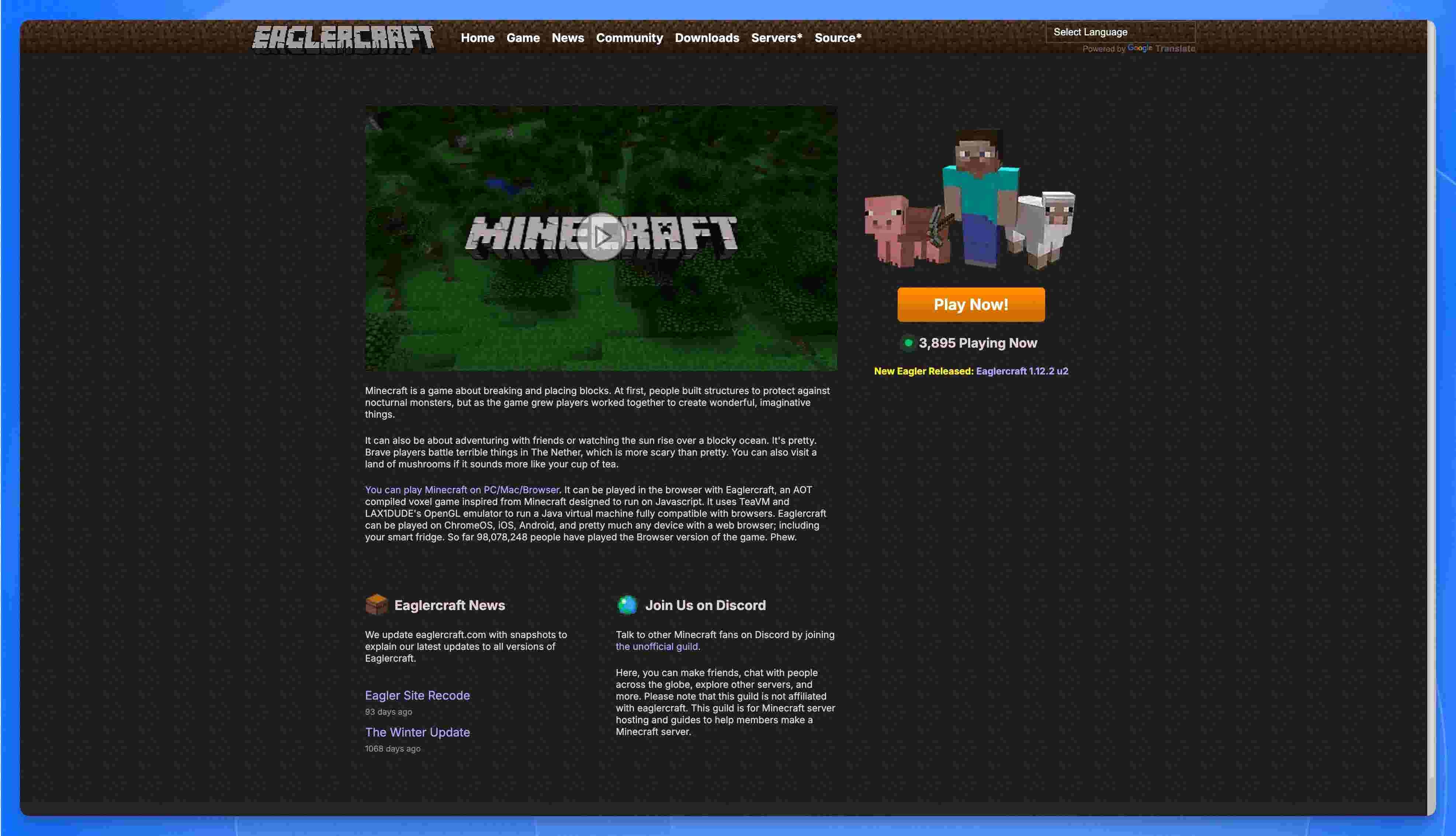 Eaglercraft
Eaglercraft is an open-source project that ports Minecraft Java Edition to run directly in a web browser. Created by a developer known as "LAX1Dude" in 2021, it allows players to experience full Minecraft gameplay on nearly any device with a modern browser—from school Chromebooks to smartphones, and even smart fridges (as the community jokes).
It's not a Minecraft-inspired clone; it is a direct port of the original Java code, translated into browser-compatible formats using sophisticated compilation techniques.
The magic behind Eaglercraft involves several key technologies:
TeaVM Compilation
Eaglercraft uses TeaVM (Tea Virtual Machine) to perform ahead-of-time (AOT) compilation of Minecraft's Java bytecode into JavaScript. This allows the entire Minecraft game logic—originally written in Java—to execute within a browser's JavaScript engine. The result is a massive JavaScript file that essentially contains the complete game.
WebAssembly (WASM) for Better Performance
Recent versions of EaglercraftX offer an experimental WASM-GC (WebAssembly with Garbage Collection) build. This newer runtime can deliver:
However, WASM-GC requires modern browser support. Chrome and Firefox remain the safest choices for testing it, while Safari support still lags enough that you should verify the current client notes before assuming it will work.
Custom WebGL Graphics Layer
Since Minecraft relies on OpenGL for 3D rendering (which browsers can't run natively), LAX1Dude created a custom OpenGL 1.3 emulator that maps Minecraft's drawing routines to WebGL operations on an HTML5 <canvas>. This allows the game to render graphics with minimal changes to the original source code.
Browser API Integration
Eaglercraft provides implementations for keyboard, mouse, audio, and file access using web APIs:
Eaglercraft runs on surprisingly old browsers—tested on Chrome 38 (circa 2014) and even Windows XP machines. Requirements:
| Feature | Minimum Requirement |
|---|---|
| Basic gameplay | WebGL 1.0 capable browser |
| Dynamic lighting & shaders | WebGL 2.0 support |
| WASM performance mode | Browser with WASM-GC support |
| Touch controls | Auto-detected on mobile devices |
Eaglercraft's popularity isn't about being free. It's about access.
It's the main weapon in a "cat-and-mouse game" between students and school IT administrators:
But here's the real secret: Eaglercraft is often a Trojan horse. An IT admin consultant's report found that many clients have a hidden, built-in unfiltered web browser. Students aren't just bypassing the filter for a game—they've gained a tool to bypass the school's entire content filtering system.
The public Eaglercraft world is chaotic:
Hosting your own server means a clean, stable, private environment where you control everything.
If that is already enough context for you, skip ahead to the deployment methods below.
Eaglercraft isn't just a stripped-down browser port. It's a surprisingly feature-rich client that, in some ways, offers more than vanilla Minecraft 1.8 ever did.
Here's what you get out of the box:
Unlike earlier versions that were multiplayer-only, EaglercraftX 1.8 includes full singleplayer support. You can:
.epk files to back them up or share with friendsThis means your builds persist between sessions—even on a school Chromebook. Just don't clear your browser data.
Pro tip: Export your world regularly. Browser storage can be wiped by IT policies or cache cleaners.
This is where Eaglercraft flexes. The client ships with a Physically Based Rendering (PBR) shader system inspired by GTA V's deferred rendering engine—written from scratch by LAX1Dude.
| Feature | Description |
|---|---|
| Dynamic Lighting | Torches and lava cast realistic, soft light |
| Reflections | Water, glass, and metal blocks reflect the environment |
| PBR Textures | Default textures show glossiness and metallic properties |
| Deferred Rendering | Modern rendering pipeline for better performance |
To enable shaders: Options → Video Settings → Shaders → Select PBR Pack
Requirements: WebGL 2.0 support. Works on most modern browsers, but skip this on older Chromebooks if you want playable framerates.
EaglercraftX has built-in voice chat using WebRTC—no Discord or third-party apps needed. It works in both Shared Worlds and on servers that support it.
How it works:
Privacy warning: WebRTC can expose your IP address to other players. On public servers, consider this before enabling voice.
Server owners can disable voice chat by adding allowVoiceClient: false to their client configuration.
Don't want to set up a full server? Shared Worlds lets you invite friends to your singleplayer world using peer-to-peer connections.
Here's how it works:
Esc → "Open to Shared World"Behind the scenes, this uses WebRTC with relay servers to punch through NATs. It's essentially "Open to LAN" but works over the internet.
Limitations:
You can import any Minecraft 1.8-compatible resource pack directly into Eaglercraft:
.zip fileMissing the music? Minecraft's soundtrack isn't included by default (file size + copyright). Download a C418 music resource pack and import it for the full nostalgic experience.
If your browser supports WebAssembly with Garbage Collection (WASM-GC), Eaglercraft can run significantly faster:
| Runtime | Performance | Browser Support |
|---|---|---|
| JavaScript | Baseline | All browsers (Chrome 38+, even Windows XP) |
| WASM-GC | ~50% more FPS | Chrome 119+, Firefox 120+, Edge 119+ |
To check: Look for "WASM-GC" in the Eaglercraft loading screen or F3 debug menu.
Note: Safari remains the least reliable choice for WASM-GC compared with Chrome or Firefox. If browser support is a deciding factor, verify the current client notes before you commit to that path.
Because Eaglercraft is open-source, the community has created numerous modified clients:
| Client | Focus | Notable Features |
|---|---|---|
| Resent Client | PvP | Keystrokes, FPS boost, click GUI, toggle mods |
| Astra Client | Aesthetics | Enhanced shaders, cleaner UI |
| CyanogenMC | Quality of Life | Polished experience, bug fixes |
| Shadow/Pixel | Performance | Optimized for low-end devices |
Warning: Some unofficial clients floating around contain malware or hidden browser exploits. Only download from trusted sources like the official Eaglercraft site or verified GitHub repositories.
Eaglercraft is designed to run on almost anything:
The only hard requirement is WebGL support. For advanced features like dynamic lighting, you need WebGL 2.0.
Here's the catch: an Eaglercraft server isn't one piece of software. It's a fragile "man-in-the-middle" setup that bridges two incompatible worlds.
A browser client lives in a security sandbox. It's forbidden from opening direct TCP/IP socket connections to game servers. It can only speak web-standard protocols—primarily WebSockets (ws:// or secure wss://).
But a standard Minecraft server (like Spigot or Paper) only speaks the Minecraft TCP protocol on port 25565.
They're speaking different languages. To make them communicate, you need a translation bridge.
Every Eaglercraft multiplayer setup requires these three components working together:
1. The Bouncer (Proxy Server)
This is the front door—the only thing the browser talks to. Common options include:
The proxy listens on a web port (typically 80, 443, or a custom port) and accepts WebSocket connections from browsers.
2. The Translator (EaglercraftXServer Plugin)
This is the magic layer. The EaglercraftXServer plugin sits inside the proxy and performs real-time protocol translation:
The plugin also handles Eaglercraft-specific features:
3. The Game Server (Spigot/Paper)
The actual Minecraft server running your world. Critical requirement:
⚠️ Must run in
online-mode=false(offline/cracked mode)
This is necessary because Eaglercraft clients cannot perform official Mojang authentication. The proxy handles any authentication you want to implement, then forwards "pre-authenticated" players to the game server.
Originally, there were separate plugins for BungeeCord (EaglerXBungee) and Velocity (EaglerXVelocity). In 2025, these were unified into EaglercraftXServer—a single plugin that works with:
The unified plugin supports all Eaglercraft versions (1.5.2, 1.8.8, 1.12.2) simultaneously, meaning players on different client versions could potentially connect to the same network (with appropriate backend servers).
Key Configuration Options:
| Setting | Purpose |
|---|---|
websocket_compression | Enable zlib compression (recommended for WiFi) |
connection_timeout | How long to wait for handshake completion |
max_connections | Limit concurrent WebSocket connections |
allow_voice_client | Enable/disable built-in voice chat |
skin_service | Configure custom skin server URL |
Don't want to set up all this infrastructure? EaglercraftX 1.8 includes Shared Worlds—a peer-to-peer multiplayer system:
Behind the scenes, this uses WebRTC to establish direct browser-to-browser connections, with community relay servers helping browsers find each other. No dedicated server, no proxy, no configuration—perfect for casual play with friends.
Limitations:
This is the classic, hands-on method for folks who are comfortable with a command line and want full control over their Eaglercraft server configuration. This approach is ideal if you:
Prerequisites: A server (like a Linux VPS or home server) with Docker and docker-compose installed. Most cloud providers (DigitalOcean, Vultr, Linode) offer $5-10/month VPS options that work perfectly for small Eaglercraft servers.
First, create directories on your server to store your world data. This way, even if you update or restart the server, your world is safe.
docker-compose.yml FileNext, create the configuration file that tells Docker how to build your server.
Paste the following content into the file. This configuration bundles the proxy, translator, and game server into a single image.
Save the file and exit the editor. Now, tell Docker to start the server in the background (-d).
You can check the server's console logs to make sure it started correctly.
Once deployed, you have two ways to connect:
Method A: Add to Server List (Port 5200)
ws://YOUR_SERVER_IP:5200wss://, the secure version, if you've manually set up an SSL reverse proxy like Nginx or Caddy. For this simple setup, stick to ws://.)Method B: Direct Connection (Port 5201 - Recommended)
http://YOUR_SERVER_IP:5201Note on
ws://vswss://: Usews://(unsecured WebSocket) for this basic setup. To usewss://(secured), you'll need to configure an SSL reverse proxy with Nginx or Caddy—covered in the advanced section below.
For public servers, especially those shared via links, using wss:// (WebSocket Secure) is recommended. Here's how to set it up with Nginx:
1. Install Nginx and Certbot:
2. Create Nginx configuration (/etc/nginx/sites-available/eaglercraft):
3. Enable and get SSL certificate:
Now players can connect via wss://your-domain.com.
If the Docker method feels like too much work, this is the zero-configuration alternative. Sealos is a cloud platform built specifically for containerized applications—it handles all the complex infrastructure so you can focus on playing.
| Feature | Docker (Self-Hosted) | Sealos (One-Click) |
|---|---|---|
| Setup Time | 30-60 minutes | Under 5 minutes |
| Technical Knowledge | Linux, Docker, networking | None required |
| SSL/WSS | Manual Nginx/Certbot setup | Automatic HTTPS |
| Server Management | SSH + command line | Web dashboard |
| Scaling | Manual configuration | One-click upgrade |
| Cost | VPS ($5-20/month) + your time | Pay-as-you-go (similar pricing) |
| Maintenance | You handle updates/security | Platform managed |
| Best For | Learning, full customization | Quick setup, reliability |
Sealos uses the same container technology under the hood—it's not a different server; it's the same Docker image with all the hard parts automated.
The fastest way to get started is using the pre-configured Eaglercraft template:
Click the button above.
Click "Deploy Now". You don't need to change any configuration.
After 0~1 minutes, your server is live. Sealos automatically:
wss:// addressFind your server URL on the application details page:
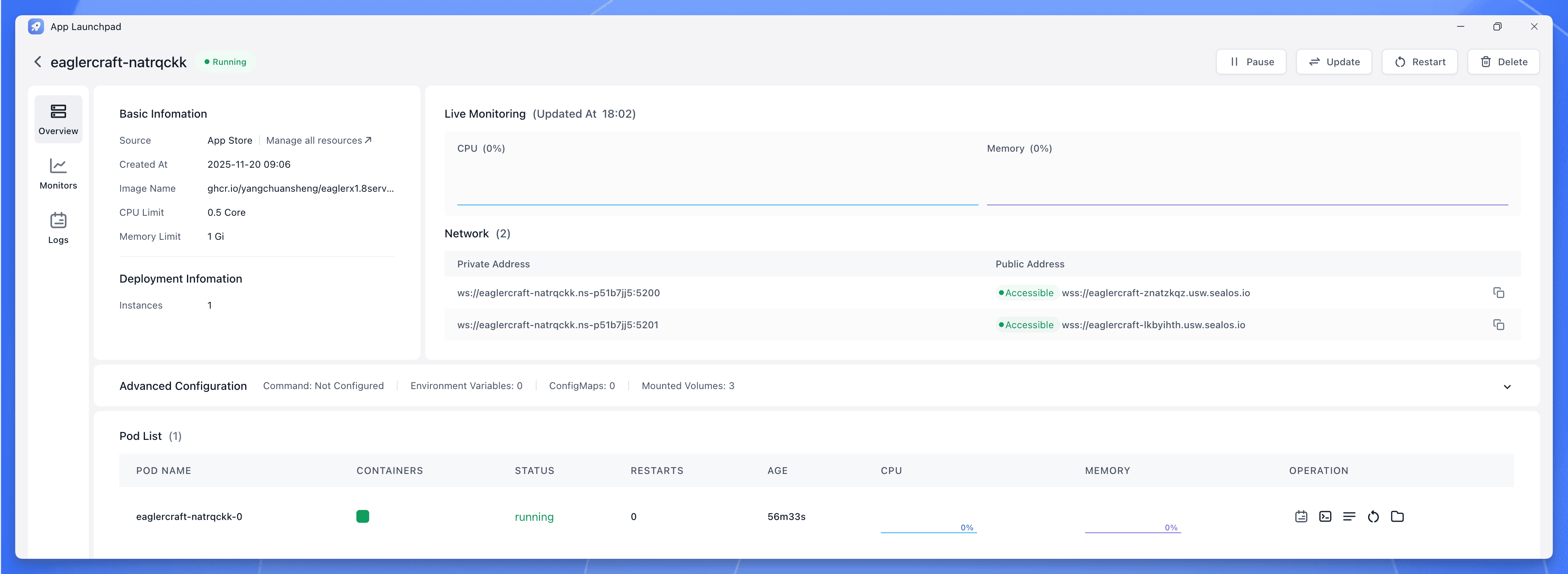 Sealos Eaglercraft Server WebSocket URL
Copy the wss:// URL and add it to your Eaglercraft client:
wss://xxxxx.sealos.io address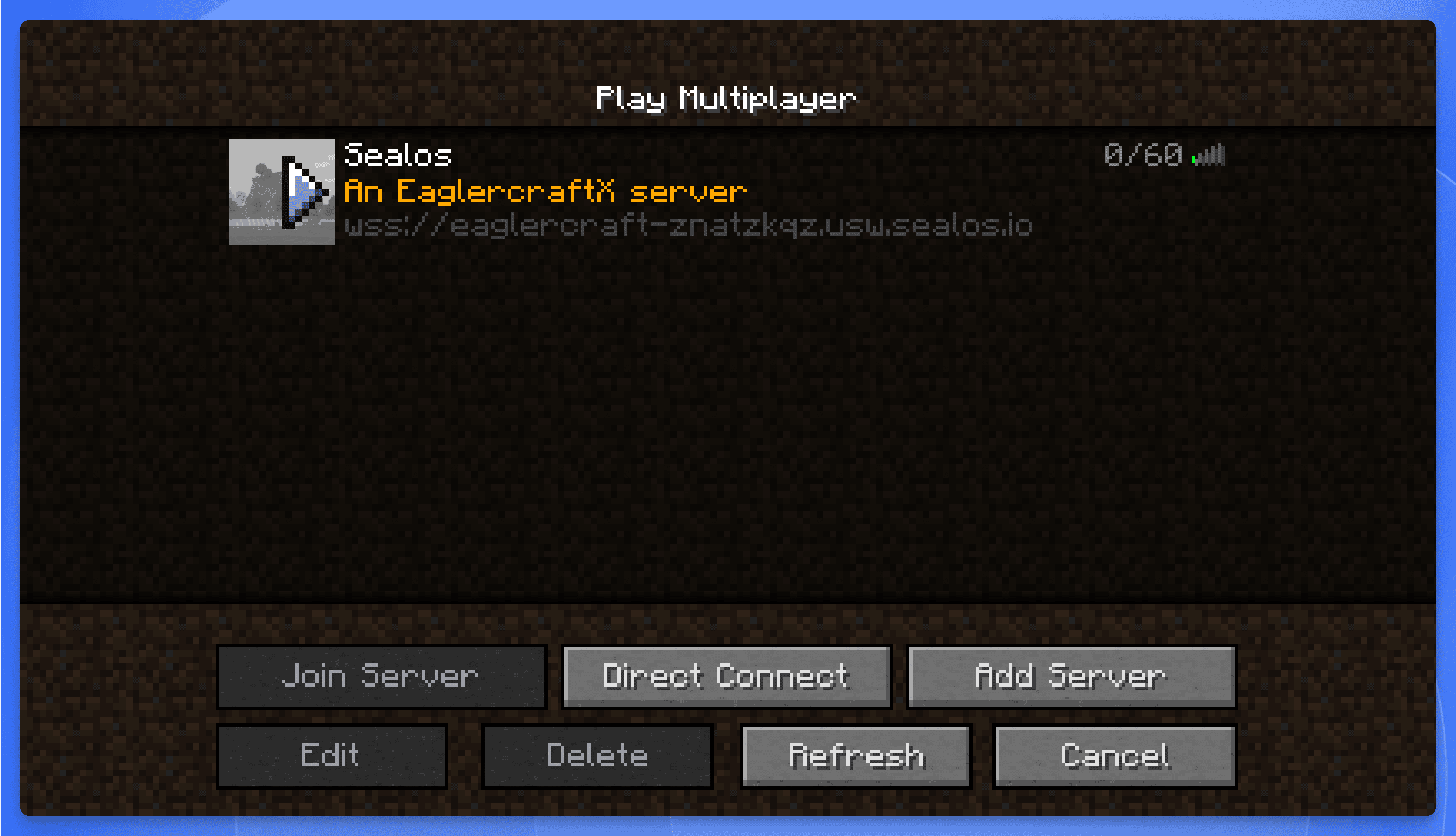 Eaglercraft Client Add Server
That's it—you now have a private Eaglercraft server with automatic SSL, no port forwarding, and no command-line required.
While Sealos is easier, the Docker method makes more sense if you:
Before investing time in your own server, you might want to explore the public Eaglercraft multiplayer scene. The important caveat is that public server addresses, uptime, moderation quality, and legal status change frequently. That makes static "top server" lists one of the least durable parts of any Eaglercraft article.
| What to check | Why it matters |
|---|---|
Does the server publish a working wss:// address and recent join instructions? | Browser-based multiplayer depends on the WebSocket endpoint being current |
| Is there an active Discord or community channel? | Public servers often communicate outages, resets, and new addresses there first |
| Is moderation visible and documented? | Public chat quality and player safety vary widely |
| Does the server explain compatibility clearly? | Some communities optimize for 1.8.8 PvP, others for survival or mixed-client setups |
| Are you comfortable trusting the client and link source? | The Eaglercraft ecosystem is heavily mirrored, and not every mirror is trustworthy |
Finding current servers: Use community-maintained server hubs like TopEaglerServers to find active servers to join or list your own, and verify the address and community activity before joining.
PvP & Competitive:
Survival & Building:
Minigames:
Public servers are great for quick fun, but they come with trade-offs:
| Public Servers | Your Own Server |
|---|---|
| ❌ Someone else's rules | ✅ Your rules |
| ❌ Can't install custom plugins | ✅ Full plugin control |
| ❌ May shut down without notice | ✅ Runs as long as you want |
| ❌ Possible lag from overcrowding | ✅ Dedicated resources |
| ❌ Risk of toxic players | ✅ Whitelist your friends |
| ❌ No world backup access | ✅ Full data ownership |
| ❌ Dynamic links and uncertain uptime | ✅ Stable join path you control |
The Eaglercraft ecosystem exists in a legal gray area, which attracts both passionate fans and bad actors:
Risks to be aware of:
Best practices:
allowVoiceClient: false in client config)Here's the practical reality: Eaglercraft links, mirrors, and public infrastructure are unstable. Takedowns happen, school filters change, and community hosts move or disappear.
That is exactly why many players end up hosting their own server. Not because self-hosting removes every legal or platform risk, but because it gives you a stable environment, a join path you control, and less dependence on random public infrastructure.
Before you dive in, you need to understand what you're getting into. Eaglercraft exists in a legal gray area, and there are real risks to consider.
Let's be direct: Mojang (Microsoft) considers Eaglercraft copyright infringement.
In 2023, Microsoft launched a widespread crackdown, issuing DMCA takedown notices that removed thousands of Eaglercraft repositories from GitHub, GitLab, and even Replit. Their official position is clear:
"EaglerCraft allows the connection to Minecraft: Java Edition servers without requiring users to have an authenticated Minecraft account... The development and distribution of this product infringes Mojang's intellectual property rights."
The original developer, LAX1Dude, eventually removed code from his sites after this pressure. However, the project has continued through mirrors and community distribution.
What this means for you:
Here's the more immediate danger: not all Eaglercraft clients are safe.
After Microsoft's crackdowns removed official sources, the vacuum was filled by countless re-uploads and forks. Many of these are trustworthy. Many are not.
Some malicious forks have been found to contain:
An IT security consultant investigating Eaglercraft in schools discovered that some clients had a secret, built-in unfiltered web browser—turning a "harmless game" into a tool for bypassing all network restrictions.
If you're going to use Eaglercraft, follow these guidelines:
| Do | Don't |
|---|---|
| Download only from eaglercraft.com or verified sources | Click random "Eaglercraft unblocked" links from search results |
| Host your own server with known, clean images | Join servers from untrusted sources |
| Use a separate browser profile or incognito mode | Enter any personal information or passwords |
| Keep your browser and system updated | Ignore security warnings from your browser |
Is using Eaglercraft "wrong"? That depends on your viewpoint:
The case against: Minecraft is a paid product. Using Eaglercraft means playing without paying, which arguably deprives developers of revenue.
The case for: Many Eaglercraft users are students who can't purchase games, or people who already own Minecraft but need browser access. The official Eaglercraft site explicitly states: "If you enjoy Minecraft, you should buy the game."
The practical reality: Eaglercraft likely doesn't significantly impact Minecraft's $200+ million in sales. Many users are not "lost sales"—they're people who would never have purchased anyway, or who eventually do buy the official game.
We're not here to tell you what to think. We're here to make sure you understand the landscape before you make your choice.
If you use public servers, you accept someone else's moderation, uptime, address changes, and client trust model.
If you host your own, you gain something more practical than hype: a cleaner server for friends, a stable world you can keep online, and a join workflow you control.
That is the strongest reason to self-host Eaglercraft in 2026. Not because the ecosystem is perfectly safe or legally settled, but because a private setup is often the most stable option available for the people who still want to use it.
此内容由惯性聚合(RSS阅读器)自动聚合整理,仅供阅读参考。 原文来自 — 版权归原作者所有。