








Businesses that fail to speak their customers' native languages are essentially closing doors to vast market opportunities. Application localization (l10n) and internationalization (i18n) have evolved from nice-to-have features to critical business requirements that can make or break a product's global success. The complexity of managing translations across multiple languages, coordinating with translators worldwide, and maintaining consistency across different platforms has traditionally been a significant barrier for many development teams.
Enter Tolgee, an innovative open-source localization platform that promises to revolutionize how we approach translation management in software development. When paired with Sealos, a cutting-edge cloud operating system designed for simplicity and efficiency, deploying and managing a robust localization infrastructure becomes as straightforward as a single click.
This comprehensive guide will explore every aspect of Tolgee as a localization solution, examine its competitive advantages, analyze potential drawbacks, and provide you with detailed insights into why this platform might be the perfect fit for your internationalization needs. We'll also walk through the seamless deployment process on Sealos and discuss how this combination can transform your approach to global software distribution.
When you are ready you can go ahead and deploy Tolgee on Sealos in just one-click.
Tolgee represents a paradigm shift in how development teams approach localization. Unlike traditional translation management systems that often create silos between developers, translators, and project managers, Tolgee introduces a unified ecosystem where all stakeholders can collaborate seamlessly within the context of the actual application.
The platform was born out of frustration with existing localization workflows that typically involve exporting translation files, sending them to translators, waiting for completed translations, importing them back into the application, and then discovering context-related issues that require another round of back-and-forth communication. Tolgee eliminates these inefficiencies by bringing the translation process directly into the application environment.
At its core, Tolgee is built on the principle that context is king in translation work. When translators can see exactly how their work will appear to end-users, they can make informed decisions about terminology, tone, and cultural adaptation that simply aren't possible when working with abstract text strings in spreadsheets or standalone translation files.
 Tolgee Translations Settings
The crown jewel of Tolgee's feature set is its in-context editing functionality, which fundamentally changes how translations are created and reviewed. This feature allows translators to work directly within the live application interface, seeing their changes in real-time as they type. The system overlays editing interfaces on top of translatable text elements, providing immediate visual feedback about character limits, text overflow, and visual hierarchy impacts.
This approach dramatically reduces the number of revision cycles typically required in localization projects. Translators can immediately see if their translation causes layout issues, whether the tone matches the surrounding interface elements, and how their work integrates with the overall user experience. For applications with complex user interfaces, this can mean the difference between a professional, polished localized product and one that feels awkward and unnatural to native speakers.
The in-context editing system also supports collaborative review processes, where multiple team members can comment on specific translations, suggest alternatives, and approve changes without leaving the application environment. This creates a more natural workflow that mirrors how modern development teams already collaborate on code and design.
Tolgee's translation memory system goes beyond simple string matching to provide intelligent suggestions based on context, project history, and linguistic patterns. The platform analyzes not just exact matches but also fuzzy matches, considering factors like text length, grammatical structure, and semantic similarity when suggesting previously translated content.
This sophisticated approach to translation memory provides several key benefits. First, it significantly reduces translation costs over time by maximizing the reuse of previous work. Second, it ensures consistency across different parts of the application and even across multiple projects within an organization. Third, it helps maintain brand voice and terminology standards by suggesting translations that align with established patterns.
The system also learns from translator preferences and corrections, gradually improving its suggestions to match the specific style and terminology preferences of each project. This machine learning aspect means that the platform becomes more valuable the longer it's used, creating a positive feedback loop that encourages continued adoption and investment.
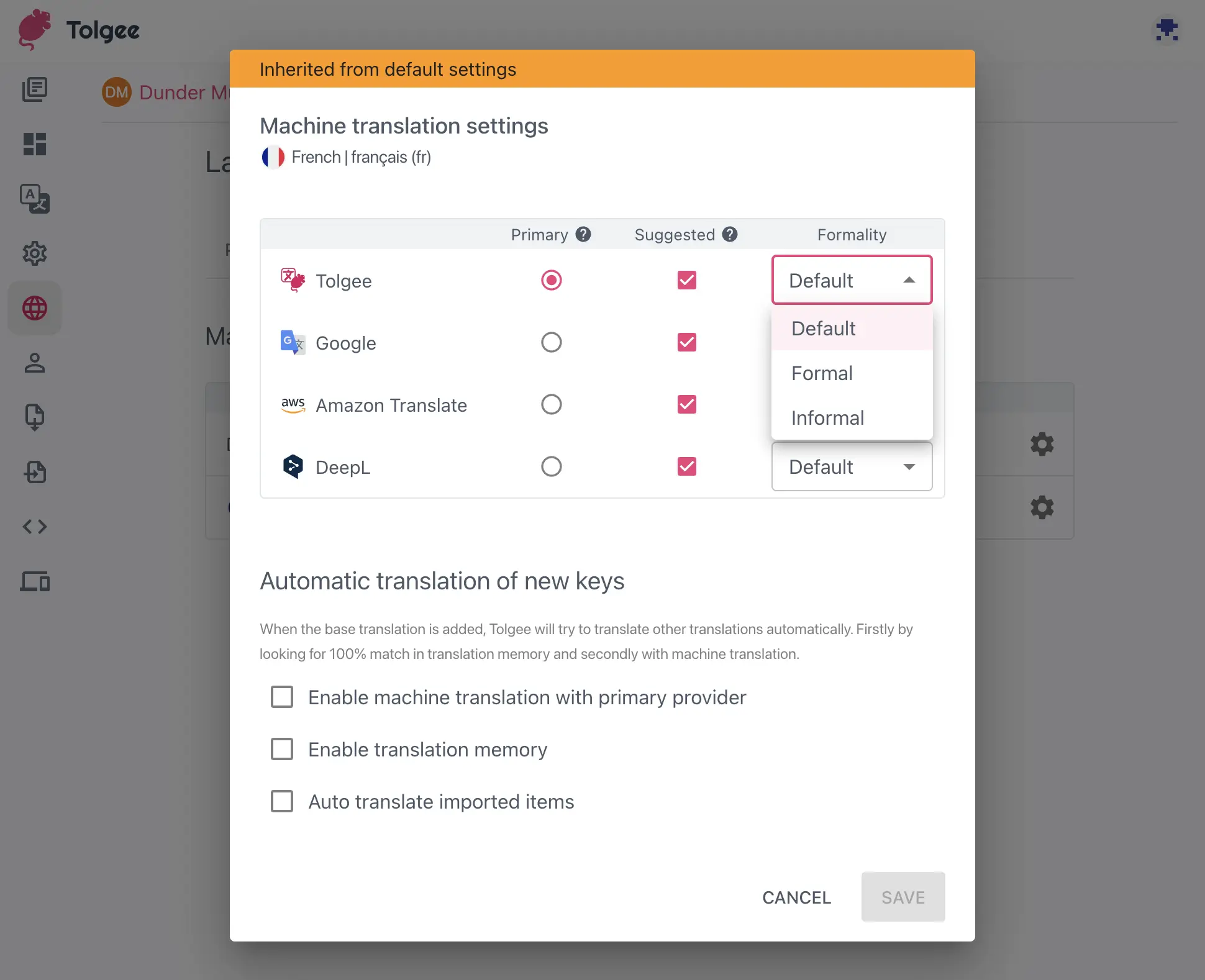
Tolgee Machine Translation Settings
While human translation remains irreplaceable for quality and cultural nuance, machine translation has evolved to provide valuable starting points for human translators. Tolgee integrates with leading machine translation services including Google Translate, DeepL, AWS Translate, and Microsoft Translator, allowing teams to choose the service that best fits their needs and budget constraints.
The platform's approach to machine translation is particularly sophisticated. Rather than simply providing raw machine translation output, Tolgee can pre-translate content based on project-specific terminology, previous human corrections, and context-aware improvements. This creates machine translations that are significantly more accurate and useful as starting points for human refinement.
The integration also supports batch processing for large volumes of content, automatic quality scoring to help prioritize human review efforts, and confidence metrics that help translators focus their attention on the translations most likely to need revision.
Tolgee offers numerous compelling advantages that set it apart from both traditional localization tools and modern competitors. Understanding these benefits can help you make an informed decision about whether Tolgee aligns with your organization's needs and workflows.
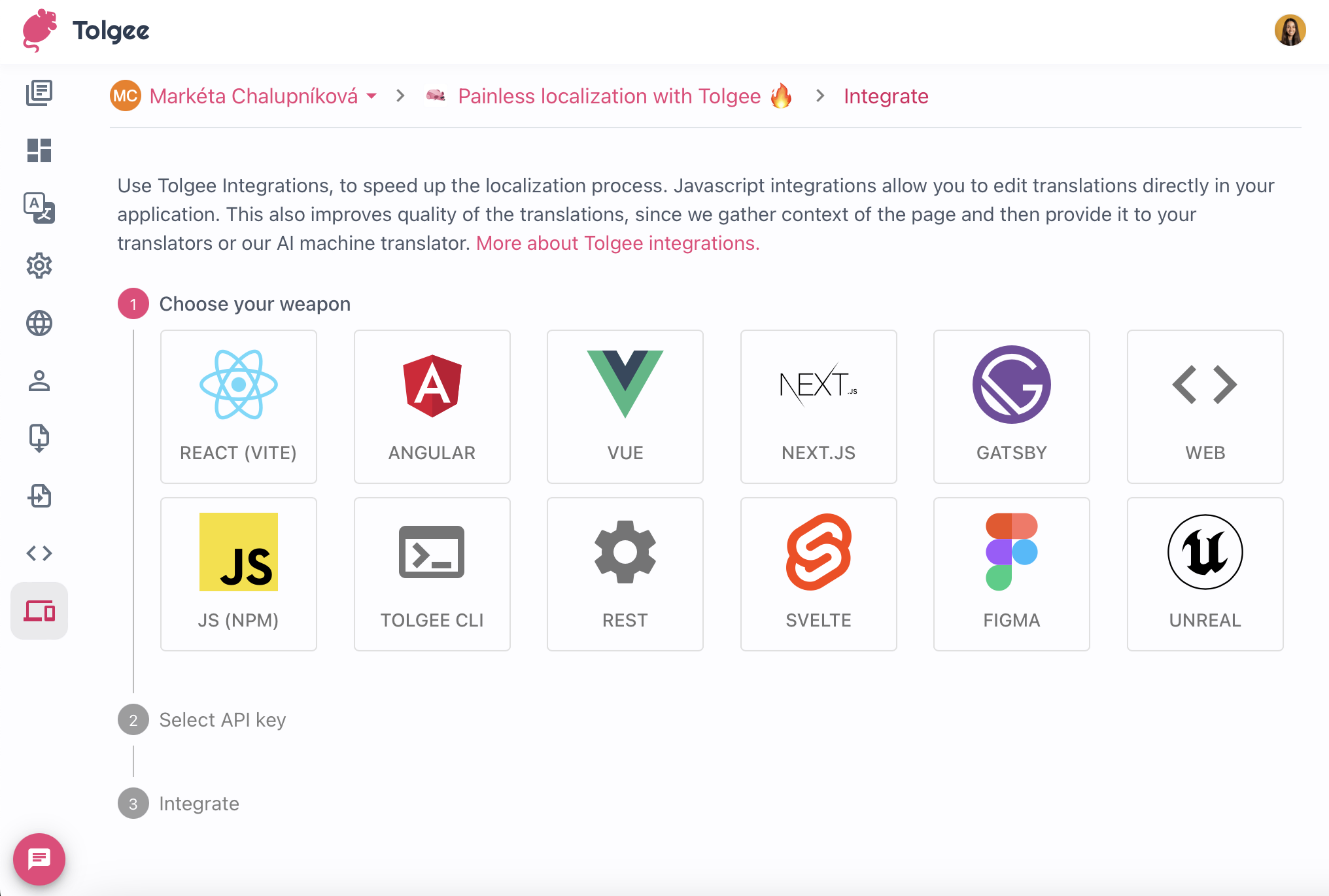 Tolgee Integrations
One of Tolgee's strongest selling points is its developer-centric design philosophy. The platform provides Software Development Kits (SDKs) for all major web development frameworks, including React, Angular, Vue.js, Svelte, Next.js, and many others. These SDKs are designed to integrate seamlessly with existing development workflows, requiring minimal changes to existing codebases.
The integration process typically involves adding a few lines of configuration code and wrapping translatable strings with Tolgee's translation functions. Once integrated, developers can focus on building features while Tolgee automatically handles string extraction, translation management, and content updates. This approach means that localization becomes a natural part of the development process rather than an afterthought that requires significant additional effort.
The platform also supports modern development practices like continuous integration and deployment (CI/CD). Automated workflows can extract new translatable strings, notify translators of updates, and automatically deploy translations without manual intervention. This integration capability means that localization doesn't slow down development velocity but instead becomes a seamless part of the release process.
Traditional localization projects often suffer from communication breakdowns between technical and non-technical team members. Tolgee addresses this challenge by providing role-based access controls and collaboration tools that allow each stakeholder to work within their area of expertise while maintaining visibility into the overall project status.
Project managers can track translation progress, monitor quality metrics, and coordinate release schedules through comprehensive dashboards that provide real-time insights into project status. Translators can focus on their craft without needing to understand technical implementation details, while developers can continue building features without being bottlenecked by translation dependencies.
The platform's commenting and review systems facilitate asynchronous collaboration across different time zones, which is particularly valuable for organizations working with global translation teams. Stakeholders can provide feedback, request clarifications, and approve changes within the context of the actual application, reducing misunderstandings and improving final translation quality.
While the immediate cost savings of using an open-source platform like Tolgee are obvious, the long-term financial benefits extend far beyond licensing fees. The platform's efficiency improvements can significantly reduce the time and effort required for localization projects, which translates directly to lower operational costs.
Translation memory functionality reduces redundant translation work, while machine translation integration can provide cost-effective starting points for human translators. The platform's quality assurance features help catch issues early in the process, preventing expensive late-stage revisions and delays.
For organizations managing multiple products or frequent releases, these efficiency gains compound over time. The ability to reuse translations across projects, maintain consistent terminology, and streamline approval processes can result in substantial cost savings and faster time-to-market for international releases.
As an open-source platform, Tolgee offers unparalleled flexibility for organizations with specific requirements or unique workflows. The codebase can be modified to integrate with proprietary systems, support custom file formats, or implement organization-specific quality assurance processes.
This flexibility extends to deployment options as well. Organizations can choose to self-host Tolgee for complete control over data and infrastructure, use Tolgee's cloud service for convenience, or implement hybrid approaches that balance control with operational simplicity. The platform's API-first architecture ensures that custom integrations and extensions are well-supported and maintainable.
While Tolgee offers numerous advantages, it's important to consider potential limitations and challenges that might affect its suitability for specific use cases or organizations.
Despite its user-friendly design, Tolgee represents a significant departure from traditional localization workflows. Organizations accustomed to file-based translation processes may need to invest time and effort in training team members on the new approach. This learning curve can be particularly challenging for translators who are comfortable with existing Computer-Aided Translation (CAT) tools and may be resistant to changing their established workflows.
The in-context editing features, while powerful, require translators to work within web browsers and may not provide all the advanced linguistic tools available in specialized CAT software. Professional translators who rely heavily on features like advanced terminology management, complex quality assurance checks, or integration with specific translation memories may find the transition challenging.
As a self-hosted solution, Tolgee requires technical expertise to deploy, maintain, and scale effectively. Organizations without dedicated DevOps resources may find the infrastructure management requirements challenging, particularly when dealing with high-availability deployments, backup strategies, and security considerations.
The platform's real-time collaboration features and in-context editing capabilities can also place additional demands on network infrastructure and browser performance. Organizations with limited technical resources or constrained network environments may need to carefully evaluate these requirements before committing to deployment.
Tolgee's web-based architecture provides excellent collaboration capabilities but can be limiting for translators who prefer to work offline or in environments with unreliable internet connectivity. While the platform supports export and import of translation files for offline work, this approach sacrifices many of the collaborative and context-aware benefits that make Tolgee valuable.
This limitation can be particularly significant for organizations working with freelance translators in regions with limited internet infrastructure or for projects requiring work in secure, air-gapped environments.
Understanding how Tolgee compares to other localization solutions can help you make an informed decision about whether it's the right fit for your organization's needs.
Traditional Computer-Aided Translation tools like SDL Trados Studio, MemoQ, and Phrase TMS have dominated the localization industry for decades. These tools excel in providing comprehensive translation environments with advanced linguistic features, extensive file format support, and sophisticated quality assurance capabilities.
However, these traditional tools often create workflow bottlenecks between development and translation teams. The export-translate-import cycle can add significant delays to development processes, and the lack of real-time context often leads to translation issues that aren't discovered until late in the development cycle.
Tolgee's approach prioritizes integration and context over advanced linguistic features. While it may not offer the same depth of CAT functionality, it provides superior integration with modern development workflows and significantly better context for translators. Organizations that prioritize development velocity and collaborative workflows may find Tolgee's approach more aligned with their needs.
Modern cloud-based localization platforms like Lokalise, Crowdin, and Phrase represent direct competitors to Tolgee, offering similar integration capabilities and collaborative features. These platforms typically provide more mature feature sets, extensive third-party integrations, and professional support services.
However, most commercial platforms come with significant ongoing costs that can escalate quickly as organizations grow. They also require organizations to store translation data on third-party infrastructure, which may not be acceptable for organizations with strict data governance requirements.
Tolgee's open-source nature provides cost advantages and complete data control, while its in-context editing capabilities offer unique value that many competitors lack. The trade-off is typically in the maturity of enterprise features and the availability of professional support services.
Some development teams manage localization using Git-based workflows with translation files stored alongside source code. This approach provides excellent version control and integration with development processes but lacks many collaborative features that translators need.
Tolgee bridges this gap by providing Git integration capabilities while adding translator-friendly interfaces and collaborative features. This allows organizations to maintain their preferred version control practices while providing translators with the tools they need to work effectively.
Sealos represents a new generation of cloud operating systems designed to simplify the deployment and management of cloud-native applications. Built on Kubernetes, Sealos abstracts away much of the complexity typically associated with container orchestration while providing enterprise-grade scalability and reliability.
Traditional Kubernetes deployments require significant expertise in container orchestration, networking, storage management, and security configuration. Sealos eliminates these complexities by providing a user-friendly interface that handles infrastructure concerns automatically while maintaining the flexibility and power of the underlying Kubernetes platform.
For Tolgee deployment, this means that organizations can have a production-ready localization platform running within minutes rather than spending days or weeks configuring infrastructure. Sealos handles SSL certificate provisioning, load balancing, persistent storage configuration, and security hardening automatically, allowing teams to focus on using Tolgee rather than managing infrastructure.
Sealos's Kubernetes foundation provides automatic scaling capabilities that can handle varying workloads without manual intervention. As localization projects grow and more translators join collaborative editing sessions, the platform can automatically provision additional resources to maintain performance.
The platform also provides built-in high availability features, including automatic failover, distributed storage, and multi-zone deployment capabilities. This ensures that localization work can continue even in the event of infrastructure failures, which is critical for organizations with aggressive release schedules.
Sealos's resource management capabilities ensure that organizations only pay for the computing resources they actually use. The platform can automatically scale resources down during periods of low activity and scale up when demand increases, optimizing costs without requiring manual intervention.
This dynamic resource allocation is particularly valuable for localization workloads, which often have irregular patterns based on project schedules and translator availability. Traditional hosting approaches often require over-provisioning to handle peak loads, resulting in wasted resources during quiet periods.
Sealos provides comprehensive security features including network isolation, encrypted storage, automated security updates, and compliance monitoring capabilities. These features are particularly important for organizations handling sensitive content or operating in regulated industries.
The platform's security model also supports fine-grained access controls and audit logging, which can be crucial for organizations that need to demonstrate compliance with data protection regulations or industry standards.
Deploying Tolgee on Sealos is remarkably simple thanks to the Sealos App Store.
You can go ahead and deploy Tolgee on Sealos or follow the instructions below.
After successfully deploying Tolgee on Sealos, several configuration steps can help optimize the platform for your specific use case and ensure optimal performance.
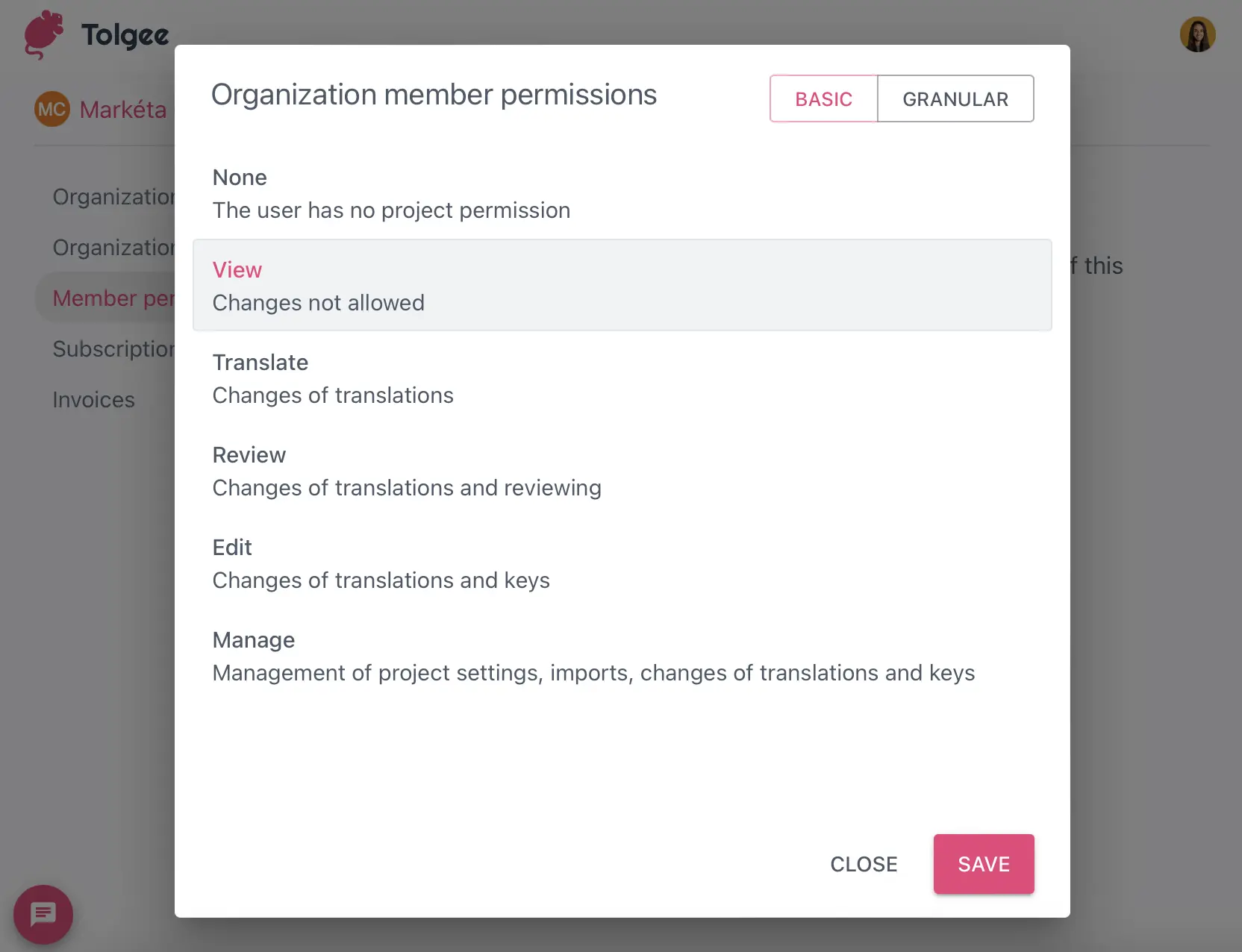 Tolgee Organization Member Permissions
The first step after deployment involves setting up user accounts and access controls that align with your organization's structure and security requirements. Tolgee supports role-based access control with predefined roles including Owner, Admin, Translator, and Reviewer, each with specific permissions designed to support common localization workflows.
Owners have complete control over projects and can manage all aspects of the platform including user management, billing, and system configuration. Admins can manage projects and users but cannot access billing or system-level settings. Translators can access assigned projects and edit translations but cannot modify project settings or manage users. Reviewers can view and comment on translations but cannot make direct edits.
For larger organizations, consider implementing single sign-on (SSO) integration to streamline user management and ensure compliance with organizational security policies. Tolgee supports standard SSO protocols and can integrate with most enterprise identity management systems.
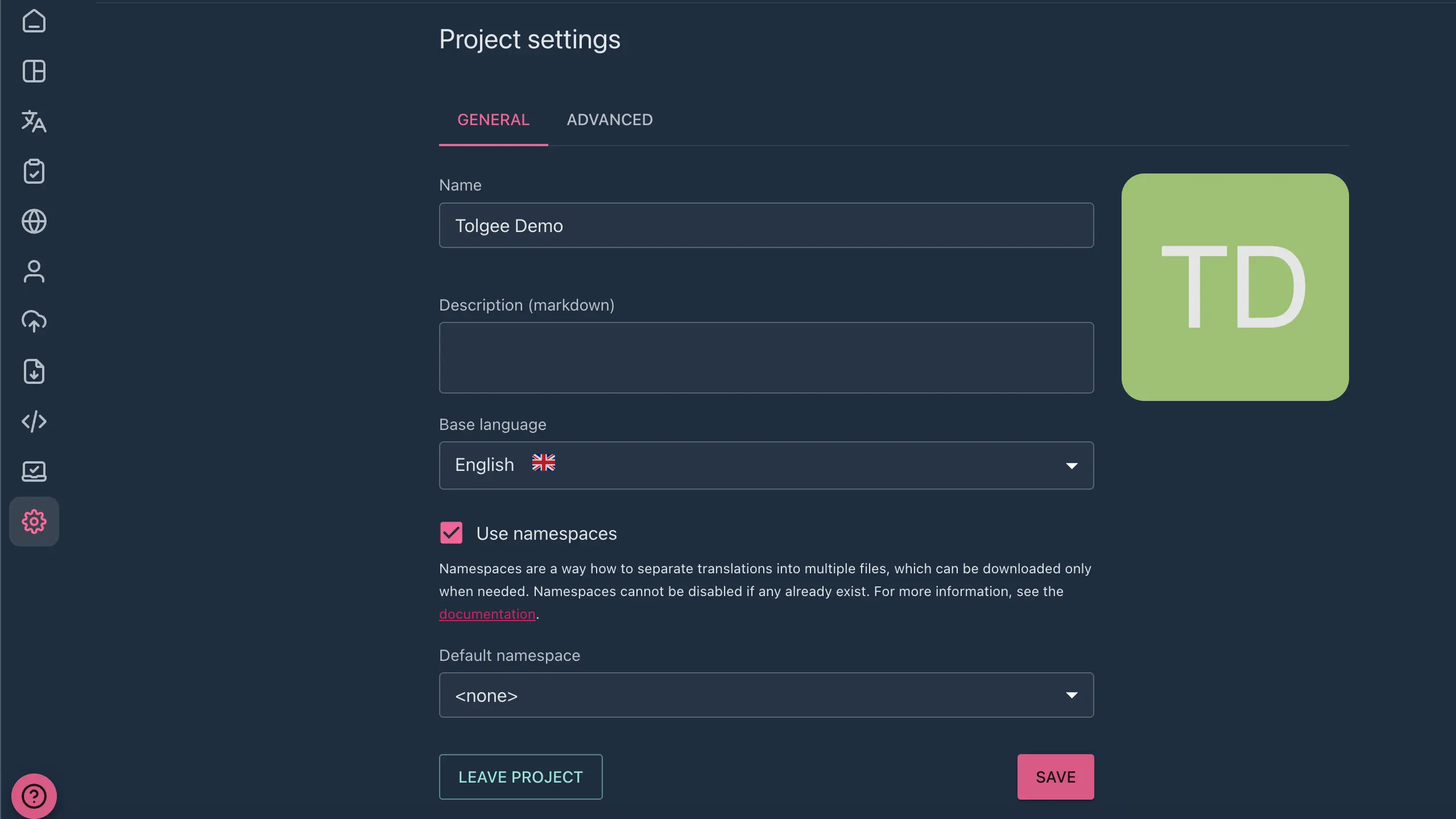 Tolgee Project Settings
Effective project organization is crucial for maintaining efficiency as your localization efforts scale. Consider creating separate projects for different products, feature areas, or release cycles to maintain clear boundaries and simplify access management.
Establish consistent naming conventions for projects, languages, and translation keys to ensure that team members can easily navigate the platform and find relevant content. Document these conventions and ensure that all team members understand and follow them consistently.
Configure your development environment to integrate seamlessly with Tolgee by implementing the appropriate SDK for your technology stack. Most integrations require minimal configuration but benefit from careful consideration of caching strategies, fallback mechanisms, and error handling approaches.
Consider implementing automated workflows that extract new translatable strings from your codebase and upload them to Tolgee automatically as part of your continuous integration process. This ensures that translators always have access to the latest content without requiring manual intervention from developers.
Tolgee represents a significant evolution in localization platform design, prioritizing developer experience, translator context, and collaborative workflows over traditional file-based translation management approaches. Its open-source nature, combined with innovative features like in-context editing and comprehensive API integration, makes it an attractive option for organizations seeking to modernize their localization processes.
The platform's strengths in developer integration, cost-effectiveness, and collaborative workflows make it particularly well-suited for agile development teams, startups, and organizations prioritizing rapid international expansion. However, organizations with complex linguistic requirements, extensive existing CAT tool investments, or limited technical resources may need to carefully evaluate whether Tolgee's approach aligns with their needs.
When deployed on Sealos, Tolgee benefits from enterprise-grade infrastructure management, automatic scaling, and comprehensive security features without the complexity typically associated with Kubernetes deployments. This combination provides a powerful, cost-effective solution for organizations seeking to implement modern localization workflows without significant infrastructure investment.
The one-click deployment capability, automatic SSL provisioning, custom domain support, and built-in backup features offered by Sealos eliminate many of the traditional barriers to implementing sophisticated localization infrastructure. This democratization of enterprise-grade localization capabilities enables organizations of all sizes to compete effectively in global markets.
As the software industry continues to prioritize global reach and cultural adaptation, platforms like Tolgee that seamlessly integrate localization into modern development workflows will become increasingly valuable. The combination of Tolgee's innovative approach to translation management and Sealos's simplified cloud infrastructure provides a compelling foundation for organizations ready to embrace the future of software localization.
Start your journey toward more efficient, collaborative, and cost-effective localization by deploying Tolgee on Sealos today. The platform's intuitive interface, comprehensive documentation, and supportive community make it easy to get started, while its powerful features and flexible architecture ensure that it can grow with your organization's evolving needs.
此内容由惯性聚合(RSS阅读器)自动聚合整理,仅供阅读参考。 原文来自 — 版权归原作者所有。