

惯性聚合 高效追踪和阅读你感兴趣的博客、新闻、科技资讯
阅读原文 在惯性聚合中打开

推荐订阅源

Y
Y Combinator Blog
博客园 - 司徒正美
TaoSecurity Blog
TaoSecurity Blog
Martin Fowler
Martin Fowler
T
Threat Research - Cisco Blogs
Blog — PlanetScale
Blog — PlanetScale
S
Secure Thoughts
博客园 - 三生石上(FineUI控件)
K
KPMG report finds enterprise disconnect between AI and its ROI | CIO
K
Kaspersky official blog
cs.CL updates on arXiv.org
Cisco Talos Blog
Cisco Talos Blog
H
Help Net Security
博客园 - 叶小钗
爱范儿
爱范儿
GbyAI
GbyAI
I
Intezer
M
MIT News - Artificial intelligence
Latest news
Latest news
Schneier on Security
T
Tor Project blog
Simon Willison's Weblog
I
InfoQ
Threat Intelligence Blog | Flashpoint
Cyber Security Advisories - MS-ISAC
C
CXSECURITY Database RSS Feed - CXSecurity.com
罗磊的独立博客
N
News and Events Feed by Topic
T
The Blog of Author Tim Ferriss
V2EX - 技术
V2EX - 技术
B
Blog
T
Tailwind CSS Blog
N
Netflix TechBlog - Medium
Security Latest
Security Latest
V
V2EX
F
Fortinet All Blogs
Forbes - Security
Forbes - Security
Application and Cybersecurity Blog
The Hacker News
The Hacker News
Scott Helme
Scott Helme
P
Privacy International News Feed
P
Palo Alto Networks Blog
H
Heimdal Security Blog
C
Cisco Blogs
T
The Exploit Database - CXSecurity.com
博客园 - Franky
酷 壳 – CoolShell
酷 壳 – CoolShell
G
Google Developers Blog
W
WeLiveSecurity
L
LINUX DO - 最新话题

Homepage on Aditya Telange

One Year with evil-winrm-py - A Retrospective Making Dynamic Instrumentation Accessible with Frida UI Breaking Payload Encryption in Web Applications HackTheBox (HTB) - Escape HackTheBox (HTB) - Resolute HackTheBox (HTB) - Certified State of VMWare Workstation (Pro?) on Linux Android App Security Testing Lab with MobSleuth Android phone as a Webcam on Linux Breaking down Reverse shell commands HackTheBox (HTB) - Photobomb Merging AOSP Security Patches into Custom ROMs Primer on HTTP Security Headers Image Zoom-In effect with HUGO HackTheBox (HTB) - Legacy HackTheBox (HTB) - Lame Cryptohack - Keyed Permutations [5 pts] Cryptohack - Resisting Bruteforce [10 pts] Cryptohack - RSA Starter 1 [10 pts] Cryptohack - Base64 [10 pts] Cryptohack - Bytes and Big Integers [10 pts] Cryptohack - Hex [5 pts] Cryptohack- XOR Starter [10 pts] HackTheBox (HTB) - Horizontall HackTheBox (HTB) - Forge HackTheBox (HTB) - Previse HackTheBox (HTB) - BountyHunter HackTheBox (HTB) - Explore HackTheBox (HTB) - Cap HackTheBox (HTB) - Pit HackTheBox (HTB) - Knife HackTheBox (HTB) - Love HackTheBox (HTB) - Tenet HackTheBox (HTB) - Ready Watermarking images with HUGO My Github Project went viral! Cryptohack - ASCII [5 pts] Cryptohack - Finding Flags [2 pts] Cryptohack - Great Snakes [3 pts] Cryptohack - JWT Sessions [10 pts] Cryptohack - Network Attacks [5 pts] Cryptohack - Token Appreciation [5 pts] CAF's Android for MSM Basic Website Analytics with Vercel Github Actions as Temporary File Sharing Platform Addition of prebuilt APK - AOSP Rom Development External Link With target='_blank' in Hugo Markdown Setting Up Build Environment - AOSP Rom Development Getting Started - AOSP Rom Development Using Secure HTTP Headers with Vercel/Zeit Education and Certifications Link Tree ↟ | Aditya Telange Personal Projects Resume - Aditya Telange Security Acknowledgements About Me Graph View License Privacy Policy
Bypassing LinkedIn's Connection Privacy with a Simple Search Filter
[Aditya Telange](https://x.com/adityatelange) · 2026-01-26 · via Homepage on Aditya Telange

How often do we trust the parameters by the client? Apparently, sometimes a bit too much. By default, we cannot view people’s connections on LinkedIn if we aren’t directly connected, but I found a way around that.

Recently, while exploring LinkedIn’s search functionality, I stumbled upon a simple authorization bypass that allowed me to view the connection list of users I wasn’t connected with, which is private information that shouldn’t have been accessible.

Note: This issue was reported to LinkedIn via HackerOne and was closed as Informative.

The Setup

If you go to a LinkedIn user’s profile, you can see their connections only if:

  • You are a 1st-degree connection.
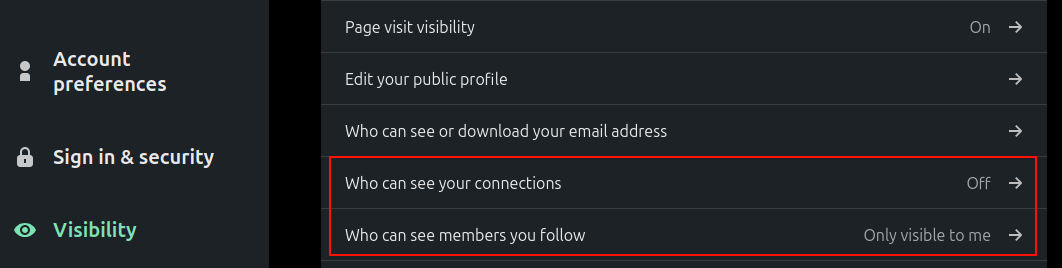
  • Even then, they may have set their privacy settings to hide their connections.

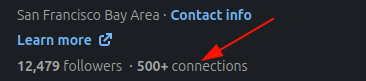
As you see in the screenshot below, the list of connections is hidden as I am not connected to this user.
LinkedIn People filters with the “Followers of” option highlighted

I was playing around with the “People” search filters. Specifically, I was looking at the “Followers of” filter, which lets you find people who follow a specific user.

When you apply this filter, the URL updates to include a specific parameter: followerOf. This parameter reveals a critical piece of information, the target user’s unique ID hash.

The URL looks something like this:

https://www.linkedin.com/search/results/people/?origin=FACETED_SEARCH&followerOf="USER-HASH-HERE"

It worked as expected and returned the list of followers.
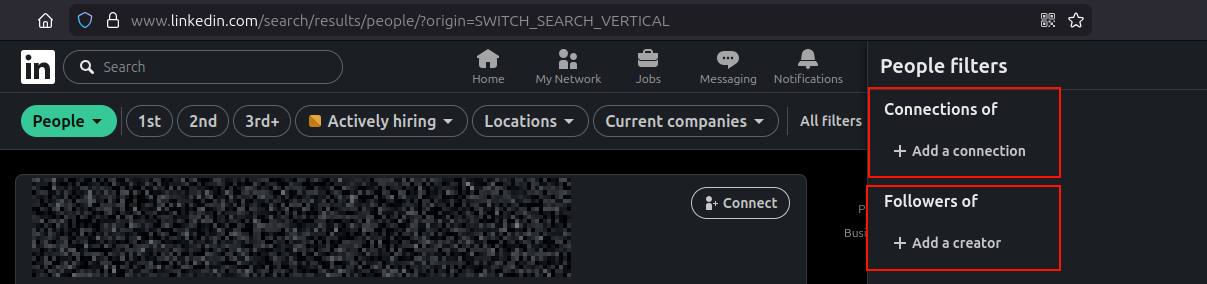
connection filters in people search

The “What If” Moment

Seeing followerOf made me wonder: if there’s a key for followers, is there a corresponding key for connections? And if there is, does the server check if I’m allowed to use it?

I decided to try a simple swap. I took the user hash I obtained from the followers search and manually constructed a new query:

https://www.linkedin.com/search/results/people/?origin=FACETED_SEARCH&connectionOf="USER-HASH-HERE"

The Result

I hit enter, expecting an error or an empty list. Instead, the search results refreshed and displayed the full list of connections for that user.

This allowed me to view 2nd and even 3rd degree connections of the target.

There is no such option in the UI/frontend to do so. This method allowed me to see connections even if the user has disabled them under settings.
Search results showing the target user’s connections exposed by the <code>connectionOf</code> query

Despite not being a 1st-degree connection myself, the server processed the connectionOf filter and returned their private network data. It seemed the access control check was tied to the intent of the original UI action (viewing followers) or wasn’t reapplied when the filter key was manually modified.

Why This Matters

Privacy controls are critical for professional networks. Many users choose to keep their connection lists private to prevent competitors from seeing their network, to avoid targeted phishing (social engineering), or simply for privacy.

By bypassing this check, an attacker could:

  1. Map out a user’s private social graph.
  2. Scrape connection data at scale.
  3. Target connections for further attacks.

Disclosure

I reported this behavior to LinkedIn’s security team via HackerOne. After review, they decided not to track this as a security vulnerability.

The report was closed with the following comment:

“After review, there doesn’t seem to be any significant security impact as a result of the behavior you are describing.

As a result, we will be closing this report as informative. If you are able to leverage this into a practical exploitation scenario, we will be happy to reevaluate this report.”

While the team didn’t see a significant direct impact, it was an interesting dive into how API filters can sometimes behave unexpectedly when manipulated.