

惯性聚合 高效追踪和阅读你感兴趣的博客、新闻、科技资讯
阅读原文 在惯性聚合中打开

推荐订阅源

V
V2EX
酷 壳 – CoolShell
酷 壳 – CoolShell
美团技术团队
有赞技术团队
有赞技术团队
Hugging Face - Blog
Hugging Face - Blog
罗磊的独立博客
S
SegmentFault 最新的问题
D
Docker
博客园 - 司徒正美
雷峰网
雷峰网
V
Visual Studio Blog
云风的 BLOG
云风的 BLOG
G
Google Developers Blog
The GitHub Blog
The GitHub Blog
A
About on SuperTechFans
让小产品的独立变现更简单 - ezindie.com
博客园 - Franky
月光博客
月光博客
Cyber Security Advisories - MS-ISAC
H
Hackread – Cybersecurity News, Data Breaches, AI and More
T
The Blog of Author Tim Ferriss
Google DeepMind News
MyScale Blog
MyScale Blog
MongoDB | Blog
MongoDB | Blog

Yesterday17's Blog

2026 新年解密红包 / Melody Flag | Yesterday17's Blog 谈谈 Iori 的设计思路(二):如何实现一个 Showroom 录制工具? | Yesterday17's Blog 谈谈 Iori 的设计思路(一):从 Nico Timeshift 说起 | Yesterday17's Blog Iori Minyami 0.1.0 发布 | Yesterday17's Blog 2025 新年解密红包 / Melody Flag | Yesterday17's Blog 使用 Cloudflare Warp 解决罗森票务的海外登录问题 | Yesterday17's Blog How To Blog 04: The Astro v5 Era | Yesterday17's Blog 谈谈 tokio::select! 的公平性 | Yesterday17's Blog Learning Pingora 05 - Connect with TLS | Yesterday17's Blog Leaving Bytedance | Yesterday17's Blog 大橋彩香 AsiaTour「Reflection」上海公演 个人向记录 & Repo | Yesterday17's Blog Recoving from burnout - What happened? | Yesterday17 Yubikey 重建手册 | Yesterday17's Blog How To Blog 03: Heimus | Yesterday17's Blog 🪧 Blog Migration Accouncement | Yesterday17's Blog Learn Your IDE - VSCode 是如何仅重启插件的? | Yesterday17's Blog How To Blog 02: Astro❤️Password | Yesterday17's Blog How To Blog 01: Why, How, and the Future | Yesterday17's Blog Learning Pingora 04 - Establish L4 Connection | Yesterday17's Blog Learning Pingora 03 - Upstreams and Peers | Yesterday17's Blog Learning Pingora 02 - A Simple HTTP Server | Yesterday17's Blog Learning Pingora 01 - Getting Started | Yesterday17's Blog 2024 新年解密红包 / Melody Flag | Yesterday17's Blog 向新的一年飞驰——记录 2023 | Yesterday17's Blog 「サクラノ刻」对话选摘(2) | Yesterday17's Blog PGP Key Revocation 注销声明 | Yesterday17's Blog 「サクラノ刻」对话选摘(1) | Yesterday17's Blog 2023 新年解密红包 / Melody Flag | Yesterday17's Blog 『蒼の彼方のフォーリズム』通关感想 | Yesterday17's Blog 单显卡直通教程 | Yesterday17's Blog
Postman 历史记录导出的解决方案 | Yesterday17's Blog
Yesterday17 · 2020-12-11 · via Yesterday17's Blog

Postman 可以说是我在 CTF 中使用最多的工具了。它确实非常好用,但我并没有完全掌握它的使用之道,因此大量的历史请求堆在一起,显得环境无比混乱。

虽说是有想要改变的想法,但这些历史记录还是非常重要的,一时间难以割舍。于是便开始寻找导出的方案。

ToC

  • indexedDB
  • 保存文件
  • 导出 db
  • 开始导出
  • 参考

indexedDB

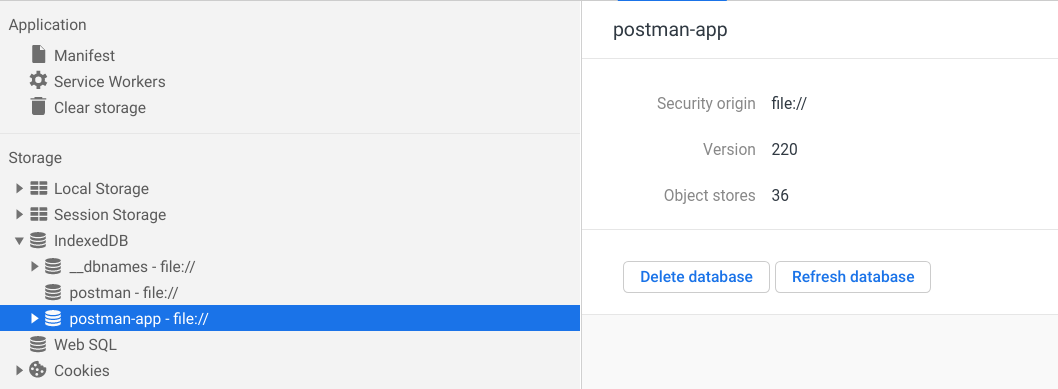
我们知道,Postman 是典型的 Electron 应用,而其数据则是存在了 indexedDB 中。通过开发者工具可以简单浏览一二:
保存文件

为了保存方便,我们定义 console.save 函数,以将字符串保存到文件[1]:

(function (console) {

console.save = function (data, filename) {

if (!data) {

console.error("Console.save: No data");

return;

}

if (!filename) filename = "console.json";

if (typeof data === "object") {

data = JSON.stringify(data, undefined, 4);

}

var blob = new Blob([data], { type: "text/json" }),

e = document.createEvent("MouseEvents"),

a = document.createElement("a");

a.download = filename;

a.href = window.URL.createObjectURL(blob);

a.dataset.downloadurl = ["text/json", a.download, a.href].join(":");

e.initMouseEvent(

"click",

true,

false,

window,

0,

0,

0,

0,

0,

false,

false,

false,

false,

0,

null

);

a.dispatchEvent(e);

};

})(console);

导出 db

这里我们使用的是 indexeddb-export-import[2] 中的函数:

/**

* Export all data from an IndexedDB database

* @param {IDBDatabase} idbDatabase - to export from

* @param {function(Object?, string?)} cb - callback with signature (error, jsonString)

*/

function exportToJsonString(idbDatabase, cb) {

const exportObject = {};

const objectStoreNamesSet = new Set(idbDatabase.objectStoreNames);

const size = objectStoreNamesSet.size;

if (size === 0) {

cb(null, JSON.stringify(exportObject));

} else {

const objectStoreNames = Array.from(objectStoreNamesSet);

const transaction = idbDatabase.transaction(objectStoreNames, "readonly");

transaction.onerror = event => cb(event, null);

objectStoreNames.forEach(storeName => {

const allObjects = [];

transaction.objectStore(storeName).openCursor().onsuccess = event => {

const cursor = event.target.result;

if (cursor) {

allObjects.push(cursor.value);

cursor.continue();

} else {

exportObject[storeName] = allObjects;

if (objectStoreNames.length === Object.keys(exportObject).length) {

cb(null, JSON.stringify(exportObject));

}

}

};

});

}

}

开始导出

最后用几行代码就可以导出了:

dbResp = indexedDB.open("postman-app");

dbResp.onsuccess = function () {

var db = dbResp.result;

exportToJsonString(db, (err, str) =>

err ? console.error(err) : console.save(str, "export.json")

);

};

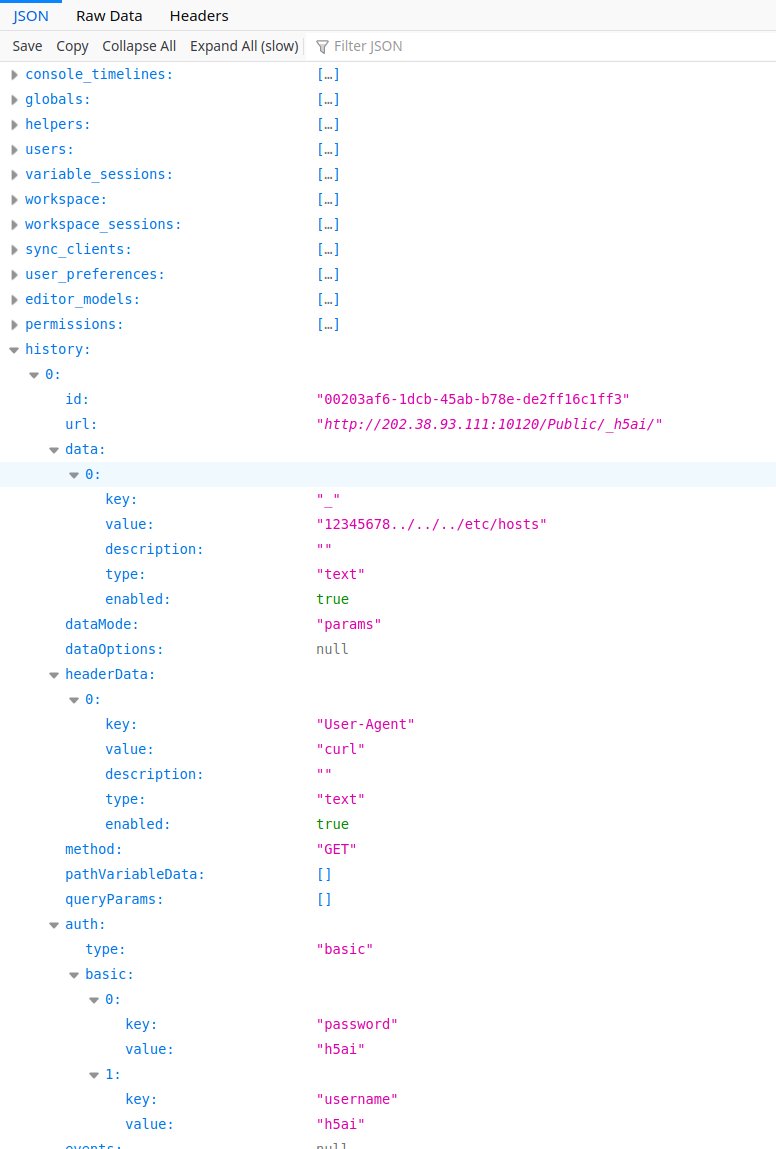
保存后用 firefox 打开的效果如下图所示:
参考

  1. https://github.com/postmanlabs/postman-app-support/issues/1647#issuecomment-341270254
  2. https://github.com/Polarisation/indexeddb-export-import