


ZFS storage pools are comprised of vdevs which are striped together. vdevs can be single disks, N-way mirrors, RAIDZ (Similar to RAID5), RAIDZ2 (Similar to RAID6), or RAIDZ3 (there is no hardware RAID analog to this, but it’s a triple parity stripe essentially). A key thing to know here is a ZFS vdev gives the IOPs performance of one device in the vdev. That means that if you create a RAIDZ2 of ten drives, it will have the capacity of 8 drives but it will have the IOPs performance of a single drive. The need for IOPs becomes important when providing storage to things like database servers or virtualization platforms. These use cases rarely utilize sequential transfers. In these scenarios, you’ll find larger numbers of mirrors or very small RAIDZ groups are appropriate choices. At the other end of the scale, a single user trying to do a sequential read or write will benefit from a larger RAIDZ[1|2|3] vdev. Many home media server applications do quite well with a pool comprising a single 3-8 drive RAIDZ[1|2|3] vdev.
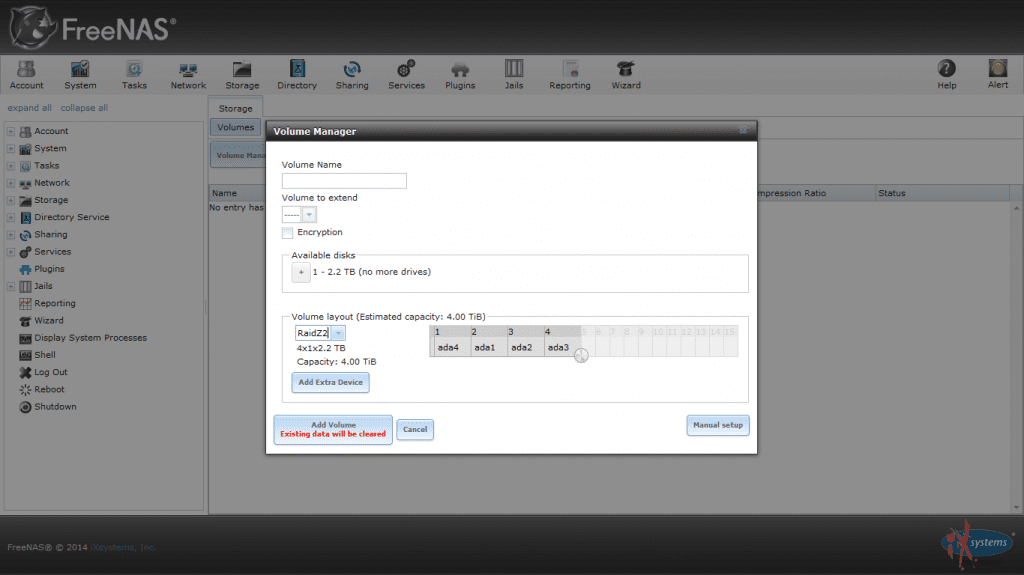
RAIDZ1 gets a special note here. When a RAIDZ1 loses a drive, all the other drives in the vdev become single points of failure. A ZFS storage pool will not operate if a vdev fails. This means if you have a pool made up of a single 10 drive RAIDZ vdev and one drive fails, pool operation depends on none of the remaining 9 drives failing. In addition, with modern drives being as large as they are, rebuild times are not trivial. During the rebuild period, all of the drives are doing increased I/O as the array rebuilds. This additional stress can cause additional drives in the array to fail. Since a degraded RAIDZ1 can withstand no additional failures, you are very close to “game over” there. Powers of 2 pool configuration: there is much wisdom out there on the internet about the value of configuring ZFS vdevs in a power of two. This made some sense when building ZFS pools that did not utilize compression. Since FreeNAS utilizes compression by default (and there are 0 cases where it makes sense to change the default!), any attempts to optimize ZFS with the vdev configuration are foiled by the compressor. Pick your vdev configuration based on the IOPs needed, space required, and desired resilience. In most cases, your performance will be limited by your networking anyway.
ZFS can use dedicated devices for its ZIL (ZFS intent log). This is essentially the write cache for synchronous writes. Some workflows generate very little traffic that would benefit from a dedicated ZIL, others use synchronous writes exclusively and, for all practical purposes, require a dedicated ZIL device. The key thing to remember here is the ZIL always exists in memory. If you have a dedicated device, the memory ZIL is mirrored to the dedicated device, otherwise it is mirrored to your pool. By using an SSD, you reduce latency and contention by not utilizing your data pool (which is presumably comprised of spinning disks) for mirroring the in-memory ZIL. There’s a lot of confusion surrounding ZFS and ZIL device failure. When ZFS was first released, dedicated ZIL devices were essential to data pool integrity. A missing ZIL vdev would render the entire pool unusable. With these older versions of ZFS, mirroring the ZIL devices was essential to prevent a failed ZIL device from destroying the entire pool. This is no longer the case with ZFS. Missing ZIL vdevs will impact performance but will not cause the entire pool to become unavailable. However, the conventional wisdom that the ZIL must be mirrored to prevent data loss in the case of ZIL failure lives on. Keep in mind that the dedicated ZIL device is merely mirroring the real in-memory ZIL. Data loss can only occur if your dedicated ZIL device fails and the system crashes with writes in transit in the unmirrored memory ZIL. As soon as the dedicated ZIL device fails, the mirror of the in-memory ZIL moves to the pool (in practice, this means you have a window of a few seconds where a system is vulnerable to data loss following a ZIL device failure). After a crash, ZFS will attempt to replay the ZIL contents. SSDs themselves have a volatile write cache, so they may lose data during a bad shutdown. To ensure the ZFS write cache replay has all of your inflight writes, the SSD devices used for dedicated ZIL devices should have power protection. HGST makes a number of devices that are specifically targeted as dedicated ZFS ZIL devices. Other manufacturers such as Intel offer appropriate devices as well. In practice, only the designer of the system can determine if the use case warrants a professional enterprise SSD with power protection or if a consumer-level device will suffice. The primary characteristics here are low latency, high random write performance, high write endurance, and, depending on the situation, power protection.
ZFS allows you to equip your system with dedicated read cache devices. Typically, you’ll want these devices to be lower latency than your main storage pool. Remember that the primary read cache used by the system is system RAM, which is orders of magnitude faster than any SSD. If you can satisfy your read cache requirements with RAM, you’ll enjoy better performance than if you use SSD read cache. In addition, there is a scenario where an L2ARC read cache can actually drop performance. Consider a system with 6GB of memory cache (ARC) and a working set that is 5.9 GB. This system might enjoy a read cache hit ratio of nearly 100%. If SSD L2ARC is added to the system, the L2ARC requires space in RAM to map its address space. This space will come at the cost of evicting data from memory and placing it in the L2ARC. The ARC hit rate will drop, and misses will be satisfied from the (far slower) SSD L2ARC. In short, not every system can benefit from an L2ARC. FreeNAS includes tools in the GUI and at the command line that can determine ARC sizing and hit rates. If the ARC size is hitting the maximum allowed by RAM, and if the hit rate is below 90%, the system can benefit from L2ARC. If the ARC is smaller than RAM or if the hit rate is 99.X%, adding L2ARC to the system will not improve performance. As far as selecting appropriate devices for L2ARC, they should be biased towards random read performance. The data on them is not persistent, and ZFS behaves quite well when faced with L2ARC device failure. There is no need or provision to mirror or otherwise make L2ARC devices redundant, nor is there a need for power protection on these devices.
Joshua Paetzel
iXsystems Senior Engineer
<< Part 2/4 of A Complete Guide to FreeNAS Hardware Design: Hardware Specifics
Part 4/4 of A Complete Guide to FreeNAS Hardware Design: Network Notes & Conclusion >>
此内容由惯性聚合(RSS阅读器)自动聚合整理,仅供阅读参考。 原文来自 — 版权归原作者所有。