
惯性聚合 高效追踪和阅读你感兴趣的博客、新闻、科技资讯
阅读原文 在惯性聚合中打开

推荐订阅源

I
InfoQ
奇客Solidot–传递最新科技情报
奇客Solidot–传递最新科技情报
Apple Machine Learning Research
月光博客
月光博客
B
Blog
罗磊的独立博客
GbyAI
GbyAI
博客园 - 三生石上(FineUI控件)
雷峰网
雷峰网
OSCHINA 社区最新新闻
OSCHINA 社区最新新闻
Microsoft Security Blog
宝玉的分享
宝玉的分享
The GitHub Blog
The GitHub Blog
人人都是产品经理
人人都是产品经理
博客园 - Franky
有赞技术团队
有赞技术团队
WordPress大学
WordPress大学
博客园 - 聂微东
钛媒体:引领未来商业与生活新知
钛媒体:引领未来商业与生活新知
V
Visual Studio Blog
MyScale Blog
MyScale Blog
Google DeepMind News
G
Google Developers Blog
aimingoo的专栏
aimingoo的专栏

Comments for TrueNAS – Open Enterprise Storage

How to Set Up and Install TrueNAS CORE Yes, You Can (Still) Virtualize TrueNAS TrueNAS enables Container Storage and Kubernetes | TrueNAS - Open Enterprise Storage TrueNAS 12.0-U2 is Released | TrueNAS - Open Enterprise Storage OpenZFS 2.0 Ships First on TrueNAS | TrueNAS - Open Enterprise Storage TrueNAS 12.0-U1 is Scheduled for early December | TrueNAS - Open Enterprise Storage iXsystems TrueNAS M60 Recognized as SDC Awards Storage Hardware Innovation of the Year Finalist | TrueNAS - TrueNAS 12.0 is Released! The TrueNAS Mini X and Mini X+ are here! Cross-Site Disaster Recovery with TrueNAS TrueNAS SCALE Release Plan | TrueNAS - Open Enterprise Storage iXsystems Unveils Industry's Fastest OpenZFS Storage System with Launch of TrueNAS M60 | TrueNAS - Open TrueNAS 12.0 BETA2 Showcases Performance Improvements | TrueNAS - Open Enterprise Storage Be One of the First to Test Drive TrueNAS 12.0 BETA | TrueNAS - Open Enterprise Storage TrueNAS is Multi-OS New-New TrueNAS Logo Unveiled | TrueNAS - Open Enterprise Storage Recession Proof Storage | FreeNAS 11.3-U3.1 Now Available - Issue #80 | TrueNAS - Open Enterprise Storage Open Source Infrastructure is Recession-Proof | TrueNAS - Open Enterprise Storage Understanding How OpenZFS Keeps Your Data Safe | TrueNAS - Open Enterprise Storage You Can Influence the TrueNAS CORE Roadmap! | TrueNAS - Open Enterprise Storage TrueNAS CORE is the new FreeNAS Setting Up Users, Permissions, and ACLs on FreeNAS | TrueNAS - Open Enterprise Storage TrueNAS Updates for VMware vSphere 7 | TrueNAS - Open Enterprise Storage How to Set Up Windows SMB Shares on FreeNAS | TrueNAS - Open Enterprise Storage FreeNAS and TrueNAS are Unifying Introducing the FreeNAS Mini E+ and All-Flash Minis | TrueNAS - Open Enterprise Storage Plex Permissions in FreeNAS 11.3 | TrueNAS - Open Enterprise Storage Latest TrueNAS and FreeNAS Release Delivers Wizards, Plugins, and Accelerated Replication | TrueNAS - Open How To Back Up Google Drive to FreeNAS | TrueNAS How To Enable Wireguard on FreeNAS 11.3 | TrueNAS - Open Enterprise Storage
Back Up Plugins and Jails on FreeNAS | TrueNAS
iX Team · 2019-05-23 · via Comments for TrueNAS – Open Enterprise Storage

For years, FreeNAS has offered functionality expansion through premade plugins and jails. In Version 11.2, the management platform was updated to make it even easier to manage and create new plugins.
FreeNAS users can treat their NAS as a server. Advanced services running on top of the ultra-secure ZFS file system allow streaming and managing media, running a website,  and even handling surveillance. As usage becomes more versatile and valuable, protecting plugins and jails becomes even more important. Luckily, FreeNAS makes it easy with the ZFS file system.
Plugins and jails are stored in the iocage dataset, which is created automatically when the first plugin or jail is installed. Users can create snapshots of the entire dataset or sub-directories of individual plugins and jails. If an issue occurs, the user can roll back a jail to a previous state.

Going a step further, snapshots can also be replicated to other FreeNAS or TrueNAS systems to aid with disaster recovery and data protection. If there are replacements or upgrades to the hardware, these images and their data can be moved over to new systems with ease.

Creating Snapshots:
Go to Storage -> Pools in the FreeNAS web interface and locate the iocage dataset.
Open the options menu (three dots) and select Create Snapshot. Enter a name and click CREATE SNAPSHOT. Snapshots can be regularly taken after a defined amount of time by going to Tasks -> Periodic Snapshots and selecting the appropriate dataset.
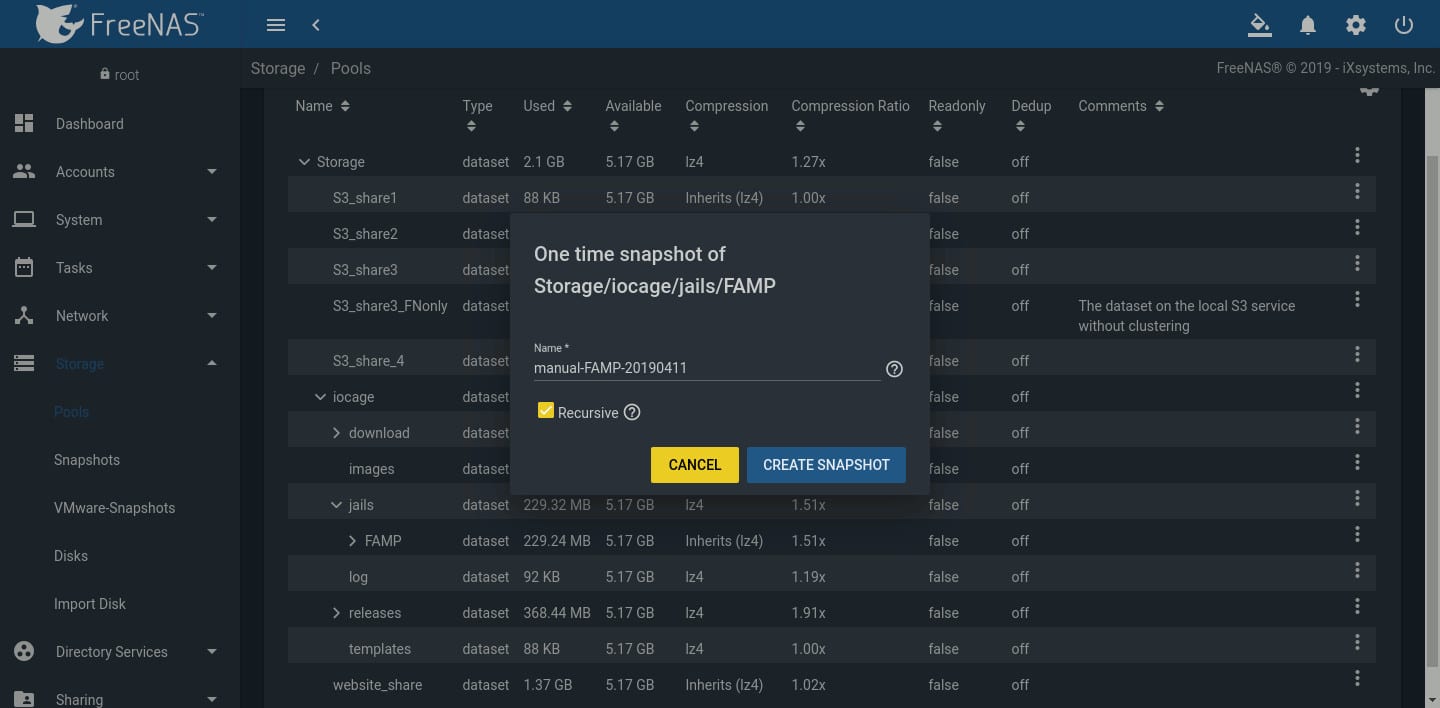
One time Snapshot of Storage

To test or rollback the iocage dataset, go to Storage -> Snapshots, find the snapshot to recover, and click Rollback.
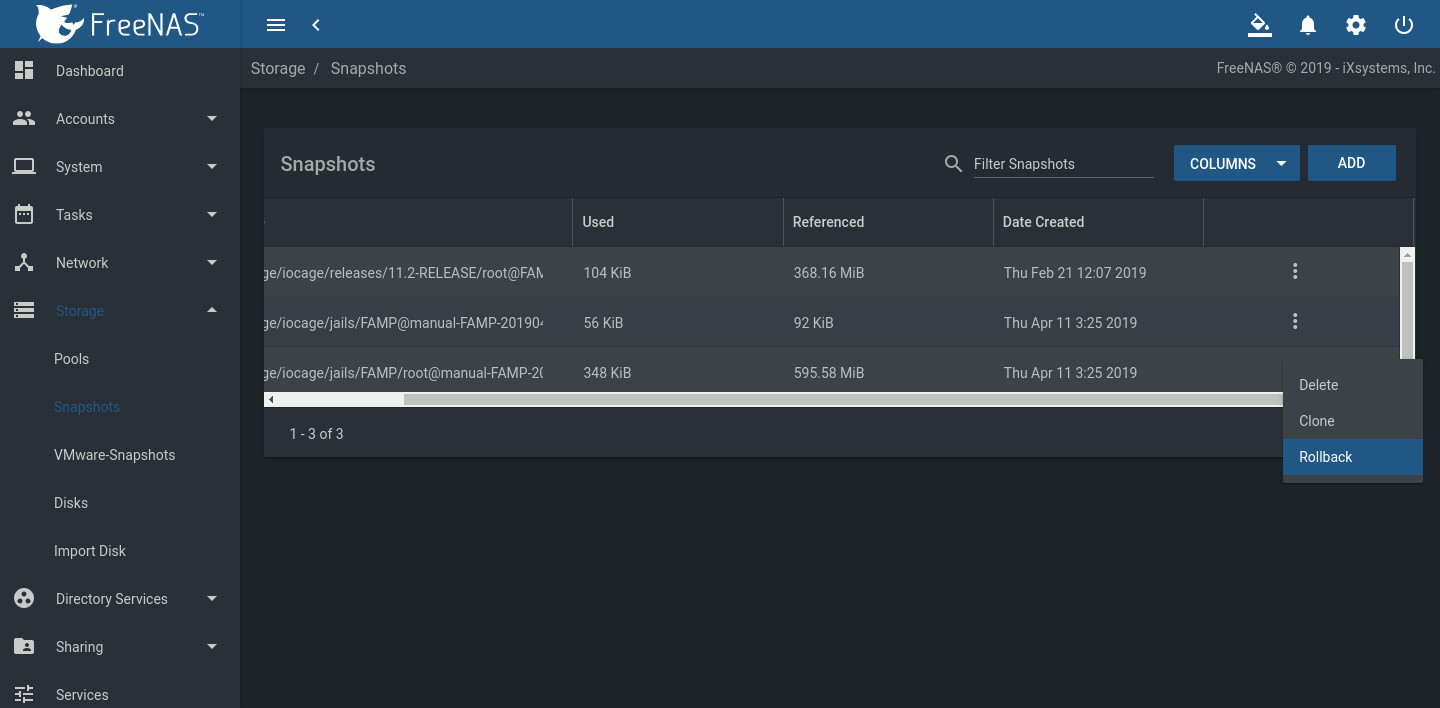
test or rollback the iocage dataset window

This graphic demonstrates the effectiveness of rolling back a dataset. A snapshot of Storage/iocage/jails/FAMP is created. Text file test.txt is then added to the jail. After rolling back the dataset to the snapshot image, test.txt is gone.
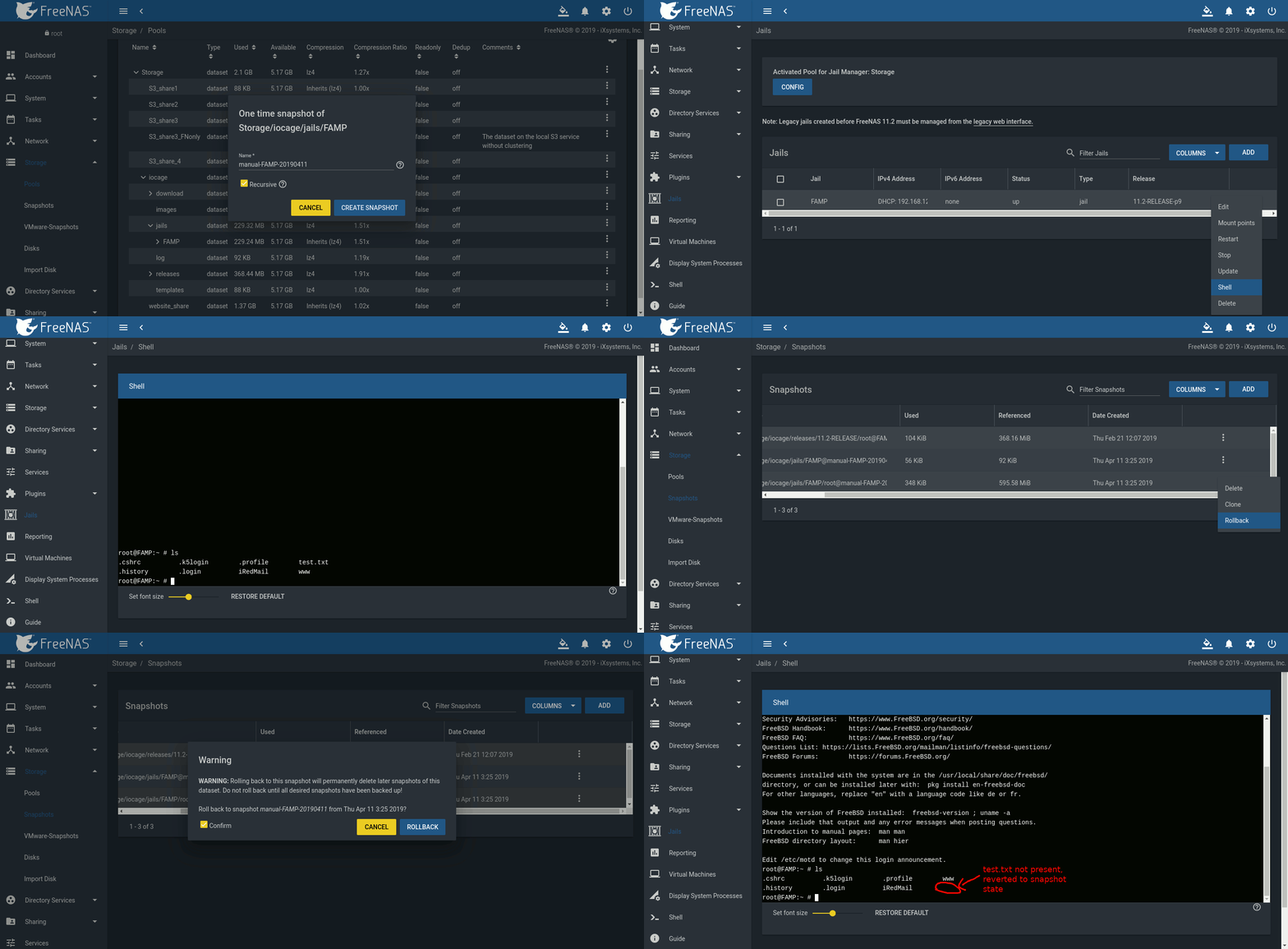
overview of FreeNAS protects jails and plugins with snapshots

This overview demonstrates how effectively FreeNAS protects jails and plugins with snapshots. Using snapshots and replication preserves your valuable data and can save you many hours of recovery time.
For more tips on using FreeNAS, go to our forums and iX University. Jails and Plugins are also coming to TrueNAS in version 11.3. If your organization is looking for a specific deployment with enterprise support, please contact us.