
惯性聚合 高效追踪和阅读你感兴趣的博客、新闻、科技资讯
阅读原文 在惯性聚合中打开

推荐订阅源

D
Docker
cs.AI updates on arXiv.org
C
Cisco Blogs
Scott Helme
Scott Helme
Know Your Adversary
Know Your Adversary
NISL@THU
NISL@THU
C
Cyber Attacks, Cyber Crime and Cyber Security
D
Darknet – Hacking Tools, Hacker News & Cyber Security
C
CXSECURITY Database RSS Feed - CXSecurity.com
S
Schneier on Security
I
Intezer
Spread Privacy
Spread Privacy
AWS News Blog
AWS News Blog
V
Vulnerabilities – Threatpost
Cloudbric
Cloudbric
V2EX - 技术
V2EX - 技术
Google Online Security Blog
L
Lohrmann on Cybersecurity
Recent Commits to openclaw:main
L
LINUX DO - 热门话题
S
Secure Thoughts
T
The Exploit Database - CXSecurity.com
博客园 - 【当耐特】
Recent Announcements
Security Archives - TechRepublic
Stack Overflow Blog
Stack Overflow Blog
罗磊的独立博客
OSCHINA 社区最新新闻
OSCHINA 社区最新新闻
K
Kaspersky official blog
阮一峰的网络日志
阮一峰的网络日志
博客园_首页
Latest news
Latest news
B
Blog
F
Full Disclosure
大猫的无限游戏
大猫的无限游戏
博客园 - 叶小钗
L
LangChain Blog
GbyAI
GbyAI
Last Week in AI
Last Week in AI
S
Security Affairs
Apple Machine Learning Research
N
Netflix TechBlog - Medium
Security Latest
Security Latest
Vercel News
Vercel News
Y
Y Combinator Blog
G
GRAHAM CLULEY
S
Securelist
T
Troy Hunt's Blog
Hacker News - Newest:
Hacker News - Newest: "LLM"
雷峰网
雷峰网

Comments for TrueNAS – Open Enterprise Storage

How to Set Up and Install TrueNAS CORE Yes, You Can (Still) Virtualize TrueNAS TrueNAS enables Container Storage and Kubernetes | TrueNAS - Open Enterprise Storage TrueNAS 12.0-U2 is Released | TrueNAS - Open Enterprise Storage OpenZFS 2.0 Ships First on TrueNAS | TrueNAS - Open Enterprise Storage TrueNAS 12.0-U1 is Scheduled for early December | TrueNAS - Open Enterprise Storage iXsystems TrueNAS M60 Recognized as SDC Awards Storage Hardware Innovation of the Year Finalist | TrueNAS - TrueNAS 12.0 is Released! The TrueNAS Mini X and Mini X+ are here! Cross-Site Disaster Recovery with TrueNAS TrueNAS SCALE Release Plan | TrueNAS - Open Enterprise Storage iXsystems Unveils Industry's Fastest OpenZFS Storage System with Launch of TrueNAS M60 | TrueNAS - Open TrueNAS 12.0 BETA2 Showcases Performance Improvements | TrueNAS - Open Enterprise Storage Be One of the First to Test Drive TrueNAS 12.0 BETA | TrueNAS - Open Enterprise Storage TrueNAS is Multi-OS New-New TrueNAS Logo Unveiled | TrueNAS - Open Enterprise Storage Recession Proof Storage | FreeNAS 11.3-U3.1 Now Available - Issue #80 | TrueNAS - Open Enterprise Storage Open Source Infrastructure is Recession-Proof | TrueNAS - Open Enterprise Storage Understanding How OpenZFS Keeps Your Data Safe | TrueNAS - Open Enterprise Storage You Can Influence the TrueNAS CORE Roadmap! | TrueNAS - Open Enterprise Storage TrueNAS CORE is the new FreeNAS Setting Up Users, Permissions, and ACLs on FreeNAS | TrueNAS - Open Enterprise Storage TrueNAS Updates for VMware vSphere 7 | TrueNAS - Open Enterprise Storage How to Set Up Windows SMB Shares on FreeNAS | TrueNAS - Open Enterprise Storage FreeNAS and TrueNAS are Unifying Introducing the FreeNAS Mini E+ and All-Flash Minis | TrueNAS - Open Enterprise Storage Plex Permissions in FreeNAS 11.3 | TrueNAS - Open Enterprise Storage Latest TrueNAS and FreeNAS Release Delivers Wizards, Plugins, and Accelerated Replication | TrueNAS - Open How To Back Up Google Drive to FreeNAS | TrueNAS How To Enable Wireguard on FreeNAS 11.3 | TrueNAS - Open Enterprise Storage The Official FreeNAS Hardware Guide | TrueNAS - Open Enterprise Storage December 11 Plugins Update: ClamAV Fix & CloudStack FreeNAS Mini Black Friday Sale Starts Now! - Issue #73 | TrueNAS - Open Enterprise Storage Breaking Down the FreeNAS Mini E! | TrueNAS TrueCommand Shifts to Prime Time | TrueNAS - Open Enterprise Storage AMD EPYC 7002 Powers Scalable TrueNAS Solutions FreeNAS and TrueNAS 11.3 make their Debuts October 30 Plugins Update | TrueNAS - Open Enterprise Storage Overview of Datasets and Snapshots in FreeNAS | TrueNAS - Open Enterprise Storage September 13 Plugins Update | TrueNAS - Open Enterprise Storage August 27 Plugin Updates: Security & Version Fixes July 24 Plugins Update | TrueNAS - Open Enterprise Storage Mount a TrueNAS or FreeNAS Share to a Docker Host | TrueNAS - Open Enterprise Storage TrueNAS Updates for VMware vSphere | TrueNAS - Open Enterprise Storage July 10 Plugins Update | TrueNAS - Open Enterprise Storage June 26 Plugins Update | TrueNAS - Open Enterprise Storage Open ZFS vs. Btrfs | and other file systems | TrueNAS - Open Enterprise Storage ZFS vs. OpenZFS Backup Evolved: Asigra Plugin for FreeNAS Back Up Plugins and Jails on FreeNAS | TrueNAS Take Command of Your NAS Fleet with TrueCommand™ | TrueNAS - Open Enterprise Storage Next Batch of Updated Plugins and How to Recover from Failed Plugin Updates | TrueNAS - Open Enterprise Run S3 Object Storage on FreeNAS and TrueNAS | TrueNAS - Open Enterprise Storage Sync Files to Dropbox with TrueNAS or FreeNAS February Plugin Updates & New Plugins for Testing Six Metrics for Measuring ZFS Pool Performance Part 2 | TrueNAS - Open Enterprise Storage Six Metrics for Measuring ZFS Pool Performance Part 1 | TrueNAS - Open Enterprise Storage TrueNAS M-Series Certified for Veeam Backup FreeNAS 11.1 is Now Available for Download! | TrueNAS FreeNAS 11.0 Released with VM & S3 Storage Support To SLOG or not to SLOG: How to best configure your ZFS Intent Log | TrueNAS - Open Enterprise Storage vCenter Web Client Plug-in for TrueNAS Now Available | TrueNAS - Open Enterprise Storage The ZFS ZIL and SLOG Demystified | TrueNAS - Open Enterprise Storage FreeNAS: A Worst Practices Guide | TrueNAS - Open Enterprise Storage FreeNAS Hardware Guide III: Pools, Performance & Cache FreeNAS vs TrueNAS FreeNAS 8.0.1‑RELEASE & Official Documentation Released
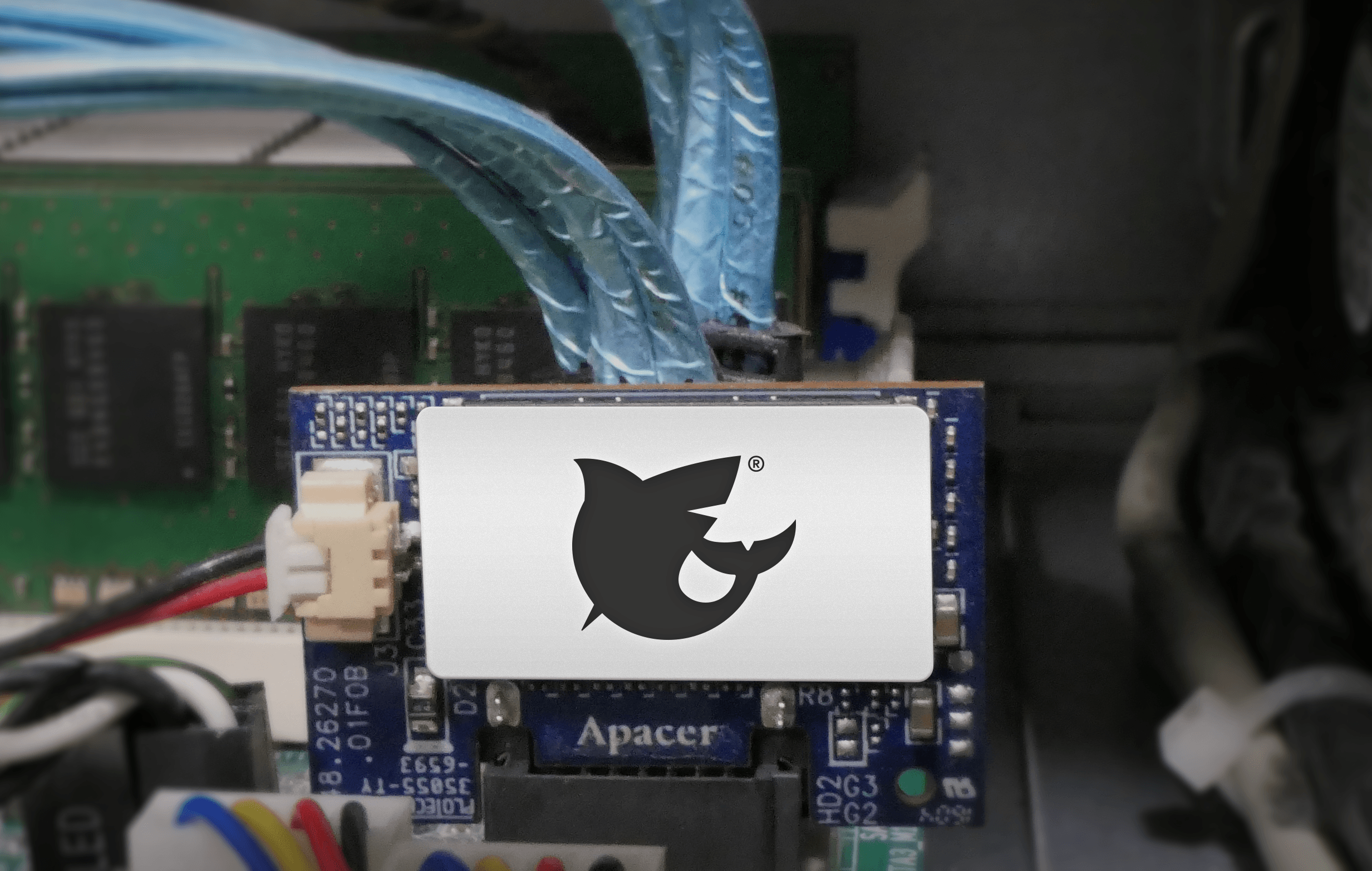
Why SATA-DOMs Are Better than USB Drives for Booting Up Your FreeNAS System | TrueNAS - Open Enterprise
iX Team · 2018-11-10 · via Comments for TrueNAS – Open Enterprise Storage


Fair warning: this is mostly a rant. This rant was mostly inspired by discussions about whether it is safe to remove a thumb drive without ejecting it from the computer, and from a wonderful article about mirroring boot devices in FreeNAS.
The non-rant version is: mirror your FreeNAS boot device, back up the configuration often, and if possible don’t use thumb drives (at least not primarily). There is some practical, non-ranty advice at the end.
You have been warned.

I have worked on filesystems, on and off, for some decades. This has also meant that I have had to deal with all sorts of storage media, and the primary lesson I’ve learned after 20 years is: ALL STORAGE MEDIA ARE HORRIBLE. They’re slow or expensive or both; they change data randomly; they stop working the moment you NEED the data on them; none of them have the lifespan of a gnat flying through an asbestos-laced cloud of chlorine gas.

Most of the advances in storage technology have been working around all of those horrors. RAID, for example, exists so that some of your hard drives can explode in a tiff, and you’ll still be able to get at your data. If you’re using FreeNAS, then you hopefully have your data pool set up with some redundancy (mirroring, for the various levels of RAID, or both).

Unfortunately for us at iXsystems, most FreeNAS users use consumer-grade thumb drives as their boot medium. And of all the horrible storage media out there, thumb drives are only better than SD and MMC cards. (Yes, some people use those. Please don’t. There is not enough beer in the world to drown our sorrows when we get bug reports from people using an MMC card as their boot device.) Thumb drives are the modern version of floppy drives. And like floppy drives, they are short-lived, slow, and prone to failure without telling you.

There are many reasons why they are so horrible. One big one is that many of them lie to you — I’ve bought name-brand thumb drives that claimed to be 4GBytes but were only 128kbytes. (This happens due to factory employees making some extra money: they’ll run the machinery after hours, using rejected parts; sometimes, they’ll throw in some firmware that treats the data as a ring buffer, so you’ll write 4Gbytes out, but in doing so will have over-written the contents many times.)

Another reason they will fail on you just when you’ve configured your system the way you like has to do with the tragic melting point of economics and NAND design. NAND, as most people know by now, has a limited lifetime — you can only write to each cell a certain number of times. Each write to it (and, to a lesser degree, each *read*) decreases the lifespan. So NAND-based storage devices have to have spare cells, and remap.

On a good SSD, for example, there might be as much as 10% in spare cells, and every write of a block gets remapped to a new one.

But thumb drives are *cheap*. So they have far fewer spare cells. (In some distressing cases, none — resulting in a thumb drive that can fail after just a couple of days.) The cheaper (and smaller) the thumb drive, the fewer spare cells it is likely to have, and the shorter lifespan.

But thumb drives are also *slow*. And this is because NAND is slow — SSDs are fast primarily because they internally use striping. Reading from one cell may be slow, but you can read from 64 of them at nearly the same time, and get a lot of data throughput. But thumb drives, being small and cheap, don’t have many NAND cells, so performance is hindered. (This is part of the reason a thumb drive may get very high read speeds, but writing may be only a trickle by comparison.)

“But how can I rest easy?” you ask plaintively. And I can help! (This is the practical advice mentioned above.)

We, at iXsystems, advise using SATA-DOMs for booting, if you can. They are a reasonable trade-off between thumb drives and a full SSD — they typically have a smaller size than an SSD, but more redundancy and parallelism than a thumb drive.

We also strongly advice mirroring your boot device. On a FreeNAS Mini, for example, you can mirror the SATA-DOM with a thumb drive. But check the periodic scrub reports for the boot pool whenever they happen — that’ll show any errors.

But you can also do more than that! For one thing, you can have a mirror with more than two devices — the SATA-DOM being the primary boot device, and two (or even more) thumb drives for mirroring.
You can also be pro-active: every month, get a new thumb drive, add it as a mirror, and then remove the previous thumb drive. (This also gives you a backup of your boot device!)

There is a big caveat with that, unfortunately: every thumb drive has a different size. Yes, sometimes even the same brand from the same manufacturer will have a different amount of bytes for a 16G thumb drive. And this can cause problems when setting up mirrors. (Some of this is my fault, and I apologize.) At this point, the best advice I have to avoid this is to manually set up the mirroring, by manually partitioning the thumb drive, and then attaching it to one of the existing boot devices from the command line.

I have one system where I installed an SSD to act as a cache device for my data pool, but I manually partitioned it so that I had a second ZFS partition on it, which I use to mirror the boot device (a SATA-DOM). This won’t help booting if the SATA-DOM dies, but it does mean that in that case, I have an up-to-date instance of my configuration, and can relatively easily get back up and running.

In conclusion: storage devices, *all of them*, are out to ruin your life. Never trust any of them, and plan for at least one failure at a critical moment.

Sean Fagan, Senior Software Engineer