







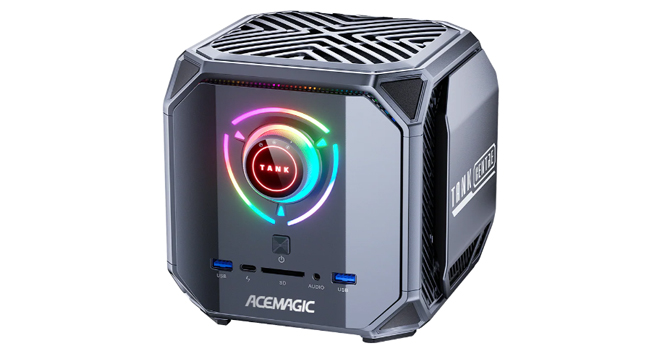
ACEMAGIC is typically known for affordable to mid-range Mini-PCs, but the Tank M1A Pro+ steps into an entirely different performance tier. This is not a typical office system or a light workstation substitute. It is a high-performance compact system built around AMD's Ryzen AI Max+ 395, with the Radeon 8060S, this Strix Halo hardware shifts it into a very different class from most machines in this category. This is all running at high power limits as well and wrapped in a very unconventional design.
ACEMAGIC also offers a non-Plus version that's geared more toward traditional gaming and GPU-driven workloads, using Intel's Core i9-13900HK and Intel Arc A770 MXM discrete graphics with 16 GB of dedicated GDDR6 memory. That gives it a more conventional performance profile for modern gaming, rendering, and other tasks that benefit from a true dedicated GPU with its own high-bandwidth memory. By comparison, the M1A Pro+ takes a more modern hybrid approach with AMD's Radeon 8060S iGPU and XDNA 2 NPU, giving it stronger AI-focused platform capabilities. Even so, as the benchmarks will show, it performs remarkably well on integrated graphics alone with excellent gaming results, surpassing our current chart leaders and showing just how far high-end iGPU performance has come.
One of the biggest highlights of the M1A Pro+ is the Radeon 8060S, as it is currently AMD's top integrated GPU for x86 Windows systems, built on RDNA 3.5 and paired with Ryzen AI Max series processors. With 40 graphics cores and boost clocks up to 2.9 GHz, it represents a major jump over the Radeon 780M and 890M solutions found in most premium Mini-PCs, pushing integrated graphics much closer to the lower end of discrete GPU territory. It also brings support for modern graphics features such as DirectX 12, making it a much better option for current AAA games and GPU-accelerated workloads than previous AMD iGPUs.
It still works within the limits of an integrated design, relying on shared system memory and a mobile-class power envelope, so it is not a direct substitute for a proper mid-range desktop graphics card. Even so, this is one of the most powerful iGPU solutions we have tested, and it makes the GPU and gaming sections especially interesting, because integrated graphics in this review pool have mostly been advancing in smaller steps until now.
The M1A Pro+ features AMD's Ryzen AI Max+ 395, a 16-core, 32-thread Zen 5 processor with boost clocks up to 5.1 GHz and a quoted AI throughput of up to 126 TOPS. Unlike most Mini-PCs that rely on efficiency-focused power targets, ACEMAGIC allows this system to run at up to 140 W in Performance mode, giving both the CPU and GPU room to stretch in sustained workloads. Users can switch between Performance, Standard, and Eco power profiles using a front-facing dial, making it easy to adjust behavior on the fly depending on workload or noise and power preferences. In our testing, we kept the front dial set to Performance mode for the main benchmark runs, and re-ran some of them (Cinebench, y-cruncher, blender and SPECviewperf) in Balanced mode to see if it yielded any difference in results.
The memory configuration is also well beyond what most compact systems offer, shipping with 128 GB of onboard LPDDR5X-8000 in a four-channel configuration. A large portion of this can be allocated as shared video memory, making the system more viable for GPU-heavy tasks like rendering, AI workloads, and large datasets. The trade-off is that memory is not upgradeable, but that's a small caveat when you have such a massive memory pool that comes standard.
Storage support is very flexible for its size, as ACEMAGIC includes three PCIe 4.0 x4 M.2 2280 slots. That opens the door for multi-drive setups focused on speed, project space, or local data-heavy workflows, something that is often limited or entirely missing in smaller enclosures. For connectivity, the Tank M1A Pro+ includes dual 2.5 GbE Ethernet ports, Wi-Fi 7, and Bluetooth 5.4, while supporting up to four 8K displays via a combination of HDMI 2.1, DisplayPort 2.0, and USB4. Front and rear I/O are dense, with a mix of USB 3.2 Gen 2, USB 3.2 Gen 1, USB4, SD card support, and dual 3.5 mm audio jacks.
One of the more unique features of the M1A Pro+ is the large front-mounted power dial, which lets the system switch between Silent, Balanced, and Performance profiles rated at 70 W, 100 W, and 140 W respectively. To see how much of an effect it actually has, I reran several parts of the benchmark suite across all three settings, including Cinebench 2024, Blender, y-cruncher, SPECviewperf 13, and our noise stress test. It will be interesting to see how much these different power profiles affect both performance and acoustics across the review.
| Specifications | |
|---|---|
| CPU | AMD Ryzen AI Max+ 395 16 cores/32 threads Zen 5 architecture Up to 5.1 GHz boost |
| GPU | AMD Radeon 8060S RDNA 3.5 architecture 40 compute units Up to 2.9 GHz |
| Memory | 128 GB LPDDR5X-8000 Four-channel Onboard, non-upgradeable |
| Storage | 3× M.2 2280 PCIe 4.0 x4 |
| Display Outputs | 2× HDMI 2.1 (8K @ 60 Hz) 1× DisplayPort 2.0 (8K @ 60 Hz) 1× USB4 Type-C (8K @ 60 Hz) |
| Connectivity | 2× HDMI 2.1 (8K@60 Hz) |
| Networking | Wi-Fi 7 Bluetooth 5.4 2× 2.5 GbE Ethernet |
| Power Modes | Silent: 70 W Balanced: 100 W Performance: 140 W |
| Operating System | Windows 11 Pro |
| Dimensions | 166.7 × 166.9 × 160.9 mm |
| Product page | ACEMAGIC Tank M1A Pro+ |
| Price | $2,899.00 USD (on sale, as of this review) |
此内容由惯性聚合(RSS阅读器)自动聚合整理,仅供阅读参考。 原文来自 — 版权归原作者所有。