







After a successful release and the fastest software adoption in TrueNAS history, TrueNAS SCALE 24.10 “Electric Eel” is now widely deployed. The update to TrueNAS 24.10.1 has delivered the quality needed for general usage. Electric Eel’s performance is also up to 70% better than TrueNAS 13.0 and Cobia and ahead of Dragonfish, which previously provided dramatic performance improvements of 50% more IOPS and 1000% better metadata. This blog dives into how we test and optimize TrueNAS Electric Eel performance.
While the details can get technical, you don’t have to handle everything yourself. TrueNAS Enterprise appliances come pre-configured and performance-tested, so you can focus on your workloads with confidence that your system is ready to deliver. For our courageous and curious Community members, we’ve outlined the steps to defining, building, and testing a TrueNAS system to meet performance requirements.
Performance targets are typically defined using a combination of bandwidth (measured in GB/s) and IOPS (short for “Input/Output Operations Per Second.”) For video editing and backups, the individual file and IO size is large, but the number of IOPS is typically low. When supporting virtualization or transactional databases, the IO size is much smaller, but significantly more IOPS are needed.
Bandwidth needs are often best estimated by looking at file sizes and transfer time expectations. High-resolution video files can range from 1 GB to several hundred GB in size. When multiple editors are reading directly from files on the storage, bandwidth needs can easily reach 10GB/s or more; and in the opposite direction, a business may have a specific time window that all backup jobs must complete in.
IOPS requirements can be more challenging, but are often expressed as an expectation from a software vendor or end-user in terms of responsiveness. If a database query needs to return in less than 1 ms, one might think that this means 1000 IOPS is the minimum – but that database query might result in authentication, a table lookup, and an audit or access log update in addition to returning the data itself – a single query might be responsible for a factor of 10 or more IOPS generated. Consider the size of IO that will be sent as well – smaller IO sizes may only be able to be stored on or read from a smaller number of disks in your array.
Client count and concurrency also impacts performance. If a single client requires a given amount of bandwidth or IOPS, but only a handful of clients will access your NAS simultaneously, the requirements can be fulfilled with a much smaller system than if ten or a hundred clients are concurrently making those same demands.
Typically, systems that need more IOPS may also need lower latency. It’s essential to determine whether reliable and consistent sub-millisecond latency or low cost per TB is more important, and find the ideal configuration.
After deciding on your performance target, it’s time to move on to selecting your media and platform.
Unlike many other storage systems, TrueNAS supports all-flash (SSD), Hard Drive (HDD) configurations, and Hybrid (mixed SSD and HDD) systems. Choosing the media also determines the system capacity and price point.
With current technology, SSDs best meet high IOPS needs. NVMe SSDs are even faster and becoming increasingly economical. TrueNAS deploys with SSDs up to 30TB in size today, with larger drives planned for availability in the future. Each of these high-performance NVMe SSDs can deliver well over 1 GB/s and over 10,000 IOPS.
Hard drives provide the best cost per TB for capacity, but are limited in two performance dimensions. Sustained bandwidth is typically around 100 MB/s for many drives, and IOPS are around 100. The combination of OpenZFS’s transactional behavior and adaptive caching technology allow for the aggregation of these drives into larger, better-performing systems. The TrueNAS M60 can support over 1,000 HDDs to deliver 10 GB/s and 50,000 IOPS from as low as $60/TB. For high-capacity storage, magnetic hard drives offer an unbeatable cost per TB.
When your performance target is consistent sub-millisecond latency, and IOPS numbers are critical, systems like the all-NVMe TrueNAS F100 bring 24 NVMe drives. With directly connected NVMe drives, there’s no added latency or PCI Express switching involved, giving you maximum performance. With a 2U footprint, and the ability to expand with up to six additional NVMe-oF (NVMe over Fabric) 2U shelves, the F100 is the sleek, high-performance sports car to the M60’s box truck – lighter, nimble, and screaming fast, but at the cost of less “cargo capacity.”
While TrueNAS and OpenZFS cannot make HDDs faster than all-Flash, the Adaptive Replacement Cache (ARC) and optional read cache (L2ARC) and write log (SLOG) devices can help make sure each system meets its performance targets. Read more about these devices in the links to the TrueNAS Documentation site above, or tune in to the TrueNAS Tech Talk (T3) Podcast episode, where the iX engineering team gives some details about where and when these cache devices can help increase performance.
After selecting suitable media, the next step to achieving a performance target is by selecting the proper hardware platform. Choose a platform balanced with the CPU, memory size, HBAs, network ports, and media drives needed to achieve a target performance level. Ensure that when designing your system to consider any requirements for power delivery and cooling in order to ensure overall stability.
Depending on the number and type of storage media selected, this may drive your platform decisions in a certain direction. A system designed for a high-bandwidth backup ingest with a hundred spinning disks will have a drastically different design from one that needs a few dozen NVMe devices. Each system will only perform as fast as its slowest component; software cannot fix a significant hardware limitation.
Each performance level has different platforms for different capacity and price points. Our customers typically choose the platforms based on the bandwidth and capacity required now or in the future. For systems where uptime and availability are crucial, platforms supporting High Availability (HA) are typically required.
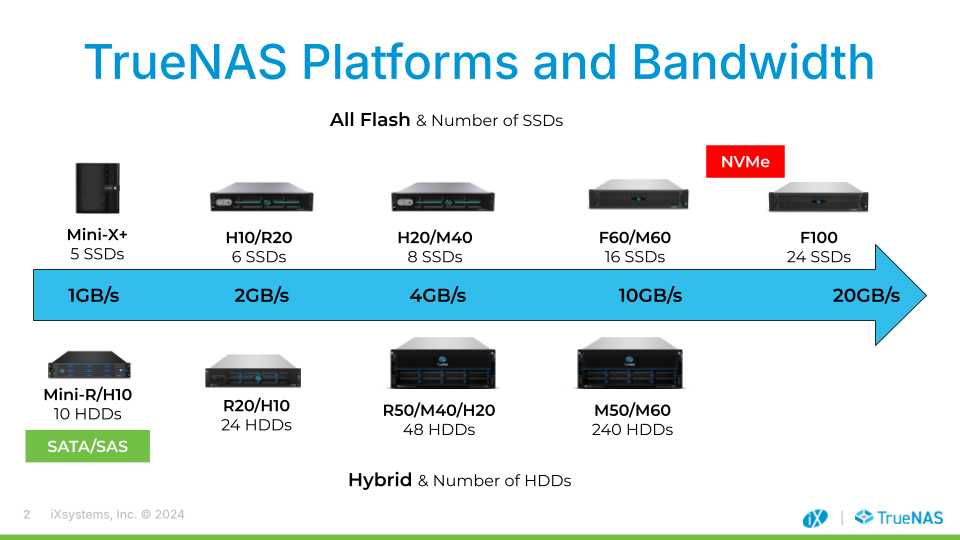
Community users can build their own smaller systems using the same principles. Resources such as the TrueNAS Hardware Guide can offer excellent guidance for system component selection, as well as the TrueNAS Community Forums.
A key feature of TrueNAS is that all of our systems run the same software, from our all-NVMe F-series to the compact Mini line. While TrueNAS Enterprise and High-Availability systems carry some additional, hardware-specific functionality, the same key features and protocols are supported by TrueNAS Community Edition. There’s no need to re-learn or use a different interface – simply build or buy the hardware platform that supports your performance and availability requirements, and jump right into the same familiar interface that users around the world already know and love.
Not many users have the opportunity to build a full test lab to run a comprehensive performance test suite. At the TrueNAS Engineering lab, we maintain a performance lab for our customers and for the benefit of the broader TrueNAS community user base.
There are three general categories of tests that the TrueNAS team runs:
Single Client: A single client (Linux, Windows, Mac) connects via a higher-speed LAN (faster than the target bandwidth by 50%) to the NAS. The test suite (e.g., fio) runs on the client. This approach often tests the client operating system and software implementation as much as the NAS, and IOPS and bandwidth results are frequently client-limited. For example, a client may be restricted to less than 3GB/s even though the NAS itself has been verified as capable of greater than 10GB/s total. TCP and storage session protocols (iSCSI, NFS, SMB) can limit the client’s performance; but this test is important to conduct as it is a realistic use-case.
Multi-client: Given that each client is usually restricted to 2-3GB/s, a system capable of 10 or 20 GB/s needs more than 10 clients to test a NAS simultaneously. The only approach is to have a lab with tens of virtual or physical clients running each of the protocols. Purely synthetic tests like fio are used, as well as more complicated real-world workload tests like virtualization and software-build tests. The aggregate bandwidth and IOPS served to all clients are the final measures of success in this test.
Client Scalability: The last class of tests is needed to simulate use cases with thousands of clients accessing the same NAS. Thousands of users in a school, university, or large company may use a shared storage system, typically via SMB. How the NAS handles those thousands of TCP connections and sessions is important to scalability and reliable operation. To set up this test, we’ve invested in virtualizing thousands of Windows Active Directory (AD) and SMB clients.
There are many test suites out there. Unfortunately, most are for testing individual drives. We recommend the following to get useful results:
Test with a suite that is intended for NAS systems. Synthetic tests like fio fall into this category, providing many options for identifying performance issues.
Do not test by copying data. Copying data goes through a different client path than reading and writing data. Depending on your client, copying data can be very single-threaded and latency-sensitive. Using dd or copying folders will give you poor measurements compared with fio, and in this scenario you may be testing your copy software, not the NAS.
Pick a realistic IO size for your workload. The storage industry previously fixated on 4KB IOPS because applications like Oracle would use this size IO – but unless you’re using Oracle or a similar transactional database, it’s likely your standard IO size is between 32 KB and 1 MB. Test with that to assess your bandwidth and IOPS.
Look at queue depth. A local SSD will often perform better than a network share because of latency differences. Unless you use 100Gbe networking, networks will restrict bandwidth and add latency. Storage systems overcome latency issues by increasing “queue depth”, the number of simultaneous outstanding IOs. If your workload allows for multiple outstanding IOs, increase the testing queue depth. Much like adding more lanes on a highway, latency remains mostly the same, but with potentially greater throughput and IOPS results.
Make sure your network is solid. Ensure that the network path between testing clients and your NAS is reliable with no packet loss, jitter, or retransmissions. Network interruptions or errors impact TCP performance and reduce bandwidth. Using lossy mediums like Wi-Fi to test is not recommended.
In the TrueNAS performance labs, we run these tests across a range of platforms and media. Our goals are to confidently measure and predict the performance of Enterprise systems, as well as ensuring optimizations across the hardware and software stack of TrueNAS. We can also experiment with tuning options for specific workloads to offer best practices for our customers and community.
Electric Eel benefits from improvements in OpenZFS, Linux, Samba, and of course optimizations in TrueNAS itself. Systems with an existing hardware bottleneck may not see obvious performance changes, but larger systems need software that scales its performance with hardware such as increasing CPU core and drive counts.
TrueNAS 24.10 builds on the 24.04 base and increases performance for basic storage services. Typically, we have measured up to a 70% IOPS improvement for all 3 major storage protocols (iSCSI, SMB, and NFS) when compared to TrueNAS 13.0. The improvement was measured on an identical hardware configuration, implying that the previous level of performance can be achieved with 30% fewer drives and processor cores for a budget-constrained use case.
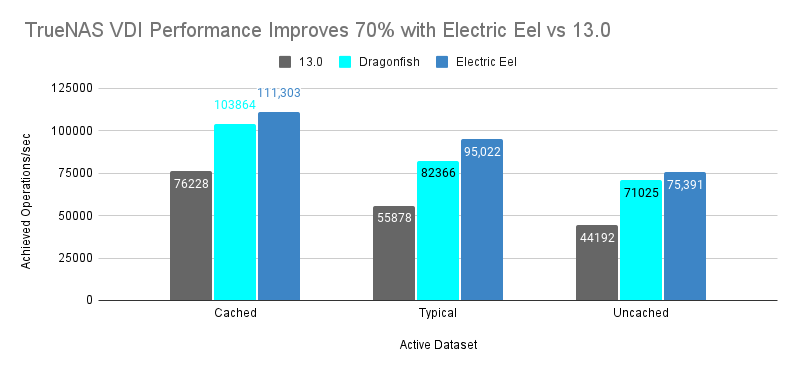 “iSCSI Mixed Workload with VDIv2 Benchmark”
These performance gains are the result of tuning at each level of the software stack. The Linux OS has improved management of threads and interrupts, the iSCSI stack has lower latency and better parallelism, and code paths in OpenZFS 2.3 have made their own improvements to parallelism and latency. In the spirit of open source, the TrueNAS Engineering team helped contribute to the iSCSI and OpenZFS endeavours, ensuring that community members of both upstream projects can benefit.
Additionally, we also observed more than 50% performance improvements from changing media to NVMe SSDs vs SAS SSDs. Platforms like the all-NVMe F-Series can deliver 150% more performance than the previous generation of SAS-based storage.
Other highlights of the Electric Eel testing include:
Exceeding 20GB/s read performance on the F100 for all three storage protocols. The storage protocols all behave similarly over TCP. Write performance is about half as much due to the need to both write to the SLOG device and the pool for data integrity.
Exceeding 250K IOPS for 32KB block sizes on the F100. 32KB is a typical block size for virtualization workloads or more modern databases. This performance was observed over all three primary storage protocols.
Exceeding 2.5GB/s on a single client for each storage protocol (SMB, NFS, iSCSI) for read, write, and mixed R/W workloads. The F-Series is the lowest latency and offers the greatest throughput, but other platforms are typically above 2GB/s.
Each platform met its performance target across all three primary storage protocols, which is a testament not only to OpenZFS’s tremendous scalability, but the refinement of their implementation within TrueNAS to extract maximum performance.
Electric Eel includes an experimental version of OpenZFS Fast Dedup. After confirming stability and performance, we plan to introduce new TrueNAS product configurations for optimal use of this feature. The goal of this testing is to allow Fast Dedup to have a relatively low impact on performance if the system is well configured.
The upcoming OpenZFS 2.3 release (planned for availability with TrueNAS 25.04 “Fangtooth”) also includes Direct IO for NVMe, which enables even higher maximum bandwidths when using high-performance storage devices with workloads that don’t benefit as strongly from caching. Tests for this feature are still pending completion, so stay tuned for future updates and information on the upcoming TrueNAS 25.04 as we move forward with development.
The TrueNAS Apps ecosystem has moved to a Docker back end, which has significantly reduced base CPU load and memory overhead. This reduced overhead has enabled better performance for systems running Apps like Minio and Syncthing. While we don’t have quantified measurements in terms of bandwidth and IOPS, our community users have reported an overall positive perceived impact.
Given the quality, security, performance, and App improvements, we recommend that new TrueNAS users start their journey with “Electric Eel” to benefit from the latest changes. We will begin shipping TrueNAS 24.10 as the default software installed on our TrueNAS products in Q1 2025.
With the explosive popularity of Electric Eel, already more popular than Dragonfish and CORE 13.0, nearly all new deployments should deploy TrueNAS 24.10. Current TrueNAS CORE users can elect to remain on CORE or upgrade to Electric Eel. Performance has now exceeded 13.0 and the software is expected to mature further in 2025.
With the release of TrueNAS SCALE 24.10, there’s never been a better time to join the growing TrueNAS community. Download the SCALE 24.10 installer or upgrade from within the TrueNAS web UI and experience True Data Freedom. Then, ensure you’ve signed up for the newly relaunched TrueNAS Community Forums to share your experience. The TrueNAS Software Status page advises which TrueNAS version is right for your systems.
此内容由惯性聚合(RSS阅读器)自动聚合整理,仅供阅读参考。 原文来自 — 版权归原作者所有。