



惯性聚合 高效追踪和阅读你感兴趣的博客、新闻、科技资讯
阅读原文 在惯性聚合中打开

推荐订阅源

S
Securelist
腾讯CDC
L
LangChain Blog
aimingoo的专栏
aimingoo的专栏
Cyber Security Advisories - MS-ISAC
博客园_首页
CTFtime.org: upcoming CTF events
云风的 BLOG
云风的 BLOG
P
Proofpoint News Feed
罗磊的独立博客
爱范儿
爱范儿
freeCodeCamp Programming Tutorials: Python, JavaScript, Git & More
H
Help Net Security
Vercel News
Vercel News
MyScale Blog
MyScale Blog
博客园 - 叶小钗
The Register - Security
钛媒体:引领未来商业与生活新知
钛媒体:引领未来商业与生活新知
量子位
Y
Y Combinator Blog
C
Cyber Attacks, Cyber Crime and Cyber Security
NISL@THU
NISL@THU
GbyAI
GbyAI
SecWiki News
SecWiki News
M
MIT News - Artificial intelligence
Engineering at Meta
Engineering at Meta
P
Privacy International News Feed
月光博客
月光博客
奇客Solidot–传递最新科技情报
奇客Solidot–传递最新科技情报
C
Check Point Blog
博客园 - 聂微东
Project Zero
Project Zero
让小产品的独立变现更简单 - ezindie.com
Latest news
Latest news
V
Vulnerabilities – Threatpost
T
The Blog of Author Tim Ferriss
cs.CL updates on arXiv.org
D
Darknet – Hacking Tools, Hacker News & Cyber Security
T
Tor Project blog
F
Fortinet All Blogs
Recorded Future
Recorded Future
IT之家
IT之家
D
Docker
The GitHub Blog
The GitHub Blog
V
Visual Studio Blog
MongoDB | Blog
MongoDB | Blog
T
Threat Research - Cisco Blogs
Hugging Face - Blog
Hugging Face - Blog
C
CXSECURITY Database RSS Feed - CXSecurity.com
V
V2EX

TrueNAS – Open Enterprise Storage

What We Heard at NAB 2026 | TrueNAS - Open Enterprise Storage TrueNAS V160 Launched: High Performance, No All-Flash Tax TrueNAS 26 Is Here: What's New in This Major Release TrueNAS Connect: Enterprise Features on Your Own Hardware TrueNAS Immutability: Multi-Layered Data Protection & Ransomware Defense TrueNAS CEO Note to Community: We Are All TrueNAS TrueNAS 25.10.2 Goldeye: 100+ Fixes & What's New TrueNAS Names Brett Davis CEO for Enterprise Growth TrueNAS Plans for 2026: TrueNAS 26 & OpenZFS 2.4 Roadmap TrueNAS Connect Plus Now Available for All Community Users TrueNAS R60: High-Speed NVMe Storage for AI Workloads Introducing TrueNAS WebShare: Secure Web-Based File Sharing TrueNAS 25.10.1: Goldeye Matures, Performs, and Connects TrueNAS & Veeam v13: Turnkey Cyber‑Resilient Backups Customer Advantages of the TrueNAS Open Core Model TrueNAS Named Data Storage Company of the Year 2025 TrueNAS 25.10: Smarter, Streamlined Updates & Tools TrueNAS F-Series Shines at IBC with Two “Best of Show” Awards TrueNAS 25.10 “Goldeye”: NVMe‑oF, Unified, Simplified Storage Introducing TrueNAS Connect: Secure Monitoring & Alerts The ESG Advantage of Open Enterprise Architecture: Why TrueNAS Is the Sustainable Choice | TrueNAS - Open TrueNAS 25.10-RC1: New Features, Fixes & OpenZFS 2.3.4 Seamless Setup: Exploring TrueNAS Web-Driven Installation | TrueNAS - Open Enterprise Storage TrueNAS 25.10 “Goldeye” BETA is Available TrueNAS 25.10 “Goldeye” Highlights TrueNAS 25.04.2: Fangtooth restores Virtualization iXsystems Rebrands as TrueNAS to Reflect Market Momentum in Enterprise Storage | TrueNAS - Open Enterprise June 1 - Apps Migration Deadline for TrueNAS 24.04 and 23.10 TrueNAS 25.04.1: Fangtooth Unification Gains Momentum TrueNAS 24.10.2.2 Prepares for IP Addressing of Apps TrueNAS H30 and F100 add Fast Dedup with TrueNAS 25.04 Meet TrueNAS Community Edition – The Future of Open Storage TrueNAS Apps Made Easy with Electric Eel & Fangtooth TrueNAS H30 Secures Two ‘Best of Show’ Honors at NAB 2025 | TrueNAS - Open Enterprise Storage TrueNAS H30 Wins Best of Show Awards at NAB 2025 TrueNAS 25.04: Fangtooth is RELEASED Slash Your Virtualization Costs with TrueNAS Storage TrueCommand 3.1 Enhances Management and Monitoring TrueNAS 25.04: Fangtooth Unification Begins with New Features Fangtooth Unification Begins | TrueNAS iXsystems Experiences Record Growth in TrueNAS Enterprise Storage, Spins Off Server Business to Amaara TrueNAS Delivers Record Growth in 2024, Plans Strategic Expansions in 2025 | TrueNAS - Open Enterprise Storage The TrueNAS H30 is the Swiss Army Knife of Storage TrueNAS 24.10.2: Electric Eel Shines Brightly The new TrueNAS H30 brings NVMe Performance to the Edge | TrueNAS - Open Enterprise Storage Ransomware Protection & Immutable Backup with TrueNAS TrueNAS Fangtooth includes OpenZFS 2.3.0 Fangtooth Unifies the TrueNAS Community TrueNAS Electric Eel Performance Sizzles | TrueNAS - Open Enterprise Storage TrueNAS 24.10.1: RAIDZ, Docker & NVMe Storage Upgrades TrueNAS Wins TrustRadius 2025 Buyer's Choice Award for Exceptional Value and Customer Experience | TrueNAS 24.10 “Electric Eel” Powers Up Your Storage TrueNAS Electric Eel: First to Integrate OpenZFS 2.3 Features Electric Eel RC1 Feature Complete | TrueNAS Enhanced Data Migration in Electric Eel | TrueNAS Immutable Backup & Enterprise Storage Security Features | TrueNAS 2024 TrueNAS Electric Eel Emerges TrueNAS Launches “Powered by TrueNAS” with First Partner HexOS The Benefits of Expanding from One to Multiple TrueNAS Systems TrueNAS SCALE Dragonfish Reaches its Second Major Milestone TrueNAS Dragonfish Performance Breathes Fire TrueNAS CORE 13.3 BETA is now Available iXsystems Brings Flagship Data Platform to Market with Production Release of TrueNAS SCALE 24.04 | TrueNAS - Open Enterprise Storage TrueNAS Enterprise H-Series Adds Versatility to Storage TrueNAS SCALE Dragonfish Major Release TrueNAS Delivers Dramatic Quality Improvements The Future of the TrueNAS Community How to Set Up and Install TrueNAS CORE TrueNAS CORE 13.3 Plans TrueNAS SCALE Dragonfish SMB Services and Performance TrueNAS Named a Customers Choice in the North American Region TrueNAS SCALE 23.10.2 Delivers Enterprise Quality Gartner Peer Insights Primary Storage Customers’ Choice New Survey Ranks Top Hypervisor Options as Users Seek VMware Alternatives Beyond VMware: Exploring Virtualization Alternatives Donation of Fast Dedup to OpenZFS and TrueNAS Fast Dedup is a Valentines Gift to the OpenZFS and TrueNAS Communities | TrueNAS - Open Enterprise Storage TrueNAS SCALE Dragonfish Reaches BETA Why Traditional Storage is So Expensive How TrueNAS Delivers Unbeatable Value | TrueNAS - Open Enterprise Storage TrueNAS Year in Review: Top Stories of 2023 TrueCommand 3.0 Manages ZFS Replication | TrueNAS - Open Enterprise Storage TrueNAS SCALE 23.10 has the Fastest Growth Ever TrueNAS 13.0-U6.1 is the Final Update Release Black Friday Special Offer for US Only! 5% Off on TrueNAS Mini R! The New Performance Flagship: TrueNAS F-Series iXsystems Introduces TrueNAS Enterprise F-Series All-NVMe Appliances and TrueNAS SCALE 23.10 TrueNAS SCALE 23.10 is RELEASED with SMB Features iXsystems Invests in Leadership as TrueNAS GrowsiXsystems Invests in Leadership as Enterprise Adoption of OpenZFS Summit highlights Fast Dedup and RAIDZ Expansion TrueNAS SCALE Cobia Has a New WebUI TrueNAS SCALE 23.10-RC.1 introduces dRAID Coffee and Open Source with Kris Moore and Isaac Levin Improves Data Mobility and Furthers Data Freedom TrueNAS SCALE Cobia Has Reached BETA Enterprise Data Protection Solutions & NVMe Secure Storage TrueNAS SCALE “Bluefin” adds SMB Multichannel and Quality iXsystems Named Gartner Peer Insights™ Customers’ Choice Newsletter: Huge iX-Storj giveaway TrueNAS Core-13.0-u5-release and more | TrueNAS - Open Enterprise Storage iXsystems Named a North America Customers Choice in Gartner Peer Insights™
Six Metrics for Measuring ZFS Pool Performance Part 1 | TrueNAS - Open Enterprise Storage
iX Team · 2018-09-25 · via TrueNAS – Open Enterprise Storage

Read part two of the Zfs Pool Performance series here

The layout of a ZFS storage pool has a significant impact on system performance under various workloads. Given the importance of picking the right configuration for your workload and the fact that making changes to an in-use ZFS pool is far from trivial, it is important for an administrator to understand the mechanics of pool performance when designing a storage system.
To quantify pool performance, we will consider six primary metrics:

  • Read I/O operations per second (IOPS)
  • Write IOPS
  • Streaming read speed
  • Streaming write speed
  • Storage space efficiency (usable capacity after parity versus total raw capacity)
  • Fault tolerance (maximum number of drives that can fail before data loss)

For the sake of comparison, we’ll use an example system with 12 drives, each one sized at 6TB, and say that each drive does 100MB/s streaming reads and writes and can do 250 read and write IOPS. We will visualize how the data is spread across the drives by writing 12 multi-colored blocks, shown below. The blocks are written to the pool starting with the brown block on the left (number one), and working our way to the pink block on the right (number 12).
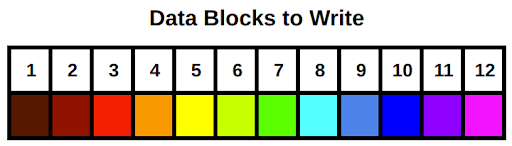
Data Blocks to Write Example
Note that when we calculate data rates and IOPS values for the example system, they are only approximations. Many other factors can impact pool access speeds for better (compression, caching) or worse (poor CPU performance, not enough memory).
There is no single configuration that maximizes all six metrics. Like so many things in life, our objective is to find an appropriate balance of the metrics to match a target workload. For example, a cold-storage backup system will likely want a pool configuration that emphasizes usable storage space and fault tolerance over the other data-rate focused metrics.
Let’s start with a quick review of ZFS storage pools before diving into specific configuration options. ZFS storage pools are comprised of one or more virtual devices, or vdevs. Each vdev is comprised of one or more storage providers, typically physical hard disks. All disk-level redundancy is configured at the vdev level. That is, the RAID layout is set on each vdev as opposed to on the storage pool. Data written to the storage pool is then striped across all the vdevs. Because pool data is striped across the vdevs, the loss of any one vdev means total pool failure. This is perhaps the single most important fact to keep in mind when designing a ZFS storage system. We will circle back to this point in the next post, but keep it in mind as we go through the vdev configuration options.
Because storage pools are made up of one or more vdevs with the pool data striped over the top, we’ll take a look at pool configuration in terms of various vdev configurations. There are three basic vdev configurations: striping, mirroring, and RAIDZ (which itself has three different varieties). The first section will cover striped and mirrored vdevs in this post; the second post will cover RAIDZ and some example scenarios.
Striped vdev
A striped vdev is the simplest configuration. Each vdev consists of a single disk with no redundancy. When several of these single-disk, striped vdevs are combined into a single storage pool, the total usable storage space would be the sum of all the drives. When you write data to a pool made of striped vdevs, the data is broken into small chunks called “blocks” and distributed across all the disks in the pool. The blocks are written in “round-robin” sequence, meaning after all the disks receive one row of blocks, called a stripe, it loops back around and writes another stripe under the first. A striped pool has excellent performance and storage space efficiency, but absolutely zero fault tolerance. If even a single drive in the pool fails, the entire pool will fail and all data stored on that pool will be lost.
The excellent performance of a striped pool comes from the fact that all of the disks can work independently for all read and write operations. If you have a bunch of small read or write operations (IOPS), each disk can work independently to fetch the next block. For streaming reads and writes, each disk can fetch the next block in line synchronized with its neighbors. For example, if a given disk is fetching block n, its neighbor to the left can be fetching block n-1, and its neighbor to the right can be fetching block n+1. Therefore, the speed of all read and write operations as well as the quantity of read and write operations (IOPS) on a striped pool will scale with the number of vdevs. Note here that I said the speeds and IOPS scale with the number of vdevs rather than the number of drives; there’s a reason for this and we’ll cover it in the next post when we discuss RAID-Z.
Here’s a summary of the total pool performance (where N is the number of disks in the pool):
N-wide striped:

  • Read IOPS: N * Read IOPS of a single drive
  • Write IOPS: N * Write IOPS of a single drive
  • Streaming read speed: N * Streaming read speed of a single drive
  • Streaming write speed: N * Streaming write speed of a single drive
  • Storage space efficiency: 100%
  • Fault tolerance: None!

Let’s apply this to our example system, configured with a 12-wide striped pool:
12-wide striped:

  • Read IOPS: 3000
  • Write IOPS: 3000
  • Streaming read speed: 1200 MB/s
  • Streaming write speed: 1200 MB/s
  • Storage space efficiency: 72 TB
  • Fault tolerance: None!

Below is a visual depiction of our 12 rainbow blocks written to this pool configuration:
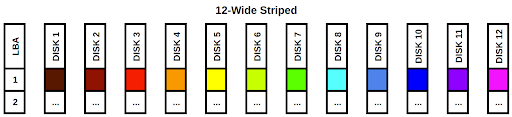
OpenZFS (ZFS) Pool Layout Example: 12-Wide Striped
The blocks are simply striped across the 12 disks in the pool. The LBA column on the left stands for “Logical Block Address”. If we treat each disk as a column in an array, each LBA would be a row. It’s also easy to see that if any single disk fails, we would be missing a color in the rainbow and our data would be incomplete. While this configuration has fantastic read and write speeds and can handle a ton of IOPS, the data stored on the pool is very vulnerable. This configuration is not recommended unless you’re comfortable losing all of your pool’s data whenever any single drive fails.
Mirrored vdev
A mirrored vdev consists of two or more disks. A mirrored vdev stores an exact copy of all the data written to it on each one of its drives. Traditional RAID-1 mirrors usually only support two drive mirrors, but ZFS allows for more drives per mirror to increase redundancy and fault tolerance. All disks in a mirrored vdev have to fail for the vdev, and thus the whole pool, to fail. Total storage space will be equal to the size of a single drive in the vdev. If you’re using mismatched drive sizes in your mirrors, the total size will be that of the smallest drive in the mirror.
Streaming read speeds and read IOPS on a mirrored vdev will be faster than write speeds and IOPS. When reading from a mirrored vdev, the drives can “divide and conquer” the operations, similar to what we saw above in the striped pool. This is because each drive in the mirror has an identical copy of the data. For write operations, all of the drives need to write a copy of the data, so the mirrored vdev will be limited to the streaming write speed and IOPS of a single disk.
Here’s a summary:
N-way mirror:

  • Read IOPS: N * Read IOPS of a single drive
  • Write IOPS: Write IOPS of a single drive
  • Streaming read speed: N * Streaming read speed of a single drive
  • Streaming write speed: Streaming write speed of a single drive
  • Storage space efficiency: 50% for 2-way, 33% for 3-way, 25% for 4-way, etc. [(N-1)/N]
  • Fault tolerance: 1 disk per vdev for 2-way, 2 for 3-way, 3 for 4-way, etc. [N-1]

For our first example configuration, let’s do something ridiculous and create a 12-way mirror. ZFS supports this kind of thing, but your management probably will not.
1x 12-way mirror:

  • Read IOPS: 3000
  • Write IOPS: 250
  • Streaming read speed: 1200 MB/s
  • Streaming write speed: 100 MB/s
  • Storage space efficiency: 8.3% (6 TB)
  • Fault tolerance: 11

Let’s look at this configuration visually:
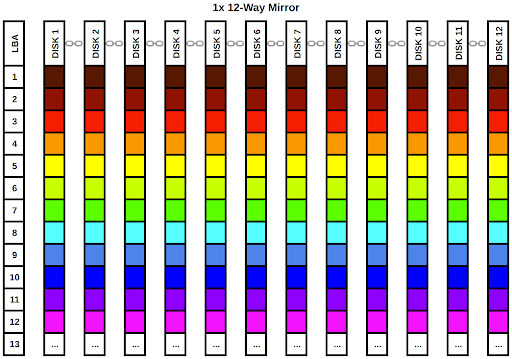
OpenZFS (ZFS) Pool Layout Example: 1x 12-Way Mirror
As we can clearly see from the diagram, every single disk in the vdev gets a full copy of our rainbow data. The chainlink icons between the disk labels in the column headers indicate the disks are part of a single vdev. We can lose up to 11 disks in this vdev and still have a complete rainbow. Of course, the data takes up far too much room on the pool, occupying a full 12 LBAs in the data array.
Obviously, this is far from the best use of 12 drives. Let’s do something a little more practical and configure the pool with the ZFS equivalent of RAID-10. We’ll configure six 2-way mirror vdevs. ZFS will stripe the data across all 6 of the vdevs. We can use the work we did in the striped vdev section to determine how the pool as a whole will behave. Let’s first calculate the performance per vdev, then we can work on the full pool:
1x 2-way mirror:

  • Read IOPS: 500
  • Write IOPS: 250
  • Streaming read speed: 200 MB/s
  • Streaming write speed: 100 MB/s
  • Storage space efficiency: 50% (6 TB)
  • Fault tolerance: 1

Now we can pretend we have 6 drives with the performance statistics listed above and run them through our striped vdev performance calculator to get the total pool’s performance:
6x 2-way mirror:

  • Read IOPS: 3000
  • Write IOPS: 1500
  • Streaming read speed: 1200 MB/s
  • Streaming write speed: 600 MB/s
  • Storage space efficiency: 50% (36 TB)
  • Fault tolerance: 1 per vdev, 6 total

Again, we will examine the configuration from a visual perspective:
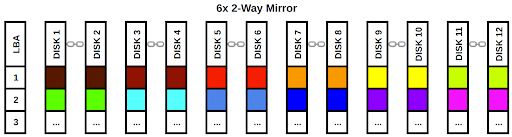
OpenZFS (ZFS) Pool Layout Example: 6x 2-Way Mirror
Each vdev gets a block of data and ZFS writes that data to all of (or in this case, both of) the disks in the mirror. As long as we have at least one functional disk in each vdev, we can retrieve our rainbow. As before, the chain link icons denote the disks are part of a single vdev. This configuration emphasizes performance over raw capacity but doesn’t totally disregard fault tolerance as our striped pool did. It’s a very popular configuration for systems that need a lot of fast I/O. Let’s look at one more example configuration using four 3-way mirrors. We’ll skip the individual vdev performance calculation and go straight to the full pool:
4x 3-way mirror:
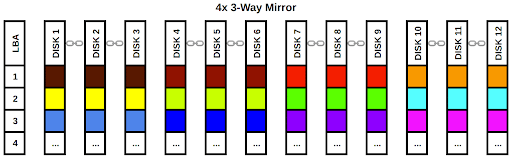
  • Read IOPS: 3000
  • Write IOPS: 1000
  • Streaming read speed: 1200 MB/s
  • Streaming write speed: 400 MB/s
  • Storage space efficiency: 33% (24 TB)
  • Fault tolerance: 2 per vdev, 8 total

OpenZFS (ZFS) Pool Layout Example: 4x 3-Way Mirror
While we have sacrificed some write performance and capacity, the pool is now extremely fault tolerant. This configuration is probably not practical for most applications and it would make more sense to use lower fault tolerance and set up an offsite backup system.
Striped and mirrored vdevs are fantastic for access speed performance, but they either leave you with no redundancy whatsoever or impose at least a 50% penalty on the total usable space of your pool. In the next post, we will cover RAIDZ, which lets you keep data redundancy without sacrificing as much storage space efficiency. We’ll also look at some example workload scenarios and decide which layout would be the best fit for each.
Jason Rose, Sales Engineer 
To learn more about ZFS and vdev layouts, get the book FreeBSD Mastery: Advanced ZFS by Michael Lucas and Allan Jude.