


If you are a storage professional but new to TrueNAS and OpenZFS, their operations and terms may be a little different for you. The purpose of this blog post is to provide a basic guide on how OpenZFS works for storage and to review some of the terms and definitions used to describe storage activities on OpenZFS. A quick dictionary of OpenZFS terms can be found here.
The TrueNAS data storage system from iXsystems, uses OpenZFS as the underlying file system and volume manager. TrueNAS is based on the Open Source software-defined storage operating system, FreeNAS, which is based on the FreeBSD Open Source operating system.
Major Advantages of OpenZFS
OpenZFS is both a file system and a volume manager. Combining these two items allows OpenZFS to know exactly where data is going on every storage device and how much data each storage device manages. OpenZFS provides several built-in RAID implementations as well. These features allow OpenZFS to dramatically reduce the amount of rebuild times in the case of a storage device failure. OpenZFS only rebuilds the used blocks on each storage device instead of having to scan the entire storage device for potential data. This is a huge advantage as storage devices get bigger and bigger.
One of the most important features in OpenZFS is that it is designed to ensure data integrity. Since OpenZFS computes a checksum for every used block on a storage device, it can identify when the storage media has experienced an error, like bit rot, that has damaged the data. OpenZFS performs the same cryptographic signatures on all of the metadata. If the underlying hardware has a problem, OpenZFS realizes that the data it has retrieved does not match its records and can take action. OpenZFS automatically corrects any discovered data errors on a storage device from a redundant copy.
OpenZFS continues this data protection design by using a copy-on-write block management system. OpenZFS never overwrites existing blocks. When writing data, OpenZFS identifies the blocks that must change and writes them to a new location on the storage device. The old blocks remain untouched. This copy-on-write process not only protects data from partial writes and corruption, it provides for additional features like snapshots and data cloning, which is the creation of a new file system from a snapshot.
Storage Pools and Datasets
The highest level of storage abstraction on TrueNAS is the storage pool. A storage pool is a collection of storage devices such as HDDs, SSDs, and NVDIMMs, NVMe, that enables the administrator to easily manage storage utilization and access on the system.
A storage pool is where data is written or read by the various protocols that access the system. Once created, the storage pool allows you to access the storage resources by either creating and sharing file-based datasets (NAS) or block-based zvols (SAN).
A dataset is a named chunk of storage within a storage pool used for file-based access to the storage pool. A dataset may resemble a traditional filesystem for Windows, UNIX, or Mac. In OpenZFS, a raw block device, or LUN, is known as a zvol. A zvol is also a named chunk of storage with slightly different characteristics than a dataset.
Once created, a dataset can be shared using NFS, SMB, AFP, or WebDAV, and accessed by any system supporting those protocols. Zvols are accessed using either iSCSI or Fibre Channel (FC) protocols.
The tremendous flexibility offered by storage pools allows you to efficiently and effectively use all the storage on the system. You do not need to dedicate certain HDDs, or other storage devices, to certain tasks or protocols which tend to create underutilized wasted space in other legacy storage architectures.
TrueNAS supports more than one storage pool per system and a storage pool can grow at anytime by adding more storage to the system.
vdevs
The next level of storage abstraction in OpenZFS, the vdev or virtual device, is one of the more unique concepts around OpenZFS storage.
A vdev is the logical storage unit of OpenZFS storage pools. Each vdev is composed of one or more HDDs, SSDs, NVDIMMs, NVMe, or SATA DOMs.
Data redundancy, or software RAID implementation, is defined at the vdev level. The vdev manages the storage devices within it freeing higher level ZFS functions from this task.
A storage pool is a collection of vdevs which, in turn, are an individual collection of storage devices. When you create a storage pool in TrueNAS, you create a collection of vdevs with a certain redundancy or protection level defined.
When data is written to the storage pool, the data is striped across all the vdevs in the storage pool. You can think of a collection of vdevs in a storage pool as a RAID 0 stripe of virtual storage devices. Much of OpenZFS performance comes from this striping of data across the vdevs in a storage pool.
In general, the more vdevs in a storage pool, the better the performance. Similar to the general concept of RAID 0, the more storage devices in a RAID 0 stripe, the better the read and write performance.
RAID
Since OpenZFS is also a RAID manager, TrueNAS does not require a hardware RAID controller which makes TrueNAS a more efficient data storage system. OpenZFS provides software RAID and offers configurations that you are most likely familiar with on your legacy storage system. Here are some of the OpenZFS storage device redundancy terms and definitions.
In OpenZFS, the concept of a RAID group is similar to other implementations in that data is striped across a grouping of storage devices with a parity calculation or devices can be mirrored. The vdevs manage the RAID protection of data with OpenZFS and you can generally equate the term RAID group with the term vdev.
Mirrors – Similar to RAID 1 mirroring in that data written to one device is written to another device. OpenZFS supports multiple device mirrors. You can put two, three, even four storage devices into a mirror and all data written to one device is written to all the devices in the mirror. A mirror will ensure the vdev is operable even if all devices but one have failed within the vdev. A typical configuration will define multiple two-device mirror vdevs for superior random I/O performance. The trade off is storage capacity due to the amount of capacity reserved for redundancy.
RAIDZ1 – Similar to RAID 5, RAIDZ1 spreads data and parity information across all of the storage devices in the vdev protecting against a single device failure in the vdev. This is the most efficient configuration from a capacity perspective and a good performing configuration for large sequential write applications like data backups.
RAIDZ2 – Similar to RAID 6, RAIDZ2 spreads data and parity information across all of the storage devices in the vdev protecting against the potential of two storage device failures in the vdev. This is the most typical configuration for general use applications storing primary data on the TrueNAS system as it provides a great balance between available capacity, data protection, and performance.
RAIDZ3 – Triple parity protection. RAIDZ3 spreads data and parity information across all of the storage devices in the vdev protecting against the potential of three storage devices failing in a vdev.
TrueNAS using OpenZFS protects data on multiple levels and goes to great lengths to provide the performance and capacity you need for your applications.
Let’s summarize the storage hierarchy just discussed.
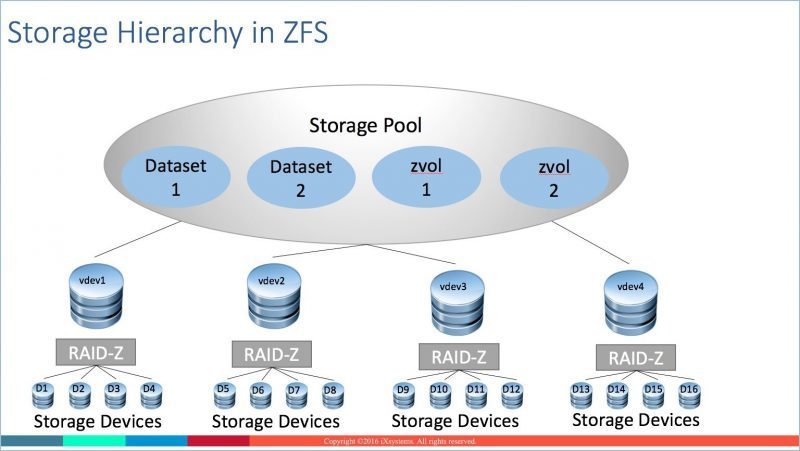
Here are some general rules around storage devices, RAID, vdevs, datasets, and storage pools.
Special vdevs
Storage pools can use special-purpose vdevs to improve performance. These special vdev types are not used to persistently store data, but instead temporarily cache data on faster devices.
SLOG: OpenZFS maintains a ZFS Intent Log (ZIL) as part of the storage pool. Similar to the journal in some other file systems, this write log is where OpenZFS writes in-progress operations so they can be completed or rolled back in the event of a system crash or power failure. One way to boost write performance is to separate the ZIL from normal storage pool operations by adding a dedicated device as a Separate Log, or SLOG. The dedicated device is usually a small but very fast device, such as a high-endurance flash device like a SSD or NVDIMM. Sometimes this SLOG device is known as a write cache. The SLOG can improve synchronous write performance for a file protocol like NFS, where an application waits for an acknowledgement from the storage destination that the data is actually written. The SLOG will have little effect on applications with asynchronous writes. The SMB and iSCSI protocols tend to use asynchronous writes so will not benefit from using a SLOG device.
L2ARC: In OpenZFS, a portion of system RAM is set aside as an Adaptive Replacement Cache, or ARC, to cache reads from the system and provide better performance for read-intensive applications. If a piece of data is read constantly, it will typically find its way to the ARC. When a piece of data is used frequently enough to benefit from caching but not frequently enough to rate being stored in RAM, OpenZFS can store it on a cache device, called a Level 2 ARC, or L2ARC. The L2ARC is typically a very fast and high-endurance flash storage like a SSD or NVDIMM. As with any read cache, the L2ARC can improve performance over time. The more data that is read, the more the data is potentially cached in either the ARC or L2ARC. Over time, the read cache will “heat up” and improve read performance.
Performance and vdevs
There are always trade-offs when you want to balance performance with capacity on a storage system. Generally speaking, a mirror can provide better IOPS and read bandwidth, but RAIDZ can provide better write bandwidth and much better space efficiency. However, the more vdevs in a pool, the better the pool performs.
For IOPS/read-intensive applications, multiple mirrored vdevs perform the best. However, this is not the most space efficient configuration as it trades performance for space.
General performance best practices around creating vdevs include:
iXsystems Sales Engineers can work with you and your specific needs for performance and capacity to design a TrueNAS configuration to ensure you get the best of both worlds.
Call iXsystems toll free at 1-855-473-7449 or send an email to info@ixsystems.com and we will answer all your questions about TrueNAS, OpenZFS, and iXsystems.
Some of th e material for this blog was taken from “FreeBSD Mastery: ZFS” by Michael W. Lucas and Allan Jude, published by Tilted Windmill Press. There are many other books by these authors so be sure to check them out if you need more in-depth information. I also suggest you read the many articles that Allan Jude has written for the FreeBSD Journal.
此内容由惯性聚合(RSS阅读器)自动聚合整理,仅供阅读参考。 原文来自 — 版权归原作者所有。