
惯性聚合 高效追踪和阅读你感兴趣的博客、新闻、科技资讯
阅读原文 在惯性聚合中打开

推荐订阅源

S
Securelist
腾讯CDC
L
LangChain Blog
aimingoo的专栏
aimingoo的专栏
Cyber Security Advisories - MS-ISAC
博客园_首页
CTFtime.org: upcoming CTF events
云风的 BLOG
云风的 BLOG
P
Proofpoint News Feed
罗磊的独立博客
爱范儿
爱范儿
freeCodeCamp Programming Tutorials: Python, JavaScript, Git & More
H
Help Net Security
Vercel News
Vercel News
MyScale Blog
MyScale Blog
博客园 - 叶小钗
The Register - Security
钛媒体:引领未来商业与生活新知
钛媒体:引领未来商业与生活新知
量子位
Y
Y Combinator Blog
C
Cyber Attacks, Cyber Crime and Cyber Security
NISL@THU
NISL@THU
GbyAI
GbyAI
SecWiki News
SecWiki News
M
MIT News - Artificial intelligence
Engineering at Meta
Engineering at Meta
P
Privacy International News Feed
月光博客
月光博客
奇客Solidot–传递最新科技情报
奇客Solidot–传递最新科技情报
C
Check Point Blog
博客园 - 聂微东
Project Zero
Project Zero
让小产品的独立变现更简单 - ezindie.com
Latest news
Latest news
V
Vulnerabilities – Threatpost
T
The Blog of Author Tim Ferriss
cs.CL updates on arXiv.org
D
Darknet – Hacking Tools, Hacker News & Cyber Security
T
Tor Project blog
F
Fortinet All Blogs
Recorded Future
Recorded Future
IT之家
IT之家
D
Docker
The GitHub Blog
The GitHub Blog
V
Visual Studio Blog
MongoDB | Blog
MongoDB | Blog
T
Threat Research - Cisco Blogs
Hugging Face - Blog
Hugging Face - Blog
C
CXSECURITY Database RSS Feed - CXSecurity.com
V
V2EX

TrueNAS – Open Enterprise Storage

What We Heard at NAB 2026 | TrueNAS - Open Enterprise Storage TrueNAS V160 Launched: High Performance, No All-Flash Tax TrueNAS 26 Is Here: What's New in This Major Release TrueNAS Connect: Enterprise Features on Your Own Hardware TrueNAS Immutability: Multi-Layered Data Protection & Ransomware Defense TrueNAS CEO Note to Community: We Are All TrueNAS TrueNAS 25.10.2 Goldeye: 100+ Fixes & What's New TrueNAS Names Brett Davis CEO for Enterprise Growth TrueNAS Plans for 2026: TrueNAS 26 & OpenZFS 2.4 Roadmap TrueNAS Connect Plus Now Available for All Community Users TrueNAS R60: High-Speed NVMe Storage for AI Workloads Introducing TrueNAS WebShare: Secure Web-Based File Sharing TrueNAS 25.10.1: Goldeye Matures, Performs, and Connects TrueNAS & Veeam v13: Turnkey Cyber‑Resilient Backups Customer Advantages of the TrueNAS Open Core Model TrueNAS Named Data Storage Company of the Year 2025 TrueNAS 25.10: Smarter, Streamlined Updates & Tools TrueNAS F-Series Shines at IBC with Two “Best of Show” Awards TrueNAS 25.10 “Goldeye”: NVMe‑oF, Unified, Simplified Storage Introducing TrueNAS Connect: Secure Monitoring & Alerts The ESG Advantage of Open Enterprise Architecture: Why TrueNAS Is the Sustainable Choice | TrueNAS - Open TrueNAS 25.10-RC1: New Features, Fixes & OpenZFS 2.3.4 Seamless Setup: Exploring TrueNAS Web-Driven Installation | TrueNAS - Open Enterprise Storage TrueNAS 25.10 “Goldeye” BETA is Available TrueNAS 25.10 “Goldeye” Highlights TrueNAS 25.04.2: Fangtooth restores Virtualization iXsystems Rebrands as TrueNAS to Reflect Market Momentum in Enterprise Storage | TrueNAS - Open Enterprise June 1 - Apps Migration Deadline for TrueNAS 24.04 and 23.10 TrueNAS 25.04.1: Fangtooth Unification Gains Momentum TrueNAS 24.10.2.2 Prepares for IP Addressing of Apps TrueNAS H30 and F100 add Fast Dedup with TrueNAS 25.04 Meet TrueNAS Community Edition – The Future of Open Storage TrueNAS Apps Made Easy with Electric Eel & Fangtooth TrueNAS H30 Secures Two ‘Best of Show’ Honors at NAB 2025 | TrueNAS - Open Enterprise Storage TrueNAS H30 Wins Best of Show Awards at NAB 2025 TrueNAS 25.04: Fangtooth is RELEASED Slash Your Virtualization Costs with TrueNAS Storage TrueCommand 3.1 Enhances Management and Monitoring TrueNAS 25.04: Fangtooth Unification Begins with New Features Fangtooth Unification Begins | TrueNAS iXsystems Experiences Record Growth in TrueNAS Enterprise Storage, Spins Off Server Business to Amaara How to Set Up and Install TrueNAS CORE Yes, You Can (Still) Virtualize TrueNAS TrueNAS enables Container Storage and Kubernetes | TrueNAS - Open Enterprise Storage TrueNAS 12.0-U2 is Released | TrueNAS - Open Enterprise Storage OpenZFS 2.0 Ships First on TrueNAS | TrueNAS - Open Enterprise Storage TrueNAS 12.0-U1 is Scheduled for early December | TrueNAS - Open Enterprise Storage iXsystems TrueNAS M60 Recognized as SDC Awards Storage Hardware Innovation of the Year Finalist | TrueNAS - TrueNAS 12.0 is Released! The TrueNAS Mini X and Mini X+ are here! Cross-Site Disaster Recovery with TrueNAS TrueNAS SCALE Release Plan | TrueNAS - Open Enterprise Storage iXsystems Unveils Industry's Fastest OpenZFS Storage System with Launch of TrueNAS M60 | TrueNAS - Open TrueNAS 12.0 BETA2 Showcases Performance Improvements | TrueNAS - Open Enterprise Storage Be One of the First to Test Drive TrueNAS 12.0 BETA | TrueNAS - Open Enterprise Storage TrueNAS is Multi-OS New-New TrueNAS Logo Unveiled | TrueNAS - Open Enterprise Storage Recession Proof Storage | FreeNAS 11.3-U3.1 Now Available - Issue #80 | TrueNAS - Open Enterprise Storage Open Source Infrastructure is Recession-Proof | TrueNAS - Open Enterprise Storage Understanding How OpenZFS Keeps Your Data Safe | TrueNAS - Open Enterprise Storage You Can Influence the TrueNAS CORE Roadmap! | TrueNAS - Open Enterprise Storage TrueNAS CORE is the new FreeNAS Setting Up Users, Permissions, and ACLs on FreeNAS | TrueNAS - Open Enterprise Storage TrueNAS Updates for VMware vSphere 7 | TrueNAS - Open Enterprise Storage How to Set Up Windows SMB Shares on FreeNAS | TrueNAS - Open Enterprise Storage FreeNAS and TrueNAS are Unifying Introducing the FreeNAS Mini E+ and All-Flash Minis | TrueNAS - Open Enterprise Storage Plex Permissions in FreeNAS 11.3 | TrueNAS - Open Enterprise Storage Latest TrueNAS and FreeNAS Release Delivers Wizards, Plugins, and Accelerated Replication | TrueNAS - Open How To Back Up Google Drive to FreeNAS | TrueNAS How To Enable Wireguard on FreeNAS 11.3 | TrueNAS - Open Enterprise Storage The Official FreeNAS Hardware Guide | TrueNAS - Open Enterprise Storage December 11 Plugins Update: ClamAV Fix & CloudStack FreeNAS Mini Black Friday Sale Starts Now! - Issue #73 | TrueNAS - Open Enterprise Storage Breaking Down the FreeNAS Mini E! | TrueNAS TrueCommand Shifts to Prime Time | TrueNAS - Open Enterprise Storage AMD EPYC 7002 Powers Scalable TrueNAS Solutions FreeNAS and TrueNAS 11.3 make their Debuts October 30 Plugins Update | TrueNAS - Open Enterprise Storage Overview of Datasets and Snapshots in FreeNAS | TrueNAS - Open Enterprise Storage September 13 Plugins Update | TrueNAS - Open Enterprise Storage Mount a TrueNAS or FreeNAS Share to a Docker Host | TrueNAS - Open Enterprise Storage Open ZFS vs. Btrfs | and other file systems | TrueNAS - Open Enterprise Storage ZFS vs. OpenZFS Backup Evolved: Asigra Plugin for FreeNAS Back Up Plugins and Jails on FreeNAS | TrueNAS Take Command of Your NAS Fleet with TrueCommand™ | TrueNAS - Open Enterprise Storage Run S3 Object Storage on FreeNAS and TrueNAS | TrueNAS - Open Enterprise Storage Sync Files to Dropbox with TrueNAS or FreeNAS February Plugin Updates & New Plugins for Testing Six Metrics for Measuring ZFS Pool Performance Part 2 | TrueNAS - Open Enterprise Storage Six Metrics for Measuring ZFS Pool Performance Part 1 | TrueNAS - Open Enterprise Storage TrueNAS M-Series Certified for Veeam Backup FreeNAS 11.1 is Now Available for Download! | TrueNAS FreeNAS 11.0 Released with VM & S3 Storage Support To SLOG or not to SLOG: How to best configure your ZFS Intent Log | TrueNAS - Open Enterprise Storage vCenter Web Client Plug-in for TrueNAS Now Available | TrueNAS - Open Enterprise Storage The ZFS ZIL and SLOG Demystified | TrueNAS - Open Enterprise Storage FreeNAS: A Worst Practices Guide | TrueNAS - Open Enterprise Storage FreeNAS vs TrueNAS
Managing VMware Storage Throughput, IOPS, and Latency on TrueNAS with SIOC | TrueNAS - Open Enterprise Storage
iX Team · 2016-08-16 · via TrueNAS – Open Enterprise Storage

by Brad Meyervmware_ready_logo

For blog entries, I always like to start with the bottom line of the article, so here it is. TrueNAS Hybrid and All Flash Storage Arrays from iXsystems support VMware SIOC using either Fibre Channel, iSCSI, or NFSv3 attached datastores.

Now, for the details.

What is SIOC? VMware introduced Storage I/O Control (SIOC) with the release of ESX and ESXi 4.1 back in 2010 providing the ability to manage storage I/O priorities when multiple VMs occupy a single shared datastore. As Cormac Hogan states in his article NFS Best Practices – Part 3: Interoperability Considerations – “The whole point of Storage I/O Control (SIOC) is to prevent a single virtual machine (VM) residing on one ESXi host from consuming more than its fair share of bandwidth on a datastore that it shares with other VMs which reside on other ESXi hosts.

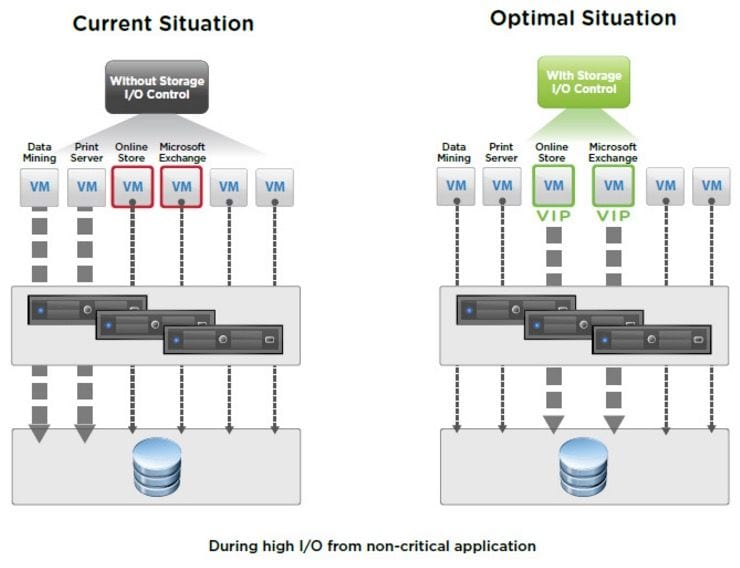
It’s really the “noisy neighbor” problem in VMware. You don’t want a lower priority VM strangling I/O capacity from a higher priority VM that shares the same datastore. This diagram shows the situation and what SIOC does for your datastore performance.
blog1
The diagram shows that the “Data Mining” and “Print Server” VMs are using more datastore I/O resources than the more important “Online Store” and “Microsoft Exchange” VMs. With SIOC set, the “Online Store” and “Microsoft Exchange” VMs get VIP I/O priority and do not get limited by their “noisy neighbors” in the datastore.

TrueNAS Hybrid and All Flash storage systems by iXsystems provide complete integration and compatibility for VMware SIOC whether you use Fibre Channel or iSCSI LUNs, or NFS. It’s not necessary to get one storage solution for SAN and another for NAS. TrueNAS integrates both block and file storage protocols into one, easy to use system that is a fraction of the cost of comparable storage systems on the market today.

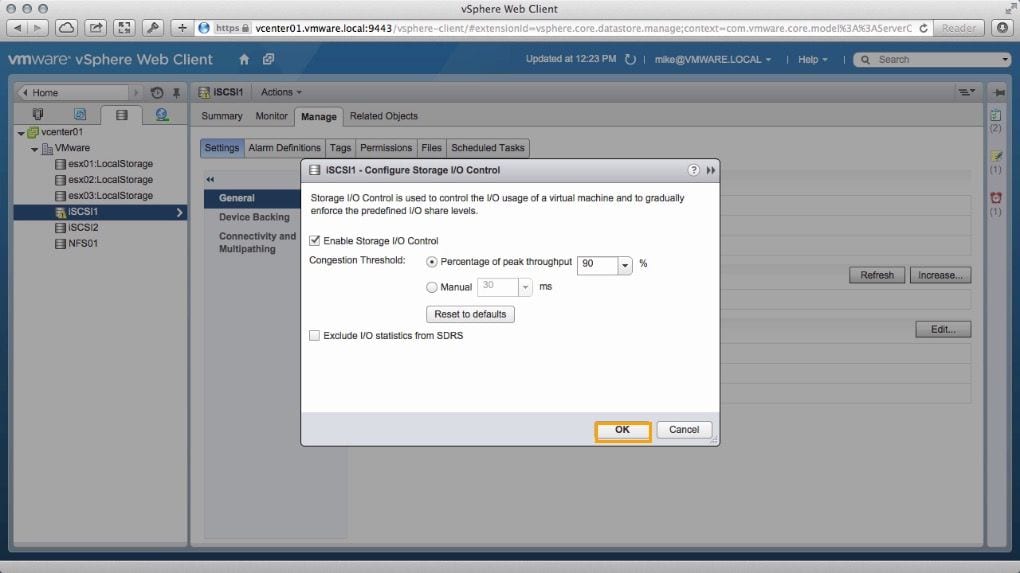
Setting up SIOC is very easy. First, you need the proper ESXi licensing. SIOC requires an Enterprise Plus ESXi license. SIOC is enabled on a per datastore basis. From the vSphere Web Client go to the Storage section, then click on the datastore to enable and select Manage. Under the Manage tab for that particular datastore select Edit.
blog2
In the settings window, Enable Storage I/O Control and set the congestion threshold. You can manually specify the threshold or set a percentage value. In this example, we set the percentage to measure the peak throughput of the datastore to be 90% and click on [OK].

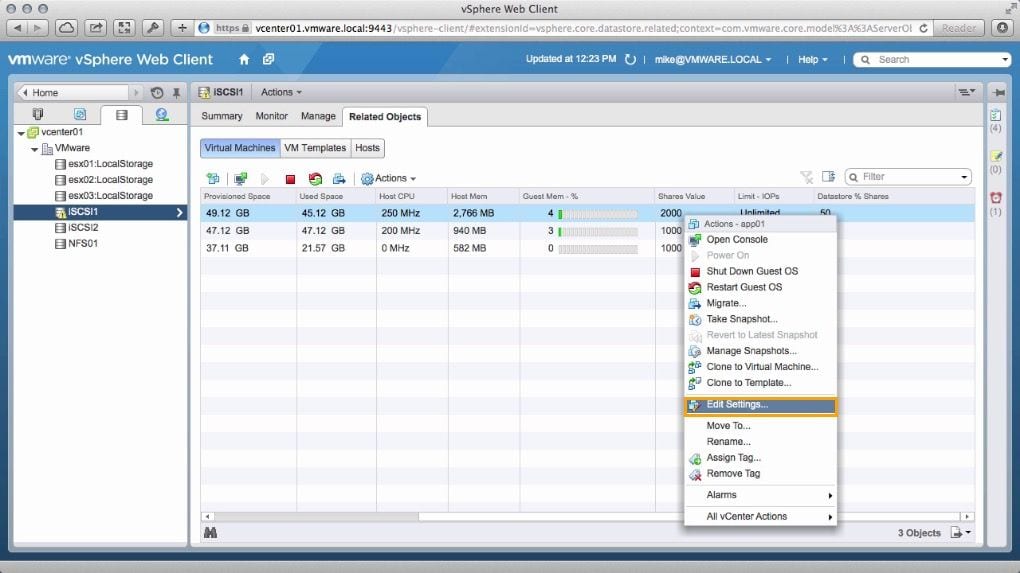
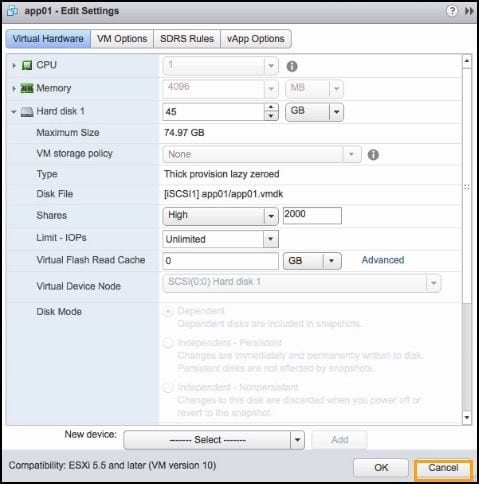
Priority for VMs in the datastore are assigned based on relative share values. You can set the relative share values for each VM by selecting the Related Objects tab for the datastore and right-clicking the VM and select Edit Settings from the menu.
blog3

By default all VMs on a particular datastore have the same share value set at 1000. You can adjust the share value for any VM higher or lower providing a relative priority for the VM within that datastore for SIOC to manage. In the example below we are setting the share value of this VM to 2000 while the remainder of the VMs in the datastore stay at 1000.
blog4
Once set, SIOC begins to monitor the datastore performance. The key thing to remember is that SIOC will do nothing other than monitoring until the datastore performance sags below the set threshold. Before that, all VMs are treated the same and have the same priority. The share values begin to take effect once the threshold boundaries are crossed.

With the introduction of VMware ESXi 5.5 in 2013, the single datastore extent maximum was expanded from 2 TB to 62 TB allowing you to store more with a single extent datastore than you could do in the past. Previously, if you wanted a datastore larger than 2TB you need to use multiple storage extents to get the desired size. However, SIOC does not work on multi-extent datastores. Now, with larger single extent datastores, SIOC can manage storage I/O much more effectively.

The new ESXi 6 release out since 2015 now supports NFSv4.1. However, VMware is still updating all of the various features to support this version of NFS. SIOC is one of the features not supported at this time under NFS 4.1. Additionally, you cannot use SDRS, SRM, or Virtual Volumes with NFSv4.1.

With TrueNAS from iXsystems, you have the flexibility of using either NFSv3, Fibre Channel or iSCSI protocols to provide storage for your ESXi environment. Having a multiprotocol storage system provides the flexibility to fit into any data center environment.  iXsystems recommends you use iSCSI for your VMware datastores. However, if you do use NFS, you must use NFSv3 to mount your datastores until VMware updates the capabilities of SIOC on ESX and TrueNAS supports NFSv4.1.

Want to know more about VMware on iXsystems? Go to the iXsystems Virtualization page at https://www.ixsystems.com/virtualization/. There you will find a wealth of information about how TrueNAS from iXsystems can solve all your virtualization issues.


Brad Meyer

As a technical and product marketing specialist, Brad Meyer, has spent his entire career in the tech industry in Silicon Valley.  Focusing primarily on data storage technology, he has worked for Hewlett-Packard (HPE), NetApp, Violin Memory, HGST, and Drobo.  Brad studied Business MIS at Cal Poly, San Luis Obispo and is now  applying his technical marketing skills to TrueNAS and OpenZFS at iXsystems in San Jose, CA.