






TrueCommand simplifies fleet management for environments running multiple TrueNAS systems, including TrueNAS Enterprise and TrueNAS Community Edition. Monitoring, configuring, and troubleshooting TrueNAS systems is greatly simplified from a single pane of glass. Enterprise IT teams can manage multiple TrueNAS systems with robust user management controls.
TrueCommand 3.1 adds support for the latest TrueNAS 25.04 “Fangtooth” releases, while managing ZFS replication, performance monitoring, and security has become even more streamlined and intuitive.
Available as both a Docker container and a cloud-based SaaS solution, TrueCommand secures communications via SSH tunnels and provides centralized control. While TrueCommand can run as an app on TrueNAS, we recommend deploying TrueCommand separately for optimal reliability and management.
TrueCommand 3.1 continues its evolution as a comprehensive management solution, bringing significant improvements:
TrueCommand’s Replication Manager simplifies the administration of ZFS snapshots across multiple TrueNAS systems. With its intuitive wizard, setting up and monitoring replication tasks becomes straightforward, reducing manual administration effort and enhancing data protection capabilities.
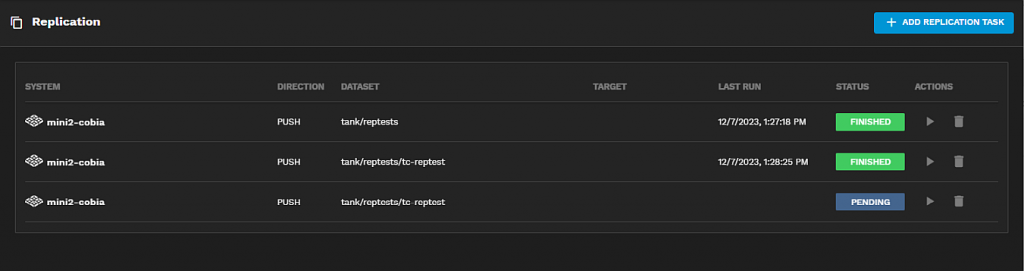
The Replication Manager dashboard simplifies ZFS replication monitoring across your entire fleet.
TrueCommand 3.1 further enhances the Fleet Dashboard introduced in TrueCommand 3.0, providing additional insight into system health, disk utilization, and alert status across multiple systems. The dashboard allows administrators to quickly identify and address issues, significantly reducing downtime and improving overall operational efficiency.
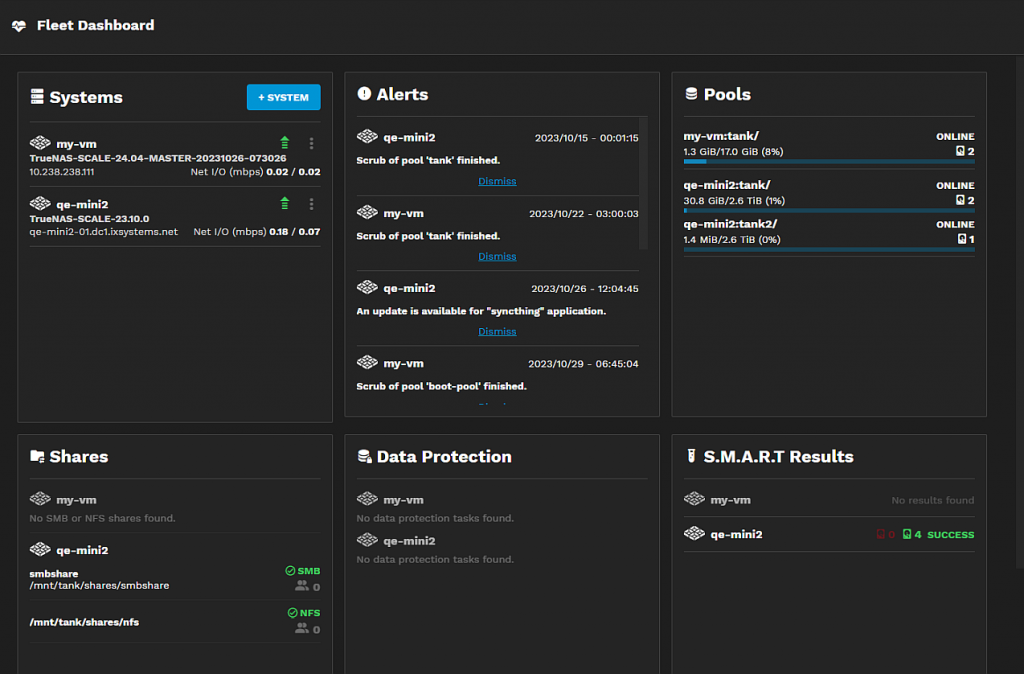
(Image byline: Quickly assess system health and disk usage across your TrueNAS environment using the enhanced Fleet Dashboard.)
TrueCommand 3.1 supports a broad range of TrueNAS versions, including:
While TrueCommand 3.1 is generally backwards compatible with older versions of TrueNAS, we encourage users running these older versions to immediately upgrade to ensure compatibility and security while benefiting from the hard work of the TrueNAS Engineering team. Please review the TrueNAS software status page for the latest recommendations.
TrueCommand Cloud deployments will be automatically updated to TrueCommand 3.1 over time. Self-hosted Docker-based deployments should follow standard container update procedures, including backing up your TrueCommand instance data, and reapplying TrueNAS passwords post-upgrade to ensure connectivity. Ensure that after upgrading your TrueCommand instance, administrators clear their browser cache (CTRL+F5) to help avoid potential UI issues.
While ongoing enhancements have addressed many reported issues, environments with large numbers of snapshots may still experience slower performance in the Snapshot Explorer. Additionally, users deploying TrueNAS Enterprise HA systems should manage system upgrades directly from the TrueNAS UI to avoid potential boot environment mismatches on controller restart.
TrueCommand remains free for deployments with up to 50 drives. Larger environments can acquire software and support licenses via the iXsystems portal.
Thanks to our dedicated community for providing valuable feedback and support. We continue to welcome your insights and suggestions as TrueCommand evolves.
To learn more about TrueCommand, including instructions on how to deploy a self-hosted container, see the TrueNAS Docs Hub on TrueCommand. There is also a guide on how to set up TrueCommand Cloud instances.
此内容由惯性聚合(RSS阅读器)自动聚合整理,仅供阅读参考。 原文来自 — 版权归原作者所有。