

惯性聚合 高效追踪和阅读你感兴趣的博客、新闻、科技资讯
阅读原文 在惯性聚合中打开

推荐订阅源

S
Securelist
博客园 - Franky
B
Blog RSS Feed
Apple Machine Learning Research
阮一峰的网络日志
阮一峰的网络日志
量子位
Hugging Face - Blog
Hugging Face - Blog
有赞技术团队
有赞技术团队
V
V2EX
宝玉的分享
宝玉的分享
钛媒体:引领未来商业与生活新知
钛媒体:引领未来商业与生活新知
F
Full Disclosure
L
LangChain Blog
大猫的无限游戏
大猫的无限游戏
雷峰网
雷峰网
G
Google Developers Blog
B
Blog
The Cloudflare Blog
T
The Blog of Author Tim Ferriss
小众软件
小众软件
博客园 - 【当耐特】
H
Help Net Security
奇客Solidot–传递最新科技情报
奇客Solidot–传递最新科技情报
T
Tailwind CSS Blog
博客园 - 叶小钗
Jina AI
Jina AI
Cloudbric
Cloudbric
N
Netflix TechBlog - Medium
Hacker News - Newest:
Hacker News - Newest: "LLM"
P
Proofpoint News Feed
L
Lohrmann on Cybersecurity
I
Intezer
IT之家
IT之家
cs.AI updates on arXiv.org
H
Hackread – Cybersecurity News, Data Breaches, AI and More
WordPress大学
WordPress大学
W
WeLiveSecurity
G
GRAHAM CLULEY
J
Java Code Geeks
H
Heimdal Security Blog
Cyberwarzone
Cyberwarzone
MyScale Blog
MyScale Blog
Latest news
Latest news
Schneier on Security
H
Hacker News: Front Page
Martin Fowler
Martin Fowler
V
Visual Studio Blog
Webroot Blog
Webroot Blog
P
Palo Alto Networks Blog
T
Tor Project blog

TrueNAS – Open Enterprise Storage

What We Heard at NAB 2026 | TrueNAS - Open Enterprise Storage TrueNAS V160 Launched: High Performance, No All-Flash Tax TrueNAS 26 Is Here: What's New in This Major Release TrueNAS Connect: Enterprise Features on Your Own Hardware TrueNAS Immutability: Multi-Layered Data Protection & Ransomware Defense TrueNAS CEO Note to Community: We Are All TrueNAS TrueNAS 25.10.2 Goldeye: 100+ Fixes & What's New TrueNAS Names Brett Davis CEO for Enterprise Growth TrueNAS Plans for 2026: TrueNAS 26 & OpenZFS 2.4 Roadmap TrueNAS Connect Plus Now Available for All Community Users TrueNAS R60: High-Speed NVMe Storage for AI Workloads Introducing TrueNAS WebShare: Secure Web-Based File Sharing TrueNAS 25.10.1: Goldeye Matures, Performs, and Connects TrueNAS & Veeam v13: Turnkey Cyber‑Resilient Backups Customer Advantages of the TrueNAS Open Core Model TrueNAS Named Data Storage Company of the Year 2025 TrueNAS 25.10: Smarter, Streamlined Updates & Tools TrueNAS F-Series Shines at IBC with Two “Best of Show” Awards TrueNAS 25.10 “Goldeye”: NVMe‑oF, Unified, Simplified Storage Introducing TrueNAS Connect: Secure Monitoring & Alerts The ESG Advantage of Open Enterprise Architecture: Why TrueNAS Is the Sustainable Choice | TrueNAS - Open TrueNAS 25.10-RC1: New Features, Fixes & OpenZFS 2.3.4 Seamless Setup: Exploring TrueNAS Web-Driven Installation | TrueNAS - Open Enterprise Storage TrueNAS 25.10 “Goldeye” BETA is Available TrueNAS 25.10 “Goldeye” Highlights TrueNAS 25.04.2: Fangtooth restores Virtualization iXsystems Rebrands as TrueNAS to Reflect Market Momentum in Enterprise Storage | TrueNAS - Open Enterprise June 1 - Apps Migration Deadline for TrueNAS 24.04 and 23.10 TrueNAS 25.04.1: Fangtooth Unification Gains Momentum TrueNAS 24.10.2.2 Prepares for IP Addressing of Apps TrueNAS H30 and F100 add Fast Dedup with TrueNAS 25.04 Meet TrueNAS Community Edition – The Future of Open Storage TrueNAS Apps Made Easy with Electric Eel & Fangtooth TrueNAS H30 Secures Two ‘Best of Show’ Honors at NAB 2025 | TrueNAS - Open Enterprise Storage TrueNAS H30 Wins Best of Show Awards at NAB 2025 TrueNAS 25.04: Fangtooth is RELEASED Slash Your Virtualization Costs with TrueNAS Storage TrueCommand 3.1 Enhances Management and Monitoring TrueNAS 25.04: Fangtooth Unification Begins with New Features Fangtooth Unification Begins | TrueNAS iXsystems Experiences Record Growth in TrueNAS Enterprise Storage, Spins Off Server Business to Amaara How to Set Up and Install TrueNAS CORE Yes, You Can (Still) Virtualize TrueNAS TrueNAS enables Container Storage and Kubernetes | TrueNAS - Open Enterprise Storage TrueNAS 12.0-U2 is Released | TrueNAS - Open Enterprise Storage OpenZFS 2.0 Ships First on TrueNAS | TrueNAS - Open Enterprise Storage TrueNAS 12.0-U1 is Scheduled for early December | TrueNAS - Open Enterprise Storage iXsystems TrueNAS M60 Recognized as SDC Awards Storage Hardware Innovation of the Year Finalist | TrueNAS - TrueNAS 12.0 is Released! The TrueNAS Mini X and Mini X+ are here! Cross-Site Disaster Recovery with TrueNAS TrueNAS SCALE Release Plan | TrueNAS - Open Enterprise Storage iXsystems Unveils Industry's Fastest OpenZFS Storage System with Launch of TrueNAS M60 | TrueNAS - Open TrueNAS 12.0 BETA2 Showcases Performance Improvements | TrueNAS - Open Enterprise Storage Be One of the First to Test Drive TrueNAS 12.0 BETA | TrueNAS - Open Enterprise Storage TrueNAS is Multi-OS New-New TrueNAS Logo Unveiled | TrueNAS - Open Enterprise Storage Recession Proof Storage | FreeNAS 11.3-U3.1 Now Available - Issue #80 | TrueNAS - Open Enterprise Storage Open Source Infrastructure is Recession-Proof | TrueNAS - Open Enterprise Storage Understanding How OpenZFS Keeps Your Data Safe | TrueNAS - Open Enterprise Storage You Can Influence the TrueNAS CORE Roadmap! | TrueNAS - Open Enterprise Storage TrueNAS CORE is the new FreeNAS Setting Up Users, Permissions, and ACLs on FreeNAS | TrueNAS - Open Enterprise Storage TrueNAS Updates for VMware vSphere 7 | TrueNAS - Open Enterprise Storage How to Set Up Windows SMB Shares on FreeNAS | TrueNAS - Open Enterprise Storage FreeNAS and TrueNAS are Unifying Introducing the FreeNAS Mini E+ and All-Flash Minis | TrueNAS - Open Enterprise Storage Plex Permissions in FreeNAS 11.3 | TrueNAS - Open Enterprise Storage Latest TrueNAS and FreeNAS Release Delivers Wizards, Plugins, and Accelerated Replication | TrueNAS - Open How To Back Up Google Drive to FreeNAS | TrueNAS How To Enable Wireguard on FreeNAS 11.3 | TrueNAS - Open Enterprise Storage The Official FreeNAS Hardware Guide | TrueNAS - Open Enterprise Storage December 11 Plugins Update: ClamAV Fix & CloudStack FreeNAS Mini Black Friday Sale Starts Now! - Issue #73 | TrueNAS - Open Enterprise Storage Breaking Down the FreeNAS Mini E! | TrueNAS TrueCommand Shifts to Prime Time | TrueNAS - Open Enterprise Storage AMD EPYC 7002 Powers Scalable TrueNAS Solutions FreeNAS and TrueNAS 11.3 make their Debuts October 30 Plugins Update | TrueNAS - Open Enterprise Storage Overview of Datasets and Snapshots in FreeNAS | TrueNAS - Open Enterprise Storage September 13 Plugins Update | TrueNAS - Open Enterprise Storage Mount a TrueNAS or FreeNAS Share to a Docker Host | TrueNAS - Open Enterprise Storage Open ZFS vs. Btrfs | and other file systems | TrueNAS - Open Enterprise Storage ZFS vs. OpenZFS Backup Evolved: Asigra Plugin for FreeNAS Back Up Plugins and Jails on FreeNAS | TrueNAS Take Command of Your NAS Fleet with TrueCommand™ | TrueNAS - Open Enterprise Storage Run S3 Object Storage on FreeNAS and TrueNAS | TrueNAS - Open Enterprise Storage Sync Files to Dropbox with TrueNAS or FreeNAS February Plugin Updates & New Plugins for Testing Six Metrics for Measuring ZFS Pool Performance Part 2 | TrueNAS - Open Enterprise Storage Six Metrics for Measuring ZFS Pool Performance Part 1 | TrueNAS - Open Enterprise Storage TrueNAS M-Series Certified for Veeam Backup FreeNAS 11.1 is Now Available for Download! | TrueNAS FreeNAS 11.0 Released with VM & S3 Storage Support To SLOG or not to SLOG: How to best configure your ZFS Intent Log | TrueNAS - Open Enterprise Storage vCenter Web Client Plug-in for TrueNAS Now Available | TrueNAS - Open Enterprise Storage The ZFS ZIL and SLOG Demystified | TrueNAS - Open Enterprise Storage FreeNAS: A Worst Practices Guide | TrueNAS - Open Enterprise Storage FreeNAS vs TrueNAS
Plex on FreeNAS | TrueNAS - Open Enterprise Storage
iX Team · 2013-09-11 · via TrueNAS – Open Enterprise Storage

“Hey man, check out this totally flippin’ sweet app!” said friend and co-worker, Peter, while sitting in the iX lounge sometime last summer. He had his Plex server running on his Macbook Pro and was controlling it, and viewing movies, from his iPhone. It was impressive, but my first question was: “Does it run on FreeBSD”? He snickered and ran away.
Fast forward one year later: “Bro, seriously, come check this out!”, I said to Peter while walking out of the break room, coffee mug filled to the brim. We walked to the lounge while he waited for drivers for the-operating-system-that-shall-not-be-named to finish installing. I stayed late the previous night configuring the newest plugin for FreeNAS: Plex Media Server, so I was pretty excited to show it off.
First thing, I brought up the Plex client and browsed to my “Channel Directory” which displayed more than 30 online streaming videos for topics that would interest me, like TED, YouTube, SoundCloud, NPR, The Onion, and Sesame Street (for my little girl). I know, I know, Slowpoke.jpg – but: I found this to be pretty amazing. The interface is solid and the options for content seemed endless (and I hadn’t even imported my personal collection yet!). Now I understood why people chose Plex over XBMC. MythTV users of the past, I feel your pain. I really do.
Setting it up was pretty easy and only took a few minutes. I started with a “Firmware Update” from 8.3.1 to 9.1.1 by downloading the “GUI Upgrade” img.xz file from FreeNAS.org, then opened my web browser to the FreeNAS interface, drilled down to ‘System->Advanced’ and clicked the ‘Firmware Upgrade’ button. It asked a question, I hit Ok, then browsed to the img.xz file and waited about 10 minutes while staring at a progress bar that was seemingly stuck at 24%. Once it finished, I refreshed the UI and clicked the new ‘Plugins’ button in the navigation bar at the top.

01_freenasui-plex-plugin\

There I saw a list of available plugins and chose to install the Plex plugin by clicking ‘Plex Media Server’ in the list, and the ‘Install’ button below.
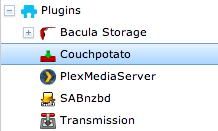
02_freenasui-plex-tree

Plex will now be available in the tree menu with the rest of the installed plugins.  Click on ‘Plex Media Server’ and then click the link to get to the Plex WebUI. At first, I didn’t realize there was a link there, so I actually did a little research and found that the Plex server is running on port 32400 on the IP of the jail (not the same as the FreeNAS IP) and browsing to ‘/manage’. Or in other words, by going to this page: “http://ip_address:32400/manage/”.

But first, you may want to add a mountpoint, share, and directory for media.

03_freenasui-shell

Create a directory in the Plex jail for your media.  Then create a dataset and mount it inside the jail by clicking ‘Add Storage’  from within the jail’s tree menu node.

04_plexui-add-section

Then browse to the http://ip_address:32400/manage/ to add the common media types (Or click ‘Plex Media Server’ in the tree menu, and click the link in the pop-up dialog).  I created a folder in my dataset for each media type by creating an AFP share pointed to my mountpoint, then accessing that from my workstation.

05_plexui-media-addfolder

I wanted to try out a movie first, so I chose “Movies” and a new dialog appears asking me to ‘Add Folder’; this is where I browse to the directory I created in the Plex jail.  You can call this whatever you like, and if you organize your movies in multiple directories you may change the section name to match.

06_plexui-add-folder

I chose to add a directory ‘/plexon’ to the jail so that it would be easier to find. You can place it wherever you like, though.  You can do this a couple of ways. I chose to mount the filesystem read-write and then create a directory called “plexon” in the Plex jail with ‘mount -uw /’ then ‘mkdir /mnt/zeddy/jails/plex_1/plexon’. Yes, I named my dataset “zeddy”, which is also how I refer to the dragon in one of our “Medieval Beastie” posters that Jenny (our graphic artist) designed.

07_plexui-insidefolder

Now inside the ‘/plexon’ directory, I created a different folder for each of the “media types” Plex allows you to add. These are the directories I created via that AFP share I mentioned earlier.

08_channels-block

Then I added all the channels that interested me after copying my iPhoto library, movies, and music over.  These are some of the video channels I installed.

09_soundcloud

I can even browse my Favorites on SoundCloud.

10_music-visualizer

Finally, I sat back and stared at this for a few minutes while reality started to bend to the beat.

Honestly, Plex on FreeNAS (FreeBSD) is in beta, so your mileage may vary. My personal experience was great, though. I will recommend this to my friends and family as their one-stop-shop for enjoying the multimedia they’ve acquired over the years accompanied by a multitude of online streaming media services.  Well done Plex team, and kudos to John Hixson for whipping this plugin into shape. It is truly a “game changer”.  If you have FreeNAS 9.x installed you can try this out today.  Now back to my normally scheduled work day, which does not include watching the latest episode of Breaking Bad. I’ll have to queue that up later.