惯性聚合 高效追踪和阅读你感兴趣的博客、新闻、科技资讯
阅读原文 在惯性聚合中打开

推荐订阅源

S
Securelist
腾讯CDC
L
LangChain Blog
aimingoo的专栏
aimingoo的专栏
Cyber Security Advisories - MS-ISAC
博客园_首页
CTFtime.org: upcoming CTF events
云风的 BLOG
云风的 BLOG
P
Proofpoint News Feed
罗磊的独立博客
爱范儿
爱范儿
freeCodeCamp Programming Tutorials: Python, JavaScript, Git & More
H
Help Net Security
Vercel News
Vercel News
MyScale Blog
MyScale Blog
博客园 - 叶小钗
The Register - Security
钛媒体:引领未来商业与生活新知
钛媒体:引领未来商业与生活新知
量子位
Y
Y Combinator Blog
C
Cyber Attacks, Cyber Crime and Cyber Security
NISL@THU
NISL@THU
GbyAI
GbyAI
SecWiki News
SecWiki News
M
MIT News - Artificial intelligence
Engineering at Meta
Engineering at Meta
P
Privacy International News Feed
月光博客
月光博客
奇客Solidot–传递最新科技情报
奇客Solidot–传递最新科技情报
C
Check Point Blog
博客园 - 聂微东
Project Zero
Project Zero
让小产品的独立变现更简单 - ezindie.com
Latest news
Latest news
V
Vulnerabilities – Threatpost
T
The Blog of Author Tim Ferriss
cs.CL updates on arXiv.org
D
Darknet – Hacking Tools, Hacker News & Cyber Security
T
Tor Project blog
F
Fortinet All Blogs
Recorded Future
Recorded Future
IT之家
IT之家
D
Docker
The GitHub Blog
The GitHub Blog
V
Visual Studio Blog
MongoDB | Blog
MongoDB | Blog
T
Threat Research - Cisco Blogs
Hugging Face - Blog
Hugging Face - Blog
C
CXSECURITY Database RSS Feed - CXSecurity.com
V
V2EX

TrueNAS – Open Enterprise Storage

What We Heard at NAB 2026 | TrueNAS - Open Enterprise Storage TrueNAS V160 Launched: High Performance, No All-Flash Tax TrueNAS 26 Is Here: What's New in This Major Release TrueNAS Connect: Enterprise Features on Your Own Hardware TrueNAS Immutability: Multi-Layered Data Protection & Ransomware Defense TrueNAS CEO Note to Community: We Are All TrueNAS TrueNAS 25.10.2 Goldeye: 100+ Fixes & What's New TrueNAS Names Brett Davis CEO for Enterprise Growth TrueNAS Plans for 2026: TrueNAS 26 & OpenZFS 2.4 Roadmap TrueNAS Connect Plus Now Available for All Community Users TrueNAS R60: High-Speed NVMe Storage for AI Workloads Introducing TrueNAS WebShare: Secure Web-Based File Sharing TrueNAS 25.10.1: Goldeye Matures, Performs, and Connects TrueNAS & Veeam v13: Turnkey Cyber‑Resilient Backups Customer Advantages of the TrueNAS Open Core Model TrueNAS Named Data Storage Company of the Year 2025 TrueNAS 25.10: Smarter, Streamlined Updates & Tools TrueNAS F-Series Shines at IBC with Two “Best of Show” Awards TrueNAS 25.10 “Goldeye”: NVMe‑oF, Unified, Simplified Storage Introducing TrueNAS Connect: Secure Monitoring & Alerts The ESG Advantage of Open Enterprise Architecture: Why TrueNAS Is the Sustainable Choice | TrueNAS - Open TrueNAS 25.10-RC1: New Features, Fixes & OpenZFS 2.3.4 Seamless Setup: Exploring TrueNAS Web-Driven Installation | TrueNAS - Open Enterprise Storage TrueNAS 25.10 “Goldeye” BETA is Available TrueNAS 25.10 “Goldeye” Highlights TrueNAS 25.04.2: Fangtooth restores Virtualization iXsystems Rebrands as TrueNAS to Reflect Market Momentum in Enterprise Storage | TrueNAS - Open Enterprise June 1 - Apps Migration Deadline for TrueNAS 24.04 and 23.10 TrueNAS 25.04.1: Fangtooth Unification Gains Momentum TrueNAS 24.10.2.2 Prepares for IP Addressing of Apps TrueNAS H30 and F100 add Fast Dedup with TrueNAS 25.04 Meet TrueNAS Community Edition – The Future of Open Storage TrueNAS Apps Made Easy with Electric Eel & Fangtooth TrueNAS H30 Secures Two ‘Best of Show’ Honors at NAB 2025 | TrueNAS - Open Enterprise Storage TrueNAS H30 Wins Best of Show Awards at NAB 2025 TrueNAS 25.04: Fangtooth is RELEASED Slash Your Virtualization Costs with TrueNAS Storage TrueCommand 3.1 Enhances Management and Monitoring TrueNAS 25.04: Fangtooth Unification Begins with New Features Fangtooth Unification Begins | TrueNAS iXsystems Experiences Record Growth in TrueNAS Enterprise Storage, Spins Off Server Business to Amaara TrueNAS Delivers Record Growth in 2024, Plans Strategic Expansions in 2025 | TrueNAS - Open Enterprise Storage The TrueNAS H30 is the Swiss Army Knife of Storage TrueNAS 24.10.2: Electric Eel Shines Brightly The new TrueNAS H30 brings NVMe Performance to the Edge | TrueNAS - Open Enterprise Storage Ransomware Protection & Immutable Backup with TrueNAS TrueNAS Fangtooth includes OpenZFS 2.3.0 Fangtooth Unifies the TrueNAS Community TrueNAS Electric Eel Performance Sizzles | TrueNAS - Open Enterprise Storage TrueNAS 24.10.1: RAIDZ, Docker & NVMe Storage Upgrades TrueNAS Wins TrustRadius 2025 Buyer's Choice Award for Exceptional Value and Customer Experience | TrueNAS 24.10 “Electric Eel” Powers Up Your Storage TrueNAS Electric Eel: First to Integrate OpenZFS 2.3 Features Electric Eel RC1 Feature Complete | TrueNAS Enhanced Data Migration in Electric Eel | TrueNAS Immutable Backup & Enterprise Storage Security Features | TrueNAS 2024 TrueNAS Electric Eel Emerges TrueNAS Launches “Powered by TrueNAS” with First Partner HexOS The Benefits of Expanding from One to Multiple TrueNAS Systems TrueNAS SCALE Dragonfish Reaches its Second Major Milestone TrueNAS Dragonfish Performance Breathes Fire TrueNAS CORE 13.3 BETA is now Available iXsystems Brings Flagship Data Platform to Market with Production Release of TrueNAS SCALE 24.04 | TrueNAS - Open Enterprise Storage TrueNAS Enterprise H-Series Adds Versatility to Storage TrueNAS SCALE Dragonfish Major Release TrueNAS Delivers Dramatic Quality Improvements The Future of the TrueNAS Community How to Set Up and Install TrueNAS CORE TrueNAS CORE 13.3 Plans TrueNAS SCALE Dragonfish SMB Services and Performance TrueNAS Named a Customers Choice in the North American Region TrueNAS SCALE 23.10.2 Delivers Enterprise Quality Gartner Peer Insights Primary Storage Customers’ Choice New Survey Ranks Top Hypervisor Options as Users Seek VMware Alternatives Beyond VMware: Exploring Virtualization Alternatives Donation of Fast Dedup to OpenZFS and TrueNAS Fast Dedup is a Valentines Gift to the OpenZFS and TrueNAS Communities | TrueNAS - Open Enterprise Storage TrueNAS SCALE Dragonfish Reaches BETA Why Traditional Storage is So Expensive How TrueNAS Delivers Unbeatable Value | TrueNAS - Open Enterprise Storage TrueNAS Year in Review: Top Stories of 2023 TrueCommand 3.0 Manages ZFS Replication | TrueNAS - Open Enterprise Storage TrueNAS SCALE 23.10 has the Fastest Growth Ever TrueNAS 13.0-U6.1 is the Final Update Release Black Friday Special Offer for US Only! 5% Off on TrueNAS Mini R! The New Performance Flagship: TrueNAS F-Series iXsystems Introduces TrueNAS Enterprise F-Series All-NVMe Appliances and TrueNAS SCALE 23.10 TrueNAS SCALE 23.10 is RELEASED with SMB Features iXsystems Invests in Leadership as TrueNAS GrowsiXsystems Invests in Leadership as Enterprise Adoption of OpenZFS Summit highlights Fast Dedup and RAIDZ Expansion TrueNAS SCALE Cobia Has a New WebUI TrueNAS SCALE 23.10-RC.1 introduces dRAID Coffee and Open Source with Kris Moore and Isaac Levin Improves Data Mobility and Furthers Data Freedom TrueNAS SCALE Cobia Has Reached BETA Enterprise Data Protection Solutions & NVMe Secure Storage TrueNAS SCALE “Bluefin” adds SMB Multichannel and Quality iXsystems Named Gartner Peer Insights™ Customers’ Choice Newsletter: Huge iX-Storj giveaway TrueNAS Core-13.0-u5-release and more | TrueNAS - Open Enterprise Storage iXsystems Named a North America Customers Choice in Gartner Peer Insights™
How To Back Up Google Drive to FreeNAS | TrueNAS
iX Team · 2020-01-22 · via TrueNAS – Open Enterprise Storage

NOTE: This is historical content that may contain outdated information.

Google Drive and G Suite are widely used tools for creating and sharing documents, spreadsheets, and presentations with team members. While cloud-based tools have inherent backups and replications included by the cloud provider, certain users may require additional backup or archive capabilities. For example, companies using G Suite for important work may be required to keep records for years, potentially beyond the scope of the G Suite subscription. FreeNAS and TrueNAS offer the ability to back up Google Drive easily, using the built-in cloud sync.
This blog will explain how to set up Google Drive sync with FreeNAS 11.3, as well as provide a few caveats and workarounds when backing up Google Docs and other Google created content.

Setting up Google Drive credentials
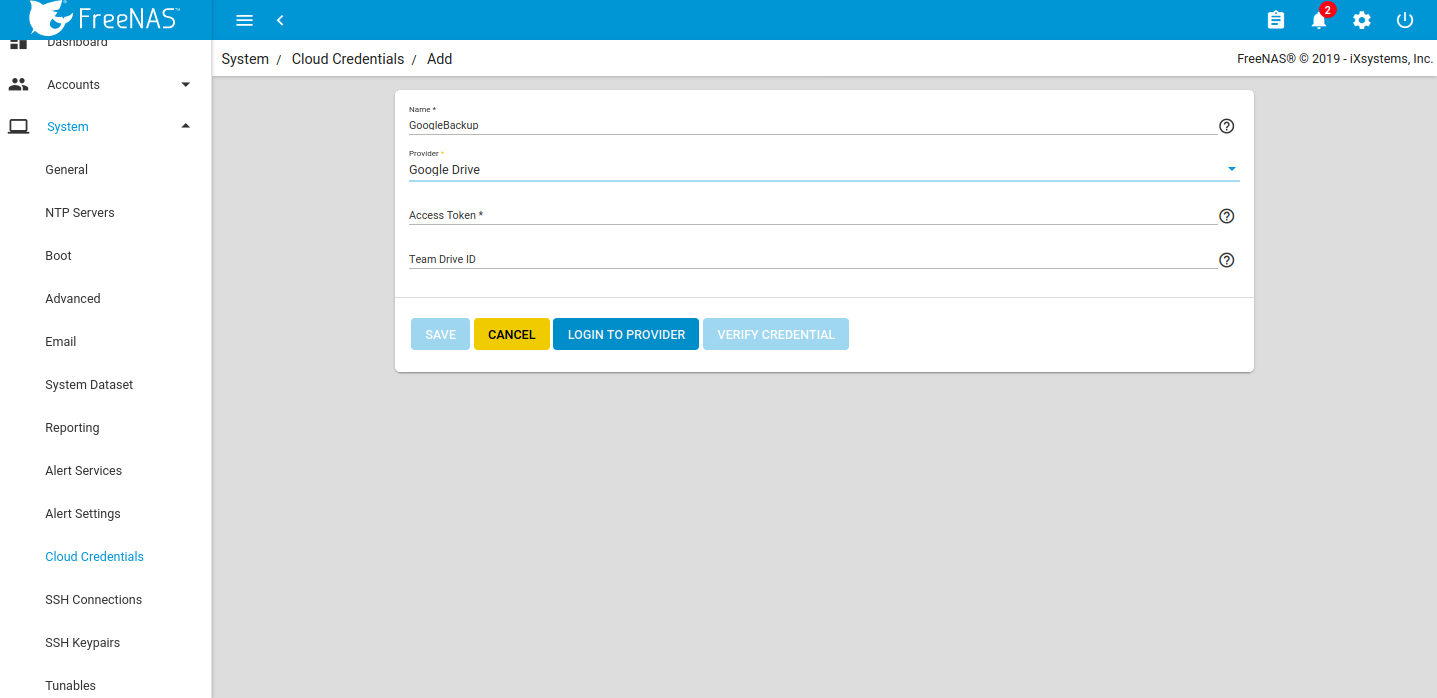
Set up the credentials under System Cloud Credentials.
Setting up Google Drive credentials

Click LOGIN TO PROVIDER and login with the appropriate Google user account. Google will request to allow access to all the Google Drive files for the FreeNAS device.
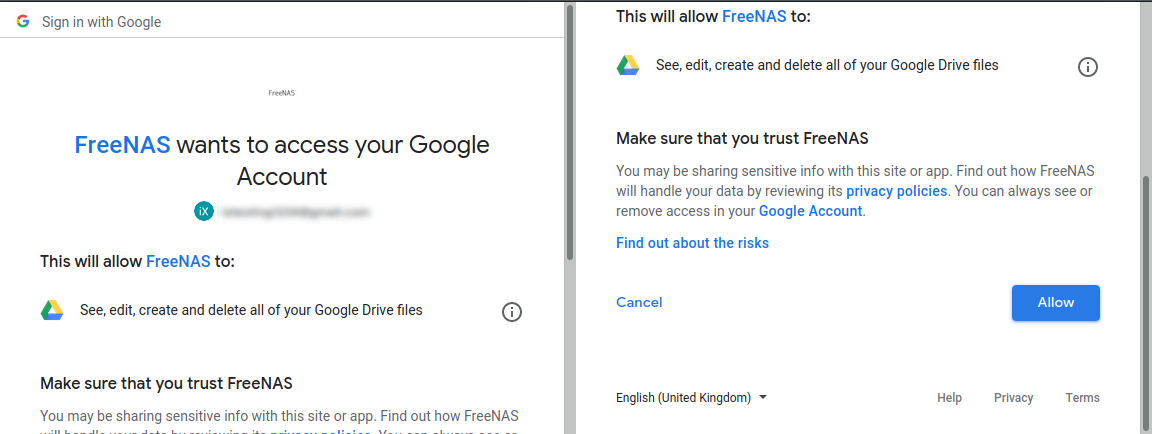
allowing access to FreeNAS device

Allow access and the appropriate access key will be inserted to the FreeNAS access token. Assign a Team ID if required, but it is not necessary in all cases. 
Click VERIFY CREDENTIAL. Once successful, click SAVE. The new cloud credentials will be visible in the web interface.
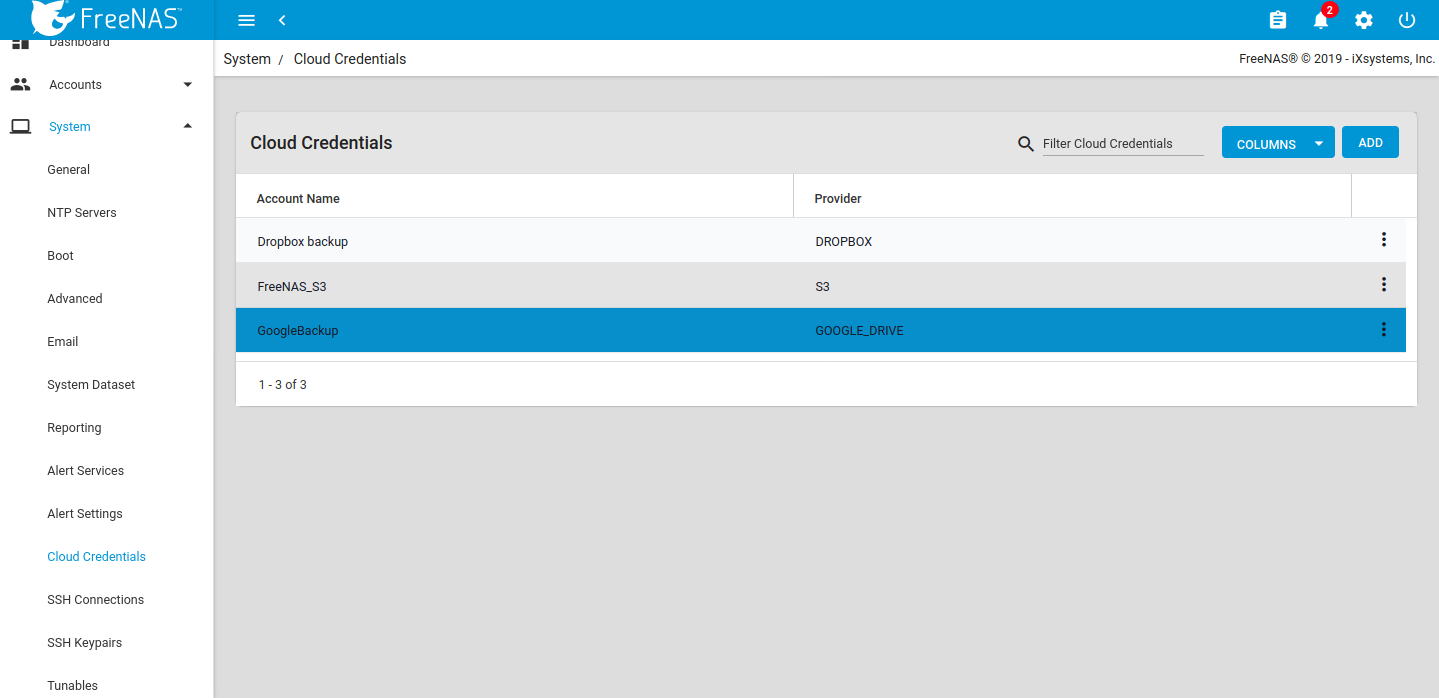
The new cloud credentials added

Set the cloud sync task

Go to Tasks Cloud Sync Tasks and set the backup time frame, frequency, and folders – both the cloud-based folder and FreeNAS dataset. Set whether the synchronization should sync all changes, just copy new files, or move files. Remove files from the cloud source or FreeNAS source depending on push or pull.
Add a description for the task and select the cloud credentials.
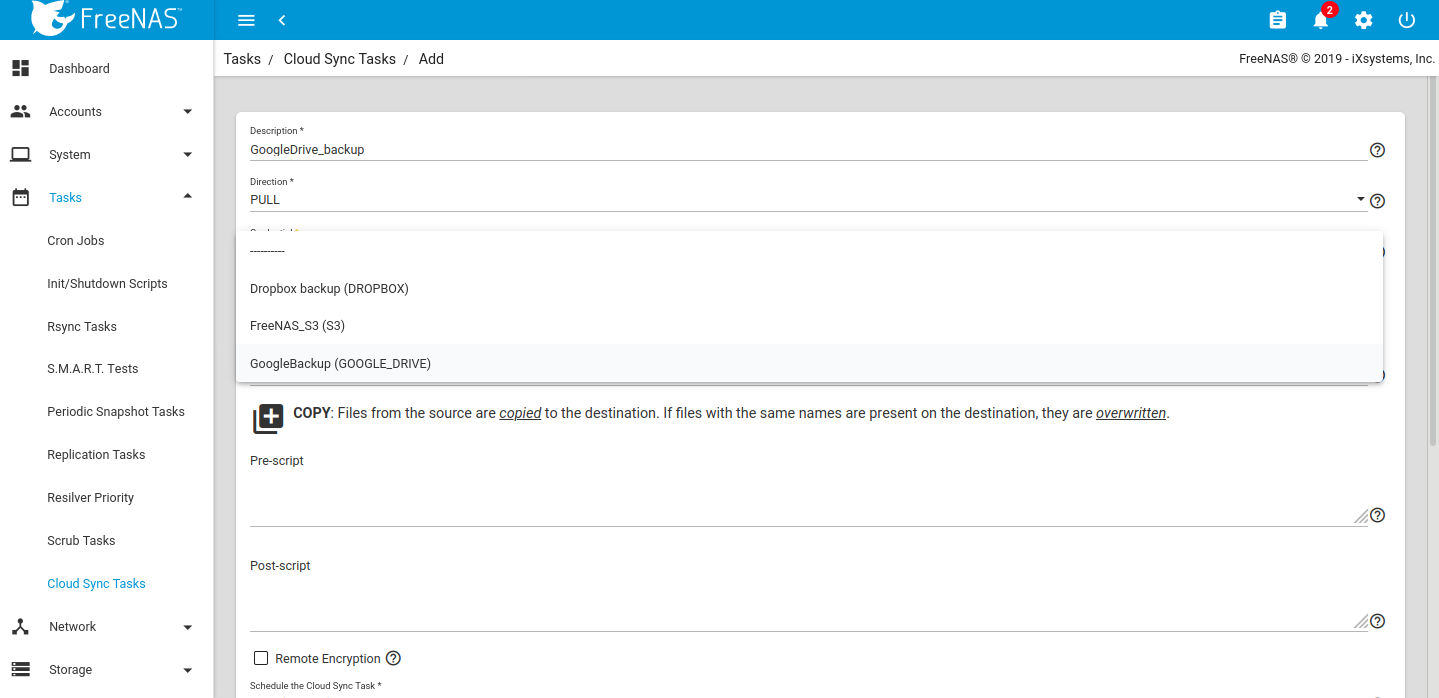
setting up cloud sync task

Choose the appropriate cloud folder target and FreeNAS storage location.
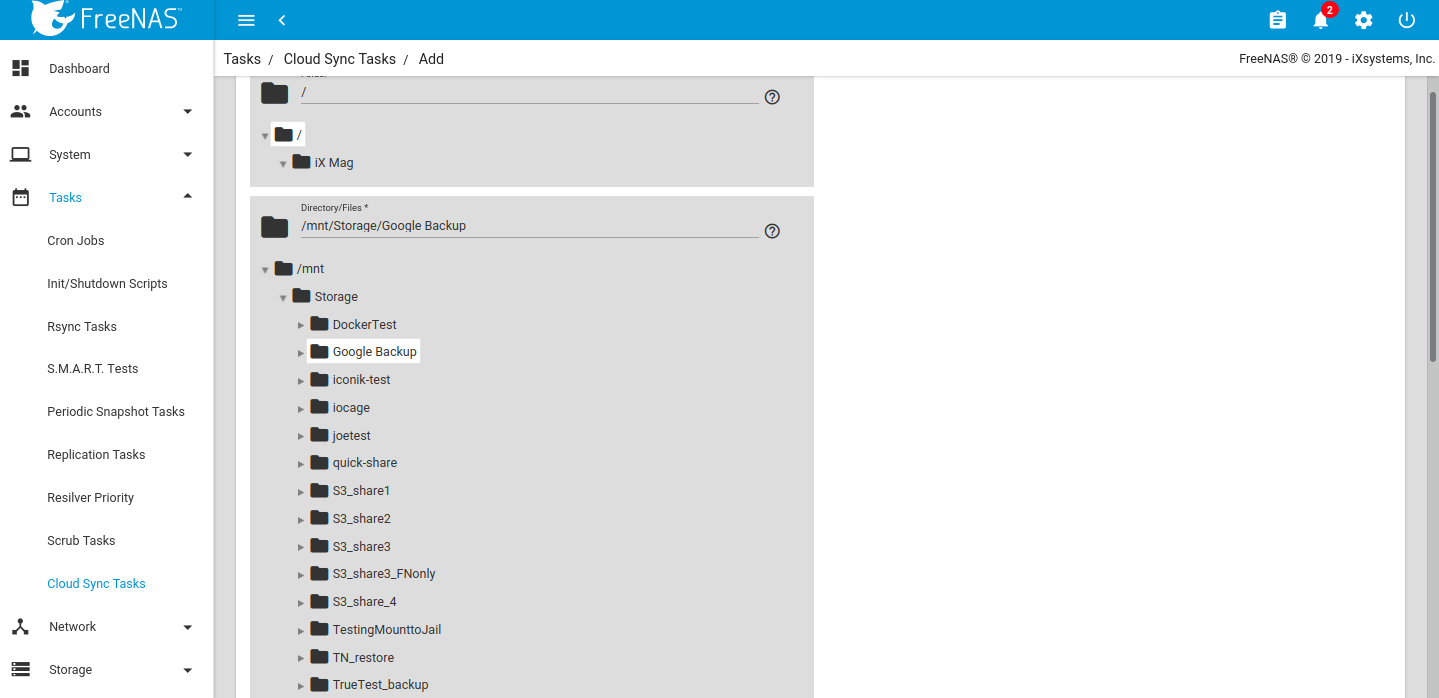
Choosing cloud folder
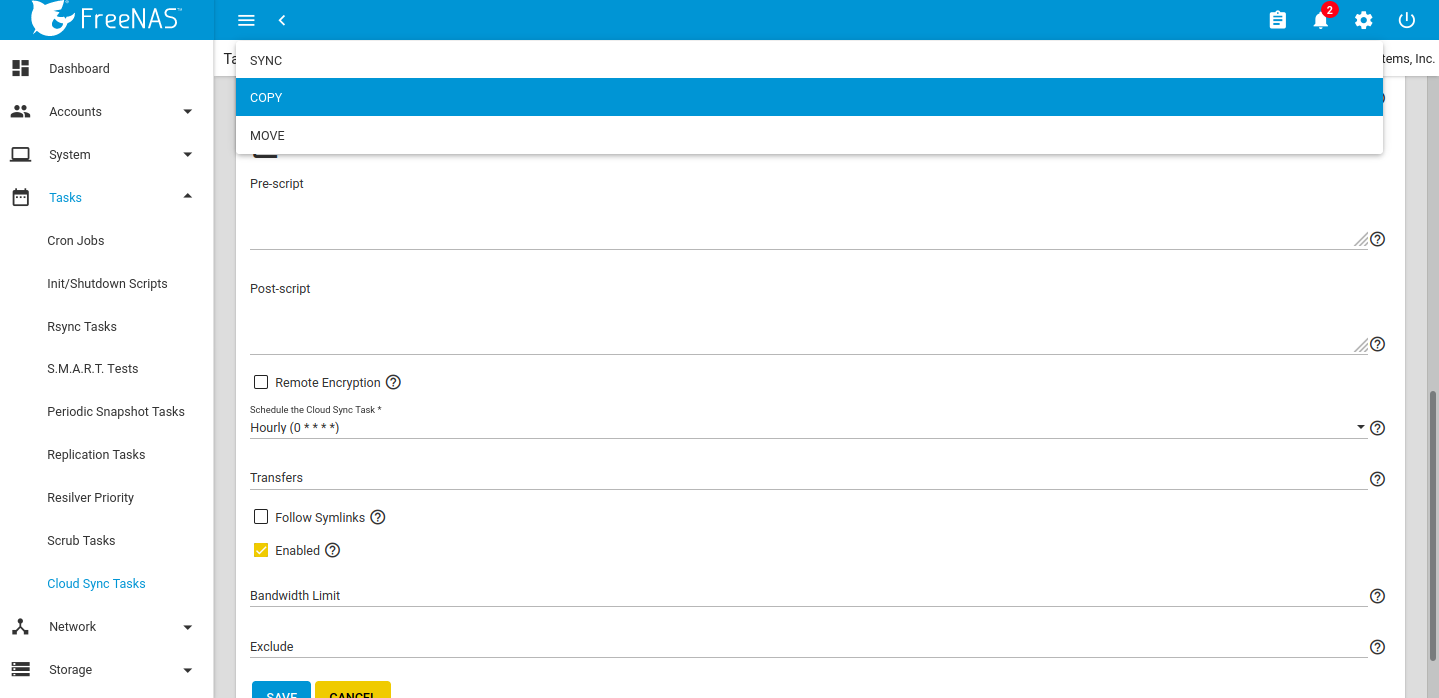
Select the file transfer mode: 

  • Sync: Keep files newly created or deleted the same.
  • Copy: Copy new files to the appropriate target (i.e., FreeNAS pulls files from Google Drive or pushes files to Google Drive).
  • Move: Copies files to the target and then delete files from the source. Using Move, users can set a folder in Google Drive for archival, and move older documents to that folder from their Drive account. Those files would then automatically get backed up to their FreeNAS storage.

Selecting file transfer mode

Once created the Task will run during the designated period of time. Edits can be made by clicking the down arrow on the right-hand side.
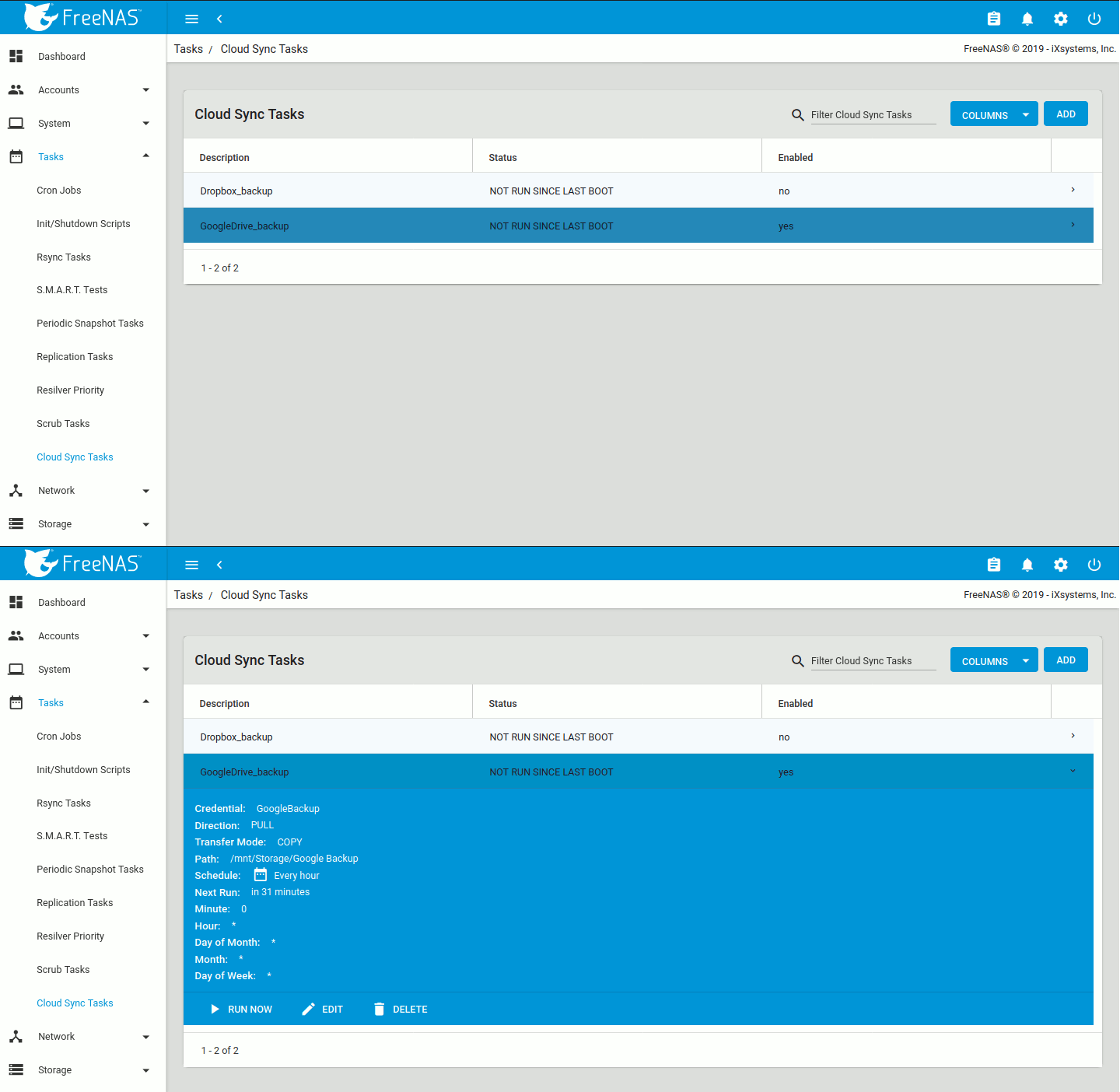
Run Now and Edit options

Clicking RUN NOW will prompt the task to start immediately and the web interface will show the status as RUNNING and SUCCESS upon completion. Details can be accessed via the Task Manager icon in the upper right-hand corner.
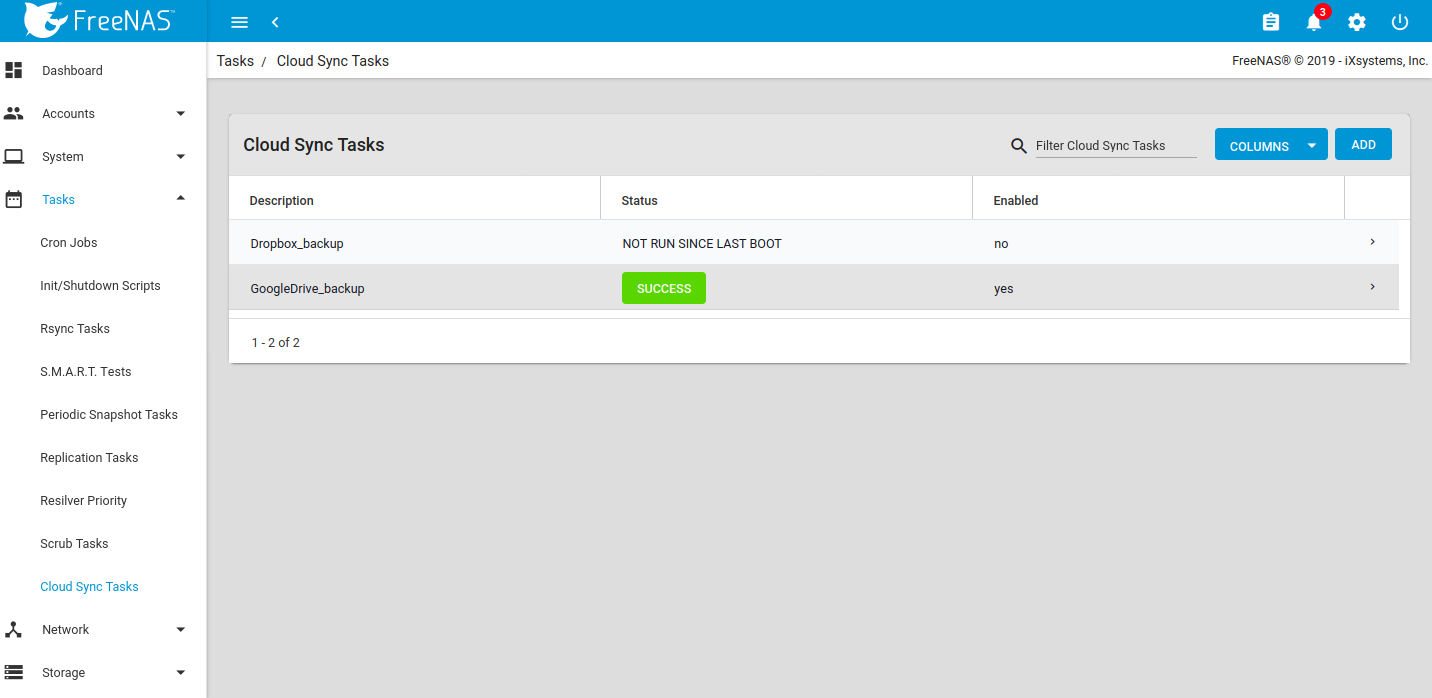
Showing Success status

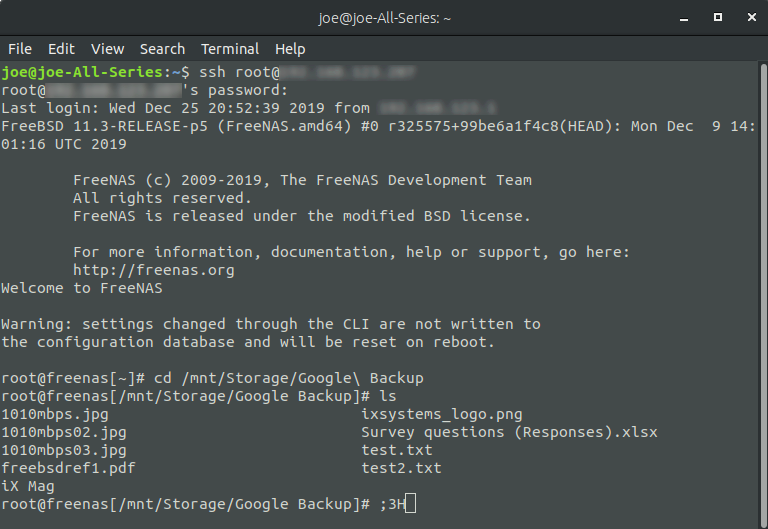
To verify success, SSH to the FreeNAS or use the built-in Shell Terminal to verify that the files are visible. 

built-in Shell Terminal to verify
prompt command window

If file access to a client PC or other device is needed, create a share to the same dataset that was set to store the cloud sync. An SMB share is used as an example. 
Go to Sharing Windows Shares (SMB) and click ADD. Choose the appropriate dataset, permissions, and settings to create a new SMB share. 
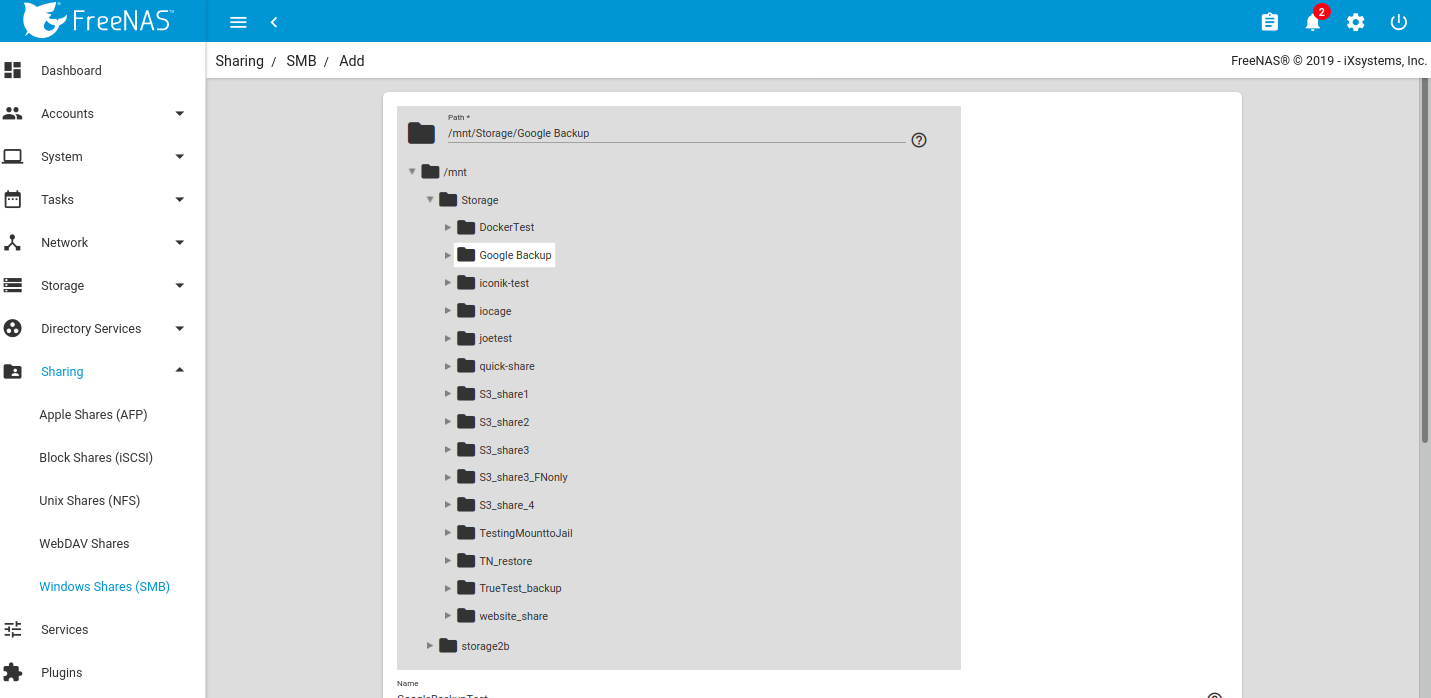
SMB Sharing

Once mounted to the client, the files should all be visible. 
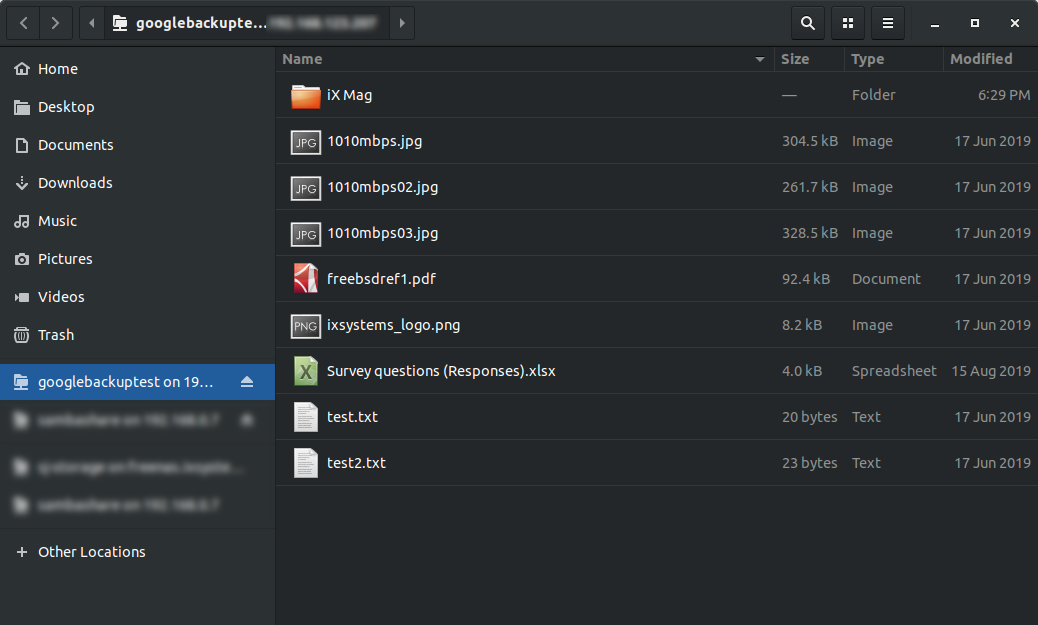
Visible files window

Working with Google created content
One caveat is that Google Docs and other files created with Google tools will have their own proprietary set of permissions and their read/write characteristics will be unknown to the system over a standard file share. Files are unreadable as a result.
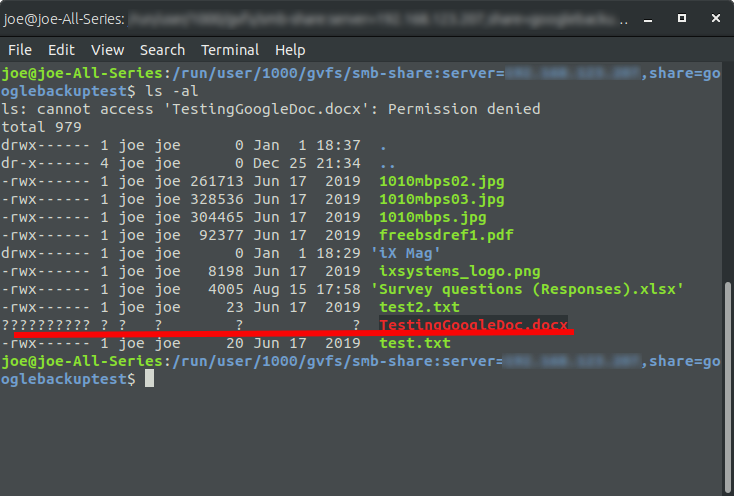
proprietary set of permissions

To allow Google created files to become readable, allow link sharing to access the files before the backup. Doing so will ensure that other users will be able to open the files with read access, make changes, and then save as another file should further edits be needed. Note that this is only necessary if the file was created using Google Docs, Google Sheets, or Google Slides; other files should not require modification of their share settings.
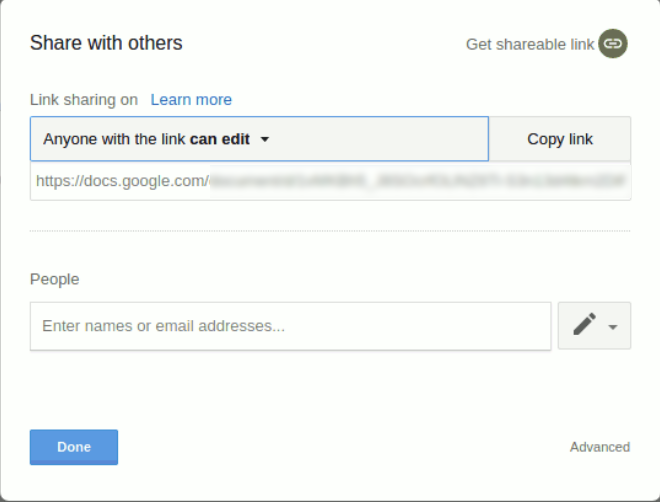
Documents link sharing
TrueNAS and FreeNAS are perfect for storing content, including cloud-based content, for the long-term. Not only is it simple to sync and backup from the cloud, but users can rest assured that their data is safe, with unlimited snapshots, copy-on-write, and built-in replication functionality.
Please contact us at https://www.ixsystems.com/contact-us/ for more information on what iXsystems can do for your organization.