

惯性聚合 高效追踪和阅读你感兴趣的博客、新闻、科技资讯
阅读原文 在惯性聚合中打开

推荐订阅源

D
DataBreaches.Net
GbyAI
GbyAI
aimingoo的专栏
aimingoo的专栏
freeCodeCamp Programming Tutorials: Python, JavaScript, Git & More
月光博客
月光博客
大猫的无限游戏
大猫的无限游戏
M
MIT News - Artificial intelligence
腾讯CDC
博客园 - Franky
Engineering at Meta
Engineering at Meta
C
Check Point Blog
T
The Blog of Author Tim Ferriss
有赞技术团队
有赞技术团队
Microsoft Azure Blog
MyScale Blog
MyScale Blog
I
InfoQ
Blog — PlanetScale
Blog — PlanetScale
P
Proofpoint News Feed
The GitHub Blog
The GitHub Blog
N
Netflix TechBlog - Medium
Last Week in AI
Last Week in AI
S
SegmentFault 最新的问题
Cyber Security Advisories - MS-ISAC
WordPress大学
WordPress大学

秋水逸冰

丽萨主机:双ISP家宽住宅IP VPS/CN2 GIA精品网/G口大带宽 | 秋水逸冰 Linux Kernel 6.18.x 编译版 | 秋水逸冰 思考未来人与 AI 的关系 | 秋水逸冰 3X-UI 面板安装和使用教程 | 秋水逸冰 Xray-UI 面板安装和使用教程 | 秋水逸冰 WCMP (Windows + Caddy + MariaDB + PHP) Nginx for Windows | 秋水逸冰 Aria2 for Windows | 秋水逸冰 Curl for Windows | 秋水逸冰 Wget for Windows | 秋水逸冰 Windows 11 Enterprise LTSC DD 镜像 Windows Server 2025 Datacenter DD 镜像 重新编译 curl 以支持 HTTP3 | 秋水逸冰 tiny10 和 tiny11 23H2 的 Windows DD 镜像 从 Apache httpd 切换到 Caddy2 LCMP (Linux + Caddy + MariaDB + PHP) Windows 11 Pro for Workstations 22H2 DD 镜像 Shadowsocks 编译版 by Teddysun | 秋水逸冰 适用于 UEFI 启动的多个 Windows 系统 DD 镜像 Linux Kernel 5.15.x 编译版 | 秋水逸冰 制作适用于 WSL 的任意 Linux 镜像 Windows 11 Pro for Workstations 21H2 DD 镜像 Windows 10 Enterprise LTSC DD 镜像 Linux Kernel 5.14.x 编译版 | 秋水逸冰 Linux Kernel 5.13.x 编译版 | 秋水逸冰 Windows Server 2022 Datacenter DD 镜像 在 Windows 10 上安装 Rocky Linux 系统 Linux Kernel 5.12.x 编译版 | 秋水逸冰 Linux Kernel 5.11.x 编译版 | 秋水逸冰 在 Windows 10 上安装 CentOS 系统
Eclipse:Failed to create the Java Virtual Machine
秋水逸冰 · 2013-08-27 · via 秋水逸冰

技术 秋水逸冰 7830浏览 0评论

Eclipse error

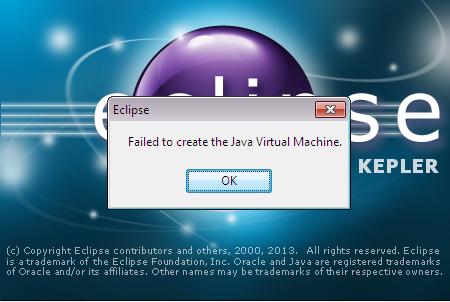
  我在用Eclipse的最新版Java EE Kepler(v4.3.0),安装完JBoss Developer Studio 7(Kepler)后,再次启动Eclipse,弹出Failed to create the Java Virtual Machine的错误。确认后就会自动退出。

  原因分析:
安装完JBoss Developer Studio 7(Kepler)后,对Eclipse安装目录下的eclipse.ini文件重新写入新的参数导致。

源文件:

-startup
plugins/org.eclipse.equinox.launcher_1.3.0.v20130327-1440.jar
--launcher.library
plugins/org.eclipse.equinox.launcher.win32.win32.x86_1.1.200.v20130521-0416
-product
org.eclipse.epp.package.jee.product
--launcher.defaultAction
openFile
--launcher.XXMaxPermSize
256M
-showsplash
org.eclipse.platform
--launcher.XXMaxPermSize
256m
--launcher.defaultAction
openFile
--launcher.appendVmargs
-vmargs
-Dosgi.requiredJavaVersion=1.6
-Xms40m
-Xmx512m

修改后:

-startup
plugins/org.eclipse.equinox.launcher_1.3.0.v20130327-1440.jar
--launcher.library
plugins/org.eclipse.equinox.launcher.win32.win32.x86_1.1.200.v20130521-0416
-product
org.eclipse.epp.package.jee.product
--launcher.defaultAction
openFile
--launcher.XXMaxPermSize
256M
-showsplash
org.eclipse.platform
--launcher.XXMaxPermSize
256m
--launcher.defaultAction
openFile
--launcher.appendVmargs
-vmargs
-Dosgi.requiredJavaVersion=1.6
-Xms256m
-Xmx1024m
-Djboss.discovery.directory.url=https://devstudio.jboss.com/updates/7.0/devstudio-directory.xml

可以看到,-Xms和-Xmx的参数被改大了,启动时系统不能为其分配足够的内存导致这个错误的出现。

解决方法:
-Xms不变,将-Xmx的参数修改为512m即可。

转载请注明:秋水逸冰 » Eclipse:Failed to create the Java Virtual Machine