

惯性聚合 高效追踪和阅读你感兴趣的博客、新闻、科技资讯
阅读原文 在惯性聚合中打开

推荐订阅源

Security Archives - TechRepublic
Project Zero
Project Zero
K
Kaspersky official blog
G
Google Developers Blog
T
Threat Research - Cisco Blogs
T
The Blog of Author Tim Ferriss
Cyberwarzone
Cyberwarzone
Y
Y Combinator Blog
Recorded Future
Recorded Future
Blog — PlanetScale
Blog — PlanetScale
Threat Intelligence Blog | Flashpoint
Cisco Talos Blog
Cisco Talos Blog
Latest news
Latest news
Microsoft Security Blog
H
Help Net Security
S
Schneier on Security
P
Palo Alto Networks Blog
H
Hacker News: Front Page
N
News and Events Feed by Topic
N
Netflix TechBlog - Medium
博客园 - Franky
OSCHINA 社区最新新闻
OSCHINA 社区最新新闻
SecWiki News
SecWiki News
Cloudbric
Cloudbric
TaoSecurity Blog
TaoSecurity Blog
CTFtime.org: upcoming CTF events
The Hacker News
The Hacker News
C
Check Point Blog
L
LangChain Blog
腾讯CDC
小众软件
小众软件
T
Tenable Blog
Google DeepMind News
GbyAI
GbyAI
L
LINUX DO - 最新话题
A
About on SuperTechFans
Google Online Security Blog
C
Cisco Blogs
Recent Announcements
Hacker News: Ask HN
Hacker News: Ask HN
freeCodeCamp Programming Tutorials: Python, JavaScript, Git & More
Vercel News
Vercel News
雷峰网
雷峰网
美团技术团队
D
DataBreaches.Net
Martin Fowler
Martin Fowler
Help Net Security
Help Net Security
钛媒体:引领未来商业与生活新知
钛媒体:引领未来商业与生活新知
F
Full Disclosure
博客园_首页

秋水逸冰

丽萨主机:双ISP家宽住宅IP VPS/CN2 GIA精品网/G口大带宽 | 秋水逸冰 Linux Kernel 6.18.x 编译版 | 秋水逸冰 思考未来人与 AI 的关系 | 秋水逸冰 3X-UI 面板安装和使用教程 | 秋水逸冰 Xray-UI 面板安装和使用教程 | 秋水逸冰 WCMP (Windows + Caddy + MariaDB + PHP) Nginx for Windows | 秋水逸冰 Aria2 for Windows | 秋水逸冰 Curl for Windows | 秋水逸冰 Wget for Windows | 秋水逸冰 Windows 11 Enterprise LTSC DD 镜像 Windows Server 2025 Datacenter DD 镜像 重新编译 curl 以支持 HTTP3 | 秋水逸冰 tiny10 和 tiny11 23H2 的 Windows DD 镜像 从 Apache httpd 切换到 Caddy2 LCMP (Linux + Caddy + MariaDB + PHP) Windows 11 Pro for Workstations 22H2 DD 镜像 Shadowsocks 编译版 by Teddysun | 秋水逸冰 适用于 UEFI 启动的多个 Windows 系统 DD 镜像 Linux Kernel 5.15.x 编译版 | 秋水逸冰 制作适用于 WSL 的任意 Linux 镜像 Windows 11 Pro for Workstations 21H2 DD 镜像 Windows 10 Enterprise LTSC DD 镜像 Linux Kernel 5.14.x 编译版 | 秋水逸冰 Linux Kernel 5.13.x 编译版 | 秋水逸冰 Windows Server 2022 Datacenter DD 镜像 在 Windows 10 上安装 Rocky Linux 系统 Linux Kernel 5.12.x 编译版 | 秋水逸冰 Linux Kernel 5.11.x 编译版 | 秋水逸冰 在 Windows 10 上安装 CentOS 系统 Linux Kernel 5.10.x 编译版 | 秋水逸冰 Caddy v1.0.5 编译版 | 秋水逸冰 在 Windows 系统里轻松创建自定义服务 | 秋水逸冰 如何在 CentOS 8 下安装 Docker Engine 在 CentOS 7 下构建 Android 编译环境 使用 Docker Buildx 构建多种系统架构镜像 | 秋水逸冰 使用 Docker 快速部署 Shadowsocks-libev + v2ray-plugin 如何使用 FirewallD 开启 IP 白名单 WireGuard 一键安装脚本 | 秋水逸冰 域名那些事儿5 | 秋水逸冰 告别 | 秋水逸冰 Windows Server 2019/2016/2012R2 Datacenter DD 镜像 如何制作 Windows Server 2019 的 DD 镜像 介绍几款 Docker 镜像 | 秋水逸冰 如何启用 Shadowsocks 的多端口 | 秋水逸冰 一键安装KMS服务脚本 | 秋水逸冰 关于免费SSL证书的那些事儿 | 秋水逸冰 使用定时任务cron监视Shadowsocks进程 | 秋水逸冰 LAMP新增Letsencrypt支持 | 秋水逸冰 从编译到二进制安装 | 秋水逸冰 PHP模块一览及简要说明 | 秋水逸冰 一键安装最新内核并开启 BBR 脚本 | 秋水逸冰 Shadowsocks 一键安装脚本(四合一) | 秋水逸冰 FTP 上传一键脚本ftp_upload.sh | 秋水逸冰 限制 IP 访问 WordPress 登录画面 CentOS 6.10安装Python2.7.18 | 秋水逸冰 一键备份脚本backup.sh | 秋水逸冰 域名那些事儿4 | 秋水逸冰 域名那些事儿3 | 秋水逸冰 LAMP下SSL设置教程 | 秋水逸冰 L2TP/IPSec一键安装脚本 | 秋水逸冰 域名那些事儿2 | 秋水逸冰 一键测试脚本bench.sh | 秋水逸冰 解决pip安装M2Crypto失败的问题 | 秋水逸冰 在CentOS下编译安装GCC | 秋水逸冰 域名那些事儿 | 秋水逸冰 MySQL性能优化的简单说明 | 秋水逸冰 Zend Guard Loader简介及下载链接一览 | 秋水逸冰 Windows和Linux下Whois命令的安装和使用 | 秋水逸冰 LAMP一键安装脚本使用说明 | 秋水逸冰 Windows系统下安装dig命令 | 秋水逸冰 如何在Debian下安装Webmin | 秋水逸冰 Apache下部署SSL教程 | 秋水逸冰 Shadowsocks-go一键安装脚本 | 秋水逸冰 少壮不努力,一生在内地 | 秋水逸冰 Google日语输入法离线安装包 | 秋水逸冰 PHP加速缓存Zend Opcache | 秋水逸冰 CentOS下安装aria2教程 | 秋水逸冰 Linux多线程下载工具Axel | 秋水逸冰 phpMyAdmin导入文件错误的解决办法 | 秋水逸冰 PHP编译安装常见错误总结 | 秋水逸冰 phpMyAdmin从4.1.x升级到4.2.x注意事项 | 秋水逸冰 Debian下shadowsocks-libev一键安装脚本 | 秋水逸冰 CentOS下shadowsocks-libev一键安装脚本 | 秋水逸冰 又一家VPS:Vultr.com | 秋水逸冰 Linux系统中常用操作命令 | 秋水逸冰 Eclipse下搭建Python开发环境 | 秋水逸冰 Shadowsocks Python版一键安装脚本 | 秋水逸冰 Git初学者:msysgit和tortoisegit | 秋水逸冰 CentOS 6下编译PHP出错 | 秋水逸冰 Apache如何开启Gzip压缩 | 秋水逸冰 Linux Shell逻辑运算符和表达式详解 | 秋水逸冰 吐槽腾讯:PC用户也是用户 | 秋水逸冰 Webmin:如何安装Perl模块DBI和DBD-MySQL | 秋水逸冰 CentOS下如何手动添加Swap | 秋水逸冰 安装PHP的PDO MySQL扩展 | 秋水逸冰 Javascript获取URL参数值 | 秋水逸冰 总结我所用过的VPS商家 | 秋水逸冰 Apache索引(目录浏览)的那些事儿 | 秋水逸冰 如何新建最低权限的SSH帐号 | 秋水逸冰
使用 GPG 加密 Github Commits
秋水逸冰 · 2017-02-26 · via 秋水逸冰

GnuPG(简称 GPG),它是目前最流行、最好用的开源加密工具之一。
GPG 有许多用途,比如对文件,邮件的加密。而本文要说的是,如何使用 GPG 来加密 Github Commits。
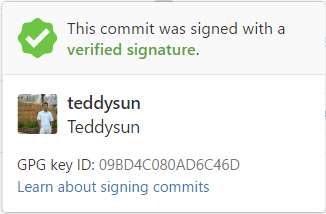
在 Github 上查看一些项目的 Commits 时,偶尔会发现「This commit was signed with a verified signature.」字样,具体来说,就是下图示例那样。
一、安装 Git 和 TortoiseGit

关于如何在 Windows 下安装 Git 和 TortoiseGit,请参考《Git初学者:msysgit和tortoisegit》一文。
官方网站:
https://git-scm.com
https://tortoisegit.org

二、生成密钥

在安装完 Git 之后,开始菜单项里会有个 Git Bash,打开,如下图所示:
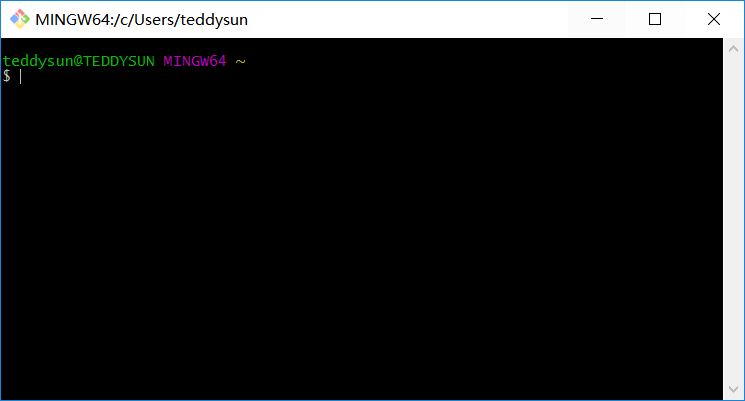
Git 自带了 gpg 命令,因此可以直接在 Git Bash 里生成密钥。命令如下:

gpg --full-generate-key

回车,提示信息如下:

gpg (GnuPG) 2.2.20-unknown; Copyright (C) 2020 Free Software Foundation, Inc.
This is free software: you are free to change and redistribute it.
There is NO WARRANTY, to the extent permitted by law.

Please select what kind of key you want:
   (1) RSA and RSA (default)
   (2) DSA and Elgamal
   (3) DSA (sign only)
   (4) RSA (sign only)
Your selection?

选择加密算法,默认选择第一个选项即可,表示加密和签名都使用 RSA 算法。
选 1,回车。

选择密钥长度,默认为 2048,建议输入 4096。

RSA keys may be between 1024 and 4096 bits long.
What keysize do you want? (2048)

输入 4096,回车。

设定密钥的有效期。

Please specify how long the key should be valid.
         0 = key does not expire
      <n>  = key expires in n days
      <n>w = key expires in n weeks
      <n>m = key expires in n months
      <n>y = key expires in n years
Key is valid for? (0)

密钥只是个人使用的话,建议选择第一个选项,即永不过期。
输入 0,回车。

系统会问你上述设置是否正确。

Is this correct? (y/N)

输入 y,回车。

系统会要求你输入个人信息。

You need a user ID to identify your key; the software constructs the user ID
from the Real Name, Comment and Email Address in this form:
    "Heinrich Heine (Der Dichter) <[email protected]>"

Real name:

「Real name」填入你的名字,需是英文。回车。

Email address:

「Email address」填入你的邮箱地址。回车。

Comment:

「Comment」可以空着不填。回车。
系统会再次让你确认填入的信息。

You selected this USER-ID:
    "Teddysun <[email protected]>"

Change (N)ame, (C)omment, (E)mail or (O)kay/(Q)uit?

输入 O,回车。
系统会让你设定一个私钥的密码。

You need a Passphrase to protect your secret key.
Enter passphrase:
Repeat passphrase:

注意这里要留空不填,直接回车即可。这是因为 TortoiseGit 不支持 1.4.x 含有私钥密码。
系统这时开始生成密钥,这时会要求你做一些随机的举动,以生成一个随机数。你拿起鼠标随便晃晃,直到完成密钥生成。

We need to generate a lot of random bytes. It is a good idea to perform
some other action (type on the keyboard, move the mouse, utilize the
disks) during the prime generation; this gives the random number
generator a better chance to gain enough entropy.

最后,提示生成完毕。

gpg: key 0AD6C46D marked as ultimately trusted
public and secret key created and signed.

三、列出密钥

命令如下:

gpg --list-keys

输出结果如下:

gpg: checking the trustdb
gpg: 3 marginal(s) needed, 1 complete(s) needed, PGP trust model
gpg: depth: 0  valid:   1  signed:   0  trust: 0-, 0q, 0n, 0m, 0f, 1u
/c/Users/teddysun/.gnupg/pubring.gpg
------------------------------------
pub   4096R/0AD6C46D 2017-02-22
uid                  Teddysun <[email protected]>
sub   4096R/5BB7BB4E 2017-02-22

第一行显示公钥文件名(pubring.gpg)
第二行显示公钥特征(4096 位,Hash 字符串和生成时间)
第三行显示用户信息
第四行显示私钥特征

四、输出密钥

公钥文件(.gnupg/pubring.gpg)以二进制形式储存,armor 参数可以将其转换为 ASCII 码显示。

gpg --armor --output public-key.txt --export [密钥ID]

[密钥ID]指定用户的公钥,如 0AD6C46D,output 参数指定输出文件名,如 public-key.txt

同时,export-secret-keys 参数可以转换私钥。

gpg --armor --output private-key.txt --export-secret-keys

public-key.txt 和 private-key.txt 默认会导出至用户目录 C:\Users\<用户名>\ 下。

五、上传公钥至 Github 帐号

点击用户头像,打开 Settings,左侧菜单点击 SSH and GPG keys,在 GPG keys 那里,点击 New GPG key。
在输入框里填入刚刚导出的 public-key.txt 内容。
点击 Add GPG key,完成上传。

六、设置 Git

回到 Git Bash 窗口,根据刚才 gpg –list-keys 显示的结果,此时已经知道密钥 ID 为 0AD6C46D。
设置 Git 使用该密钥 ID 加密:

git config --global user.signingkey 0AD6C46D

设置 Git 全局使用该密钥加密:

git config --global commit.gpgsign true

最后,再输入以下命令查看 Git 配置情况:

git config -l

包含以下信息。

user.signingkey=0AD6C46D
commit.gpgsign=true

至此,使用 GPG 加密 Github Commits 就正式完成了。
以后再 Git Commit,同步到 Github 上之后,就会发现该 Commit 已显示 Verified。

参考链接:

https://teddysun.com/333.html
https://help.github.com/articles/generating-a-new-gpg-key/
https://help.github.com/articles/adding-a-new-gpg-key-to-your-github-account/
https://help.github.com/articles/signing-commits-using-gpg/
http://www.ruanyifeng.com/blog/2013/07/gpg.html

转载请注明:秋水逸冰 » 使用 GPG 加密 Github Commits