


惯性聚合 高效追踪和阅读你感兴趣的博客、新闻、科技资讯
阅读原文 在惯性聚合中打开

推荐订阅源

Microsoft Azure Blog
WordPress大学
WordPress大学
小众软件
小众软件
OSCHINA 社区最新新闻
OSCHINA 社区最新新闻
V
V2EX
Hugging Face - Blog
Hugging Face - Blog
美团技术团队
博客园 - 三生石上(FineUI控件)
Last Week in AI
Last Week in AI
酷 壳 – CoolShell
酷 壳 – CoolShell
博客园 - Franky
Microsoft Security Blog
Y
Y Combinator Blog
A
About on SuperTechFans
The GitHub Blog
The GitHub Blog
U
Unit 42
H
Hackread – Cybersecurity News, Data Breaches, AI and More
云风的 BLOG
云风的 BLOG
IT之家
IT之家
MyScale Blog
MyScale Blog
V
Visual Studio Blog
Cyber Security Advisories - MS-ISAC
I
InfoQ
博客园 - 司徒正美

秋水逸冰

丽萨主机:双ISP家宽住宅IP VPS/CN2 GIA精品网/G口大带宽 | 秋水逸冰 Linux Kernel 6.18.x 编译版 | 秋水逸冰 思考未来人与 AI 的关系 | 秋水逸冰 3X-UI 面板安装和使用教程 | 秋水逸冰 Xray-UI 面板安装和使用教程 | 秋水逸冰 WCMP (Windows + Caddy + MariaDB + PHP) Nginx for Windows | 秋水逸冰 Aria2 for Windows | 秋水逸冰 Curl for Windows | 秋水逸冰 Wget for Windows | 秋水逸冰 Windows 11 Enterprise LTSC DD 镜像 Windows Server 2025 Datacenter DD 镜像 重新编译 curl 以支持 HTTP3 | 秋水逸冰 tiny10 和 tiny11 23H2 的 Windows DD 镜像 从 Apache httpd 切换到 Caddy2 LCMP (Linux + Caddy + MariaDB + PHP) Windows 11 Pro for Workstations 22H2 DD 镜像 Shadowsocks 编译版 by Teddysun | 秋水逸冰 适用于 UEFI 启动的多个 Windows 系统 DD 镜像 Linux Kernel 5.15.x 编译版 | 秋水逸冰 制作适用于 WSL 的任意 Linux 镜像 Windows 11 Pro for Workstations 21H2 DD 镜像 Windows 10 Enterprise LTSC DD 镜像 Linux Kernel 5.14.x 编译版 | 秋水逸冰 Linux Kernel 5.13.x 编译版 | 秋水逸冰 Windows Server 2022 Datacenter DD 镜像 在 Windows 10 上安装 Rocky Linux 系统 Linux Kernel 5.12.x 编译版 | 秋水逸冰 Linux Kernel 5.11.x 编译版 | 秋水逸冰 在 Windows 10 上安装 CentOS 系统
poco图片站被ESET Smart Security 6拦截的解决办法 | 秋水逸冰
发表我的评论 · 2013-04-12 · via 秋水逸冰

技术 秋水逸冰 8517浏览 1评论

poco block
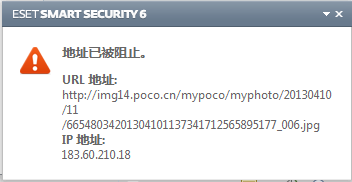
poco作为国内著名的图片社区站,很多网站引用了其外链。但是最近遇到了诺顿的杀毒软件套装ESET Smart Security 6或杀毒软件ESET NOD32 Antivirus将poco列入内部黑名单而频频阻止访问,并弹出窗口如上图。

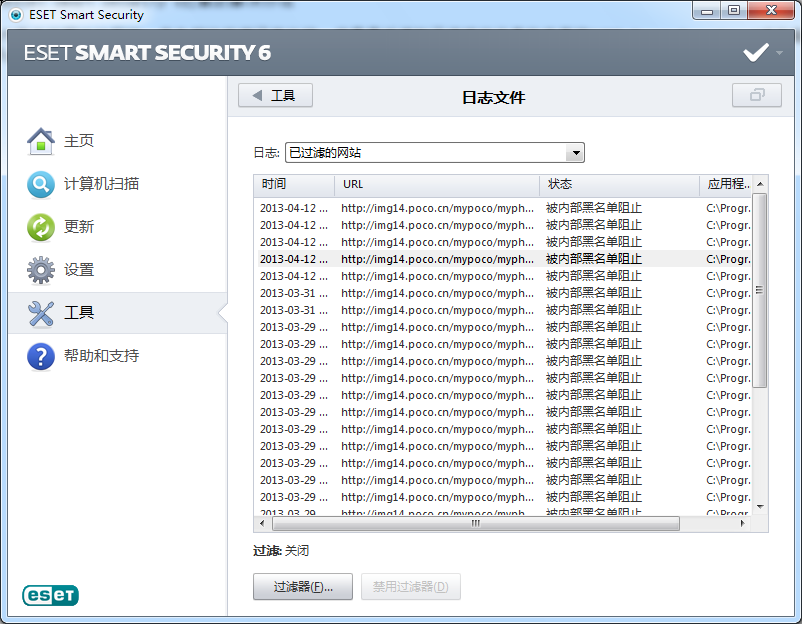
日志文件如下图。
poco block

网上有人说现在用http://img14.poco.cn/做图床的网页图片都打不开了,我把网址添加到不过滤的地址列表和允许的地址列表还是没用。
实际上,经过亲测只需将poco的整站域名添加到不过滤的地址列表即可。操作流程如下:
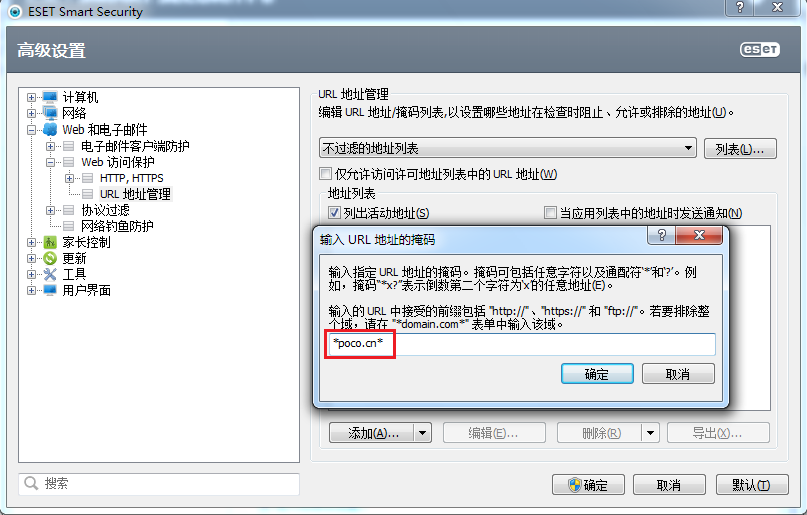
软件主界面–>设置–>进入高级设置–>Web和电子邮件–>Web访问保护–>URL地址管理,选中“不过滤的地址列表”,点击“添加(A)”按钮,在弹出的框里填“*poco.cn*”,见下图红色框框部分。注意不要将双引号也填进去了。
poco block

最后点击“确认”,保存即可。
再刷新网站,应该就再不会出现弹出窗口阻止了。

转载请注明:秋水逸冰 » poco图片站被ESET Smart Security 6拦截的解决办法