



惯性聚合 高效追踪和阅读你感兴趣的博客、新闻、科技资讯
阅读原文 在惯性聚合中打开

推荐订阅源

Google DeepMind News
Stack Overflow Blog
Stack Overflow Blog
Hugging Face - Blog
Hugging Face - Blog
博客园_首页
T
The Blog of Author Tim Ferriss
博客园 - 叶小钗
N
Netflix TechBlog - Medium
腾讯CDC
C
Check Point Blog
P
Proofpoint News Feed
Engineering at Meta
Engineering at Meta
GbyAI
GbyAI
S
SegmentFault 最新的问题
F
Fortinet All Blogs
美团技术团队
U
Unit 42
freeCodeCamp Programming Tutorials: Python, JavaScript, Git & More
博客园 - 司徒正美
F
Full Disclosure
Recorded Future
Recorded Future
D
DataBreaches.Net
博客园 - 【当耐特】
Martin Fowler
Martin Fowler
J
Java Code Geeks
I
InfoQ
Y
Y Combinator Blog
A
About on SuperTechFans
AI
AI
爱范儿
爱范儿
Exploit-DB.com RSS Feed
Forbes - Security
Forbes - Security
W
WeLiveSecurity
M
MIT News - Artificial intelligence
雷峰网
雷峰网
cs.CV updates on arXiv.org
Simon Willison's Weblog
Schneier on Security
The GitHub Blog
The GitHub Blog
Security Archives - TechRepublic
aimingoo的专栏
aimingoo的专栏
Cyber Security Advisories - MS-ISAC
G
GRAHAM CLULEY
Know Your Adversary
Know Your Adversary
Latest news
Latest news
Threat Intelligence Blog | Flashpoint
D
Docker
Recent Commits to openclaw:main
量子位
V2EX - 技术
V2EX - 技术
Project Zero
Project Zero

孙琪峥

端午安康!博客进行了主题升级 - 孙琪峥 群晖NAS MySQL无法外部连接的解决办法 - 孙琪峥 - 比花言巧语更难的是学会闭嘴 群晖NAS MySQL无法外部连接的解决办法 - 孙琪峥 - 比花言巧语更难的是学会闭嘴 “npm warn Unknown project config "electron_mirror". This will stop working in the next major version of npm”的解决方案 - 孙琪峥 “npm warn Unknown project config "electron_mirror". This will stop working in the next major version of npm”的解决方案 - 孙琪峥 鱼贝贝文件信息批量提取神器v1.3.0.250118 免费|绿色免安装|全功能离线版 - 孙琪峥 - 比花言巧语更难的是学会闭嘴 鱼贝贝文件信息批量提取神器v1.3.0.250118 免费|绿色免安装|全功能离线版 - 孙琪峥 - 比花言巧语更难的是学会闭嘴 phpstudy启动报错nginx: [emerg] invalid number of arguments in "include" directive in 的解决方法 - 孙琪峥 phpstudy启动报错nginx: [emerg] invalid number of arguments in "include" directive in 的解决方法 - 孙琪峥 微信小程序《隐私政策》范文参考 - 孙琪峥 - 比花言巧语更难的是学会闭嘴 微信小程序《隐私政策》范文参考 - 孙琪峥 - 比花言巧语更难的是学会闭嘴 electron开发中使用nodemon进行热更新的方法 - 孙琪峥 - 比花言巧语更难的是学会闭嘴 electron开发中使用nodemon进行热更新的方法 - 孙琪峥 - 比花言巧语更难的是学会闭嘴 electron开发,文件无法拖放到渲染窗口的一种奇怪情况,附原因和解决方案 - 孙琪峥 - 比花言巧语更难的是学会闭嘴 electron开发,文件无法拖放到渲染窗口的一种奇怪情况,附原因和解决方案 - 孙琪峥 - 比花言巧语更难的是学会闭嘴 moment.js日期时间插件,设置中文语言的方法 - 孙琪峥 - 比花言巧语更难的是学会闭嘴 moment.js日期时间插件,设置中文语言的方法 - 孙琪峥 - 比花言巧语更难的是学会闭嘴 使用npm安装electron失败的可行解决方案 - 孙琪峥 - 比花言巧语更难的是学会闭嘴 使用npm安装electron失败的可行解决方案 - 孙琪峥 - 比花言巧语更难的是学会闭嘴 Windows11系统cmd终端提示“命令提示符已被系统管理员停用”的一种可行解决方案 - 孙琪峥 - 比花言巧语更难的是学会闭嘴
Windows11系统cmd终端提示“命令提示符已被系统管理员停用”的一种可行解决方案 - 孙琪峥 - 比花言巧语更难的是学会闭嘴
admin · 2023-05-01 · via 孙琪峥

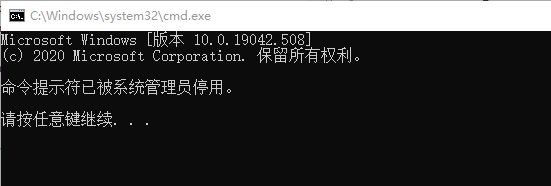
今天老孙的笔记本win11系统,打开cmd控制台的时候,突然提示“命令提示符已被系统管理员停用”,也没修改啥系统配置,莫名其妙的问题。

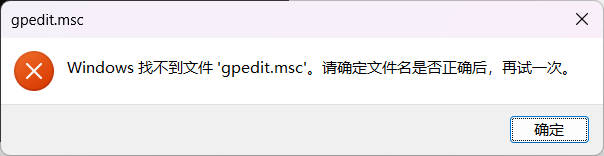
在网上搜索了一下,好多解决方案都是运行gpedit.msc命令修改策略,但是老孙这个系统打不开策略功能(不知道啥原因,岁数大了,也懒得刨根问底折腾了)。
百度谷歌搜了半天,找到一个亲测可行的方法,供大家参考:

1.win+r快捷键打开运行命令窗口,输“regedit”命令打开注册表窗口
2.左侧目录树中依次展开到HKEY_CURRENT_USER\Software\Policies\Microsoft\Windows\System
3.双击名称为“DisableCMD”的键值,修改为“0”,单击“确定”

没重启,重新打开cmd界面,功能就正常了。