


- 11 min read
- CSS, Coding, Techniques
sibling-index() and sibling-count(). Staggered cascade effect in one line of CSS without :nth-child() rules or JS workarounds. Works for 5 items or 5,000.You know that thing where you have a grid of cards, and you want them to fade in one after another? That staggered cascade effect. Looks great. Should be simple. And yet every time I’ve built it, the implementation has made me feel like I’m doing something fundamentally stupid.
See the Pen [Dynamic Staggered Animations with CSS sibling-index() [forked]](https://codepen.io/smashingmag/pen/zxowBog) by Durgesh.
Because the options were always the same. Say you want staggered animation delays on a list of 10 items. You either wrote a Sass loop that spat out a dozen :nth-child() rules, each one hardcoding a --index variable for that specific position:
/* One rule per item. Hope the list never grows. */
li:nth-child(1) { --idx: 1; }
li:nth-child(2) { --idx: 2; }
li:nth-child(3) { --idx: 3; }
/* ... eight more of these ... */
li:nth-child(10) { --idx: 10; }

li {
  animation-delay: calc(var(--idx) * 100ms);
}
Ten items. Ten rules. If the list grows to 50? You cap it and hope for the best, or set up a Sass loop that generates hundreds of selectors at build time. Engineers like Roman Komarov have come up with O(√N) strategies — legitimately clever stuff — but you still end up with 63 rules to cover 1,023 elements.
Or you looped through elements in JavaScript and set inline styles. style="--index: 3". Right there in the DOM. Works fine. Also spreads layout concerns across your scripts and quietly breaks six months later when someone refactors the component without realizing the CSS depends on a JavaScript-injected variable.
Both approaches have always bugged me for the same reason: you’re telling the browser something it already knows. The browser built the DOM tree. It knows which element is the third child. It has the data. CSS just couldn’t access it.
Well, now it can:
li {
  animation-delay: calc(sibling-index() * 100ms);
}
One line. Works for 5 items or 5,000. No event listeners. No mutation observers. No re-renders.
sibling-index() and sibling-count() are part of the CSS Values and Units Module Level 5 spec (Section 9, if you’re the type who reads W3C drafts for fun). The proposal was approved via CSSWG issue #4559 after substantial discussion. The functions themselves take no arguments — you just use them.
sibling-index()gives you the 1-based position of an element among its parent’s children. First child returns1. Fifth child returns5. It only counts element nodes — text nodes, comments, and whitespace are all invisible to it.sibling-count()gives you the total number of element children the parent has. Basically, the CSS equivalent ofelement.parentElement.children.lengthin JavaScript, but available in your stylesheet.
Both functions resolve to <integer> — not <string>, an actual number. That means you can throw them into calc(), min(), max(), round(), mod(), trigonometric stuff like sin() and cos(). When you write calc(sibling-index() * 100ms), CSS handles the type coercion and spits out a valid <time> value. No tricks needed. Compare that with counter(), which returns a string and can only live inside content on pseudo-elements — it’s a different thing entirely.
One clarification that trips people up: :nth-child() is a selector. It picks elements. It doesn’t produce a value. You can’t write calc(:nth-child() * 10px) — that’s not valid CSS. sibling-index() does the opposite. It sits inside your declarations and gives you a number you can calculate with. They solve different problems, and until now we’ve been duct-taping :nth-child() into a role it was never designed for.
Patterns Worth Stealing
Once it clicks that these are just integers, ideas come fast.
Reverse Stagger
Want the last item to animate first? Subtract:
.card {
  animation: fade-in 0.4s ease both;
  animation-delay: calc((sibling-count() - sibling-index()) * 80ms);
}
Last child gets (N - N) * 80ms = 0ms — it fires instantly. First child gets (N - 1) * 80ms. The animation kicks off the moment the page loads instead of pausing for an awkward beat.
Automatic Equal Widths
Stop counting children manually to set percentages:
.tab {
  width: calc(100% / sibling-count());
}
Five tabs? 20% each. Add a sixth? 16.66%. Remove two? 25%. No media queries, no resize observers, no JavaScript at all.
That said, you can imagine a scenario where too many items make for really narrow tabs, at which point you might want to go with something else, perhaps a Flexbox wrapping solution.
Hue Distribution
Spread colors evenly across the color wheel:
.swatch {
  background-color: hsl(
    calc((360deg / sibling-count()) * sibling-index()) 70% 50%
  );
}
Three items get hues 120° apart. Twelve items get 30° increments. The palette adapts to whatever’s in the DOM, which is the kind of thing you’d normally reach for a JavaScript color library to do.
Distributing items in a circle used to mean calculating sine and cosine in JavaScript. CSS now has sin() and cos() natively (Juan Diego RodrÃguez has a great practical walkthrough of these on CSS-Tricks), and combined with tree-counting, the whole thing collapses into pure CSS:
.radial-item {
  --angle: calc((360deg / sibling-count()) * sibling-index());
  --radius: 120px;

  position: absolute;
  left: calc(50% + var(--radius) * cos(var(--angle)));
  top: calc(50% + var(--radius) * sin(var(--angle)));
  transform: rotate(calc(var(--angle) * -1));
}
Six items? Hexagon. Eight? Octagon. Add or remove items, and the layout recalculates. No JavaScript computing coordinates.
Z-Index Stacking
Building a card fan? One line:
.card {
  z-index: calc(sibling-count() - sibling-index());
}
First card stacks highest, last card gets 0. Flip the math if you want the reverse.
The Gotchas
These are worth going through individually because they’re not obvious from the spec.
Shadow DOM Scoping
sibling-index() and sibling-count() operate on the DOM tree, not the flattened visual tree. This distinction will absolutely bite you with Web Components.
Say you have a custom element with this shadow DOM:
<section>
  <slot></slot>
  <div class="internal"></div>
</section>
If you style .internal with sibling-index(), it returns 2. Always. Even if the <slot> projects 300 elements. The function sees two children of <section> in the shadow tree — the <slot> and the .internal div. Projected light DOM content doesn’t exist as far as the count is concerned.
There’s also a security thing going on here. If a light DOM stylesheet tries to reach into a component via ::part() and use sibling-index(), the browser returns 0. Flat zero. It’s a deliberate wall to prevent external CSS from probing the internal structure of third-party components. Honestly, I think that’s the right call.
Pseudo-Elements Don’t Count
::before and ::after aren’t siblings. They don’t show up in sibling-count() and they don’t have their own sibling-index(). But — and this is the part that’ll save you a debugging session — you can use these functions inside pseudo-element declarations. When you write #target::before { width: calc(sibling-index() * 10px); }, it evaluates sibling-index() against #target, not against the pseudo-element. The pseudo-element isn’t a real node, so the function traces back to its originating element. Same story with ::slotted(*)::before — it checks the slotted element’s index in the light DOM.
display: none Still Counts
This one burned me. Elements with display: none vanish from the layout tree. They take up no space. Screen readers don’t see them. But they’re still in the DOM.
Since sibling-index() reads the DOM tree, not the layout tree, hidden elements get counted:
<ul>
  <!-- sibling-index() = 1 -->
  <li>Apple</li>
  <!-- sibling-index() = 2, invisible -->
  <li style="display:none">Banana</li>
  <!-- sibling-index() = 3, NOT 2 -->
  <li>Cherry</li>
</ul>
Cherry is 3, not 2. The hidden banana still holds its spot.
This doesn’t matter for most layouts. But if you’re building something like a search filter that hides non-matching items with display: none, your staggered animations and circular layouts will develop gaps. The visible items keep their original, non-sequential indexes. For anything that depends on continuous counting — radial menus, proportional widths — you’ll need to actually remove filtered nodes from the DOM instead of just hiding them. Or fall back to JavaScript-managed indexes.
Note: visibility: hidden and opacity: 0 count too, but that feels more intuitive since those elements still take up space. display: none is the sneaky one because the element disappears visually but still occupies a DOM slot.
Custom Properties Evaluate Immediately
This is subtle. If you try to centralize the index on a parent:
.parent {
  --idx: sibling-index();
}
…that --idx resolves right there on .parent. It grabs the parent’s own sibling index, locks it to that number, and every child inherits that single fixed value. Every child gets the same number. Almost certainly not what you want or expect.
The fix is simple — put the function on the elements that need it:
.child {
  --idx: sibling-index();
  animation-delay: calc(var(--idx) * 100ms);
}
The CSSWG has discussed an inherits: declaration addition to @property that could theoretically fix this. If you haven’t used @property, it lets you define a custom property’s type, initial value, and inheritance behavior — way more control than a raw --variable. But the inherits: declaration idea is still in early CSSWG discussion, not baked into any spec draft. It could be years before it lands — or it might not land at all. Even with @property today, there’s no mechanism to say “don’t evaluate yet, wait for the child.” So for now, just apply directly.
Performance at Scale
Changing the DOM — i.e., adding, removing, reordering children — triggers style recalculation for affected siblings. The browser handles this during the cascade phase (before layout and paint), so it’s faster than the old approach of looping in JavaScript and stamping inline styles.
But there’s a real cost if you push it. Inserting an element at the beginning of a container with 10,000 children forces the engine to recalculate the sibling index for all 10,000 elements after it. For normal stuff — navigation, card grids, tab bars — you’ll never notice. For a live stock ticker or an infinite-scroll feed with thousands of nodes constantly churning, keep using JavaScript-managed indexes inside your virtualization window. These functions are fast. They’re not zero-cost.
Browser Support
As of writing, Chrome/Edge 138 shipped these functions in stable releases (June 2025), and Safari 26.2 followed. Firefox hasn’t shipped them in stable yet, but Mozilla’s spec position is positive and implementation work is actively underway — tracked under Bugzilla issue #1953973. Check caniuse for the latest before you ship.
Chrome and Safari together cover roughly 75–80% of global traffic. That’s a strong majority, but Firefox’s absence means you still need a fallback.
For shipping today, @supports is your friend:
/* Baseline that works everywhere */
.item {
  width: 25%;
  animation-delay: 0ms;
}

/* Progressively enhance where supported */
@supports (z-index: sibling-index()) {
  .item {
    width: calc(100% / sibling-count());
    animation-delay: calc(sibling-index() * 80ms);
  }
}
Static fallback for Firefox. Mathematical layout for everyone else. Nobody gets a broken page.
On polyfills:A JavaScript polyfill that loops through siblings and sets inline styles is the exact thing these functions exist to replace. But that doesn’t mean you’re stuck with hardcoded fallback values either. Juan Diego RodrÃguez wrote a solid piece on “How to Wait for the
sibling-count()andsibling-index()Functions” that lays out the right model for progressive enhancement until native support hits Baseline. His approach uses existing CSS techniques (like Roman Komarov’s counting hacks) as a bridge rather than a full JavaScript polyfill. Worth reading if you need to ship something production-ready today while Firefox catches up.
Accessibility Notes
This needs saying because it’s easy to get excited and forget: these functions are purely visual. They change how things look. They don’t change what things mean.
If you use sibling-index() math to visually reorder a list — via order or grid placement — a screen reader still reads the DOM in source order. Keyboard tab order follows the DOM, too. Visual layout and semantic structure will contradict each other, and that’s an accessibility failure.
For interactive components like data grids, radial menus, or custom listboxes that lean on tree-counting for layout, you still need JavaScript to sync ARIA attributes. aria-posinset and aria-setsize have no idea what CSS is calculating. If your CSS says “this is visually item 3 of 7” but ARIA says something different (or nothing), assistive technology users get a broken experience.
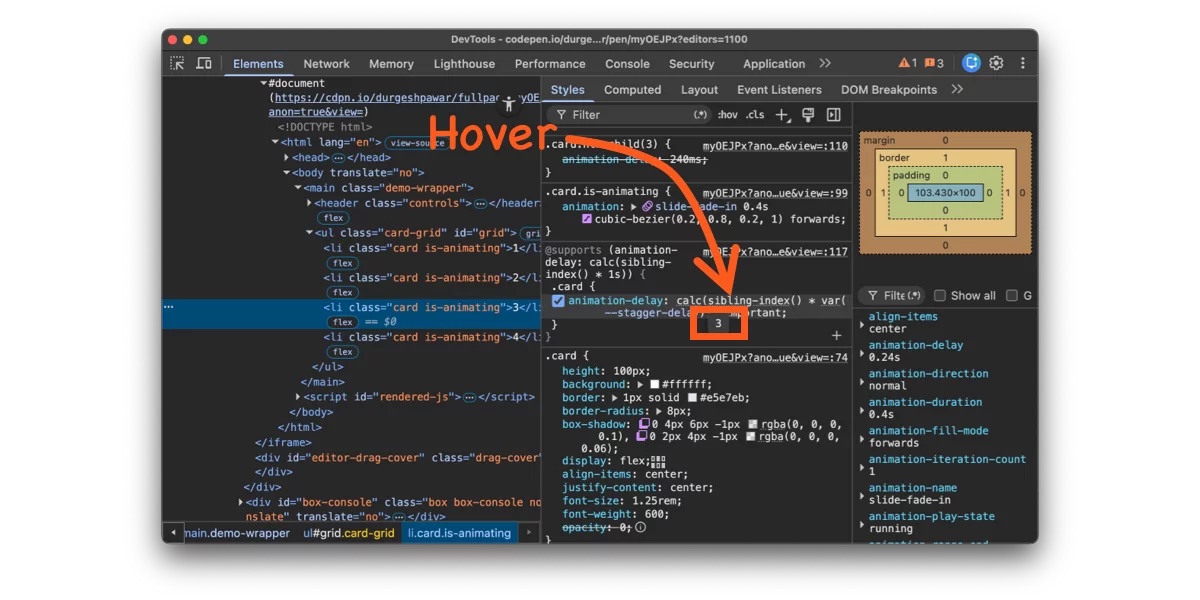
On the debugging side, recent versions of Chrome DevTools let you inspect computed sibling-index() and sibling-count() values directly in the Elements panel, which helps when the math isn’t doing what you expect.
What’s Coming
The current spec only counts all element siblings. But the CSSWG has documented a planned extension in issue #9572: an of <selector> argument, matching what :nth-child() already supports.
Something like sibling-index(of .active) would let you count only siblings matching a specific selector. An element that’s the eighth child overall but the third .active child would return 3. For dynamic UIs where you’re filtering or toggling visibility, that would keep the index sequential without requiring DOM manipulation.
There’s also been CSSWG discussion around children-count() and descendant-count() functions — the first would tell you how many children an element has (useful for parent-driven layouts), the second would count all descendants recursively. Both are still at the proposal stage, but they’d round out the tree-counting story: sibling-index() and sibling-count() give you the horizontal view (where am I among my peers?), while children-count() and descendant-count() would give you the vertical view (what’s below me?).
That feeling I mentioned at the top — writing ten :nth-child() rules for a staggered animation and wondering if you’re missing something obvious? You weren’t. The obvious thing just didn’t exist yet.
 (gg, yk)