



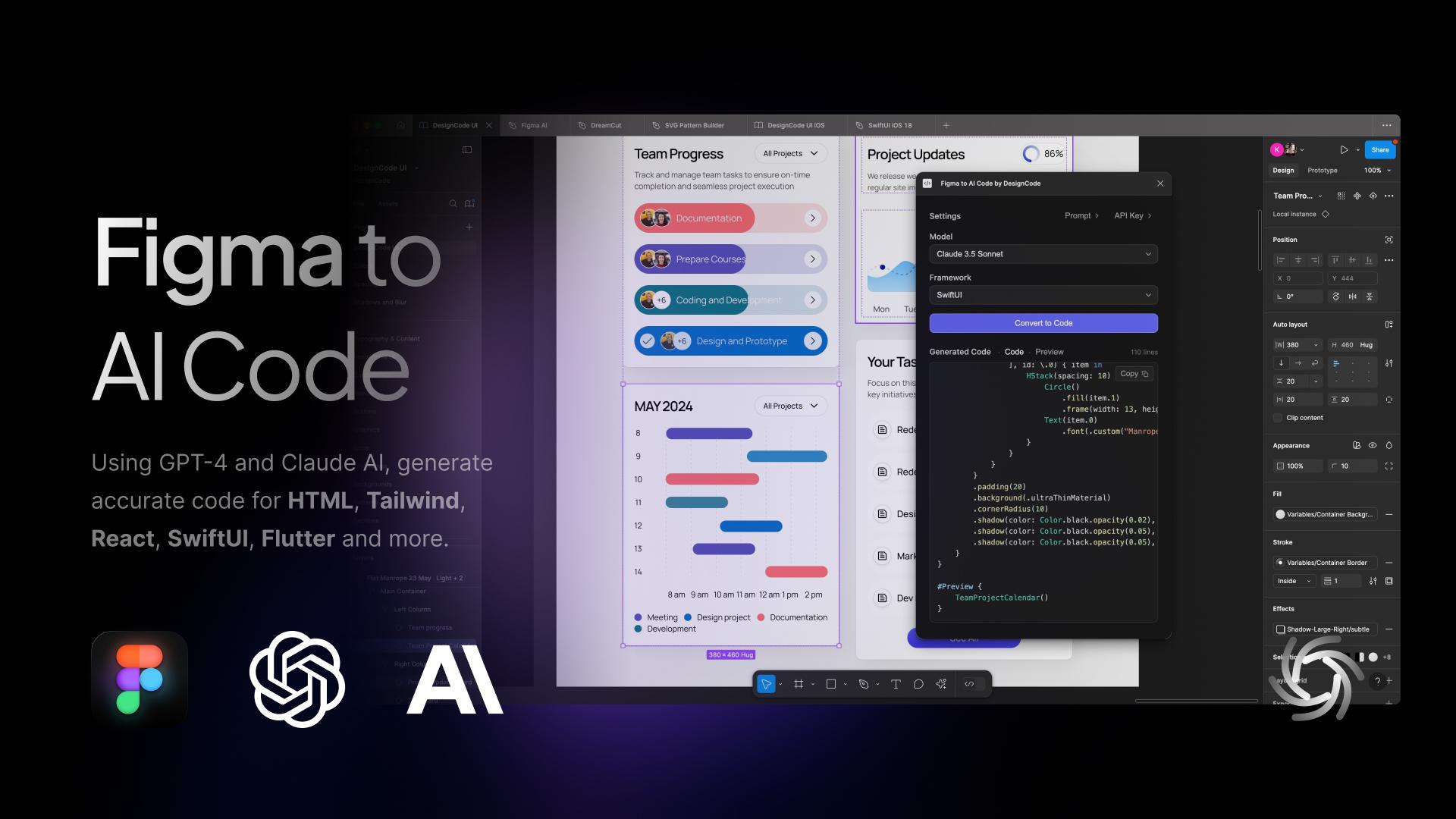
In early 2026, I noticed that the UX designer’s toolkit seemed to shift overnight. The industry standard “Should designers code?” debate was abruptly settled by the market, not through a consensus of our craft, but through the brute force of job requirements. If you browse LinkedIn today, you’ll notice a stark change: UX roles increasingly demand AI-augmented development, technical orchestration, and production-ready prototyping.
For many, including myself, this is the ultimate design job nightmare. We are being asked to deliver both the “vibe” and the “code” simultaneously, using AI agents to bridge a technical gap that previously took years of computer science knowledge and coding experience to cross. But as the industry rushes to meet these new expectations, they are discovering that AI-generated functional code is not always good code.
The LinkedIn Pressure Cooker: Role Creep In 2026
The job market is sending a clear signal. While traditional graphic design roles are expected to grow by only 3% through 2034, UX, UI, and Product Design roles are projected to grow by 16% over the same period.
However, this growth is increasingly tied to the rise of AI product development, where “design skills” have recently become the #1 most in-demand capability, even ahead of coding and cloud infrastructure. Companies building these platforms are no longer just looking for visual designers; they need professionals who can “translate technical capability into human-centered experiences.”
This creates a high-stakes environment for the UX designer. We are no longer just responsible for the interface; we are expected to understand the technical logic well enough to ensure that complex AI capabilities feel intuitive, safe, and useful for the human on the other side of the screen. Designers are being pushed toward a “design engineer” model, where we must bridge the gap between abstract AI logic and user-facing code.
A recent survey found that 73% of designers now view AI as a primary collaborator rather than just a tool. However, this “collaboration” often looks like “role creep.” Recruiters are often not just looking for someone who understands user empathy and information architecture — they want someone who can also prompt a React component into existence and push it to a repository!
This shift has created a competency gap.
As an experienced senior designer who has spent decades mastering the nuances of cognitive load, accessibility standards, and ethnographic research, I am suddenly finding myself being judged on my ability to debug a CSS Flexbox issue or manage a Git branch.
The nightmare isn’t the technology itself. It’s the reallocation of value.
The Competence Trap: Two Job Skill Sets, One Average Result
There is potentially a very dangerous myth circulating in boardrooms that AI makes a designer “equal” to an engineer. This narrative suggests that because an LLM can generate a functional JavaScript event handler, the person prompting it doesn’t need to understand the underlying logic. In reality, attempting to master two disparate, deep fields simultaneously will most likely lead to being averagely competent at both.
The “Averagely Competent” Dilemma
For a senior UX designer to become a senior-level coder is like asking a master chef to also be a master plumber because “they both work in the kitchen.” You might get the water running, but you won’t know why the pipes are rattling.
- The “cognitive offloading” risk.
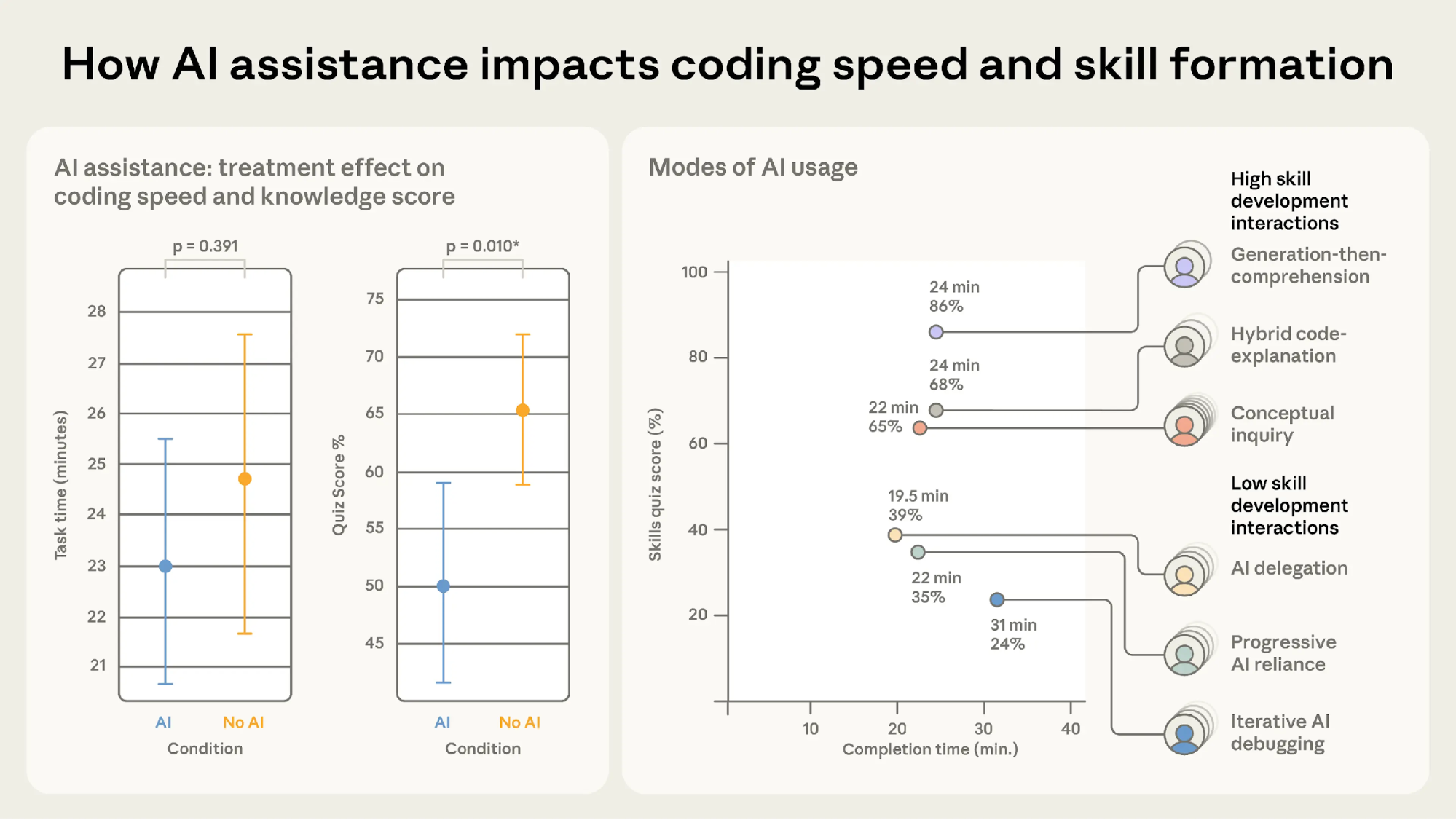
Research shows that while AI can speed up task completion, it often leads to a significant decrease in conceptual mastery. In a controlled study, participants using AI assistance scored 17% lower on comprehension tests than those who coded by hand. - The debugging gap.
The largest performance gap between AI-reliant users and hand-coders is in debugging. When a designer uses AI to write code they don’t fully understand, they don’t have the ability to identify when and why it fails.
So, if a designer ships an AI-generated component that breaks during a high-traffic event and cannot manually trace the logic, they are no longer an expert. They are now a liability.
The High Cost Of Unoptimised Code
Any experienced code engineer will tell you that creating code with AI without the right prompt leads to a lot of rework. Because most designers lack the technical foundation to audit the code the AI gives them, they are inadvertently shipping massive amounts of “Quality Debt”.
Common Issues In Designer-Generated AI Code
- The security flaw
Recent reports indicate that up to 92% of AI-generated codebases contain at least one critical vulnerability. A designer might see a functioning login form, unaware that it has an 86% failure rate in XSS defense, which are the security measures aimed at preventing attackers from injecting malicious scripts into trusted websites. - The accessibility illusion
AI often generates “functional” applications that lack semantic integrity. A designer might prompt a “beautiful and functional toggle switch,” but the AI may provide a non-semantic<div>that lacks keyboard focus and screen-reader compatibility, creating Accessibility Debt that is expensive to fix later. - The performance penalty
AI-generated code tends to be verbose. AI is linked to 4x more code duplication than human-written code. This verbosity slows down page loads, creates massive CSS files, and negatively impacts SEO. To a business, the task looks “done.” To a user with a slow connection or a screen reader, the site is a nightmare.
Creating More Work, Not Less
The promise of AI was that designers could ship features without bothering the engineers. The reality has been the birth of a “Rework Tax” that is draining engineering resources across the industry.
- Cleaning up
Organisations are finding that while velocity increases, incidents per Pull Request are also rising by 23.5%. Some engineering teams now spend a significant portion of their week cleaning up “AI slop” delivered by design teams who skipped a rigorous review process. - The communication gap
Only 69% of designers feel AI improves the quality of their work, compared to 82% of developers. This gap exists because “code that compiles” is not the same as “code that is maintainable.”
When a designer hands off AI-generated code that ignores a company’s internal naming conventions or management patterns, they aren’t helping the engineer; they are creating a puzzle that someone else has to solve later.
The Solution
We need to move away from the nightmare of the “Solo Full-Stack Designer” and toward a model of designer/coder collaboration.
The ideal reality:
- The Partnership
Instead of designers trying to be mediocre coders, they should work in a human-AI-human loop. A senior UX designer should work with an engineer to use AI; the designer creates prompts for intent, accessibility, and user flow, while the engineer creates prompts for architecture and performance. - Design systems as guardrails
To prevent accessibility debt from spreading at scale, accessible components must be the default in your design system. AI should be used to feed these tokens into your UI, ensuring that even generated code stays within the “source of truth.”
Beyond The Prompt
The industry is currently in a state of “AI Infatuation,” but the pendulum will eventually swing back toward quality.
Businesses that prioritise “designer-shipped code” without engineering oversight will eventually face a reckoning of technical debt, security breaches, and accessibility lawsuits. The designers who thrive in 2026 and beyond will be those who refuse to be “prompt operators” and instead position themselves as the guardians of the user experience. This is the perfect outcome for experienced designers and for the industry.
Our value has always been our ability to advocate for the human on the other side of the screen. We must use AI to augment our design thinking, allowing us to test more ideas and iterate faster, but we must never let it replace the specialised engineering expertise that ensures our designs technically work for everyone.
Summary Checklist for UX Designers
- Work Together.
Use AI-made code as a starting point to talk with your developers. Don’t use it as a shortcut to avoid working with them. Ask them to help you with prompts for code creation for the best outcomes. - Understand the “Why”.
Never submit code you don’t understand. If you can’t explain how the AI-generated logic works, don’t include it in your work. - Build for Everyone.
Good design is more than just looks. Use AI to check if your code works for people using screen readers or keyboards, not just to make things look pretty.
 (yk)
(yk)