


- 14 min read
- JavaScript, React, Coding
There’s a mental model most React developers share without ever discussing it out loud. That forms are always supposed to be components. This means a stack like:
- React Hook Form for local state (minimal re-renders, ergonomic field registration, imperative interaction).
- Zod for validation (input correctness, boundary validation, type-safe parsing).
- React Query for backend: submission, retries, caching, server sync, and so on.
And for the vast majority of forms — your login screens, your settings pages, your CRUD modals — this works really well. Each piece does its job, they compose cleanly, and you can move on to the parts of your application that actually differentiate your product.
But every once in a while, a form starts accumulating things like visibility rules that depend on earlier answers, or derived values that cascade through three fields. Maybe even entire pages that should be skipped or shown based on a running total.
You handle the first conditional with a useWatch and an inline branch, which is fine. Then another. Then you’re reaching for superRefine to encode cross-field rules that your Zod schema can’t express in the normal way. Then, step navigation starts leaking business logic. At some point, you look at what you’ve built and realize that the form isn’t really UI anymore. It’s more of a decision process, and the component tree is just where you happened to store it.
This is where I think the mental model for forms in React breaks down, and it’s really nobody’s fault. The RHF + Zod stack is excellent at what it was designed for. The issue is that we tend to keep using it past the point where its abstractions match the problem because the alternative requires a different way of thinking about forms entirely.
This article is about that alternative. To show this, we’ll build the exact same multi-step form twice:
- With React Hook Form + Zod wired to React Query for submission,
- With SurveyJS, which treats a form as data — a simple JSON schema — rather than a component tree.
Same requirements, same conditional logic, same API call at the end. Then we’ll map exactly what moved and what stayed, and lay out a practical way to decide which model you should use, and when.
The form we’re building:
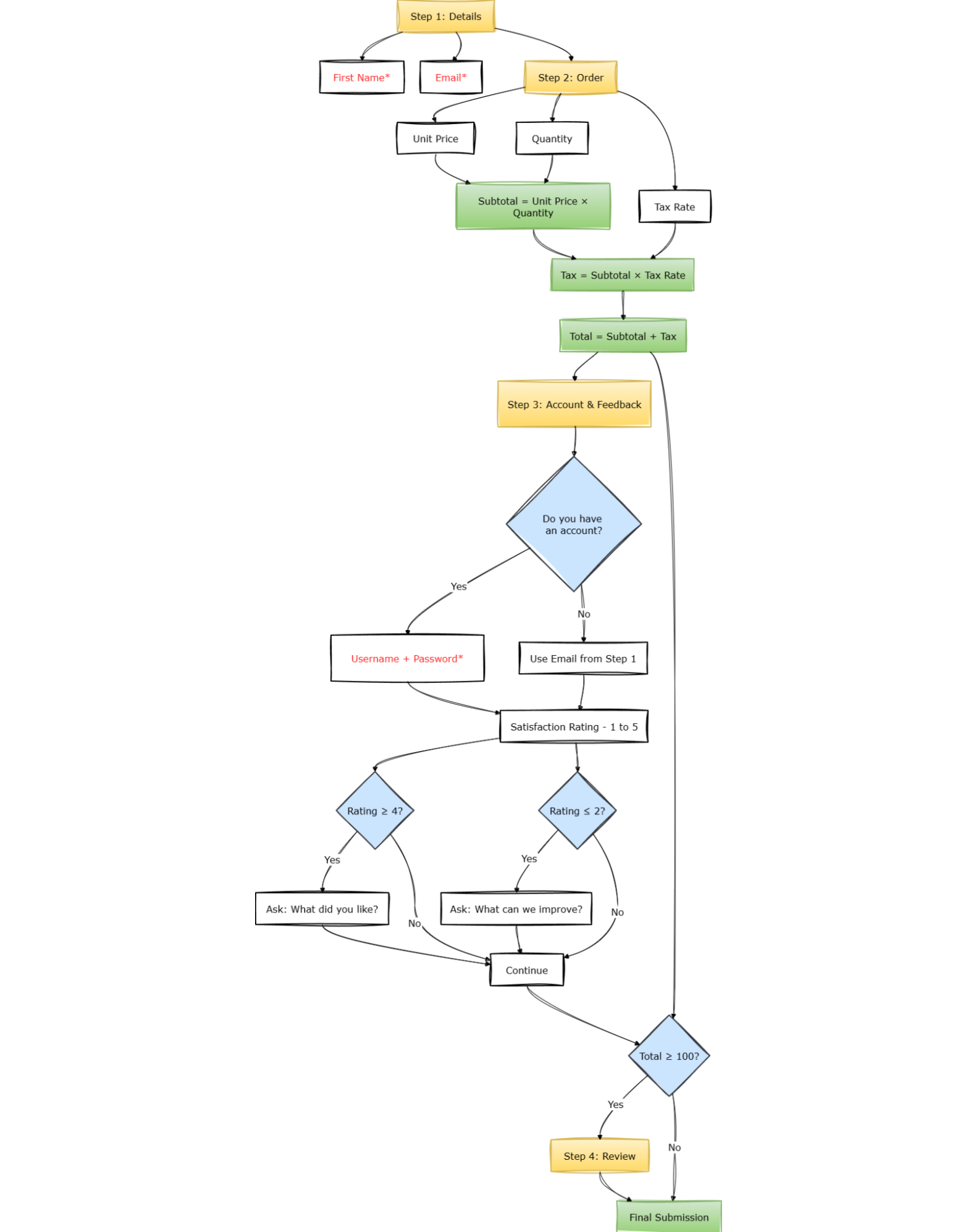
This form will use a 4-step flow:
Step 1: Details
- First name (required),
- Email (required, valid format).
Step 2: Order
- Unit price,
- Quantity,
- Tax rate,
- Derived:
- Subtotal,
- Tax,
- Total.
Step 3: Account & Feedback
- Do you have an account? (Yes/No)
- If Yes → username + password, both required.
- If No → email already collected in step 1.
- Satisfaction rating (1–5)
- If ≥ 4 → ask “What did you like?”
- If ≤ 2 → ask “What can we improve?”
Step 4: Review
- Only appears if
total >= 100 - Final submission.
This is not extreme. But it’s enough to expose architectural differences.
Part 1: Component-Driven (React Hook Form + Zod)
Installation
npm install react-hook-form zod @hookform/resolvers @tanstack/react-query
Zod Schema
Let’s start with the Zod schema, because that’s usually where the shape of the form gets established. For the first two steps — personal details and order inputs — everything is straightforward: required strings, numbers with minimums, and an enum. The interesting part starts when you try to express the conditional rules.
import { z } from "zod";

export const formSchema = z.object({
  firstName: z.string().min(1, "Required"),
  email: z.string().email("Invalid email"),
  price: z.number().min(0),
  quantity: z.number().min(1),
  taxRate: z.number(),
  hasAccount: z.enum(["Yes", "No"]),
  username: z.string().optional(),
  password: z.string().optional(),
  satisfaction: z.number().min(1).max(5),
  positiveFeedback: z.string().optional(),
  improvementFeedback: z.string().optional(),
}).superRefine((data, ctx) => {
  if (data.hasAccount === "Yes") {
    if (!data.username) {
      ctx.addIssue({ code: "custom", path: ["username"], message: "Required" });
    }
    if (!data.password || data.password.length < 6) {
      ctx.addIssue({ code: "custom", path: ["password"], message: "Min 6 characters" });
    }
  }

  if (data.satisfaction >= 4 && !data.positiveFeedback) {
    ctx.addIssue({ code: "custom", path: ["positiveFeedback"], message: "Please share what you liked" });
  }

  if (data.satisfaction <= 2 && !data.improvementFeedback) {
    ctx.addIssue({ code: "custom", path: ["improvementFeedback"], message: "Please tell us what to improve" });
  }
});

export type FormData = z.infer<typeof formSchema>;
Notice that username and password are typed as optional() even though they’re conditionally required because Zod’s type-level schema describes the shape of the object, not the rules governing when fields matter.
The conditional requirement has to live inside superRefine, which runs after the shape is validated and has access to the full object. That separation is not a flaw; it’s just what the tool is designed for: superRefine is where cross-field logic goes when it can’t be expressed in the schema structure itself.
What’s also notable here is what this schema doesn’t express. It has no concept of pages, no concept of which fields are visible at which point, and no concept of navigation. All of that will live somewhere else.
Form Component
import { useForm, useWatch } from "react-hook-form";
import { zodResolver } from "@hookform/resolvers/zod";
import { useMutation } from "@tanstack/react-query";
import { useState, useMemo } from "react";
import { formSchema, type FormData } from "./schema";

const STEPS = ["details", "order", "account", "review"];

type OrderPayload = FormData & { subtotal: number; tax: number; total: number };

export function RHFMultiStepForm() {
  const [step, setStep] = useState(0);

  const mutation = useMutation({
    mutationFn: async (payload: OrderPayload) => {
      const res = await fetch("/api/orders", {
        method: "POST",
        headers: { "Content-Type": "application/json" },
        body: JSON.stringify(payload),
      });
      if (!res.ok) throw new Error("Failed to submit");
      return res.json();
    },
  });

  const {
    register,
    control,
    handleSubmit,
    formState: { errors },
  } = useForm<FormData>({
    resolver: zodResolver(formSchema),
    defaultValues: {
      price: 0,
      quantity: 1,
      taxRate: 0.1,
      satisfaction: 3,
      hasAccount: "No",
    },
  });

  const price = useWatch({ control, name: "price" });
  const quantity = useWatch({ control, name: "quantity" });
  const taxRate = useWatch({ control, name: "taxRate" });
  const hasAccount = useWatch({ control, name: "hasAccount" });
  const satisfaction = useWatch({ control, name: "satisfaction" });

  const subtotal = useMemo(() => (price ?? 0) * (quantity ?? 1), [price, quantity]);
  const tax = useMemo(() => subtotal * (taxRate ?? 0), [subtotal, taxRate]);
  const total = useMemo(() => subtotal + tax, [subtotal, tax]);

  const onSubmit = (data: FormData) => mutation.mutate({ ...data, subtotal, tax, total });

  const showSubmit = (step === 2 && total < 100) || (step === 3 && total >= 100)

  return (
    <form onSubmit={handleSubmit(onSubmit)}>
      {step === 0 && (
        <>
          <input {...register("firstName")} placeholder="First Name" />
          <input {...register("email")} placeholder="Email" />
        </>
      )}

      {step === 1 && (
        <>
          <input type="number" {...register("price", { valueAsNumber: true })} />
          <input type="number" {...register("quantity", { valueAsNumber: true })} />
          <select {...register("taxRate", { valueAsNumber: true })}>
            <option value="0.05">5%</option>
            <option value="0.1">10%</option>
            <option value="0.15">15%</option>
          </select>

          <div>Subtotal: {subtotal}</div>
          <div>Tax: {tax}</div>
          <div>Total: {total}</div>
        </>
      )}

      {step === 2 && (
        <>
          <select {...register("hasAccount")}>
            <option value="Yes">Yes</option>
            <option value="No">No</option>
          </select>

          {hasAccount === "Yes" && (
            <>
              <input {...register("username")} placeholder="Username" />
              <input {...register("password")} placeholder="Password" />
            </>
          )}

          <input type="number" {...register("satisfaction", { valueAsNumber: true })} />

          {satisfaction >= 4 && (
            <textarea {...register("positiveFeedback")} />
          )}

          {satisfaction <= 2 && (
            <textarea {...register("improvementFeedback")} />
          )}
        </>
      )}

      {step === 3 && total >= 100 && <div>Review and submit</div>}

      <div>
        {step > 0 && <button type="button" onClick={() => setStep(step - 1)}>Back</button>}
        {showSubmit ? (
          <button type="submit" disabled={mutation.isPending}>
            {mutation.isPending ? "Submitting…" : "Submit"}
          </button>
        ) : step < STEPS.length - 1 ? (
          <button type="button" onClick={() => setStep(step + 1)}>Next</button>
        ) : null}
      </div>
      {mutation.isError && <div>Error: {mutation.error.message}</div>}
    </form>
  );
}
See the Pen [SurveyJS-03-RHF [forked]](https://codepen.io/smashingmag/pen/gbwwmNO) by sixthextinction.
There’s quite a lot happening here, and it’s worth slowing down to notice where things ended up.
- The derived values —
subtotal,tax,total— are computed in the component viauseWatchanduseMemobecause they depend on live field values and there’s no other natural place for them. - The visibility rules for
username,password,positiveFeedback, andimprovementFeedbacklive in JSX as inline conditionals. - The step-skipping logic — the review page only appearing when
total >= 100— is embedded into theshowSubmitvariable and the render condition on step 3. - Navigation itself is just a
useStatecounter that we’re manually incrementing. - React Query handles retries, caching, and invalidation. The form just calls
mutation.mutatewith validated data.
None of this is wrong, per se. This is still idiomatic React, and the component is quite performant thanks to how RHF isolates re-renders.
But if you were to hand this to someone who hadn’t written it and ask them to explain under what conditions the review page appears, they’d have to trace through showSubmit, the step 3 render condition, and the nav button logic — three separate places — to reconstruct a rule that could have been stated in one line.
The form works, yes, but the behavior isn’t really inspectable as a system. It has to be executed mentally.
More importantly, changing it requires engineering involvement. Even a small tweak, like adjusting when the review step shows up, means editing the component, updating validation, opening a pull request, waiting for review, and deploying again.
Part 2: Schema-Driven (SurveyJS)
Now let’s build the same flow using a schema.
Installation
npm install survey-core survey-react-ui @tanstack/react-query
survey-core
The MIT-licensed platform-independent runtime engine that powers SurveyJS’s form rendering — the part we care about here. It takes a JSON schema, builds an internal model from it, and handles everything that would otherwise live in your React component: evaluating visibility expressions, computing derived values, managing page state, tracking validation, and deciding what “complete” means given which pages were actually shown.survey-react-ui
The UI / rendering layer that connects that model to React. It’s essentially a<Survey model={model} />component that re-renders whenever the engine’s state changes. SurveyJS UI libraries are also available for Angular, Vue3, and many other frameworks.
Together, they give you a fully functional, multi-page form runtime without writing a single line of control flow.
The schema format itself is, as said before, just a JSON — no DSL or anything proprietary. You can inline it, import it from a file, fetch it from an API, or store it in a database column and hydrate it at runtime.
The Same Form, As Data
Here’s the same form, this time expressed as a JSON object. The schema defines everything: structure, validation, visibility rules, derived calculations, page navigation — and hands it to a Model that evaluates it at runtime. Here’s what that looks like in full:
export const surveySchema = {
  title: "Order Flow",
  showProgressBar: "top",
  pages: [
    {
      name: "details",
      elements: [
        { type: "text", name: "firstName", isRequired: true },
        { type: "text", name: "email", inputType: "email", isRequired: true, validators: [{ type: "email", text: "Invalid email" }] }
      ]
    },
    {
      name: "order",
      elements: [
        { type: "text", name: "price", inputType: "number", defaultValue: 0 },
        { type: "text", name: "quantity", inputType: "number", defaultValue: 1 },
        {
          type: "dropdown",
          name: "taxRate",
          defaultValue: 0.1,
          choices: [
            { value: 0.05, text: "5%" },
            { value: 0.1, text: "10%" },
            { value: 0.15, text: "15%" }
          ]
        },
        {
          type: "expression",
          name: "subtotal",
          expression: "{price} * {quantity}"
        },
        {
          type: "expression",
          name: "tax",
          expression: "{subtotal} * {taxRate}"
        },
        {
          type: "expression",
          name: "total",
          expression: "{subtotal} + {tax}"
        }
      ]
    },
    {
      name: "account",
      elements: [
        {
          type: "radiogroup",
          name: "hasAccount",
          choices: ["Yes", "No"]
        },
        {
          type: "text",
          name: "username",
          visibleIf: "{hasAccount} = 'Yes'",
          isRequired: true
        },
        {
          type: "text",
          name: "password",
          inputType: "password",
          visibleIf: "{hasAccount} = 'Yes'",
          isRequired: true,
          validators: [{ type: "text", minLength: 6, text: "Min 6 characters" }]
        },
        {
          type: "rating",
          name: "satisfaction",
          rateMin: 1,
          rateMax: 5
        },
        {
          type: "comment",
          name: "positiveFeedback",
          visibleIf: "{satisfaction} >= 4"
        },
        {
          type: "comment",
          name: "improvementFeedback",
          visibleIf: "{satisfaction} <= 2"
        }
      ]
    },
    {
      name: "review",
      visibleIf: "{total} >= 100",
      elements: []
    }
  ]
};
Compare this to the RHF version for a moment.
- The
superRefineblock that conditionally requiredusernameandpasswordis gone.visibleIf: "{hasAccount} = 'Yes'"combined withisRequired: truehandles both concerns together, on the field itself, where you’d expect to find them. - The
useWatch+useMemochain that computedsubtotal,tax, andtotalis replaced by threeexpressionfields that reference each other by name. - The review page condition, which in the RHF version was reconstructable only by tracing through
showSubmit, the step 3 render branch. - And finally, the nav button logic is a single
visibleIfproperty on the page object.
The same logic is there. It’s just that the schema gives it a place to live where it’s visible in isolation, rather than spread across the component.
Also, note that the schema uses type: 'expression' for subtotal, tax, and total. Expression is read-only and used mainly to display calculated values. SurveyJS also supports type: 'html' for static content, but for calculated values, expression is the right choice.
Now for the React side.
Rendering And Submission
Very simple. Wire onComplete to your API the same way — via useMutation or plain fetch:
import { useState, useEffect, useRef } from "react";
import { useMutation } from "@tanstack/react-query";
import { Model } from "survey-core";
import { Survey } from "survey-react-ui";
import "survey-core/survey-core.css";

export function SurveyForm() {
  const [model] = useState(() => new Model(surveySchema));

  const mutation = useMutation({
    mutationFn: async (data) => {
      const res = await fetch("/api/orders", {
        method: "POST",
        headers: { "Content-Type": "application/json" },
        body: JSON.stringify(data),
      });
      if (!res.ok) throw new Error("Failed to submit");
      return res.json();
    },
  });

  const mutationRef = useRef(mutation);
  mutationRef.current = mutation;
  useEffect(() => {
    const handler = (sender) => mutationRef.current.mutate(sender.data);
    model.onComplete.add(handler);
    return () => model.onComplete.remove(handler);
  }, [model]); // ref avoids re-registering handler every render (mutation object identity changes)

  return (
    <>
      <Survey model={model} />
      {mutation.isError && <div>Error: {mutation.error.message}</div>}
    </>
  );
}
See the Pen [SurveyJS-03-SurveyJS [forked]](https://codepen.io/smashingmag/pen/emddWNV) by sixthextinction.
onCompletefires when the user reaches the end of the last visible page. So iftotalnever crosses 100 and the review page is skipped, it still fires correctly because SurveyJS evaluates visibility before deciding what “last page” means.- Then,
sender.datacontains all answers along with the calculated values (subtotal,tax,total) as first-class fields, so the API payload is identical to what the RHF version assembled manually inonSubmit. - The
mutationRefpattern is the same one you’d reach for anywhere you need a stable event handler over a value that changes on every render — nothing SurveyJS-specific about it.
The React component no longer contains any business logic at all. There’s no useWatch, no conditional JSX, no step counter, no useMemo chain, no superRefine. React is doing what it’s actually good at: rendering a component and wiring it to an API call.
What Moved Out Of React?
| Concern | RHF Stack | SurveyJS |
|---|---|---|
| Visibility | JSX branches | visibleIf |
| Derived values | useWatch / useMemo | expression |
| Cross-field rules | superRefine | Schema conditions |
| Navigation | step state | Page visibleIf |
| Rule location | Distributed across files | Centralized in the schema |
What stays in React is layout, styling, submission wiring, and app integration, which is to say, the things React is actually designed for.
Everything else moved into the schema, and because the schema is just a JSON object, it can be stored in a database, versioned independently of your application code, or edited through internal tooling without requiring a deploy.
A product manager who needs to change the threshold that triggers the review page can do that without touching the component. That’s a meaningful operational difference for teams where form behavior evolves frequently and isn’t always driven by engineers.
When To Use Each Approach?
Here’s a good rule of thumb that works for me: imagine deleting the form entirely. What would you lose?
- If it’s screens, you want component-driven forms.
- If it’s business logic, like thresholds, branching rules, and conditional requirements that encode real decisions, you want a schema engine.
Similarly, if the changes coming your way are mostly about labels, fields, and layout, RHF will serve you fine. If they’re about conditions, outcomes, and rules that your ops or legal team might need to adjust on a Tuesday afternoon without filing a ticket, the schema model with SurveyJS is the more honest fit.
These two approaches are not really in competition with each other. They address different classes of problems, and the mistake worth avoiding is mismatching the abstraction to the weight of the logic — treating a rule system like a component because that’s the familiar tool, or reaching for a policy engine because a form grew to three steps and acquired a conditional field.
The form we built here sits near the boundary deliberately, complex enough to expose the difference but not so extreme that the comparison feels rigged. Most real forms that have gotten unwieldy in your codebase probably sit near that same boundary, and the question is usually just whether anyone has named what they actually are.
Use React Hook Form + Zod when:
- Forms are CRUD-oriented;
- Logic is shallow and UI-driven;
- Engineers own all behavior;
- Backend remains the source of truth.
Use SurveyJS when:
- Forms encode business decisions;
- Rules evolve independently of UI;
- Logic must be visible, auditable, or versioned;
- Non-engineers influence behavior;
- The same form must run across multiple frontends.
 (yk)
(yk)