





- 10 min read
- User Research, UX, Design, AI
In my previous article, I explored how AI can help us create functional personas more efficiently. We looked at building personas that focus on what users are trying to accomplish rather than demographic profiles that look good on posters but rarely change design decisions.
But creating personas is only half the battle. The bigger challenge is getting those insights into the hands of people who need them, at the moment they need them.
Every day, people across your organization make decisions that affect user experience. Product teams decide which features to prioritize. Marketing teams craft campaigns. Finance teams design invoicing processes. Customer support teams write response templates. All of these decisions shape how users experience your product or service.
And most of them happen without any input from actual users.
You do the research. You create the personas. You write the reports. You give the presentations. You even make fancy infographics. And then what happens?
The research sits in a shared drive somewhere, slowly gathering digital dust. The personas get referenced in kickoff meetings and then forgotten. The reports get skimmed once and never opened again.
When a product manager is deciding whether to add a new feature, they probably do not dig through last year’s research repository. When the finance team is redesigning the invoice email, they almost certainly do not consult the user personas. They make their best guess and move on.
This is not a criticism of those teams. They are busy. They have deadlines. And honestly, even if they wanted to consult the research, they probably would not know where to find it or how to interpret it for their specific question.
The knowledge stays locked inside the heads of the UX team, who cannot possibly be present for every decision being made across the organization.
What If Users Could Actually Speak?
What if, instead of creating static documents that people need to find and interpret, we could give stakeholders a way to consult all of your user personas at once?
Imagine a marketing manager working on a new campaign. Instead of trying to remember what the personas said about messaging preferences, they could simply ask: “I’m thinking about leading with a discount offer in this email. What would our users think?”
And the AI, drawing on all your research data and personas, could respond with a consolidated view: how each persona would likely react, where they agree, where they differ, and a set of recommendations based on their collective perspectives. One question, synthesized insight across your entire user base.
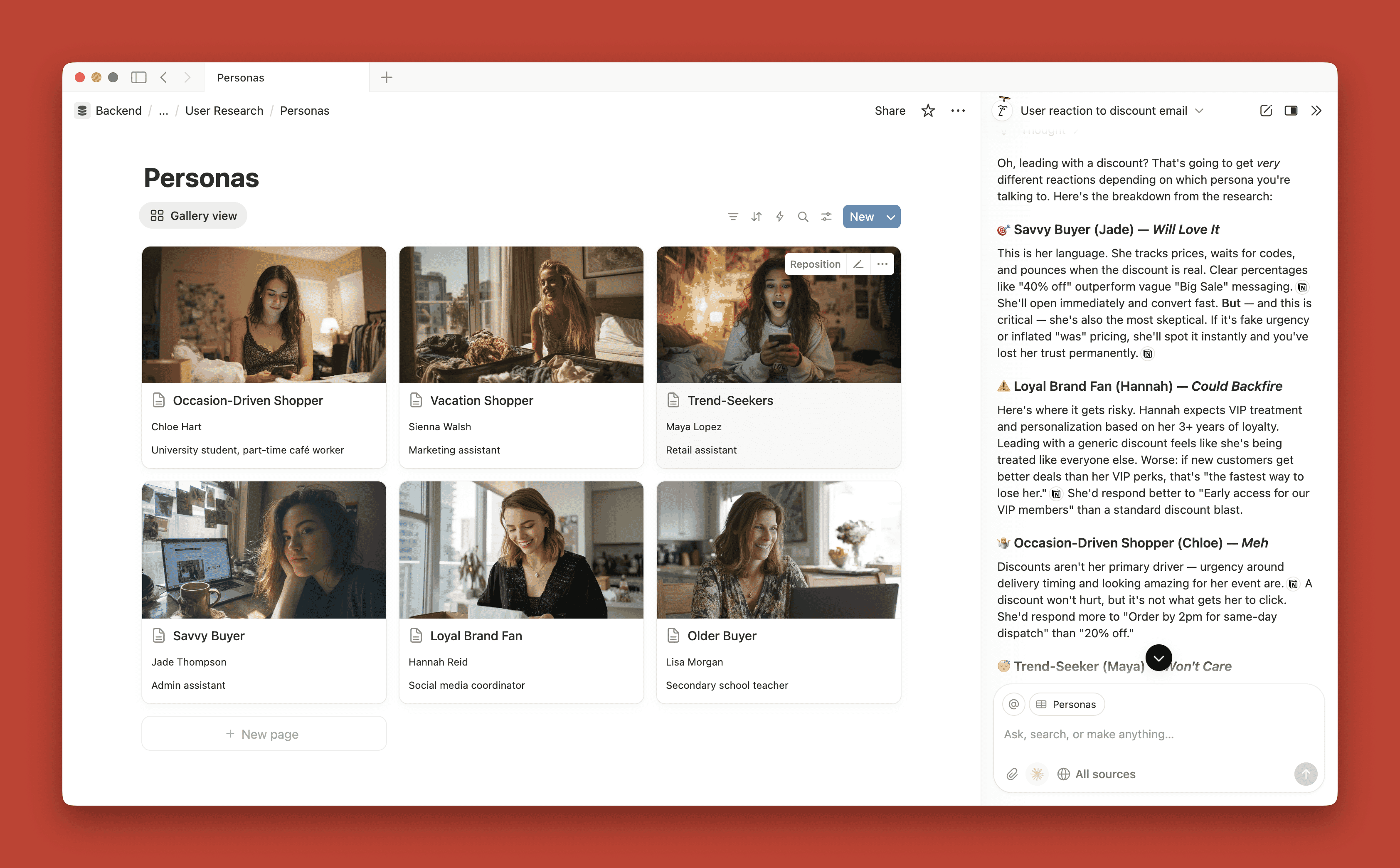
This is not science fiction. With AI, we can build exactly this kind of system. We can take all of that scattered research (the surveys, the interviews, the support tickets, the analytics, the personas themselves) and turn it into an interactive resource that anyone can query for multi-perspective feedback.
Building the User Research Repository
The foundation of this approach is a centralized repository of everything you know about your users. Think of it as a single source of truth that AI can access and draw from.
If you have been doing user research for any length of time, you probably have more data than you realize. It is just scattered across different tools and formats:
- Survey results sitting in your survey platform,
- Interview transcripts in Google Docs,
- Customer support tickets in your helpdesk system,
- Analytics data in various dashboards,
- Social media mentions and reviews,
- Old personas from previous projects,
- Usability test recordings and notes.
The first step is gathering all of this into one place. It does not need to be perfectly organized. AI is remarkably good at making sense of messy inputs.
If you are starting from scratch and do not have much existing research, you can use AI deep research tools to establish a baseline.
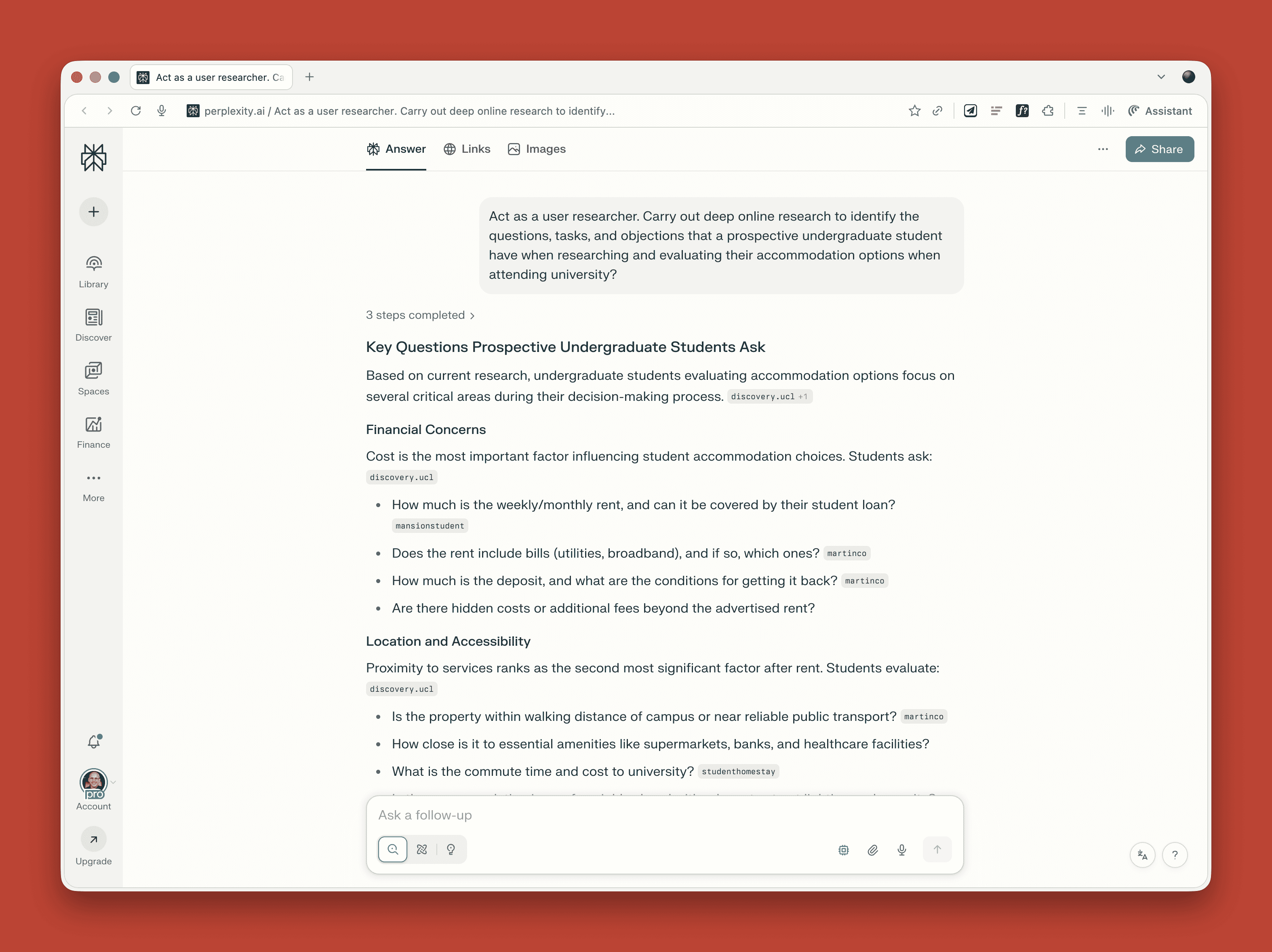
These tools can scan the web for discussions about your product category, competitor reviews, and common questions people ask. This gives you something to work with while you build out your primary research.
Creating Interactive Personas
Once you have your repository, the next step is creating personas that the AI can consult on behalf of stakeholders. This builds directly on the functional persona approach I outlined in my previous article, with one key difference: these personas become lenses through which the AI analyzes questions, not just reference documents.
The process works like this:
- Feed your research repository to an AI tool.
- Ask it to identify distinct user segments based on goals, tasks, and friction points.
- Have it generate detailed personas for each segment.
- Configure the AI to consult all personas when stakeholders ask questions, providing consolidated feedback.
Here is where this approach diverges significantly from traditional personas. Because the AI is the primary consumer of these persona documents, they do not need to be scannable or fit on a single page. Traditional personas are constrained by human readability: you have to distill everything down to bullet points and key quotes that someone can absorb at a glance. But AI has no such limitation.
This means your personas can be considerably more detailed. You can include lengthy behavioral observations, contradictory data points, and nuanced context that would never survive the editing process for a traditional persona poster. The AI can hold all of this complexity and draw on it when answering questions.
You can also create different lenses or perspectives within each persona, tailored to specific business functions. Your “Weekend Warrior” persona might have a marketing lens (messaging preferences, channel habits, campaign responses), a product lens (feature priorities, usability patterns, upgrade triggers), and a support lens (common questions, frustration points, resolution preferences). When a marketing manager asks a question, the AI draws on the marketing-relevant information. When a product manager asks, it pulls from the product lens. Same persona, different depth depending on who is asking.
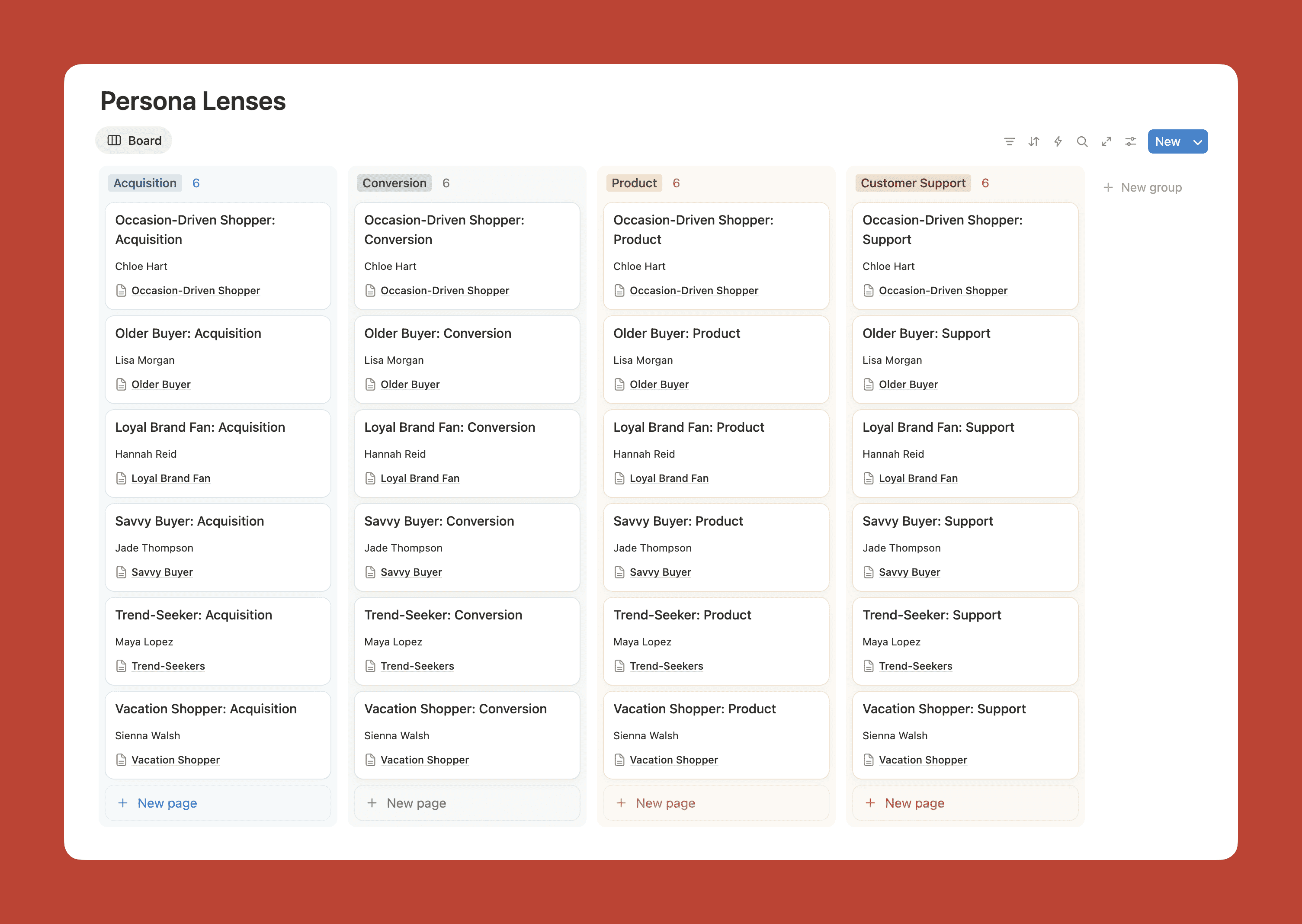
The personas should still include all the functional elements we discussed before: goals and tasks, questions and objections, pain points, touchpoints, and service gaps. But now these elements become the basis for how the AI evaluates questions from each persona’s perspective, synthesizing their views into actionable recommendations.
Implementation Options
You can set this up with varying levels of sophistication depending on your resources and needs.
The Simple Approach
Most AI platforms now offer project or workspace features that let you upload reference documents. In ChatGPT, these are called Projects. Claude has a similar feature. Copilot and Gemini call them Spaces or Gems.
To get started, create a dedicated project and upload your key research documents and personas. Then write clear instructions telling the AI to consult all personas when responding to questions. Something like:
You are helping stakeholders understand our users. When asked questions, consult all of the user personas in this project and provide: (1) a brief summary of how each persona would likely respond, (2) an overview highlighting where they agree and where they differ, and (3) recommendations based on their collective perspectives. Draw on all the research documents to inform your analysis. If the research does not fully cover a topic, search social platforms like Reddit, Twitter, and relevant forums to see how people matching these personas discuss similar issues. If you are still unsure about something, say so honestly and suggest what additional research might help.
This approach has some limitations. There are caps on how many files you can upload, so you might need to prioritize your most important research or consolidate your personas into a single comprehensive document.
The More Sophisticated Approach
For larger organizations or more ongoing use, a tool like Notion offers advantages because it can hold your entire research repository and has AI capabilities built in. You can create databases for different types of research, link them together, and then use the AI to query across everything.

The benefit here is that the AI has access to much more context. When a stakeholder asks a question, it can draw on surveys, support tickets, interview transcripts, and analytics data all at once. This makes for richer, more nuanced responses.
What This Does Not Replace
I should be clear about the limitations.
“
There are several scenarios where you still need primary research:
- When launching something genuinely new that your existing research does not cover;
- When you need to validate specific designs or prototypes;
- When your repository data is getting stale;
- When stakeholders need to hear directly from real humans to build empathy.
In fact, you can configure the AI to recognize these situations. When someone asks a question that goes beyond what the research can answer, the AI can respond with something like: “I do not have enough information to answer that confidently. This might be a good question for a quick user interview or survey.”
And when you do conduct new research, that data feeds back into the repository. The personas evolve over time as your understanding deepens. This is much better than the traditional approach, where personas get created once and then slowly drift out of date.
The Organizational Shift
If this approach catches on in your organization, something interesting happens.
“
Instead of spending time creating reports that may or may not get read, you spend time ensuring the repository stays current and that the AI is configured to give helpful responses.
Research communication changes from push (presentations, reports, emails) to pull (stakeholders asking questions when they need answers). User-centered thinking becomes distributed across the organization rather than concentrated in one team.
This does not make UX researchers less valuable. If anything, it makes them more valuable because their work now has a wider reach and greater impact. But it does change the nature of the work.
Getting Started
If you want to try this approach, start small. If you need a primer on functional personas before diving in, I have written a detailed guide to creating them. Pick one project or team and set up a simple implementation using ChatGPT Projects or a similar tool. Gather whatever research you have (even if it feels incomplete), create one or two personas, and see how stakeholders respond.
Pay attention to what questions they ask. These will tell you where your research has gaps and what additional data would be most valuable.
As you refine the approach, you can expand to more teams and more sophisticated tooling. But the core principle stays the same: take all that scattered user knowledge and give it a voice that anyone in your organization can hear.
In my previous article, I argued that we should move from demographic personas to functional personas that focus on what users are trying to do. Now I am suggesting we take the next step: from static personas to interactive ones that can actually participate in the conversations where decisions get made.
Because every day, across your organization, people are making decisions that affect your users. And your users deserve a seat at the table, even if it is a virtual one.
Further Reading On SmashingMag
- “A Closer Look At Personas: What They Are And How They Work | 1”, Shlomo Goltz
- “How To Improve Your Design Process With Data-Based Personas”, Tim Noetzel
- “How To Make Your UX Research Hard To Ignore”, Vitaly Friedman
- “How To Build Strong Customer Relationships For User Research”, Renaissance Rachel
 (yk)
(yk)