









This is part two of three (part one and part three).
How does it work?
How is it integrated into the tools? Glad you asked!
Is it a browser extension?
We already have a couple of internal browser extensions, most notably Teleporter, which is installed on pretty much every Guardian computer and overlays some extra functionality in various places (such as the website and a number of our tools) to help internal users jump around from one thing to another.
So you may think Pinboard is a browser extension. Unfortunately, releasing browser extensions is painful and slow. The process is quite involved, different for different browsers and takes hours/days to propagate to users. So not really suitable, especially while the project was in active development, often with many releases per day.
Is it a library?
So you may be thinking, a library which is a dependency of the other tools, we’ve got lots of precedent for that, notably within the tools space we’ve got the relatively modern “prosemirror-elements”, which is a nice TypeScript React library where all the different ‘elements’ which make up articles etc. are implemented (such as text element, image element, video element, tweet element and so on) this library is then used in various places, most notably in Composer’s text editor. The host application (Composer) is written in Angular so needs lots of glue code to bind variables to React. It’s the same story for other tools and even if they are made using React (such as the video tool) they’re unlikely to be the same version etc.
Even with a nice library like this, which uses semantic release, every time you make a change you need to bump the dependency in all the consuming applications. So you need to factor in the build time of the library code, then the release propagation, then the build time of the host applications and then the release time. In the case of the above, that’s a minimum 30-minute round-trip, which wasn’t really suitable for Pinboard.
So instead, it is its own beast!

… is the line in composer.gutools.co.uk, which:
-
Is a simple script tag which loads pinboard.loader.js from pinboard.gutools.co.uk (i.e. ‘bootstrapping-lambda’ via an API Gateway). pinboard.loader.js is not a static asset but an endpoint, which generates a small amount of JavaScript on the fly, as such it’s explicitly not cached.
-
Before responding it verifies the user’s panda cookie (shared auth between the tools based on top-level domain, note how pinboard and composer are both subdomains of gutools.co.uk) and checks for the pinboard permission, looks up the AppSync connection details/URLs and last generates an auth token for AppSync.
-
The JS it returns essentially instructs the host page to add a further script tag to load, pinboard.main.[HASH].js which is the main single bundle for the pinboard app, the contents of which is the same for everyone and has a hash in the name so it can be cached indefinitely.
-
When that script loads it calls Pinboard.mount passing in the connection details and token, which in turn displays the little floating pin blob etc.
Magic!
So, a very simple integration into the host application (one line) and importantly, decouples releases of pinboard and the host application.
Now what about those little ‘Add to 📌’ buttons we see in the Grid in the video, which look more deeply integrated into the host tool. They’re also very lightweight in terms of the integration point.
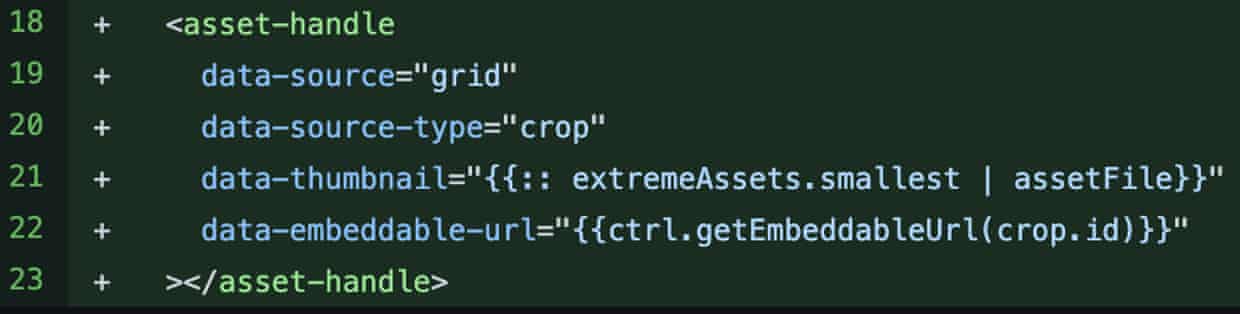
Here you see the template code in the Grid (which is Angular), an “asset-handle” tag which crucially is meaningless to the host application and doesn’t render anything visual if pinboard isn’t loaded (for example at the BBC who have started using the Grid in recent years) or if pinboard is broken perhaps. That’s it, as far as the Grid is concerned.
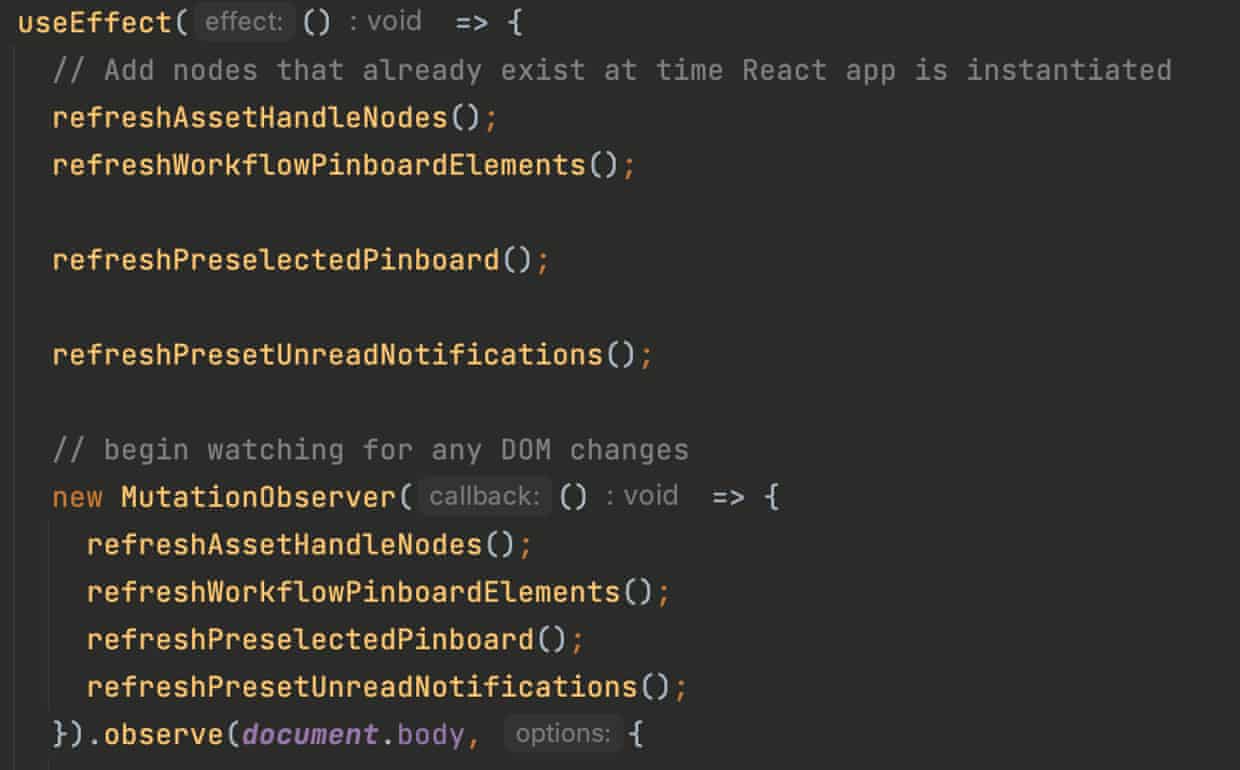
So once pinboard is loaded, it runs this code …
… which finds those asset handles very simply with …

… and stores them to state. Pinboard then keeps up to date with any changes to the host application (note how I mentioned Grid is written in Angular, which has a different render life cycle than React in Pinboard), it does this using MutationObserver, a standard DOM API. Once it has references to the DOM nodes of those asset handles, on render it simply iterates through, instantiating some components …
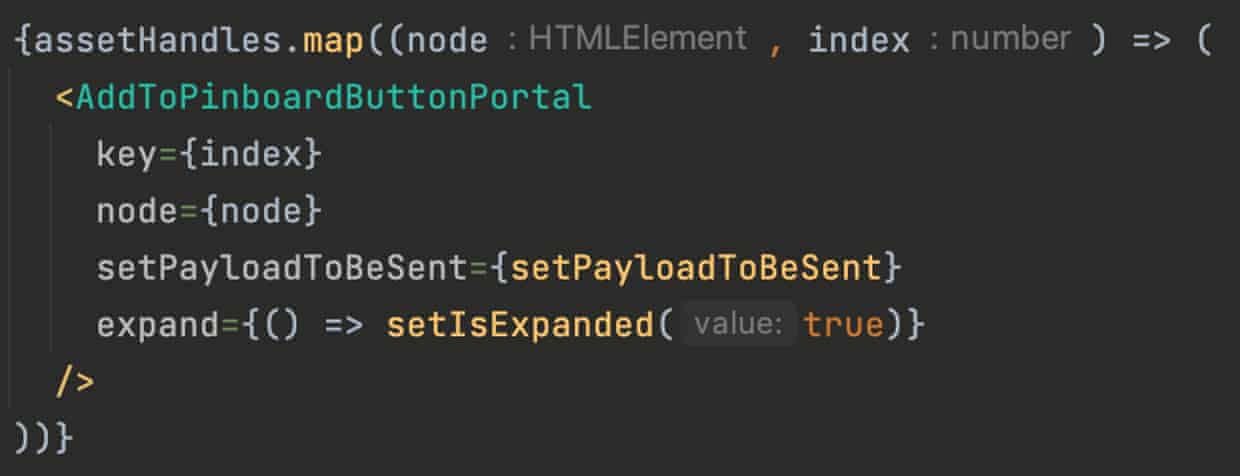
… which are wrapped in React Portals …
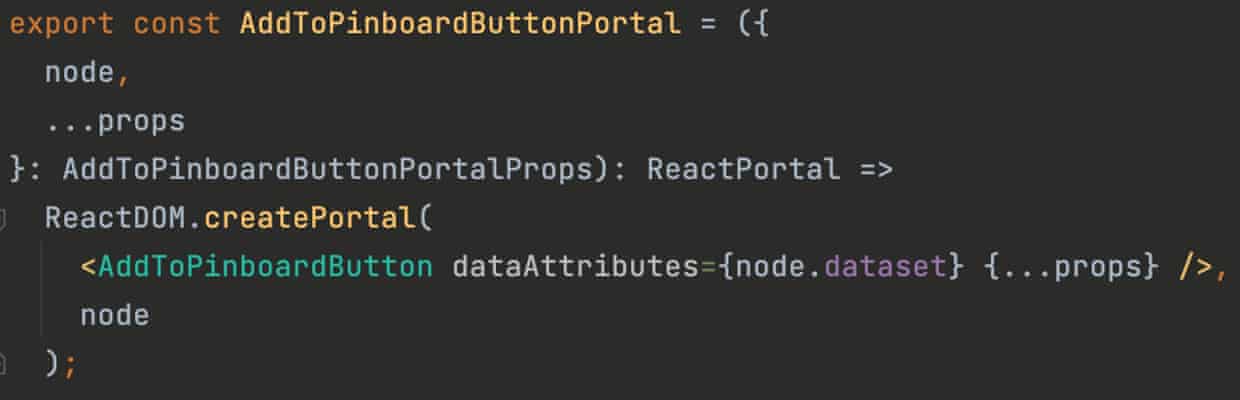
… a core but lesser known feature of React which let you take over DOM elements outside the element where the React app is mounted.
Last thing to mention, we use another standard but lesser known bit of the DOM API … Shadow DOM. Which essentially lets you sandbox the CSS from the main DOM. Anything visual in pinboard is inside one or more shadow DOMs, to isolate the styles, to avoid the host application messing up pinboard’s styles or vice versa.
GraphQL (via AWS AppSync)
GraphQL allows you to abstract over multiple data sources and present a single (and fairly simple) schema to the client. Aside from the types representing the data, you have queries (for reading data), mutations (for changing data) and subscriptions (to hear in real-time about those mutations). The notion of ‘subscriptions’ was pretty key in our decision to use GraphQL/AppSync, given we were making a real-time collaboration application – those subscriptions are essentially websockets under the hood but nicely abstracted for you.
AppSync is AWS’ managed GraphQL so you don’t need to worry about provisioning servers, keeping GraphQL up to date etc. It provides connection to various data sources, via ‘resolvers’. You can use them to connect to all sorts; lambdas, http endpoints, DynamoDB, even RDS. These resolvers have optional request and response mapping, but they’re in a not too friendly proprietary language, so we just use lambdas and simply parse the JSON payload from AppSync in the lambda and reply with some JSON – which is nice and benefits from the shared code etc.
There are lots of auth options; API keys, AWS Cognito etc. but we just have a custom lambda. In my experience AppSync has been great and you should certainly read up on it and potentially consider it for some projects. Worth noting though, it’s not the cheapest, and although I wouldn’t call it expensive, I probably wouldn’t use it for reader facing things as its pay per request.
This is part two of three (part one and part three).
Credits
Pinboard was built by Tom Richards, Jenny Graham-Jones, Thalia Silver, Andrew Nowak, Phillip Barron & Ara Cho with additional developer contributions from Fred O’Brien & Samantha Gottlieb. Product design from Ana Pradas and product direction from Calvin Dickson. All the while supported by the rest of the content production team in the Product & Engineering department. Not forgetting the input/time/effort from countless Guardian journalists, who have helped shape Pinboard.