







In September 2024, I started building AlgoMaster.io from scratch after quitting my job at Amazon. By December, it was live. Today, it serves over 70,000 users and handles roughly 300,000 requests per day. The entire thing runs on about $900 a month.
In this article, I’ll break down every major technology I used and, more importantly, why I chose it. If you’re planning to build your own platform, SaaS product, or side project, this could save you weeks of research and decision paralysis.
AlgoMaster is a Software Engineering interview preparation platform with interactive courses. It includes features like: algorithm visualizations, an in-browser code editor with remote execution, multiple AI-powered capabilities such as AI chatbot, system design interview practice, text-to-speech for lessons, and much more.
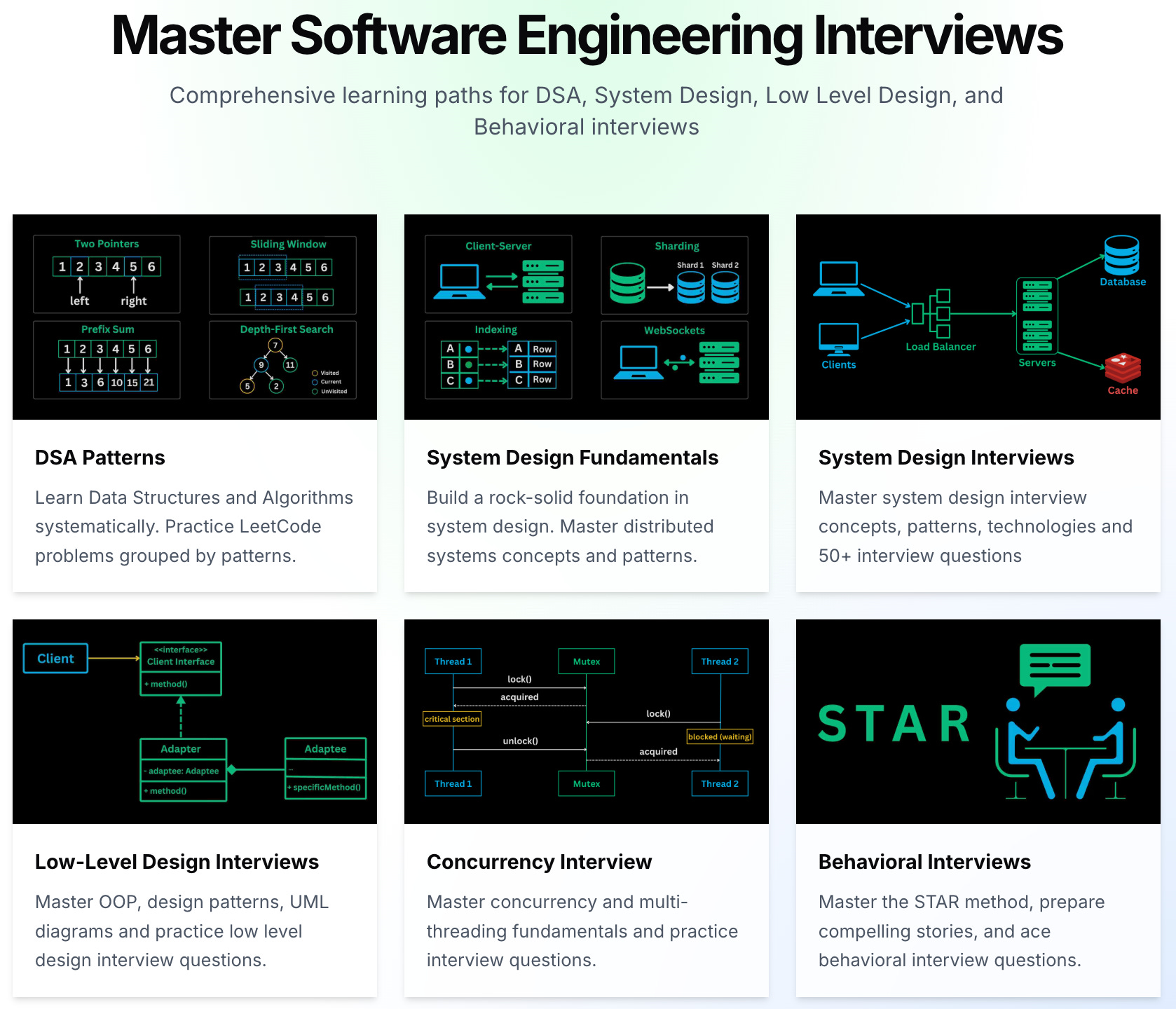
Building it taught me a lot about choosing the right tools, knowing when “good enough” is better than “perfect,” and shipping fast without compromising on what truly matters.
Before diving into individual tools, here’s how everything fits together at a high level.
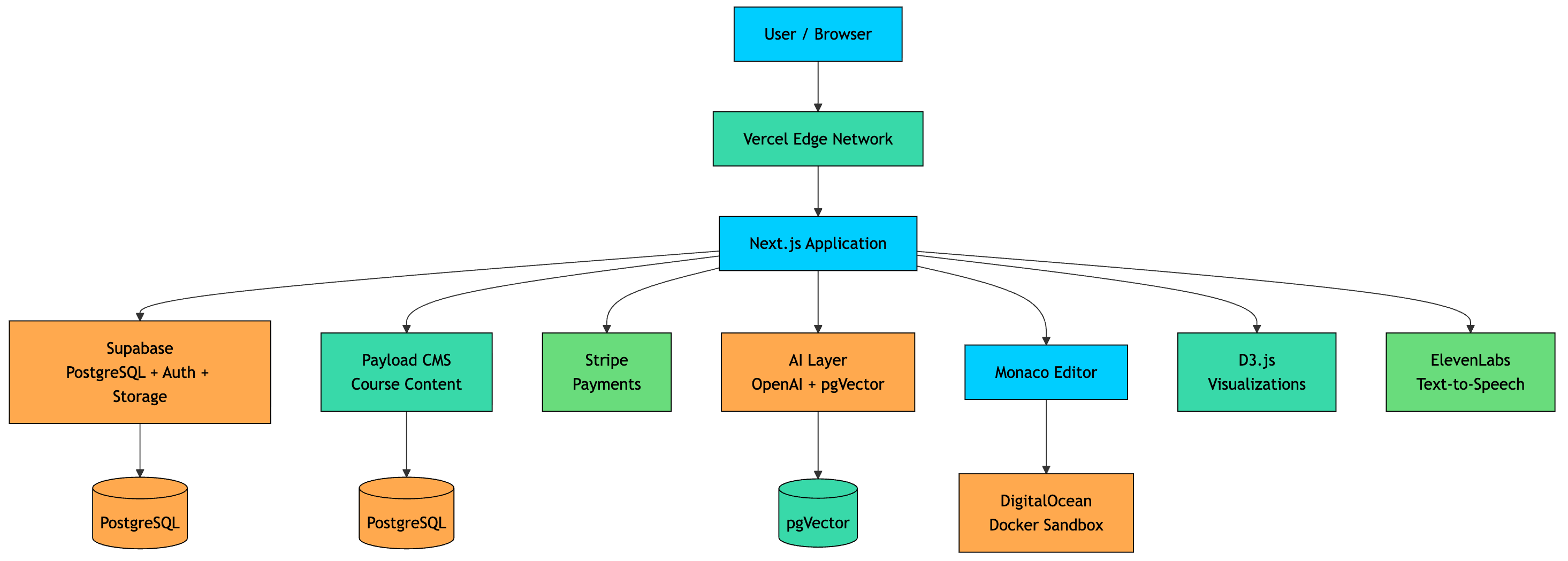
The architecture is intentionally simple. A Next.js frontend, deployed on Vercel, handles both the UI and API routes. Supabase powers the database, authentication, and file storage. Payload CMS manages all course content. Stripe handles payments. And a combination of OpenAI, Whisper, Elevanlabs and pgVector powers the AI features.
Every user request first hits Vercel’s edge network, where it is routed to the appropriate Next.js serverless function or static page. From there, the application communicates with the relevant backend services as needed.
Simple, but it works at scale.

The entire platform is built as a Next.js 15 application using the App Router.
Next.js is an open-source, full-stack React framework that provides a structured approach along with powerful built-in features for building high-performance, scalable web applications.
I had not used Next.js before this project and had to learn it from scratch. After evaluating multiple options, it became clear that Next.js was the best fit for what I was building, both in terms of capabilities and ecosystem.
Here is what made Next.js the right choice:
Full Stack Framework: It allows me to build both the frontend and backend in a single codebase, which simplifies development and reduces context switching.
Server-side rendering (SSR) for SEO: For a content-heavy platform like AlgoMaster, SEO is critical. SSR ensures better indexing and faster initial load times.
File-based routing: Routing is simple and intuitive. The file system directly maps to application routes, which improves developer experience and maintainability.
I use TypeScript across the entire codebase. For a project of this scale (1000+ code files), it is not optional.
Type safety has prevented countless bugs, especially at API boundaries where mismatches can easily occur. It also improves code readability, refactoring confidence, and long-term maintainability.

For the component library, I went with shadcn/ui. If you have not used it, shadcn is different from traditional component libraries like Material UI or Chakra.
Instead of installing a package and importing opaque components, you copy the component source code directly into your project. That means you own it completely. You can customize anything without fighting the library’s abstractions or overriding styles with hacky CSS specificity tricks.
Tailwind CSS handles all the styling. I had used plain CSS, CSS Modules, and styled-components on previous projects, and Tailwind was the clear winner for speed. Your design decisions live right where your markup is, and you’re never hunting through a separate CSS file.
Choosing Supabase was one of the most important decisions I made. As a solo developer, I needed a solution that could handle the database, authentication, and file storage without stitching together multiple services.
Supabase provides a full PostgreSQL database with a clean dashboard, built-in authentication (email, Google, GitHub OAuth), and S3-compatible storage for assets.
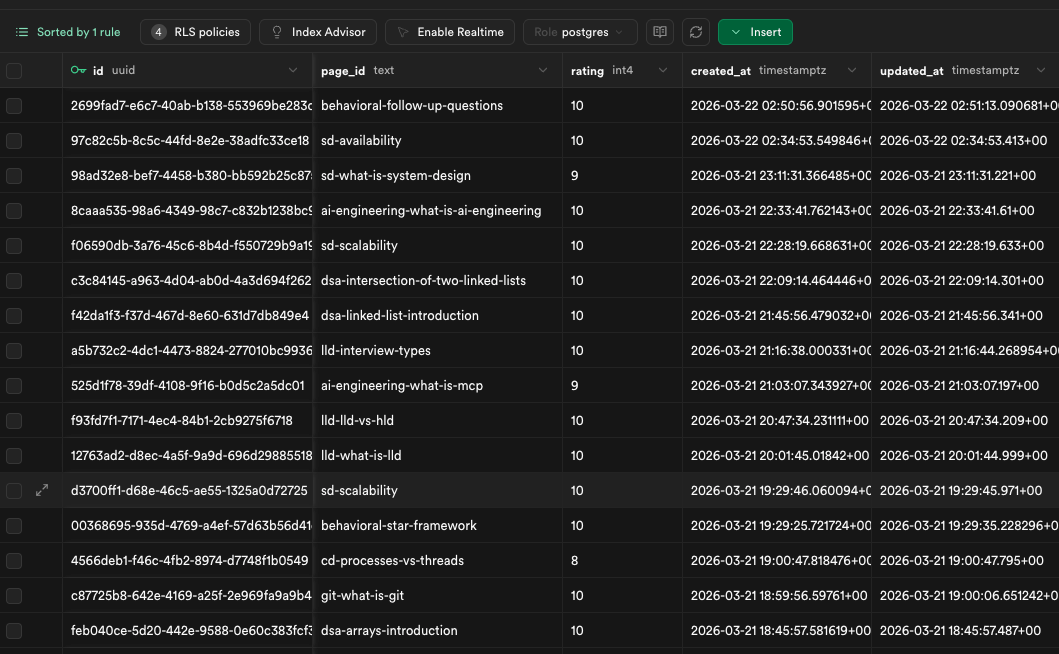
It also includes an interactive SQL editor, which makes it easy to run queries, debug issues, and inspect data directly without leaving the dashboard.
To improve performance for global users, I’ve configured a read replica alongside the primary database. This helps reduce latency for read-heavy operations across different regions.
One of the biggest advantages is Row-Level Security (RLS). I’ve configured RLS on sensitive tables so that even if someone attempts to access data via a direct API request, they can only see their own data.
Supabase makes this straightforward. You define SQL policies once, and they are enforced at the database level, which adds a strong layer of security without additional backend complexity.
This was one of the hardest parts to figure out. I spent a significant amount of time exploring different CMS options and even tried building a custom solution from scratch before finally settling on Payload.
The platform handles a large amount of structured content: courses, chapters, lessons, code examples, quizzes, and diagrams. I needed a CMS that could model complex relationships, remain developer-friendly, and be self-hosted.
Payload CMS checked all the boxes.
It is a headless, TypeScript-native, API-first CMS. I define all content schemas directly in TypeScript, and Payload automatically generates the admin panel along with REST and GraphQL APIs.
The admin panel is where all course content is created and managed, which makes the workflow smooth and centralized. I’ve defined multiple custom blocks to support different content components such as code snippets, callouts, diagrams, and more.
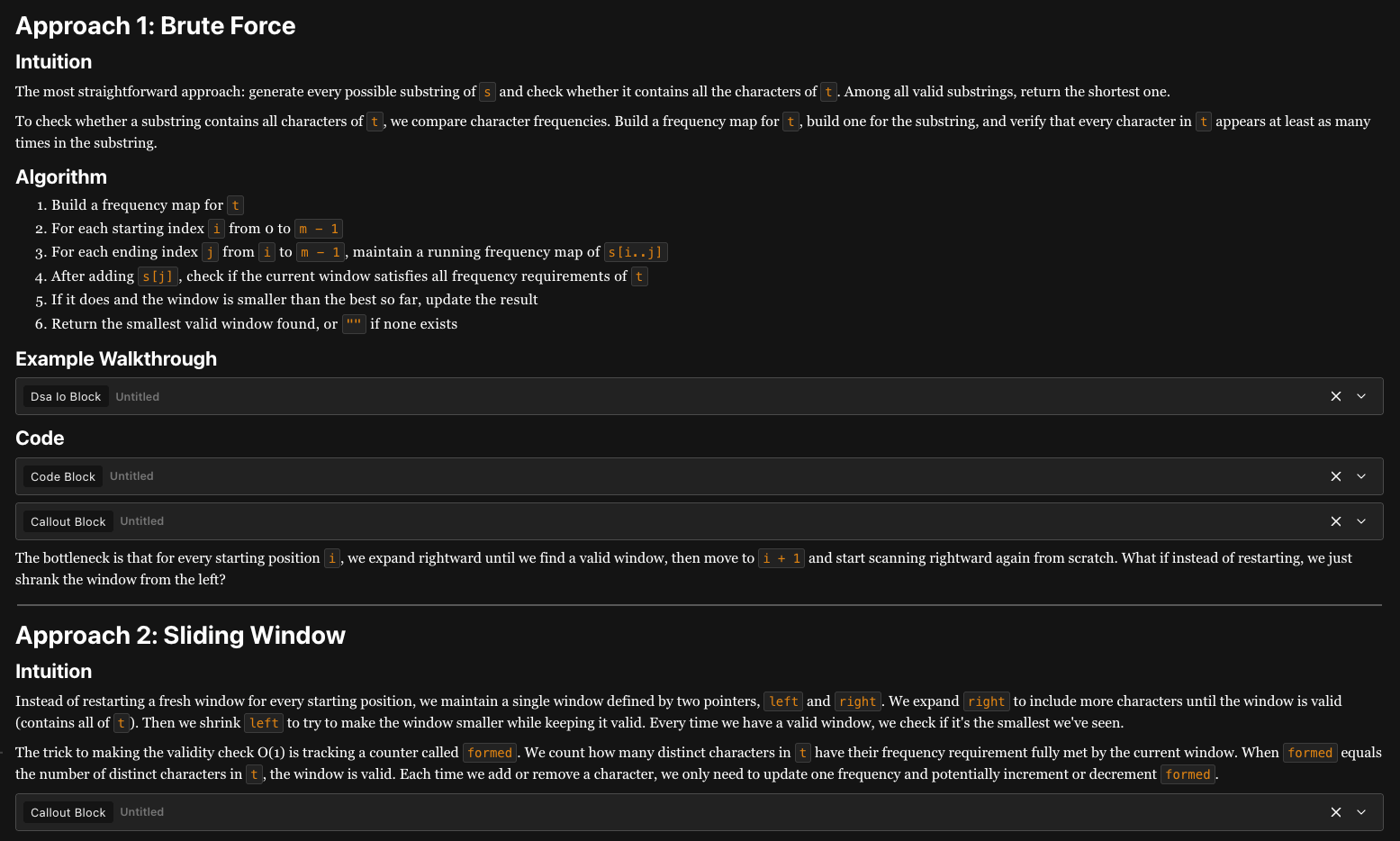
All Payload CMS data is stored in PostgreSQL under a separate schema, keeping it isolated from the main application data.
The Payload application itself is deployed separately on Vercel, allowing it to scale independently from the main platform.
All payments are handled through Stripe.
The integration works like this: when a user subscribes, Stripe creates a subscription and sends a webhook to my Next.js API route. The webhook handler then updates the user’s entitlements in Supabase, granting access to premium features.
When a subscription is cancelled or expires, another webhook fires, and access is automatically revoked.
The interesting part was handling multi-currency support. I have users across 50+ countries, so displaying localized pricing was important. For this, I use Vercel’s geolocation headers to detect the user’s region and map it to the appropriate currency, enabling a seamless localized pricing experience.
I’ve built 5+ AI-powered features into the platform, including:
A lesson chatbot that answers questions based on the current chapter
“Explain with AI” for content, code blocks, and diagrams
An evaluation system for coding and LLD exercises
A full system design practice mode with AI-driven feedback
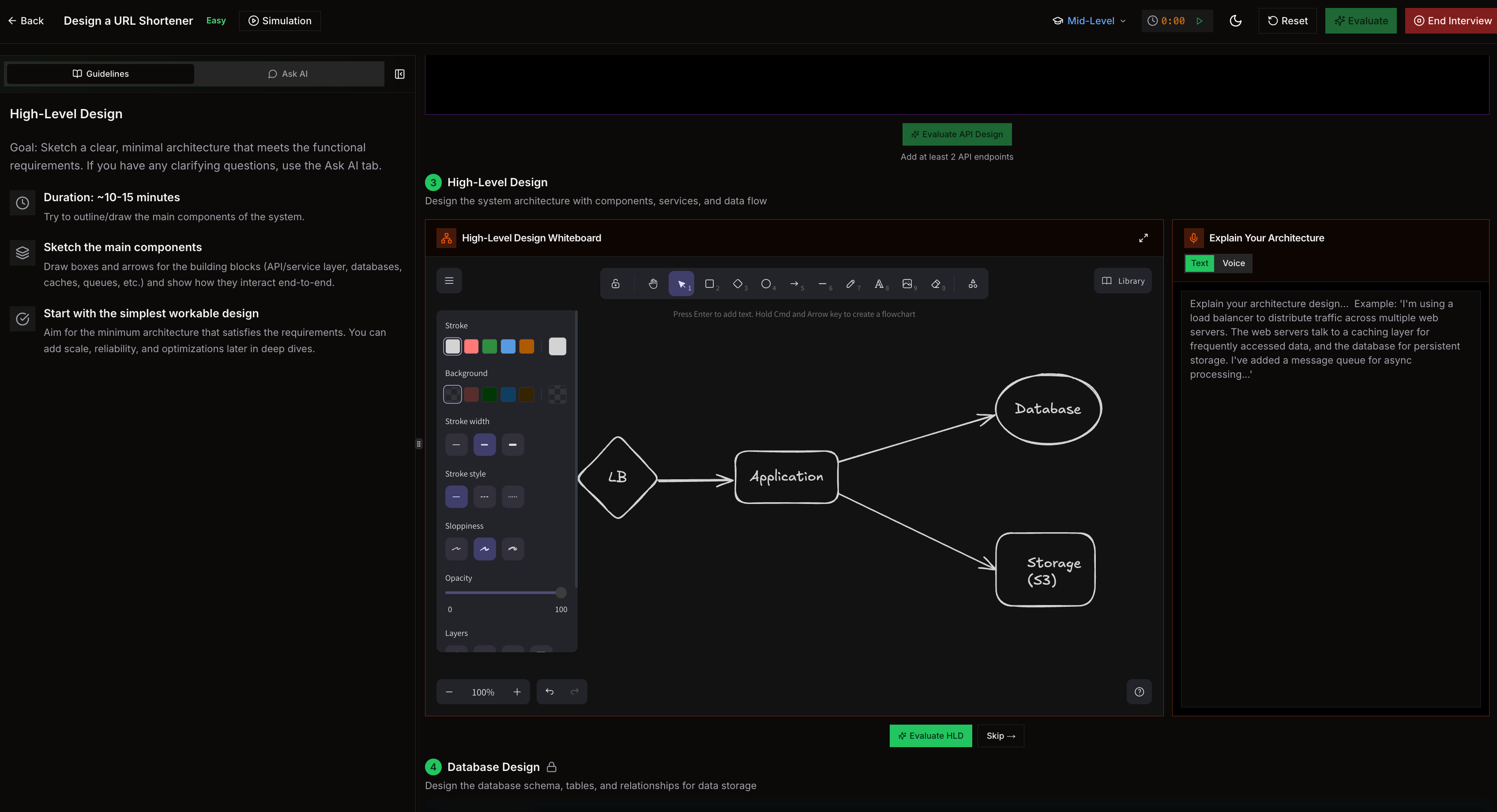
The Vercel AI SDK acts an AI gateway that makes it easy to switch between different models. It also handles streaming responses seamlessly between the model APIs and the client, which improves the overall user experience.
I use OpenAI models such as GPT-5.4-mini and GPT-5.1 to power text-based AI features across the platform.
I use smaller models for high-frequency, lightweight tasks such as “Ask AI” and answer evaluation. For more complex tasks like system design evaluation and judging, I use larger, more capable models to get deeper reasoning and higher-quality outputs.
Voice input is powered by OpenAI Whisper. Users can speak their answers during interview simulations, and the audio is transcribed server-side.
I use the pgVector extension in PostgreSQL to power the RAG-based chatbot experience across the platform.
At a high level, pgVector allows me to store and query embeddings directly inside my existing Postgres database. This removes the need for a separate vector database and keeps everything in a single, consistent system.
One important challenge with RAG systems is keeping embeddings up to date. To handle this, I’ve set up hooks in Payload CMS. Whenever a piece of content is created or updated, it automatically triggers re-generation of embeddings for that content.
Some users prefer listening over reading, especially during commutes. To support this, I use ElevenLabs api to generate audio versions of lessons.
Each audio file is generated once and then cached in Supabase Storage, so the cost is incurred only a single time per lesson.
While this feature is relatively expensive, the improvement in user experience makes it well worth it.
And yes, I use Claude Code (Anthropic’s AI coding tool) extensively for development. It has been one of the biggest productivity multipliers in building this platform.
I’ve built an in-browser code editor that allows users to write and execute code directly from the browser.
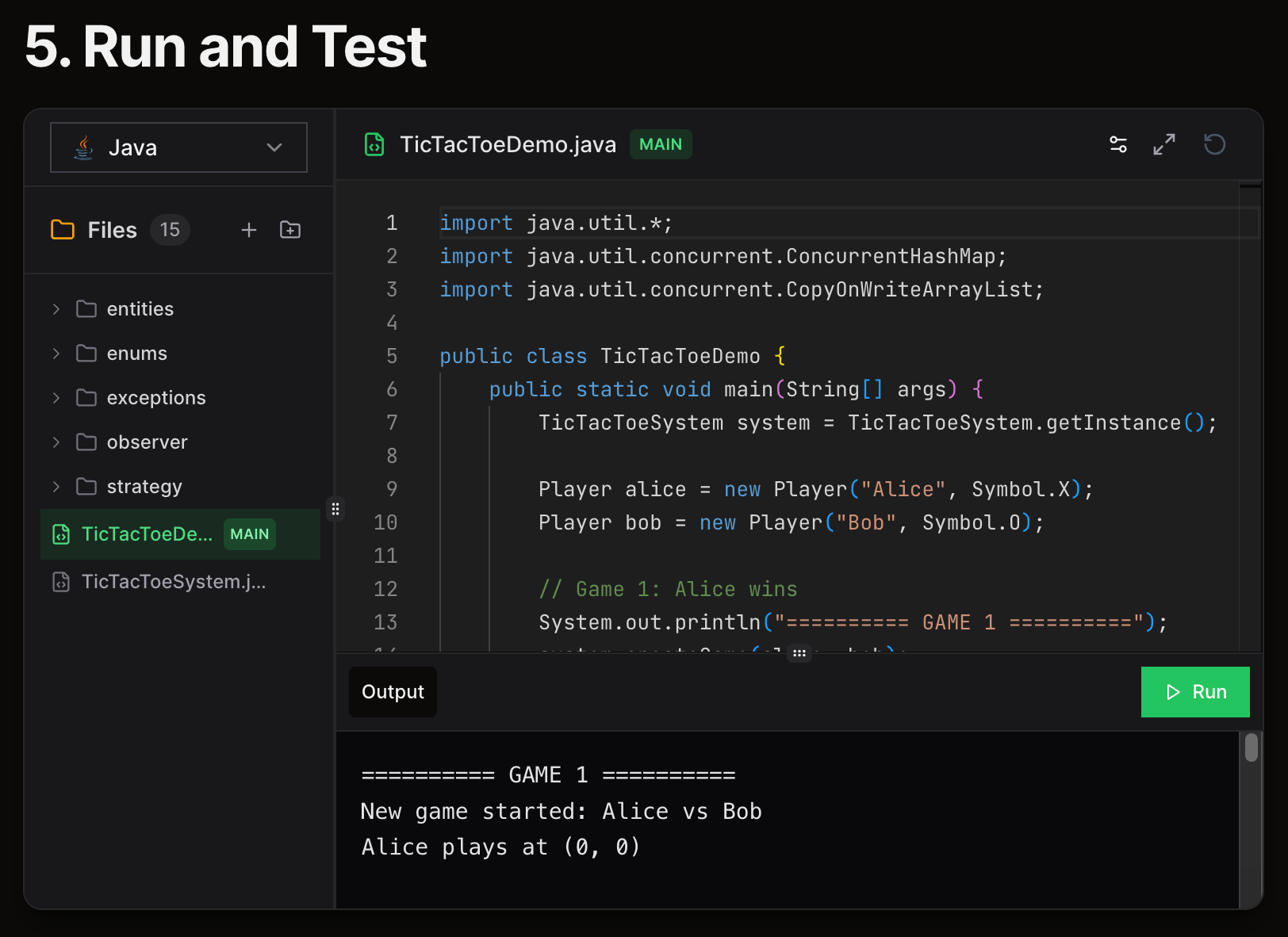
Every coding practice page uses Monaco Editor, the same editor that powers VS Code. It provides syntax highlighting, autocomplete, multi-language support, and a familiar developer experience.
Users can write and run code seamlessly without leaving the platform.
For code execution, I run a self-managed execution service on a DigitalOcean Droplet running Docker containers.
When a user clicks “Run,” their code is sent to the server, executed inside an isolated Docker container, and the output is returned. Each execution runs with strict time and memory limits to ensure reliability and fairness.
These containers are ephemeral. A new container is created for each execution and destroyed immediately afterward.
This level of isolation is critical because users can submit arbitrary code. It ensures that one user’s code cannot affect another user’s execution or access the underlying host system.
The platform includes 200+ interactive visualizations and simulations covering key interview topics such as DSA and System Design.
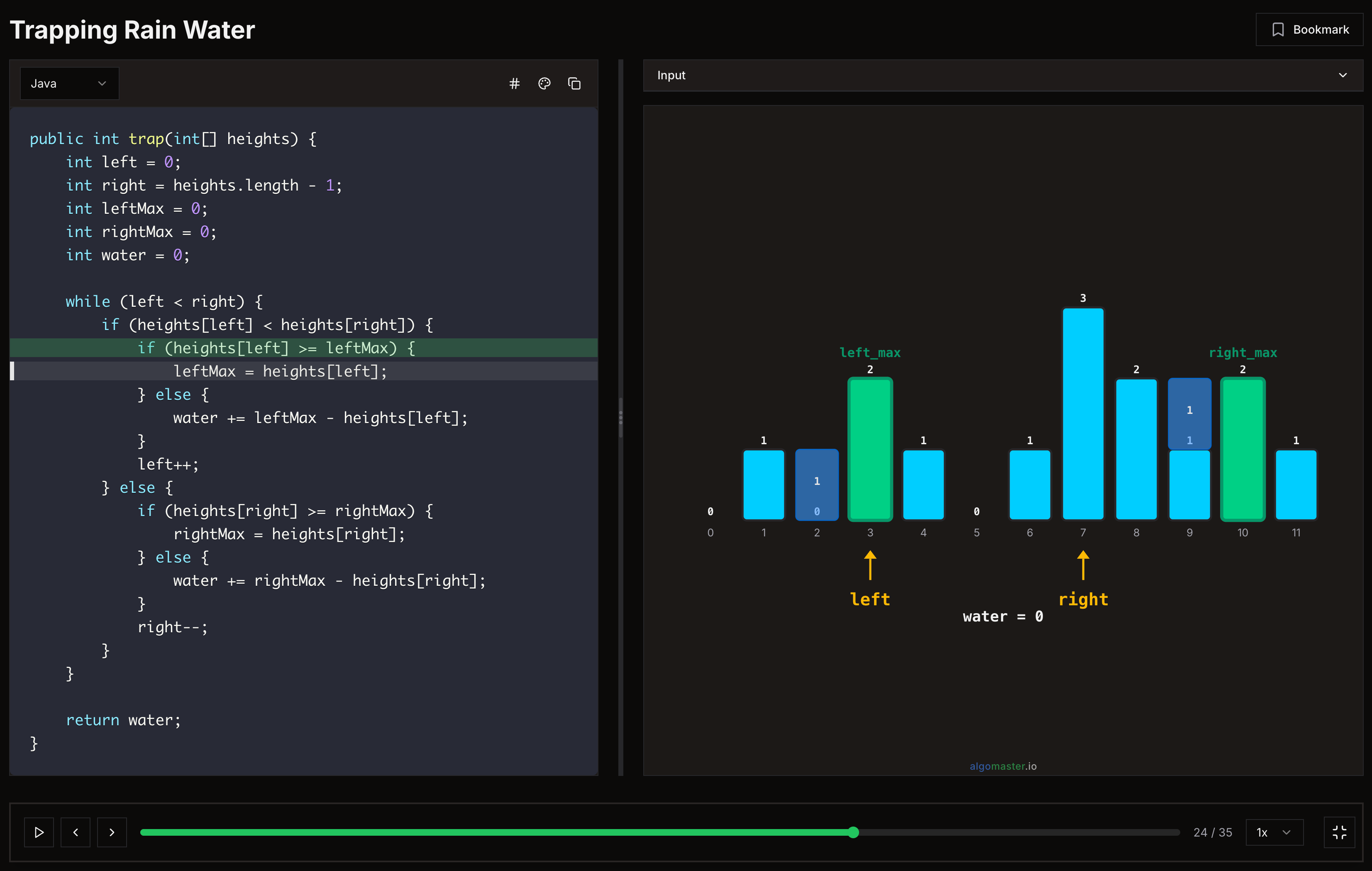
One of the core features of the platform is step-by-step algorithm visualization. These are built using D3.js, which provides fine-grained control over SVG elements, making it ideal for animating data structures and algorithms.
D3 does have a steep learning curve, but it unlocks a level of flexibility and precision that is hard to achieve with higher-level charting libraries.
Mermaid for diagrams embedded in course content (architecture diagrams, flowcharts, sequence diagrams)
Recharts for analytics dashboards and progress charts
Excalidraw for the whiteboard feature, where users can sketch out system designs during practice sessions
The application is deployed on Vercel. For a Next.js app, this is the path of least resistance.
Every push to GitHub triggers an automatic build and deployment, and rolling back to a previous version is straightforward if something goes wrong.
I don’t manage any servers myself. Vercel handles infrastructure and auto-scaling out of the box. When traffic spikes, serverless functions scale automatically without any manual intervention.
To control costs and prevent abuse, I’ve configured rate limits and spending limits.
PostHog is used for product analytics, including tracking page views, active users, and overall user behavior.
It is open-source, self-hostable, and offers a generous free tier, although I currently use their cloud version.
PostHog also supports feature flags, which I plan to use for gradual rollouts. This will allow me to release new features to a subset of users first, validate them in production, and then roll them out to everyone with confidence.
A few more tools that are worth mentioning:
Used for transactional emails such as login links and comment reply notifications. It has a clean API, reliable deliverability, and a generous free tier, which makes it a great fit.
Powers the notes feature. Users can take notes while going through courses, and BlockNote provides a Notion-like block editor that is easy to integrate with React. It supports rich text, code blocks, checklists, and more.
Handles client-side state management. I had used Redux in a previous project and found it too verbose for my needs. Zustand is minimal, requires almost no boilerplate, and just works. It’s perfect for managing things like editor state, UI preferences, and quiz progress.
Most of these tools have generous free tiers. You can build something substantial without spending a dollar until you have real users. The barrier to starting is genuinely lower than it’s ever been.
What I’ve learned is this: the hard part is not choosing the perfect tech stack. It is building something people actually want, improving it consistently based on feedback, and showing up every day to make it better. The tech stack is just the vehicle.
You also don’t need to know everything before you start. I didn’t know 90% of the tools I’ve mentioned in this article when I began. I learned them along the way, one problem at a time.
I hope you found this useful. Let me know if you have any suggestions or recommendations.
此内容由惯性聚合(RSS阅读器)自动聚合整理,仅供阅读参考。 原文来自 — 版权归原作者所有。