





Protocol Buffers are fantastic for defining API contracts. They give you a massive ecosystem of tooling, backward compatibility guarantees, and rock-solid schemas. But if you have ever tried sharing protobuf docs with an API consumer, you know the generated documentation story usually feels like a complete afterthought.
Most tooling forces you into a frustrating compromise. You either get docs that are technically complete but too ugly to send to others, or you get something pretty that requires a mountain of custom templates, glue code, and endless project-specific maintenance. Or you just share the protobuf files, which is also not amazing.
That frustration is exactly why I originally built protoc-gen-connect-openapi. The OpenAPI ecosystem has tools like Redocly and Swagger UI that give you beautiful, browsable websites out of the box. Translating Connect APIs into OpenAPI made sense at the time, but it solved the problem in a round-about way. I will say that it works remarkably well, but I wanted a tool that starts from protobuf, keeps the schema front and center, and still looks polished enough to publish.
So I made ProtoDocs.
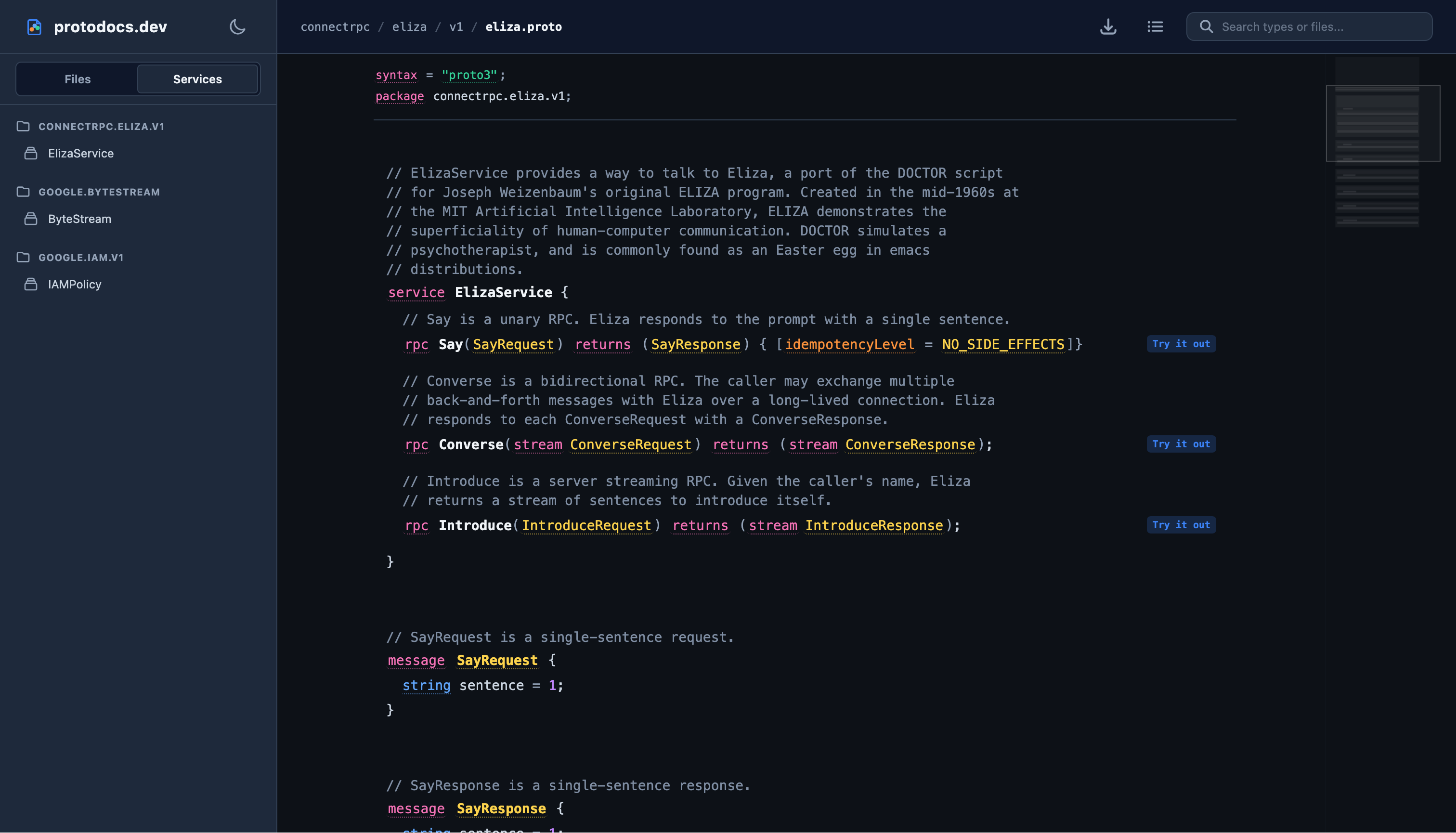
A screenshot of the ProtoDocs interface showing protobuf files, services, messages, and RPC calls.
Protobuf-first documentation
ProtoDocs is a web-based documentation browser for Protocol Buffer definitions. It is built around protobuf concepts directly: files, packages, services, RPCs, messages, enums, fields, oneofs, options, and comments.
What does “protobuf-first” actually mean? It means the tool is not ashamed of the raw protobuf source. Personally, I think protobuf schemas are pretty clean, expressive, and highly readable, which is something I definitely can’t say for the verbose, nested JSON/YAML of OpenAPI. Instead of hiding the schemas behind abstract templates, ProtoDocs leans into the source code itself. It renders the actual protobuf syntax directly (complete with syntax highlighting), but overlays it with rich, interactive tooltips on everything, from keywords and field names to type references and custom options, making it easy to navigate and learn as you browse.
Fun fact: the configuration of ProtoDocs itself is defined as a Protocol Buffer schema. That means ProtoDocs is self-documenting. You can browse the official configuration options directly on protodocs.dev, which is a pretty fun way to showcase the tool.
The main goal is simple: make protobuf documentation pretty, navigable, and useful without turning it into a completely different API description format first.
What it does
ProtoDocs gives you a documentation UI that lets you explore the API from a few different angles:
- Browse files and packages through a clean directory hierarchy that merges common path prefixes, making large proto trees easier to scan.
- Inspect services and RPC methods, including unary and streaming signatures, alongside custom method options.
- Drill into messages, enums, custom options, oneof declarations, nested types, comments, and linked type references.
- Jump to definitions and find references across the loaded files. Type tooltips can be pinned, allowing you to move from a field to the type declaration or see where a type is used without losing your place.
- Interactive “Try it out” panel for sending live Connect, gRPC-Web, and proxied gRPC requests (including streaming calls) directly to target RPC services from the browser.
- Websocket-based proxy to tunnel browser requests and streaming calls, avoiding CORS restrictions and enabling direct connection to your services.
- Syntax highlighting and interactive help for the underlying protobuf source code, rendering it cleanly and adding keyword tooltips that explain what they do.
- Multiple schema loading options including serving pre-built descriptor set files (e.g. from
buforprotoc), querying live servers using reflection, or reading directly from an in-memory Go registry for embedded usage.
As you edit input parameters in the client panel, ProtoDocs also generates command snippets for Connect, grpcurl, and buf curl, serving as a bridge from browser exploration to reproducible terminal commands.
Built for Connect, but not only Connect
ProtoDocs is heavily designed around ConnectRPC servers.
That is where the experience feels the most natural to me, because a Connect server can expose the Connect protocol, gRPC, and gRPC-Web from the exact same API surface. ProtoDocs leverages that to provide browser-native exploration while staying close to the real RPC contract.
The interactive client supports:
- Connect
- gRPC-Web
- gRPC through proxy mode
The documentation side is protobuf-first, so the schema browsing makes sense anywhere you have protobuf descriptors. The richer interactive path is where ConnectRPC servers truly shine.
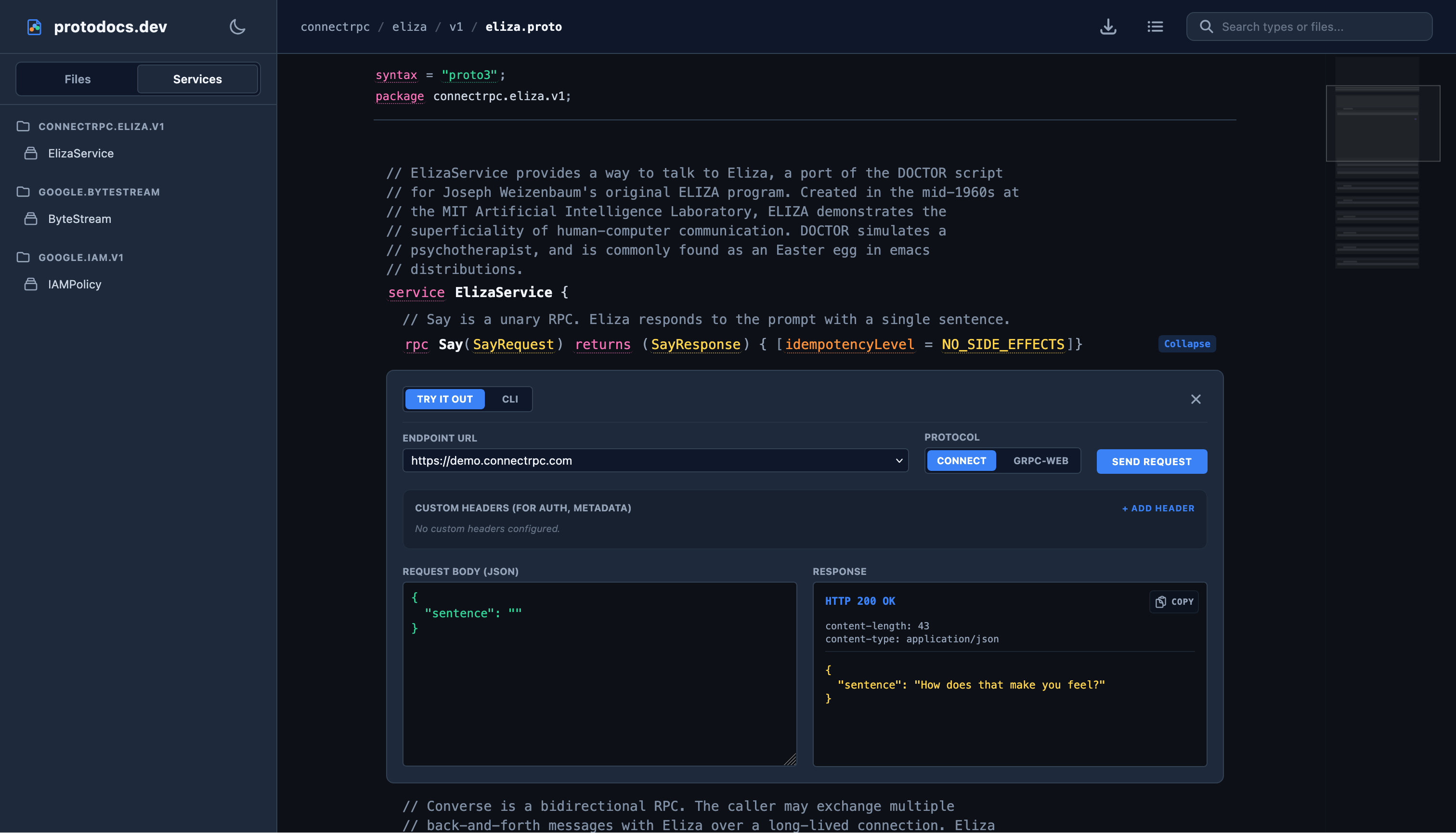
A screenshot showing that you can make requests, similar to swagger.
Three ways to run it
There are three primary ways to deploy ProtoDocs:
- Static Website
- With a backend
- Embedded into Go applications
All three of these approaches have strengths and weaknesses, so let’s dig into how this works:
Static website
ProtoDocs can be hosted as a static site. Put the built frontend on Nginx, S3, Netlify, GitHub Pages, or any other static host, point it at one or more descriptor files, and you have browsable protobuf documentation.
This mode is the simplest deployment. The browser talks directly to your target API server for interactive requests, so your API server needs CORS configured if you want the “Try it out!” panel to work.

Website with a small backend
ProtoDocs can also run with a small backend proxy.
In this mode, browser requests and streaming calls tunnel through the proxy. That avoids CORS problems and lets the backend forward requests to gRPC, gRPC-Web, or Connect services.

I expect this mode to be the most useful for internal tools and developer portals where “open the docs and call the API” needs to work out of the box.
Embedded Go handler
ProtoDocs can be embedded directly into a Go HTTP server.
This gives you the documentation UI, descriptor loading from the Go registry, and the proxy path all from the same application. If you already have a Go service exposing Connect or gRPC handlers, mounting ProtoDocs alongside it makes the service self-documenting without requiring a separate docs deployment.
At a high level, it looks like this:
handler, err := protodocs.NewHandler(protodocs.Config{
    Title:    "My Service Documentation",
    LogoText: "My Service",
    Registry: protoregistry.GlobalFiles,
    Prefix:   "/docs/",
})
if err != nil {
    log.Fatal(err)
}

http.Handle("/docs/", handler)
Themes, source, and sharp edges
ProtoDocs has light, dark, and cyberpunk themes. They can follow system preferences or be toggled manually.
It can render source views, markdown comments, structured options, package trees, service lists, search results, and linked type details. The idea is to make the source schema readable without forcing people to clone a repo, find the right proto directory, and mentally resolve every import by hand.
It is also still early days.
There are bugs. There are parts of the UI and runtime behavior that will inevitably change as the project gets more real-world use.
But it is far enough along that I want people to try it, complain about what is confusing, and show me the protobuf schemas that break it. If you run into any sharp edges, have feedback on how to improve the layout, or want to contribute a fix, please head over to GitHub to open an issue or submit a PR!
Try it
You can try the live demo at protodocs.dev.
A protobuf-first documentation browser for APIs that deserve better than ugly generated docs.
If you have a ConnectRPC, gRPC-Web, or descriptor-heavy protobuf project, I would love for you to point ProtoDocs at it and see where it falls over.