惯性聚合 高效追踪和阅读你感兴趣的博客、新闻、科技资讯
阅读原文 在惯性聚合中打开

推荐订阅源

腾讯CDC
IT之家
IT之家
有赞技术团队
有赞技术团队
WordPress大学
WordPress大学
Apple Machine Learning Research
OSCHINA 社区最新新闻
OSCHINA 社区最新新闻
人人都是产品经理
人人都是产品经理
The Cloudflare Blog
钛媒体:引领未来商业与生活新知
钛媒体:引领未来商业与生活新知
freeCodeCamp Programming Tutorials: Python, JavaScript, Git & More
博客园 - 【当耐特】
V
V2EX
Last Week in AI
Last Week in AI
H
Help Net Security
The GitHub Blog
The GitHub Blog
S
SegmentFault 最新的问题
F
Fortinet All Blogs
I
InfoQ
宝玉的分享
宝玉的分享
A
About on SuperTechFans
MongoDB | Blog
MongoDB | Blog
Microsoft Azure Blog
Blog — PlanetScale
Blog — PlanetScale
B
Blog

Stonecharioteer on Tech

I Traced My Traffic Through a Home Tailscale Exit Node What Was I Reading Last? In Three Not-So-Easy Pieces Dogfooding Is Hard Code blocks in your books, finally GoForGo v0.9.0 Merrilin - We built an app to read books I use a Macbook now Data Structures & Algorithms - Preparing for Interviews Using a local DNS namespace for local service discovery Direction KOllector - Publishing KOReader Highlights gbt: branches touched in the last 24 hours A Soiree into Symbols in Ruby Some Smalltalk about Ruby Loops Ruby Blocks Returning from Ruby Blocks, Procs and Lambdas My Linux Laptop Finally Works: How Claude Helped Me Fix Years of Annoyances TIL: Watchexec - Modern File Watching for Development Workflows A Less Busy Mind GoForGo - Learn Go through live examples Migrating My Old Blog to Hugo with Claude The Qtile Window Manager: A Python-Powered Tiling Experience Read the RFCs that Built the Internet Py-x-Protobuf - Or How I Learned to Stop Worrying and Love Protocol Buffers Python Reverse a List New Beginnings Leaving ChainSafe Systems Crews Not Teams A System for Getting Better at LeetCode So Far So Rust
Screen Lock for Cinnamon Desktop using Zenity and Termina...
2024-01-29 · via Stonecharioteer on Tech

This is how I did it in case I forget

This post is more of a “this is how I did it incase I forget”.

I’ve switched to Cinnamon Desktop (on Fedora 39) last year, after giving up on trying to maintain my Qtile configuration. I was wasting too much time on it.

One personal painpoint I had is that I wanted to lock my screen without resorting to using the main Cinnamon menu all the time. I could use the keyboard shortcuts dialog to trigger the built-in screen lock but I also wanted a confirmation, which I haven’t yet figured out how to do with the built-in features. Plus, I’m a creature of habit, so I wanted something that I could preserve and use in another window manager if need be.

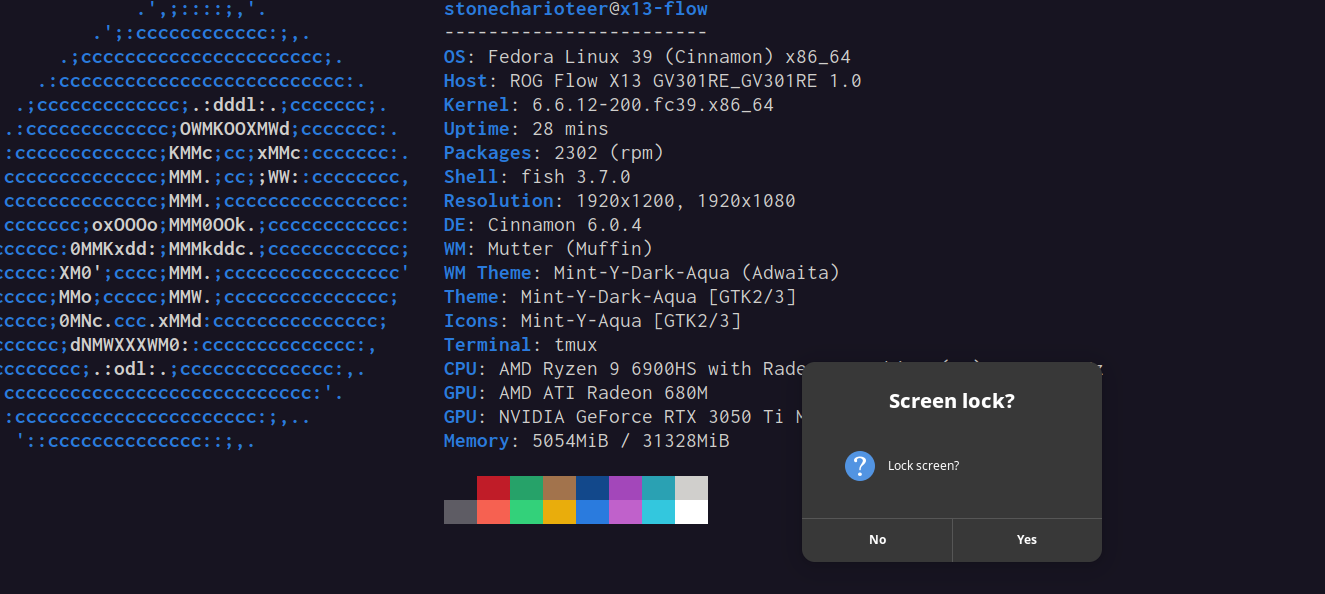
To that end, I remembered a friend once showed me Zenity to create simple GUIs for Linux. I strung up this one liner that prompts me if I want to lock my screen and then locks it if I click yes.

1
2
bash -c "zenity --question --text='Lock screen?' --title='Screen lock?' && \
  cinnamon-screensaver-command -l && xset dpms force off;"

Screenlock prompt with Zenity

I needed the bash -c "" bit since this would be within the cinnamon launch options and I’d want to ensure that this is reproducible all the time.

If I move to another window manager, I just need to replace cinnamon-screensave-command. I also use xset dpms force off because it takes a while to turn off my laptop screen and sometimes I do this just before sleeping or turning the lights off and I don’t want to wait.

I don’t close the lid because I use my current laptop, an Asus RoG X13 Flow in the tent mode, and would have to disconnect my docking station to flip it around and close the lid.