





1: Introduction
The IT infrastructure of this home lab took almost half a year from the initial design to the final realization, and it took a lot of time and a little bit of money.
The time, needless to say, was spent on fishing during work, including “overtime” during off-duty hours; the money spent included hardware and software costs, such as domain names, Handsome themes, cloud hosting, cloud storage, and a small X86 box and an ARM Raspberry Pi placed in the home, costing a total of almost 3K, and there will be fixed costs of 300RMB per year for cloud hosting in the future. There is a fixed cost of 300RMB per year for cloud hosting. The time spent on this project is really a bottomless pit, life goes on and on.
Based on this, most of the Internet services, such as blogs, Web sites, videos, downloads, mailboxes, code repositories, etc., can be built with the help of open source projects, anytime, anywhere.
2: List
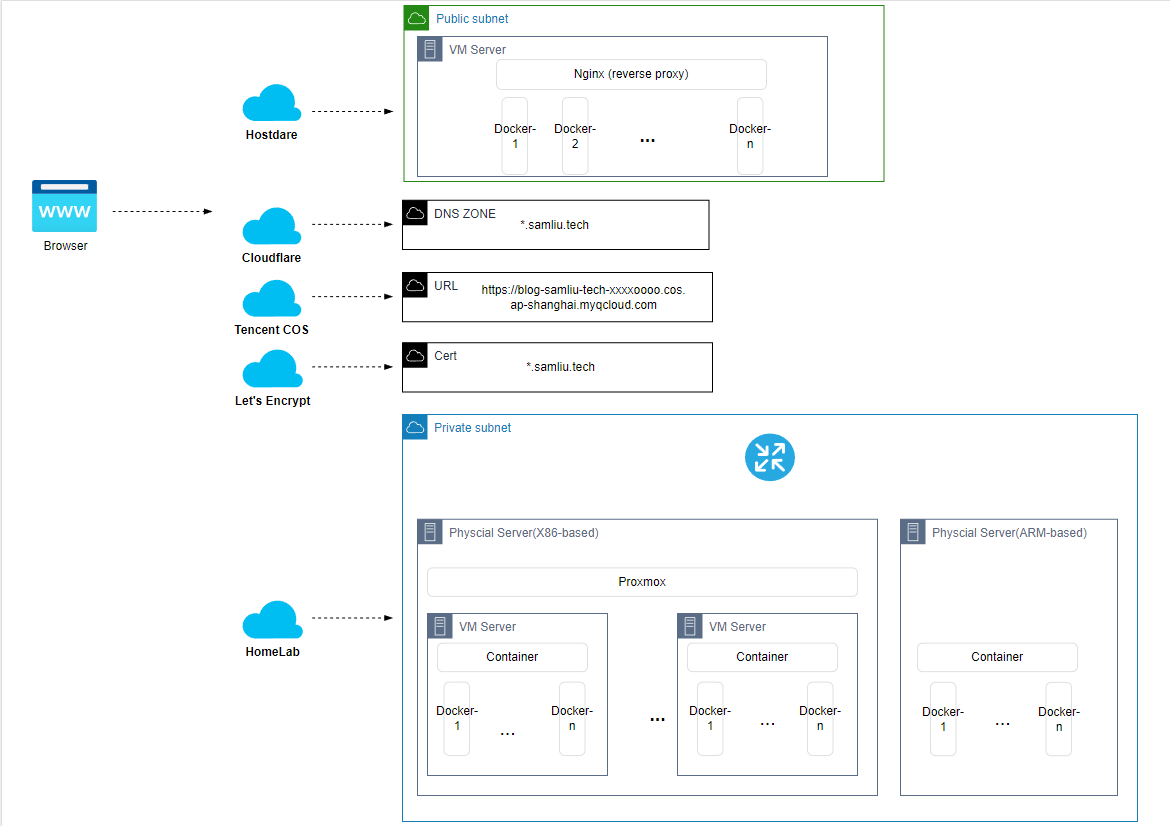
- Domain name: samliu.tech Purchased from Tencent cloud, in order to facilitate the application of SSL certificate, currently hosted in Cloudflare.
- Cloudflare: Hostdare, a beautiful country, not so well-known old host business, configuration is not important, the line is the focus. Maximum bandwidth 50Mb, telecom two-way CN2 GIA line, Unicom and mobile direct connection, usually RTT < 200ms, peak RTT < 300ms, peak period is also very stable, very few packet loss.
- Cloud storage: Tencent cloud COS, as a blog graph bed use, so even if the host is far away in the United States, the domestic access experience is also very good, there is no configuration CDN.
- X86 host and ARM host: homelab most of the things about this part, placed at home, 7×24. using Proxmox system virtualization, Docker process virtualization.
- Let’s Encrypt.
An internet service for requesting free SSL certificates, with the help of automated scripts, after the first configuration is done, there is no need to pay attention to subsequent ones, including certificate renewals, fully automated.
3: The On-Cloud Part
The cloud host has a fixed public IP and system Ubuntu 12. The domain is currently hosted by Cloudflare with custom DNS records on it.
Nginx acts as a first-class reverse proxy server, accepting traffic from the user’s side, mainly proxying web traffic and forwarding it to different services at the backend based on different host fields, i.e., different domain names, in the Http protocol. The services deployed in the backend, for example, two different types of blogs:
Based on Typecho platform: https://homelab.samliu.tech
Based on WordPress platform: https://blog.samliu.tech
Of course there are also standalone docker-based applications, such as Letsencrypt, that automate everything about certificates.
For applications that are not latency sensitive, they can be deployed on another backend, the ‘Homelab’ local environment. The cloud host acts as a traffic forwarder, forwarding different traffic to the ‘Homelab’ local environment based on policies, either web traffic or normal TCP/UPD traffic.
The component that accomplishes the forwarding task is an open source project FRP, which can forward TCP/UDP traffic based on ports or HTTP(S) traffic based on domain names, acting as a web reverse proxy. Deploy FRP server on the cloud, ‘Homelab’ locally deploy FRP client, at this time the FRP server, for web traffic, in fact, also acts as a secondary reverse proxy, for the sake of centralized management of certificates and the efficiency of the session establishment issues considerations, the host on the cloud to terminate all the HTTPS traffic, for the web traffic to ‘Homelab’, only forward http traffic, frp tunnel itself has encryption function, security can be guaranteed.
Session Establishment Efficiency Issues: For weak network environments, such as packet loss or high latency lines,
TCP three handshakes, as well as TLS 1-4 handshakes, will seriously increase the service response time,
which is manifested in the slow opening of the site, based on the UDP HTTP3,
which is a perfect fit for this scenario.


UDP-based HTTP3 is perfectly suited for this scenario !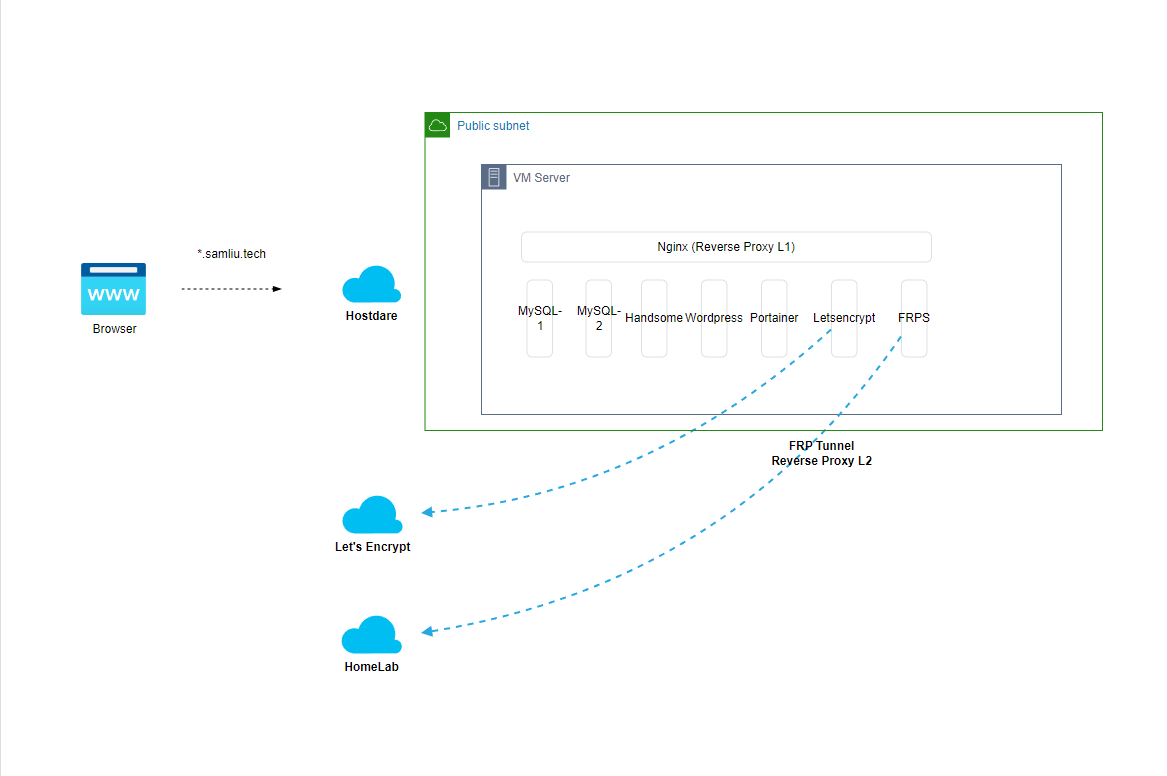
4: Under the Cloud
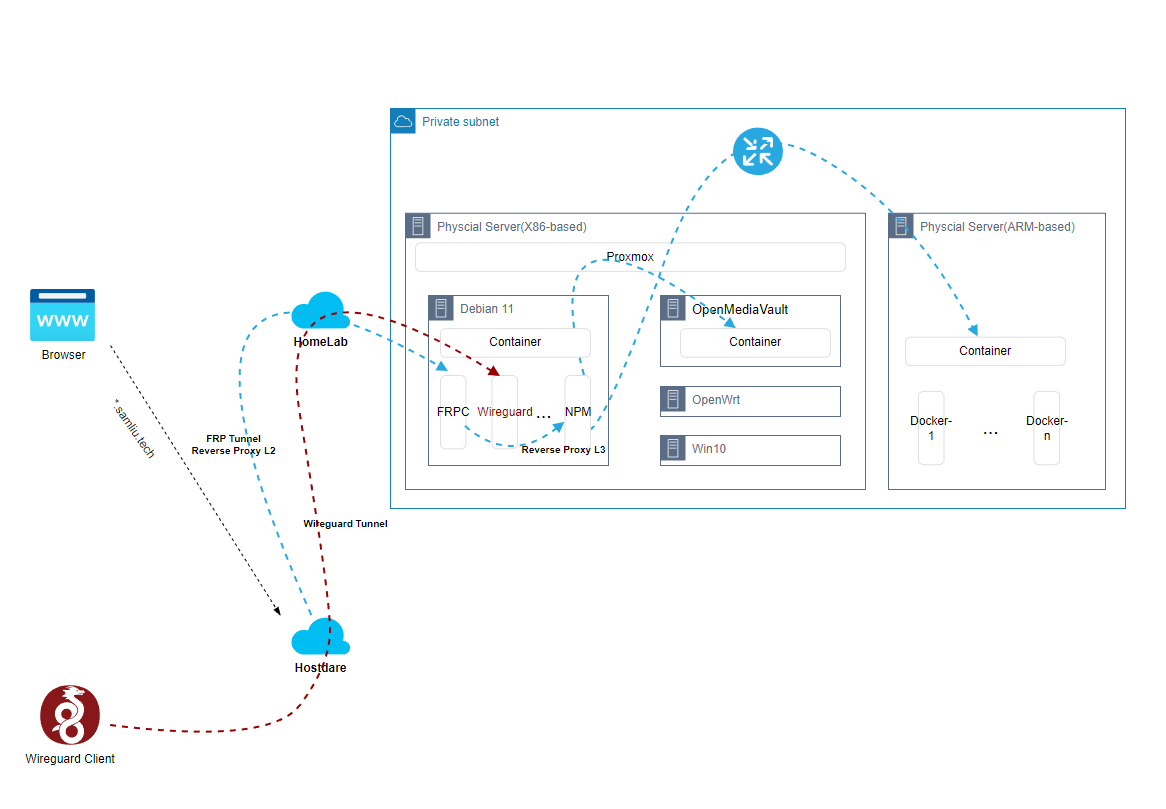
‘Homelab’ environment for X86 chicks, deploying the free open source Proxmox virtualization system, an alternative to VMWare Vsphere.
The following VMs are currently available:
- Debian 11: the main system, deploying a variety of applications, mostly docker-based as well
- OpenMediaVault: an open source NAS system
- OpenWrt: Bypass GFW
- Win10: graphical workbench
ARM Chick, mainly used to try some ARM applications, of course, can also deploy ARM version of Proxmox.
On Debian VM, there are some special infrastructure applications, the aforementioned FRP:
- FRP client: used to establish a tunnel with the FRP server and act as a secondary reverse proxy
- NPM (Nginx Proxy Management):
Open source graphical project for Nginx, easy to manage and configure some Nginx features, as well as integrate some other features, here it acts as a third-level
Here it acts as a third-level reverse proxy, accepting http web traffic from the FRP Tunnel and distributing it to the real application.
FRP can of course also forward traffic directly to the application, but for back-end applications that need to be changed frequently, FRP is not very convenient to manage, NPM is a bit easier.
A more perfect solution is actually Traefik, when deploying Docker-based applications, it will automatically change the relevant reverse proxy configuration, deployment that is online. - Next terminal: This is actually a Web-based management platform, cross-platform management of intranet IT assets, anytime, anywhere.
- Wireguard: Next-generation VPN solution, here is also used to connect to the intranet, easy to manage, of course, you need to install the wireguard client!
5: Life goes on and on and on and on and on and on
After the above infrastructure deployment is completed, you can focus on the application itself, Docker Hub big market, Github food market, at your disposal… Blogs, Netflix, videos, downloads, email, code repositories and more!
Post Views: 2,206