





Previously wrote a, introduce how to use python to realize the network device configuration batch backup, in a small-scale environment, it can really run, but in a larger-scale environment, after the actual use, there are a lot of imperfections, like a toy.
Coincidentally now, there is a large thousands of network devices environment, need to do standardization, so there is an urgent need to improve, iterative, change the previous toy program, so that it can really apply in the production environment, practical.
Includes two separate functions, one for ‘read’ configuration, one for ‘write’ configuration, and includes the results of the execution and logging of the execution process.
1 config_get v0.3.py
import os
import xlrd
from netmiko import ConnectHandler
import re
import time
import threading
import encodings.idna
from queue import Queue
import csv,codecs
import logging


BASE_DIR = os.getcwd()
print(BASE_DIR)
BASE_DIR_configuration = os.path.join(BASE_DIR, time.strftime("%Y%m%d%H%M%S", time.localtime()))
os.mkdir(BASE_DIR_configuration)


logging.basicConfig(filename=os.path.join(BASE_DIR_configuration, 'running.log'), level=logging.DEBUG)
logger = logging.getLogger("netmiko")

for file in os.listdir(BASE_DIR):
    if file == 'input_config_get v0.3.xls':
        file_name = file

wb = xlrd.open_workbook(filename=file_name)
sheet1 = wb.sheet_by_index(0)#get the sheet by index and it start with 0
#  sheet2 = wb.sheet_by_name('Devices')#get the sheet by name

device_infor_all = []
title_rows = sheet1.row_values(0)#get row values

for number_rows in range(1, sheet1.nrows):
    value_rows = sheet1.row_values(number_rows)
    device_infor_all.append(dict(zip(title_rows, value_rows)))


WORD_THREAD = 20

IP_QUEUE = Queue()
for i in device_infor_all:
    IP_QUEUE.put(i)

#print(device_infor_all)
results_txt = []
results_csv = []

def devices_conn():
    while not IP_QUEUE.empty():
        device = IP_QUEUE.get()
        cmd_set = wb.sheet_by_name(device['cmd_set']).col_values(0)
        #print(cmd_set)

        cisco1 = {
        "device_type": "cisco_ios" if device['ssh_telnet'] == "ssh" else "cisco_ios_telnet",
        "host": device['IP'],
        "username": device['Username'],
        "password": device['Password'],
        "secret": None if device['Enable'] == '' else device['Enable'],
        "global_delay_factor": 4 if device['Delay'] == '' else int(device['Delay'])
        }

        device_directory = os.path.join(BASE_DIR_configuration, re.sub(r'[\\@#!|/]', '_', device['Hostname']) + '___' + device['IP'])

        os.mkdir(device_directory)
        try:
            with ConnectHandler(**cisco1) as net_connect:
                if device['Enable'] != '':
                    net_connect.enable()
                # print(net_connect.find_prompt())
                r1 = net_connect.find_prompt()
                #th_name = threading.current_thread().getName()
                for command in cmd_set:
                    output = net_connect.send_command(command.strip())
                    with open(os.path.join(device_directory, re.sub(r'[\\@#!|/]', '_', command) + '.txt'), 'wt') as f:
                        f.write(output)
            results_dict = {'Hostname':device['Hostname'], 'IP':device['IP'], 'Result':'Done', 'Prompt':r1 }
            r1 = device['Hostname'] + '___' + device['IP'] + '___' + 'done!!!' + '___' + r1
            results_txt.append(r1)
            results_csv.append(results_dict)
            print(r1)
        except:
            results_dict = {'Hostname':device['Hostname'], 'IP':device['IP'], 'Result':'Fail', 'Prompt':None }
            r1 = device['Hostname'] + '___' + device['IP'] + '___' + 'login Fail!!!'
            results_txt.append(r1)
            results_csv.append(results_dict)
            print(r1)


if __name__ == '__main__':
    threads = []
    start = time.perf_counter()
    for i in range(WORD_THREAD):
        thread = threading.Thread(target=devices_conn)
        thread.start()
        threads.append(thread)

    for thread in threads:
        thread.join()

    with open(os.path.join(BASE_DIR_configuration, 'login_results.txt'), 'wt') as f:
        for i in results_txt:
            f.write(i)
            f.write('\n')


    with codecs.open(os.path.join(BASE_DIR_configuration, 'login_results.csv'), 'w', encoding='utf_8_sig') as csvfile:
        fieldnames = ['Hostname', 'IP', 'Result', 'Prompt']
        writer = csv.DictWriter(csvfile, fieldnames=fieldnames)
        writer.writeheader()
        for item in results_csv:
            writer.writerow({
            'Hostname': item['Hostname'],
            'IP': item['IP'],
            'Result': item['Result'],
            'Prompt': item['Prompt']
            })


    #print(threading.active_count())
    print()
    print("all done: time", time.perf_counter() - start, "\n")
Caution:
- The name of the input excel file should be fixed, it needs to be in the same folder as the python file
- WORD_THREAD = 20, this is the number of threads, modify as needed, more than the upper limit of hardware resources, the program will crash!
- The program is only adapted to Cisco IOS devices.
- This program is used to view the configuration
- pyinstaller ‘. \config_get v0.3.py’, can be packaged into an exe file and copied together with the input file for use in environments without python.
2 config_set v0.3.py
import os
import xlrd
from netmiko import ConnectHandler
import re
import time
import threading
import encodings.idna
from queue import Queue
import csv,codecs
import logging


BASE_DIR = os.getcwd()
print(BASE_DIR)
BASE_DIR_configuration = os.path.join(BASE_DIR, time.strftime("%Y%m%d%H%M%S", time.localtime()))
os.mkdir(BASE_DIR_configuration)

logging.basicConfig(filename=os.path.join(BASE_DIR_configuration, 'running.log'), level=logging.DEBUG)
logger = logging.getLogger("netmiko")

for file in os.listdir(BASE_DIR):
    if file == 'input_config_set v0.3.xls':
        file_name = file

wb = xlrd.open_workbook(filename=file_name)
sheet1 = wb.sheet_by_index(0)#get the sheet by index and it start with 0
#  sheet2 = wb.sheet_by_name('Devices')#get the sheet by name

device_infor_all = []
title_rows = sheet1.row_values(0)#get row values

for number_rows in range(1, sheet1.nrows):
    value_rows = sheet1.row_values(number_rows)
    device_infor_all.append(dict(zip(title_rows, value_rows)))

WORD_THREAD = 20

IP_QUEUE = Queue()
for i in device_infor_all:
    IP_QUEUE.put(i)

# print(device_infor_all)
results_txt = []
results_csv = []

def devices_conn():
    while not IP_QUEUE.empty():
        device = IP_QUEUE.get()
        cmd_set = wb.sheet_by_name(device['cmd_set']).col_values(0)
        #print(cmd_set)

        cisco1 = {
        "device_type": "cisco_ios" if device['ssh_telnet'] == "ssh" else "cisco_ios_telnet",
        "host": device['IP'],
        "username": device['Username'],
        "password": device['Password'],
        "secret": None if device['Enable'] == '' else device['Enable'],
        "global_delay_factor": 4 if device['Delay'] == '' else int(device['Delay'])
        }

        device_directory = os.path.join(BASE_DIR_configuration, re.sub(r'[\\@#!|/]', '_', device['Hostname']) + '___' + device['IP'])

        os.mkdir(device_directory)
        try:
            with ConnectHandler(**cisco1) as net_connect:
                if device['Enable'] != '':
                    net_connect.enable()
                r1 = net_connect.find_prompt()
                output = net_connect.send_command("config t", expect_string=r"config", strip_prompt=False, strip_command=False)
                for command in cmd_set:
                    output += net_connect.send_command(command.strip(), expect_string=r"config", strip_prompt=False, strip_command=False)
                output += net_connect.send_command("end", expect_string=r"#", strip_prompt=False, strip_command=False)
                output += net_connect.send_command("write", expect_string=r"#", strip_prompt=False, strip_command=False)
                # print(output)
                with open(os.path.join(device_directory, 'session.txt'), 'wt') as f:
                    f.write(output)
            results_dict = {'Hostname':device['Hostname'], 'IP':device['IP'], 'Result':'Done', 'Prompt':r1 }
            r1 = device['Hostname'] + '___' + device['IP'] + '___' + 'done!!!' + '___' + r1
            results_txt.append(r1)
            results_csv.append(results_dict)
            print(r1)
        except:
            results_dict = {'Hostname':device['Hostname'], 'IP':device['IP'], 'Result':'Fail', 'Prompt':None }
            r1 = device['Hostname'] + '___' + device['IP'] + '___' + 'login Fail!!!'
            results_txt.append(r1)
            results_csv.append(results_dict)
            print(r1)


if __name__ == '__main__':
    threads = []
    start = time.perf_counter()
    for i in range(WORD_THREAD):
        thread = threading.Thread(target=devices_conn)
        thread.start()
        threads.append(thread)

    for thread in threads:
        thread.join()

    with open(os.path.join(BASE_DIR_configuration, 'config_results.txt'), 'wt') as f:
        for i in results_txt:
            f.write(i)
            f.write('\n')

    with codecs.open(os.path.join(BASE_DIR_configuration, 'config_results.csv'), 'w', encoding='utf_8_sig') as csvfile:
        fieldnames = ['Hostname', 'IP', 'Result', 'Prompt',]
        writer = csv.DictWriter(csvfile, fieldnames=fieldnames)
        writer.writeheader()
        for item in results_csv:
            writer.writerow({
            'Hostname': item['Hostname'],
            'IP': item['IP'],
            'Result': item['Result'],
            'Prompt': item['Prompt'],

            })


    #print(threading.active_count())
    print()
    print("all done: time", time.perf_counter() - start, "\n")
Caution:
- The name of the input excel file should be fixed, it needs to be in the same folder as the python file
- WORD_THREAD = 20, this is the number of threads, modify as needed, more than the upper limit of hardware resources, the program will crash!
- The program is only adapted to Cisco IOS devices.
- This program is used to modify the configuration
- pyinstaller ‘. \config_get v0.3.py’, can be packaged into an exe file and copied together with the input file to an environment without python.
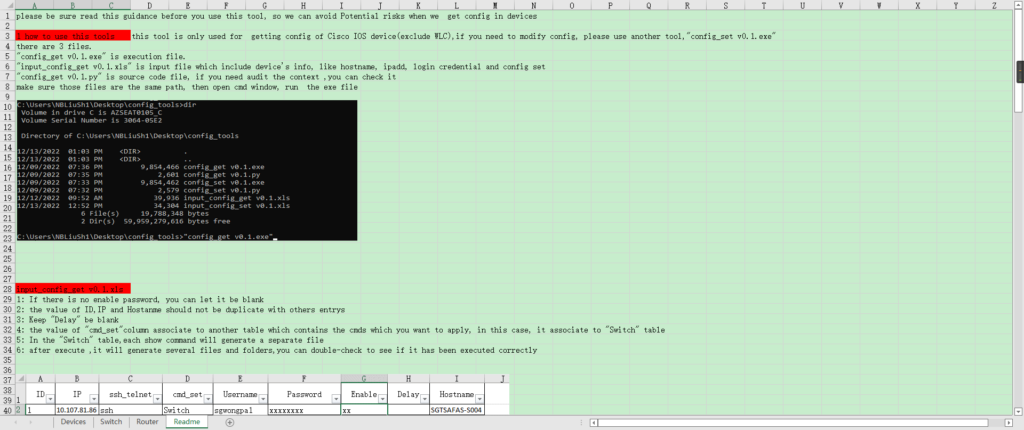
3 input files
input_config_get v0.3.xls for config_get v0.3.py program
input_config_set v0.3.xls is used in config_set v0.3.py program.
4 repository
Github sshuangliu/auto_config_get
Post Views: 2,554