


Applying for a free SSL certificate is quite easy, there are many ways to do it, such as Let’s Encrypt, and you don’t need to have a real name, you just need to prove that you ‘own’ the specific domain name.。
This kind of ‘ownership’ is not in the legal sense of ownership, it may be more appropriate to say ‘operational rights’, for example, even if this domain name legally belongs to someone A, by hacker B through social engineering to get the domain name system account, you can set up all kinds of DNS records for the domain name. Even if the domain name legally belongs to someone A, and hacker B gets his hands on the DNS account through social engineering, and can set up various DNS records for the domain name, then the domain name actually belongs to hacker B in the eyes of the Let’s Encrypt Certificate Authority, and a certificate will still be issued for the domain name, which, of course, will contain the information that hacker B expects.
In contrast to the traditional way of issuing certificates, an organization such as Let’s Encrypt no longer verifies a bunch of legal and physical information about the domain name, but simply issues it to whoever can operate it, with the information they need.
This approach is actually a relaxation of the threshold for certificate applications. Whereas before the verification of information needed to be more or less connected to the real subject, and may have been an administrative approval exercise, now it is a purely technical verification, done entirely in the virtual world.
The threshold is lowered, to a certain extent, the security is reduced, the credibility is reduced, so large companies, the government and other industries will still follow the previous way of applying for certificates, and at the same time Let’s Encrypt similar organizations in order to enhance the security of this way, the validity of the certificate is only days 90 days, the expiration of the re-application.
It was a liberation of thought, a change in security philosophy, a new business model that stirred the industry when Let’s Encrypt came out of nowhere at the time, and now appears to have succeeded.
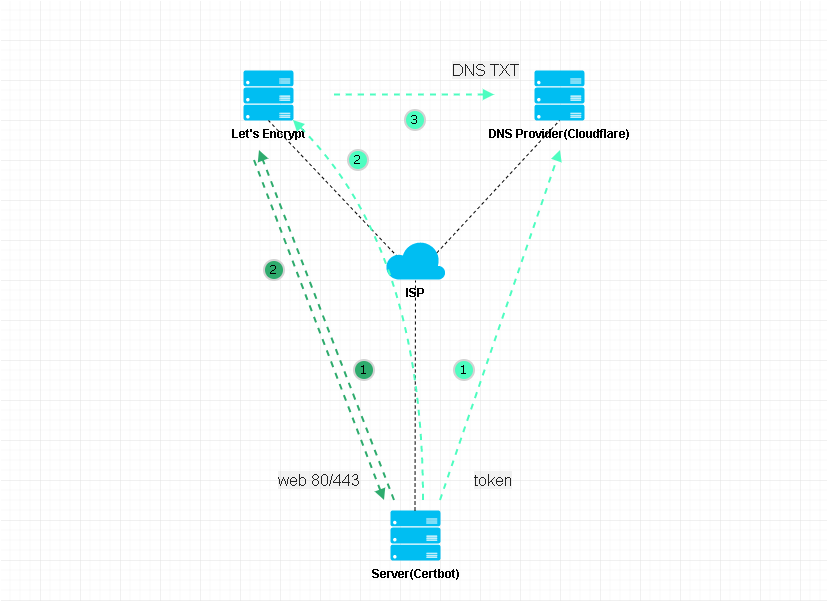
As above, two steps. With the Certbot client program, it will temporarily start a web service on the Server side, write some data, and then tell Let’s Encrypt to access pidashboard.samliu.tech, if you can successfully access the Server, it proves that you have “ownership” of pidashboard.samliu.tech, and will issue a certificate, all you need to do is to configure pidashboard.samliu.tech to point to the Server, and the certificate will be issued, you need to do is to configure pidashboard.samliu.tech to point to the Server. All you need to do is configure pidashboard.samliu.tech to point to the Server’s A record and release port 80/443.
As above, three steps. For example, samliu.tech, a second-level domain name, if it is too cumbersome to apply for all the sub-domains one by one, you can apply for a wildcard certificate, for example, *.samliu.tech, which is a somewhat different way of validating the certificate application, and can only be validated using DNS Challenge.
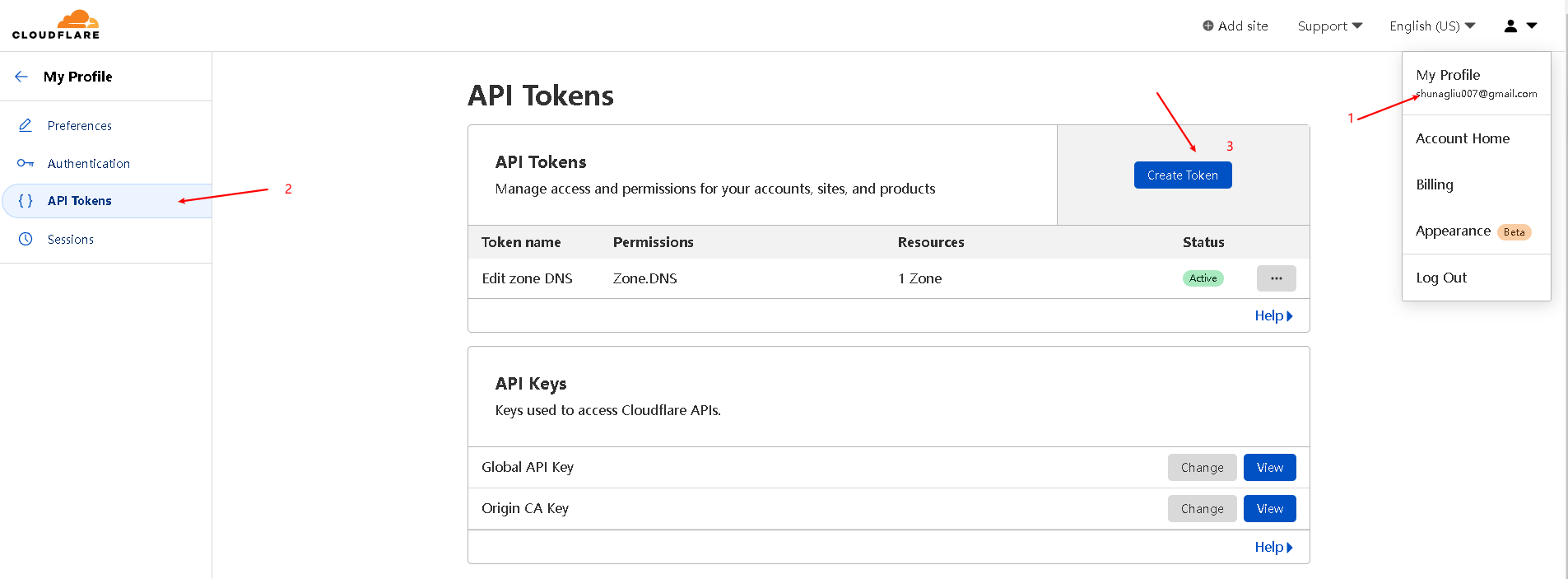
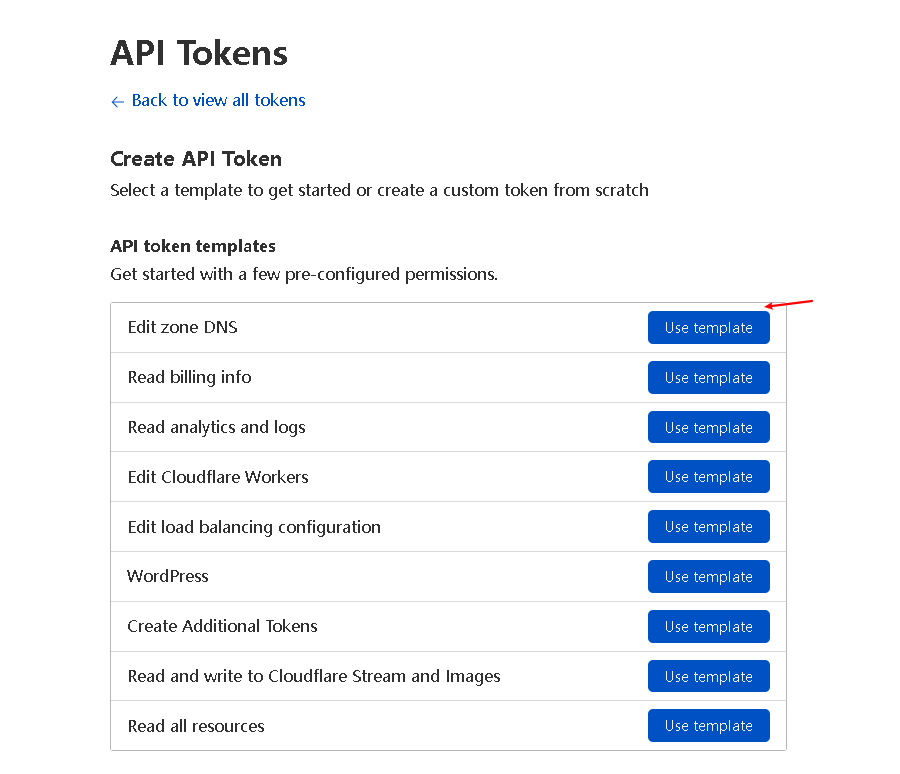
Certbot DNS Challenge , first under your domain name hosting organization account, create an api token, required to have the authority to read and write DNS Zone, and then add token information to Certbot, so that when Certbot application, through the API, under your DNS account corresponding to the domain name space to create a TXT record, finally Certbot told Let’s Encrypt to read the TXT record, if consistent, it proves that you have the “right to own” samliu.tech, will be issued a wildcard certificate, issued after the TXT record, it will be deleted by Certbot

Before deployment, first get a secondary domain name, for example, I bought the domain name samliu.tech in tencent cloud, at the same time my domain name hosting organization is also tencent cloud, here, I don’t apply for api token in the tencent cloud account, because Certbot is not very well adapted to tencent cloud domain name hosting organization, so I migrate the hosting organization samliu.tech from tencent cloud to Cloudflare, after migration, the management of the sub-domain will be handed over to Cloudflare, it will be a little slow to add new records synchronized to domestic. Cloudflare, after the migration, the management of sub-domains will be handed over to Cloudflare, when adding new records, synchronized to the domestic, will be a little slow, but the🆗。
docker run -d --name letsencrypt_testing \
--cap-add=NET_ADMIN \
-e PUID=1000 \
-e PGID=1000 \
-e TZ=Asia/Shanghai \
-e URL=samliu.tech \
-e SUBDOMAINS=wildcard \
-e VALIDATION=dns \
-e DNSPLUGIN=cloudflare \
-e DHLEVEL=2048 \
-v /home/sam/letsencrypt-config_testing:/config \
--restart unless-stopped \
linuxserver/swagsudo nano /home/sam/letsencrypt-config_testing/dns-conf/cloudflare.ini
changing config as follow
# Instructions: https://github.com/certbot/certbot/blob/master/certbot-dns-cloudflare/certbot_dns_cloudflare/__init__.py#L20
# Replace with your values
# With global api key:
#dns_cloudflare_email = cloudflare@example.com
#dns_cloudflare_api_key = 0123456789abcdef0123456789abcdef01234567
# With token (comment out both lines above and uncomment below):
dns_cloudflare_api_token = xxxxxxxxxxxxxxxxxxxsam@debian:~$ ls -l /home/sam/letsencrypt-config_testing/etc/letsencrypt/archive/samliu.tech
total 20
-rw-r--r-- 1 sam sam 2199 Aug 11 16:35 cert1.pem
-rw-r--r-- 1 sam sam 3749 Aug 11 16:35 chain1.pem
-rw-r--r-- 1 sam sam 5948 Aug 11 16:35 fullchain1.pem
-rw------- 1 sam sam 3272 Aug 11 16:35 privkey1.pem
fullchain1.pem privkey1.pem the certificate chain and private key, imported into the server can be used
The container will automatically renew the certificate 30 days before it expires, or you can configure an automatic e-mail alert before the expiration.
If there is no auto-renew within 30 days, enter the container and manually /app/le-renew.sh.
If you manually renew, create a new container, reconfigure the token, and ignore the time limit.
View timed tasks in the container:
sudo docker exec -it letsencrypt_testing sh
crontab -e
# do daily/weekly/monthly maintenance
# min hour day month weekday command
*/15 * * * * run-parts /etc/periodic/15min
0 * * * * run-parts /etc/periodic/hourly
0 2 * * * run-parts /etc/periodic/daily
0 3 * * 6 run-parts /etc/periodic/weekly
0 5 1 * * run-parts /etc/periodic/monthly
# renew letsencrypt certs
8 2 * * * /app/le-renew.sh >> /config/log/letsencrypt/letsencrypt.log 2>&1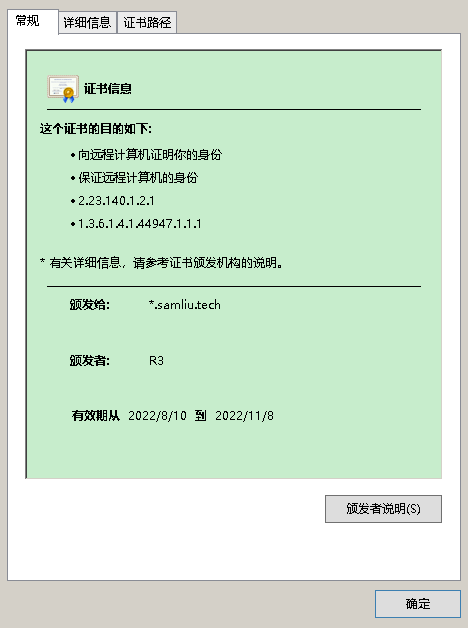
references:
How To Secure Nginx with Let’s Encrypt on Ubuntu 20.04 | DigitalOcean
How To Create Let’s Encrypt Wildcard Certificates with Certbot | DigitalOcean
Let’s Encrypt + Docker = wildcard certs (blackvoid.club)
linuxserver/swag – Docker Image | Docker Hub
https://imququ.com/post/ecc-certificate.html
https://blog.cloudflare.com/keyless-ssl-the-nitty-gritty-technical-details/
https://cloud.tencent.com/developer/article/1426836?from=article.detail.1420663
https://github.com/acmesh-official/acme.sh
https://cipherlist.eu tls chips Configuration Best Practices
https://www.ssllabs.com/ssltest/analyze.html?d=blog.samliu.tech
https://whatsmychaincert.com/?blog.samliu.tech
Post Views: 2,784
此内容由惯性聚合(RSS阅读器)自动聚合整理,仅供阅读参考。 原文来自 — 版权归原作者所有。