


The context that actually matters isn't in your database. It's in the tools your users live in every day. Multi-stage agents stall the moment they hit a step they can't see. And every missing integration is a different OAuth flow, a different token lifecycle, weeks of plumbing before the agent reads a single record.
WorkOS Pipes connects your agent to the tools your users live in. Pre-built connectors for GitHub, Slack, Salesforce, Google Drive, and more. Pipes handles OAuth, token refresh, and credential storage. You call the real provider API with a fresh token, every time. Your agent pulls context at every step, for as long as the task runs.
Engineers at Pinterest work across a sprawling set of internal systems every day. They query data through Presto, debug batch jobs in Spark, manage workflows in Airflow, search internal documentation, and track bugs in ticketing platforms.
When Pinterest started building AI agents, they wanted those agents to do more than answer questions. They wanted agents that could reach into these systems directly, pulling logs, investigating bug tickets, querying databases, and proposing fixes, all within the surfaces engineers already use.
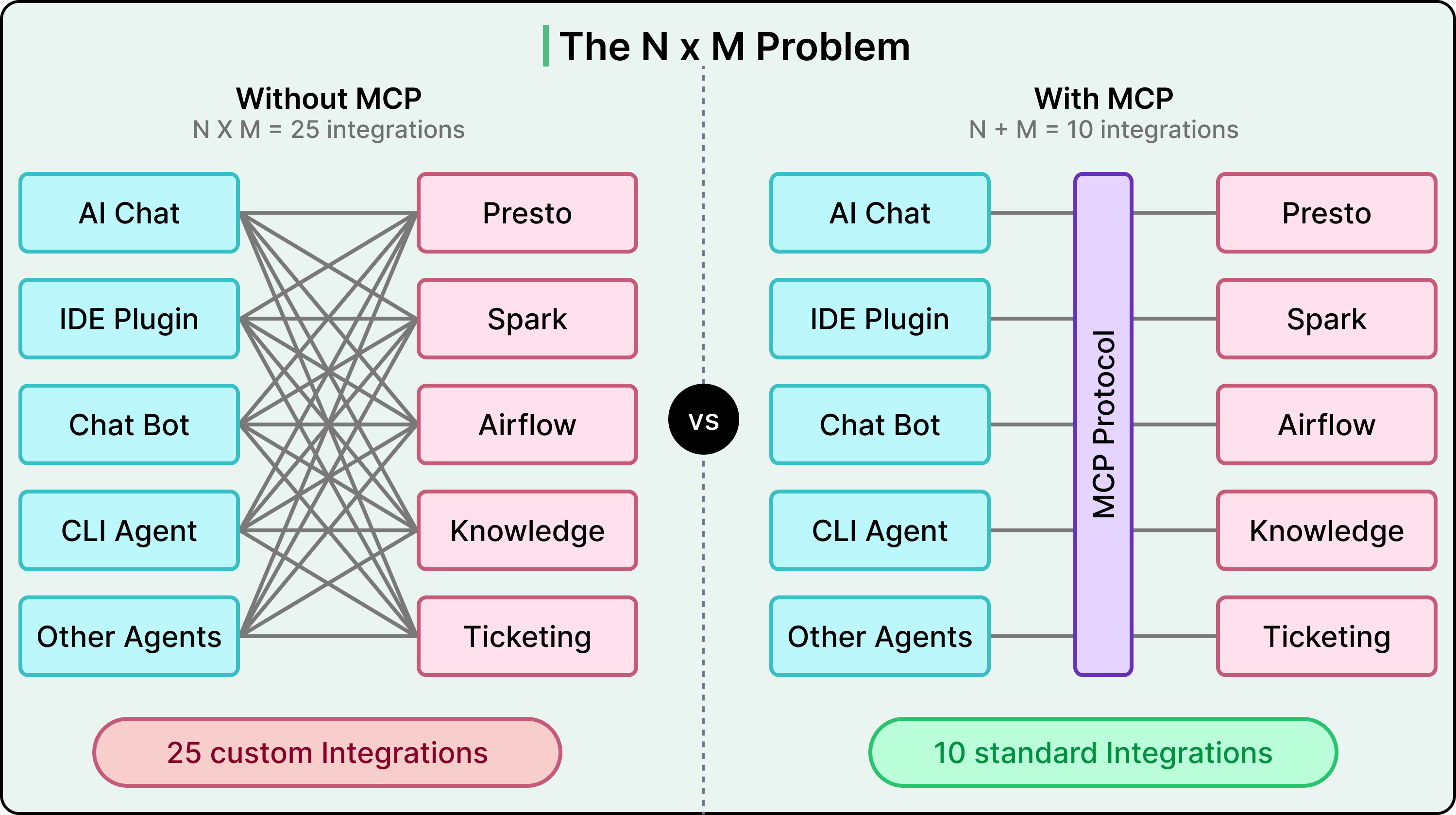
The challenge was driven by standard maths. If you have five AI-powered surfaces (an internal chat app, IDE plugins, chatbots, CLI agents, and other autonomous agents) and ten internal tools, you’d need fifty bespoke integrations without a shared protocol. In other words, every new surface or tool multiplies the work.
The Model Context Protocol (MCP) promised to collapse that multiplication into addition. Build one MCP client per surface and one MCP server per tool, and they all speak the same language.
Pinterest adopted MCP as the foundation for this vision. However, implementing the protocol turned out to be the easy part. The real engineering effort went into everything around it, such as a central registry, a two-layer auth system, a unified deployment pipeline, and observability baked in from day one.
In this article, we look at how Pinterest designed that ecosystem and what they had to get right beyond the protocol itself.
Disclaimer: This post is based on publicly shared details from the Pinterest Engineering Team. Please comment if you notice any inaccuracies.
Model Context Protocol (MCP) is an open-source standard that gives large language models a unified way to talk to external tools and data sources.
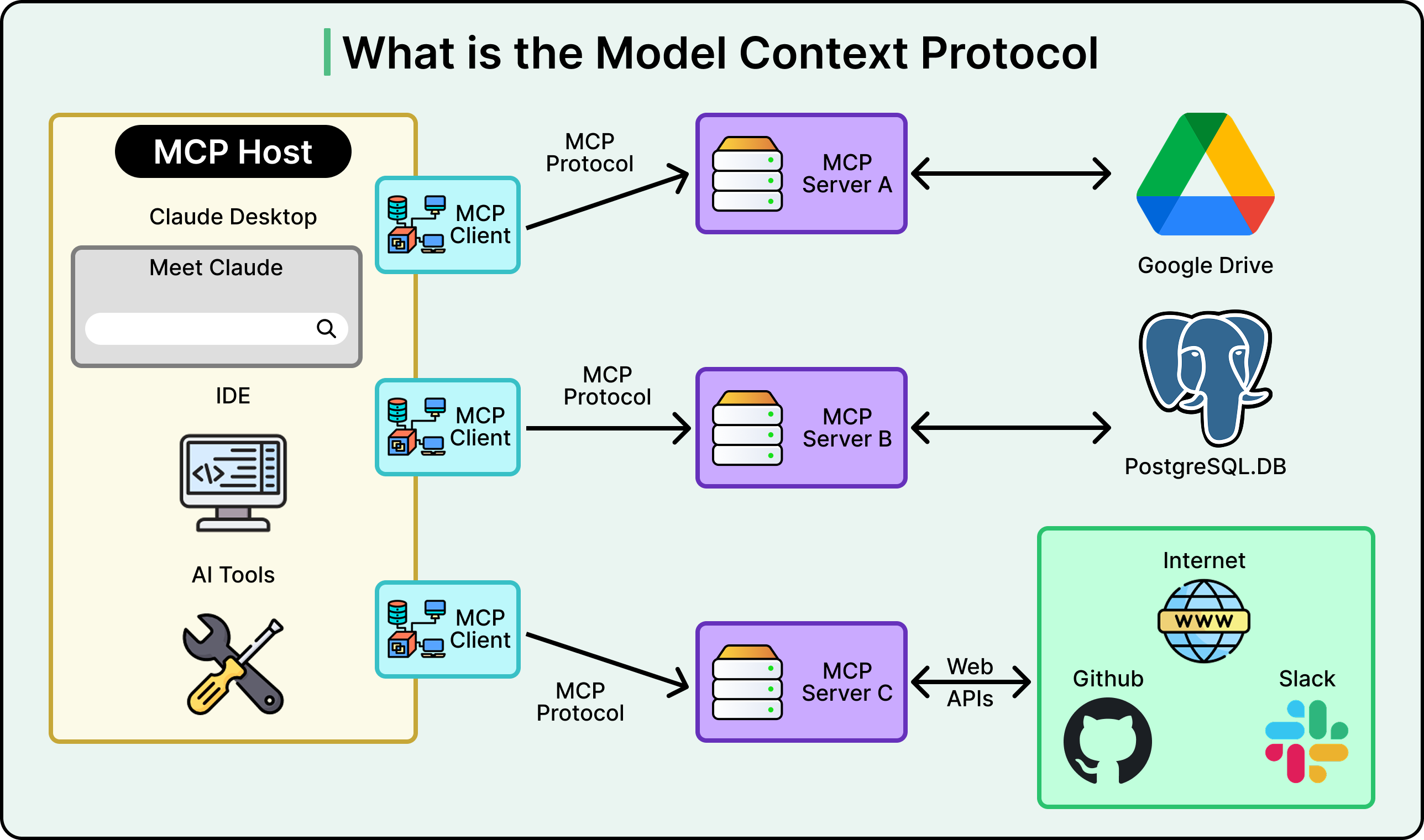
Instead of writing custom glue code between every AI application and every tool it needs to access, MCP defines a shared client-server protocol. An AI surface acts as the client, an MCP server wraps a tool or data source, and they communicate using a standardized format for discovering tools, invoking them, and returning structured results.
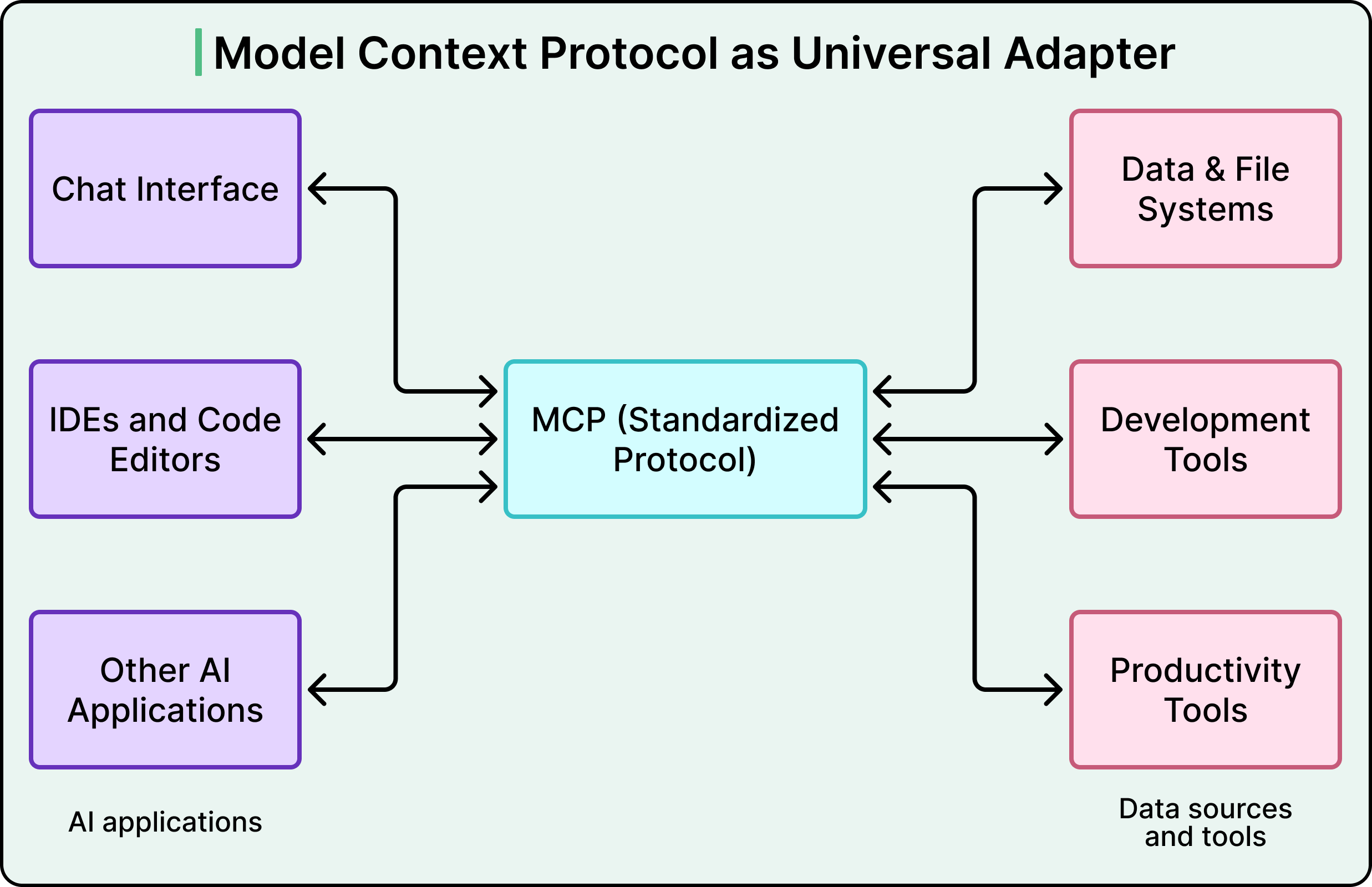
Before MCP, connecting AI surfaces to internal tools was an N x M problem. Five surfaces times ten tools equals fifty custom integrations to build and maintain. MCP turns that into an N+M problem. You build five clients and ten servers, and any client can talk to any server. That is fifteen pieces of work instead of fifty, and the gap widens as you add more surfaces or tools.
But MCP only defines the communication protocol. It does not handle authentication, authorization, deployment, service discovery, or governance.
Those are the problems Pinterest had to solve on its own. In other words, the MCP spec provides the grammar, and Pinterest had to build the entire school system around it.
When Pinterest decided to adopt MCP, three early decisions shaped the entire ecosystem. Each involved a genuine tradeoff, and understanding those tradeoffs helps us make sense of why the architecture looks the way it does.
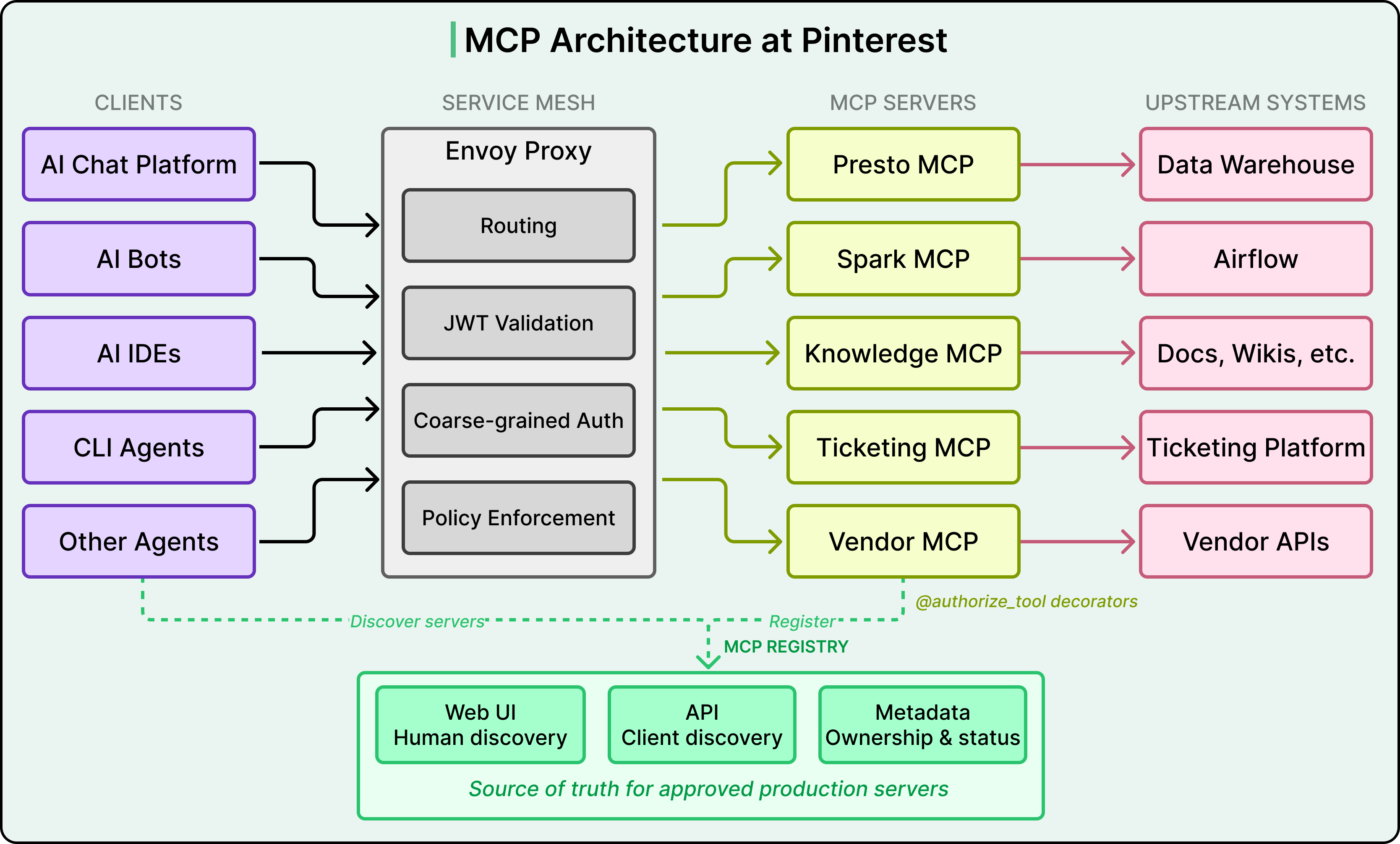
See the diagram below that shows the overall architecture:
MCP supports local servers that run on a developer’s laptop and communicate over standard input/output. Many individual developers use MCP this way with tools like Claude or Cursor.
Pinterest went the opposite direction.
They explicitly optimized for internal cloud-hosted MCP servers, where their routing and security infrastructure could be applied consistently. Local servers are still allowed for experimentation, but the so-called paved path at Pinterest is to write a server, deploy it to their cloud compute environment, and register it in their central catalog. Every tool call becomes a network request, which adds latency compared to a local server.
However, centralizing servers in the cloud meant that Pinterest could apply consistent authentication, authorization, logging, and monitoring across every server without relying on individual developers to configure those things correctly on their own machines.
Pinterest debated building a single monolithic MCP server that exposed every tool versus building multiple domain-specific servers. They chose the latter.
For example, the Presto MCP server handles data queries. The Spark MCP server handles job debugging. The Knowledge MCP server handles documentation and institutional Q&A. Each server owns a small, coherent set of tools.
Two forces drove this decision.
First, different servers need different access controls. The Presto server touches sensitive business data and requires strict group-based gating. A documentation server is lower risk and can be more broadly accessible. Bundling them into one server would force a single access policy across tools with very different sensitivity levels.
Second, every tool description consumes tokens in the AI model’s context window, which is the limited amount of text the model can process in a single interaction. A monolithic server with fifty tools would stuff the model’s prompt with tool descriptions it does not need for the current task, crowding out space for the actual conversation.
Domain-specific servers keep the tool list small and relevant. This context window constraint is uniquely AI-specific because in a traditional microservices setup, you would not worry about your service catalog consuming tokens.
The tradeoff here is more operational overhead per server, since each one needs deployment, monitoring, and ownership. This cost led directly to the third bet.
Early feedback from teams was clear. Spinning up a new MCP server required too much boilerplate, including deployment pipelines, service configuration, and operational setup, all before anyone could write a single line of business logic.
The Pinterest engineering team responded by building a unified deployment pipeline. Teams define their tools, and the platform handles deployment, scaling, and infrastructure. This turned what had been a multi-day setup process into something where domain experts could focus entirely on their business logic. Without this investment, the bet around many small servers would have collapsed under its own operational weight.
Sitting beneath all of this is the MCP registry, a central catalog that serves as the source of truth for which servers exist, who owns them, and how to connect to them. It has two faces.
A web UI lets humans browse available servers, see their live status, find the owning team and support channels, and inspect visible tools.
An API lets AI clients programmatically discover servers, validate them, and check whether a given user is authorized to access a given server.
Only servers registered here count as approved for production use. In other words, the registry is not just a phone book, but the governance backbone of the entire ecosystem.
Giving AI agents access to tools that touch real production systems and sensitive data raises immediate security concerns.
Pinterest treated MCP as a joint project with their security team from day one, and the result is a two-layer authorization model that deserves careful attention.
See the diagram below:
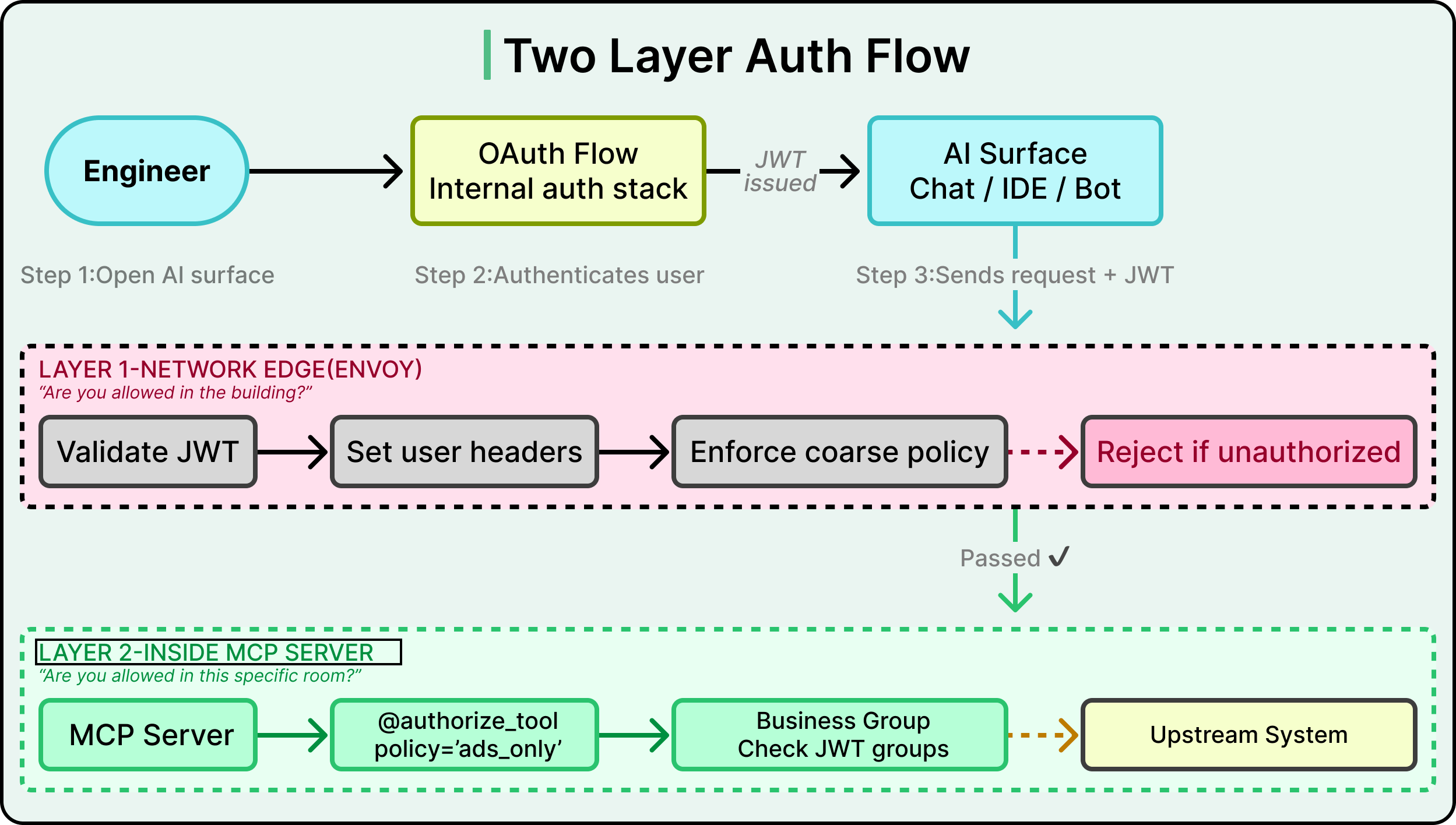
Consider what happens when an engineer opens Pinterest’s internal AI chat and asks the agent to query revenue data from the data warehouse. That single request crosses multiple systems as mentioned below:
The chat frontend talks to the MCP registry to find available servers.
The request gets routed to the Presto MCP server, which runs a query against a real database containing business-sensitive information.
At every hop, the system needs to answer two questions. Who is this person? And are they allowed to do this specific thing?
Layer 1 handles coarse-grained checks at the network edge.
When an engineer opens any AI surface at Pinterest, they go through an OAuth flow, which is the standard process for logging in with a company account and granting the application permission to act on the user’s behalf. This produces a JWT (JSON Web Token), a small signed token that encodes the user’s identity and group memberships. That JWT travels with every subsequent request.
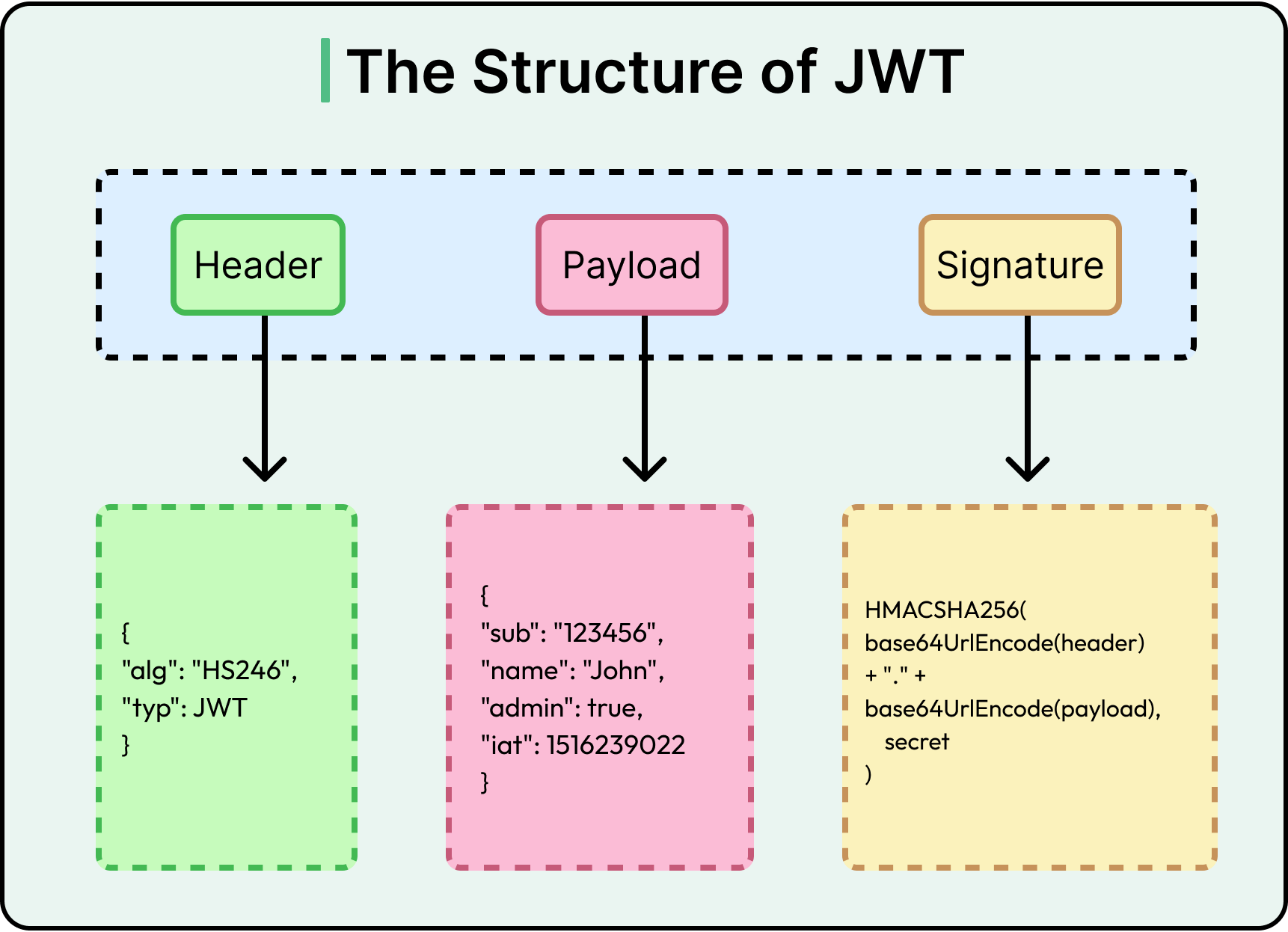
Before a request reaches any MCP server, it passes through Envoy, a network proxy that sits in front of every service in Pinterest’s infrastructure. Envoy validates the JWT by checking the signature and expiration, then converts it into standard headers like X-Forwarded-User and X-Forwarded-Groups.
Envoy also enforces coarse-grained access policies. These are broad rules like “the production AI chat application may talk to the Presto MCP server, but experimental servers running in the dev namespace are off-limits.” If the request violates these rules, it gets rejected before the MCP server ever sees it. Think of Envoy as the building security desk. It checks your badge and makes sure you are supposed to be in the building at all.
Layer 2 handles fine-grained checks inside each server.
Even if Envoy lets a request through, the MCP server applies a second layer of authorization at the individual tool level. Pinterest uses a decorator pattern on tool functions (@authorize_tool(policy=’...’)) that checks whether the specific user is allowed to invoke that specific tool.
For example, the Presto MCP server might be reachable by many teams, but only the Ads engineering group can call a tool like get_revenue_metrics. This is like the difference between being allowed into the building and being allowed into a specific room.
For servers that handle particularly sensitive data, Pinterest adds business-group gating. The server extracts the user’s business group membership from their JWT and checks it against an approved list before even establishing a session. This list of approved groups is set during the initial security review when the server is first registered.
For example, even though the Presto MCP server is technically reachable from Pinterest’s broadly used AI chat interface, only specific groups like Ads, Finance, or certain infrastructure teams can actually connect and run queries. This means that turning on a powerful, data-heavy server in a popular surface does not silently expand who can see sensitive data.
Why two layers instead of one?
Envoy’s policies are fast, network-level checks that block obviously unauthorized traffic before it reaches any application code. The tool-level decorators handle nuanced, business-logic-specific permissions that a network proxy is not equipped to reason about. Together, they provide defense in depth. Even if one layer has a misconfiguration, the other still catches unauthorized access.
The official MCP specification defines an OAuth 2.0 authorization flow where users authenticate with each MCP server individually, typically involving consent screens and per-server token management. Pinterest skipped this entirely. Since they control the entire internal environment, they piggyback on the auth session the user already has when they open an AI surface. There is no additional login prompt or consent dialog when a user invokes an MCP tool.
This is simpler for end users, but only works because Pinterest owns every piece of the stack. A company relying on third-party MCP servers would likely need the per-server OAuth approach described in the spec.
Lastly, for automated service-to-service calls where there is no human in the loop, Pinterest uses SPIFFE-based authentication. In this pattern, the calling service proves its identity through a cryptographic certificate issued by the service mesh rather than presenting a human’s JWT. Pinterest reserves this for low-risk, read-only scenarios where the blast radius is tightly constrained.
Pinterest was deliberate about one thing. MCP could not be a science project that lived in its own separate interface. It had to show up in the tools that engineers already use every day.
The diagram below shows how the MCP integration has been done across various surfaces at Pinterest.
Pinterest’s internal AI chat interface is used by the majority of employees daily. The frontend automatically handles OAuth flows and returns a list of usable MCP tools scoped to the current user’s permissions. Once connected, the AI agent binds MCP tools directly into its toolset, so invoking an MCP tool feels identical to calling any other built-in capability. From the user’s perspective, they are just asking the AI to do something, and the MCP plumbing is invisible.
Pinterest also embeds AI bots in its internal communication platform, and these bots expose MCP tools as well. Auth is handled through the registry API, just like the web interface. These bots support context-aware tool scoping, meaning certain MCP tools are restricted to certain channels. Spark MCP tools, for example, only appear in Airflow support channels. This keeps tool lists relevant to the conversation and prevents users from accidentally invoking tools that do not make sense in a given context.
AI-enabled IDEs can pull data through the Presto MCP server on demand, so agents bring data directly into coding workflows instead of requiring engineers to switch to a separate dashboard. CLI agents provide similar capabilities for terminal-based workflows.
The servers that see the heaviest usage reflect the most common engineering pain points.
The Presto MCP server is consistently the highest-traffic server because data access is a universal need across teams.
The Spark MCP server underpins Pinterest’s AI-assisted debugging experience, where agents diagnose job failures, summarize logs, and help record structured root-cause analyses, turning noisy operational threads into reusable knowledge.
The Knowledge MCP server acts as a general-purpose endpoint for institutional knowledge, giving agents the ability to search documentation and answer questions across internal sources.
Since MCP servers enable automated actions, the blast radius of a mistake is larger than if a human manually performed the same steps.
Pinterest’s agent guidance mandates human-in-the-loop approval before any sensitive or expensive action. Agents propose actions, humans approve or reject (optionally in batches) before execution. Pinterest also uses elicitation for dangerous operations, where the AI explicitly asks the user to confirm before performing something like overwriting data in a table. This is a governance decision.
Pinterest built observability into the MCP ecosystem from the start rather than treating it as an afterthought. All MCP servers use a set of shared library functions that provide logging for inputs and outputs, invocation counts, exception tracing, and other telemetry out of the box. This is part of the server framework itself, so teams get observability for free when they use the unified deployment pipeline.
At the ecosystem level, Pinterest tracks the number of registered servers and tools, invocation counts across all servers, and a north-star metric that rolls everything up into a single number. That number is the time saved. For each tool, server owners provide a “minutes saved per invocation” estimate, based on lightweight user feedback and comparison to the prior manual workflow. Multiplied by invocation counts, this gives an order-of-magnitude view of impact.
As of January 2025, MCP servers at Pinterest were handling 66,000 invocations per month across 844 monthly active users. Using the owner-provided estimates, MCP tools were saving on the order of approximately 7,000 hours per month.
Pinterest’s MCP ecosystem offers a clear blueprint for organizations building AI agents that need to act on internal systems. The pattern they established, a standard protocol, a central registry, layered auth, a unified deployment pipeline, and built-in observability, is transferable well beyond Pinterest’s specific context.
The most important lesson is where the effort actually went. The MCP protocol gave Pinterest a shared language between AI surfaces and tools. That was necessary but far from sufficient. The registry, auth layers, deployment pipeline, and measurement framework are what turned a promising protocol into a production system handling tens of thousands of invocations per month.
To conclude, Pinterest’s approach suggests a practical starting point of seeding a small set of high-leverage MCP servers that solve real pain points, then invest in the platform work, especially the deployment pipeline, that makes it easy for other teams to build on top. Pinterest’s unified pipeline was the unlock that turned a platform team project into an org-wide ecosystem.
References: