
惯性聚合 高效追踪和阅读你感兴趣的博客、新闻、科技资讯
阅读原文 在惯性聚合中打开

推荐订阅源

S
Schneier on Security
F
Fortinet All Blogs
B
Blog
GbyAI
GbyAI
P
Proofpoint News Feed
量子位
The Register - Security
宝玉的分享
宝玉的分享
大猫的无限游戏
大猫的无限游戏
云风的 BLOG
云风的 BLOG
V
Visual Studio Blog
B
Blog RSS Feed
WordPress大学
WordPress大学
Recorded Future
Recorded Future
Recent Announcements
V
Vulnerabilities – Threatpost
cs.CV updates on arXiv.org
cs.AI updates on arXiv.org
S
Secure Thoughts
雷峰网
雷峰网
Stack Overflow Blog
Stack Overflow Blog
C
Cybersecurity and Infrastructure Security Agency CISA
Webroot Blog
Webroot Blog
AWS News Blog
AWS News Blog
K
KPMG report finds enterprise disconnect between AI and its ROI | CIO
Exploit-DB.com RSS Feed
The GitHub Blog
The GitHub Blog
爱范儿
爱范儿
O
OpenAI News
月光博客
月光博客
H
Hacker News: Front Page
S
Security Affairs
W
WeLiveSecurity
The Hacker News
The Hacker News
aimingoo的专栏
aimingoo的专栏
freeCodeCamp Programming Tutorials: Python, JavaScript, Git & More
Help Net Security
Help Net Security
MongoDB | Blog
MongoDB | Blog
Cyber Security Advisories - MS-ISAC
D
Docker
T
The Blog of Author Tim Ferriss
Spread Privacy
Spread Privacy
Blog — PlanetScale
Blog — PlanetScale
J
Java Code Geeks
S
Securelist
Microsoft Azure Blog
TaoSecurity Blog
TaoSecurity Blog
T
Threat Research - Cisco Blogs
M
MIT News - Artificial intelligence
A
About on SuperTechFans

Menghuan1918's Blog

提升浏览器多标签页管理效率 介绍页 友链 My Arch Linux - 外观与字体 使用ray.tune进行自动调整超参数 使用Docker(MinIO)和Caddy创建图床服务 AI系统攻击手段(简要概述) RAG预处理增强:让Fastgpt/Dify召回更多东西 将PDF知识图谱化:graphrag+Doc2X+DeepSeek 如虎添翼:为gpt_academic配置searxng搜索 包管理工具UV使用指南:全面替代conda 折腾杂谈:运用Dify+xinference+ollama构建知识库 折腾杂谈:部署一个网页在线状态面板/反代切换到Caddy 笔记软件的最终选择:Obsidian + Self-hosted LiveSync 配置DOSBox以及其窗口大小 在VSCode中配置多平台的C/C++语言支持 折腾杂谈:部署Alist并整合/服务器优化 在Linux上交叉编译出Windows可执行程序 利用MSYS2在windows上配置C/C++/openGL开发环境 强制对游戏应用FSR 折腾杂谈:Docker部署Rustdesk/切换网站框架 Speedometer 3.0分数测试(电子斗蛐蛐) 在Arch Linux下编译32位C程序出错 使用pelican以及nginx建立个人博客
Ollama跨平台性能比拼:Windows遥遥落后
Menghuan1918 · 2024-05-23 · via Menghuan1918's Blog

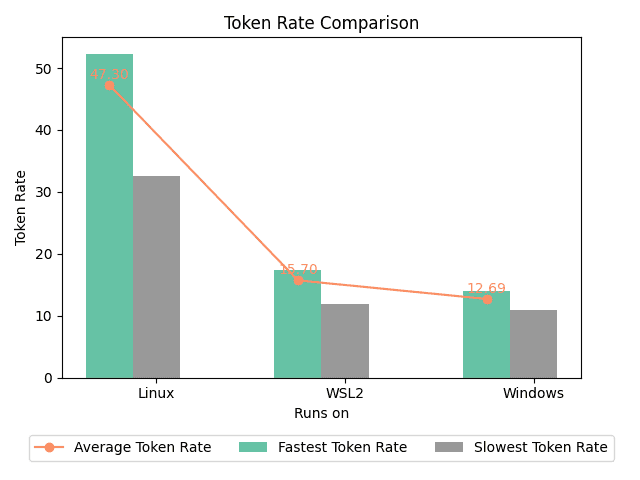
Ollama + llama3-8B基本可以满足基本的翻译工作了,并且其也能 流畅 地在我的残血3060M上运行。当然,正如标题所言,这个流畅的前提是不在Windows下运行。

或者标题也可以改成:"AI PC的拖油瓶:Windodws?"(手动滑稽)

结果以及猜测

本次测试平台:华硕天选二,11800H+残血3060M,40GB内存。其中Linux为Arch Linux,内核版本6.9.1-arch1-1,使用nvidia-open驱动。Windows为最新版Windows 11,WLS2为Ubuntu24.04,驱动均为最新。

使用的测试脚本是我自己写的,你可以在这个储存仓找到:
Winows这效率...
Winows这效率...

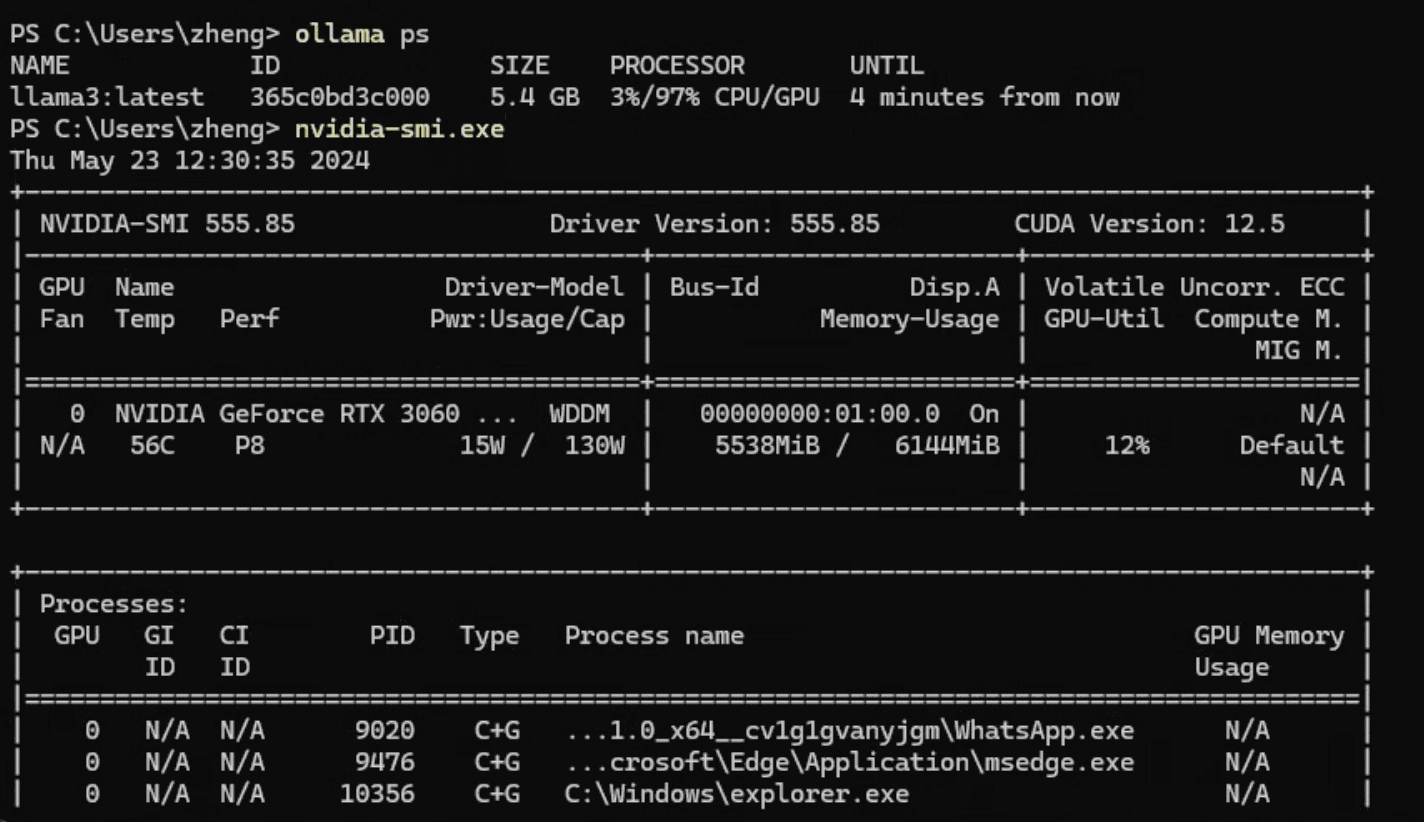
观察两者的ollama运行日志,实际上很快就能发现问题所在:Windows上并没有将模型完全加载到GPU上!
Windows
Windows
Linux
Linux

虽然运行nvidia-smi会发现显存并没有占满,但是奇怪的是ollama并没有将这些显存给用尽。而在WSL2上也出现了同样的问题,无法完全占满显存。

河里的猜测

参考这个issue,在部分加载到GPU上时Windows会显著慢于Linux,我自己实测也是这样,在使用llama.cpp部分加载模型到GPU,设置的层数相同的情况下Windows也会慢上几倍。不过这似乎并不能解释ollama在WLS2上为什么会更快

后续

事情依然没解决:一个河里的推测是Windows会占用更多的显存从而导致模型无法完全加载到GPU上。而在不完全加载时WLS2的运行效率也远高于Windows原生...因此得出结论:即使不能在原生的linux上运行大模型,也可以在WSL2上运行以取得更高的生成速度。

在更好的CPU上,不完全加载时WSL2甚至能有Windows原生2倍的速度。见我提的这个issues
