






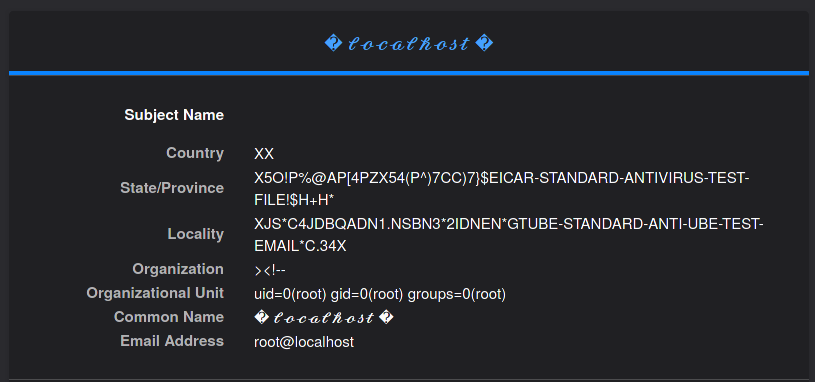
This is the story of the most awful SSL certificate I have ever made. This was done entirely for my own amusement, and for the minute possibility that I could make somebody I don’t like miserable.
Now, why on earth would I want to do this? Well, I don’t particularly respect scanner people. Their scanners are annoying, their tools always suck, and they create tonnes of noise in my logs that I don’t like. So, what I’m going to do is create an annoying certificate for counterspam. I’ll add to the metadata all kinds of nasty strings that make security software freak out, make scanners crash, and maybe even break things…
…Actually, I’m mostly doing this to experiment with OpenSSL and the file capture modules of Suricata IDS software. That’s another post for another day though, so for now we’ll continue with the counterspam narrative.
So, the full list of nasties to pack into this certificate are:
- The EICAR test file
- The GTUBE email spam test string
- The output of
idas root on a UNIX system, which is a known IDS signature - The dreaded Unicode ‘�’ character, a common signal that you’ve messed up your character encoding
- A little bit of HTML that could break formatting if not escaped properly
These signatures will be packed into the certificate metadata fields of a self-signed TLS certificate, then I will serve that certificate from the default virtual host on my webserver. This way, all of my legitimate web traffic will still get a real, trusted certificate; while the scanner traffic trying to access my server by IP (instead of hostname) will be served a bogus certificate full of junk data.
Then, maybe, just maybe this junk data will leak out into a public like Shodan or Censys, and be gobbled up by other data aggregator services. Somewhere along the line, maybe something bad will happen.
OpenSSL configuration
First, I created a cursed.cnf file with the nasty strings in it. This is a working, minimal OpenSSL config file that will create a csr for a self-signed certificate.
[ req ]
default_bits            = 4096
default_md              = sha512
default_keyfile         = private.key
distinguished_name      = req_distinguished_name
attributes              = req_attributes
x509_extensions         = v3_ca
prompt                  = no
encrypt_key             = no
string_mask             = utf8only

[ req_distinguished_name ]
countryName             = "XX"
stateOrProvinceName     = "X5O!P%@AP[4\PZX54(P^)7CC)7}$EICAR-STANDARD-ANTIVIRUS-TEST-FILE!$H+H*"
localityName            = "XJS*C4JDBQADN1.NSBN3*2IDNEN*GTUBE-STANDARD-ANTI-UBE-TEST-EMAIL*C.34X"
organizationName        = "><!--"
organizationalUnitName  = "uid=0(root) gid=0(root) groups=0(root)"
commonName              = "� 𝓵𝓸𝓬𝓪𝓵𝓱𝓸𝓼𝓽 �"
emailAddress            = "root@localhost"

[ v3_req ]
subjectAltName = @alt_names
[alt_names]
DNS.1          = localhost
DNS.2          = localhost.local
DNS.3          = l.o.c.a.l.h.o.s.t
DNS.4          = localhost.in-addr.arpa
[ v3_ca ]
[ req_attributes ]
Using the config file, I can create the self-signed cert and the private key. For more fun, I am making the lifespan of the cert last until 9999 CE (the maximum OpenSSL will allow) to attempt to cause some Y2K-esque problems.
openssl req -x509 -config ./cursed.cnf -keyout cursed.key -out cursed.crt -days 2913999 -utf8 -new
Once the cert is generated, it can be viewed with Openssl once again:
openssl x509 -in cursed.crt -text -noout
The output will look like a normal cert, but with some odd data:
Certificate:
    Data:
        Version: 3 (0x2)
        Serial Number: ...
        Signature Algorithm: sha512WithRSAEncryption
        Issuer: C = XX, ST = "X5O!P%@AP[4PZX54(P^)7CC)7}$EICAR-STANDARD-ANTIVIRUS-TEST-FILE!$H+H*", L = XJS*C4JDBQADN1.NSBN3*2IDNEN*GTUBE-STANDARD-ANTI-UBE-TEST-EMAIL*C.34X, O = "><!--", OU = uid=0(root) gid=0(root) groups=0(root), CN = \EF\BF\BD \F0\9D\93\B5\F0\9D\93\B8\F0\9D\93\AC\F0\9D\93\AA\F0\9D\93\B5\F0\9D\93\B1\F0\9D\93\B8\F0\9D\93\BC\F0\9D\93\BD \EF\BF\BD, emailAddress = root@localhost
        Validity
            Not Before: Apr  5 22:23:35 2021 GMT
            Not After : Jul  9 22:23:35 9999 GMT
        Subject: C = XX, ST = "X5O!P%@AP[4PZX54(P^)7CC)7}$EICAR-STANDARD-ANTIVIRUS-TEST-FILE!$H+H*", L = XJS*C4JDBQADN1.NSBN3*2IDNEN*GTUBE-STANDARD-ANTI-UBE-TEST-EMAIL*C.34X, O = "><!--", OU = uid=0(root) gid=0(root) groups=0(root), CN = \EF\BF\BD \F0\9D\93\B5\F0\9D\93\B8\F0\9D\93\AC\F0\9D\93\AA\F0\9D\93\B5\F0\9D\93\B1\F0\9D\93\B8\F0\9D\93\BC\F0\9D\93\BD \EF\BF\BD, emailAddress = root@localhost
        Subject Public Key Info:
            Public Key Algorithm: rsaEncryption
                RSA Public-Key: (4096 bit)
                Modulus: ...
Unfortunately the Unicode stuff will be encoded in the CLI, rest assured that in a browser it will look correct.
After verifying the cert, it is transferred to my webserver. This would also work with any other HTTP server like Apache; using Nginx is my personal preference.
In my /etc/nginx/nginx.conf file, I added this default server block:
...
    server {
            listen 80 default_server;
            server_name _;
            server_name_in_redirect off;
            return 301 http://$remote_addr;
    }
    server {
            listen 443 ssl  default_server;
            server_name _;
            ssl_certificate     /etc/nginx/ssl/cursed.crt;
            ssl_certificate_key /etc/nginx/ssl/cursed.key;
            server_name_in_redirect off;
            return 301 http://$remote_addr;
    }
In addition to serving up the junk cert, this also redirects all requests back where they came using a 301 redirect. This has the interesting side effect of being able to leak IPs of scanner bots on their own websites.
Nginx can be reloaded for the new certificate to kick in.
# nginx -t && service nginx reload
nginx: the configuration file /etc/nginx/nginx.conf syntax is ok
nginx: configuration file /etc/nginx/nginx.conf test is successful
Finally, I can view the cert using the openssl TLS client commands:
$ openssl s_client -connect 198.51.100.59:443
CONNECTED(00000003)
Can't use SSL_get_servername
depth=0 C = XX, ST = "X5O!P%@AP[4PZX54(P^)7CC)7}$EICAR-STANDARD-ANTIVIRUS-TEST-FILE!$H+H*", L = XJS*C4JDBQADN1.NSBN3*2IDNEN*GTUBE-STANDARD-ANTI-UBE-TEST-EMAIL*C.34X, O = "><!--", OU = uid=0(root) gid=0(root) groups=0(root), CN = \EF\BF\BD \F0\9D\93\B5\F0\9D\93\B8\F0\9D\93\AC\F0\9D\93\AA\F0\9D\93\B5\F0\9D\93\B1\F0\9D\93\B8\F0\9D\93\BC\F0\9D\93\BD \EF\BF\BD, emailAddress = root@localhost
verify error:num=18:self signed certificate
verify return:1
...
And, within a couple days I will be able to see the chaos I have caused… So far I’ve managed to test the Unicode compatibility of a few SSL cert checking websites..