


惯性聚合 高效追踪和阅读你感兴趣的博客、新闻、科技资讯
阅读原文 在惯性聚合中打开

推荐订阅源

A
About on SuperTechFans
C
Cybersecurity and Infrastructure Security Agency CISA
N
News and Events Feed by Topic
C
Cisco Blogs
Cisco Talos Blog
Cisco Talos Blog
A
Arctic Wolf
Scott Helme
Scott Helme
P
Palo Alto Networks Blog
S
Schneier on Security
D
Darknet – Hacking Tools, Hacker News & Cyber Security
T
Tor Project blog
量子位
G
Google Developers Blog
H
Hackread – Cybersecurity News, Data Breaches, AI and More
B
Blog RSS Feed
NISL@THU
NISL@THU
Exploit-DB.com RSS Feed
AWS News Blog
AWS News Blog
爱范儿
爱范儿
Last Week in AI
Last Week in AI
Y
Y Combinator Blog
L
LINUX DO - 最新话题
Security Archives - TechRepublic
Threat Intelligence Blog | Flashpoint
S
Secure Thoughts
Cloudbric
Cloudbric
aimingoo的专栏
aimingoo的专栏
L
Lohrmann on Cybersecurity
TaoSecurity Blog
TaoSecurity Blog
Recent Commits to openclaw:main
Hacker News: Ask HN
Hacker News: Ask HN
freeCodeCamp Programming Tutorials: Python, JavaScript, Git & More
The GitHub Blog
The GitHub Blog
有赞技术团队
有赞技术团队
S
Security @ Cisco Blogs
cs.CL updates on arXiv.org
C
Cyber Attacks, Cyber Crime and Cyber Security
G
GRAHAM CLULEY
P
Proofpoint News Feed
V
V2EX
Martin Fowler
Martin Fowler
C
CERT Recently Published Vulnerability Notes
Attack and Defense Labs
C
CXSECURITY Database RSS Feed - CXSecurity.com
The Cloudflare Blog
SecWiki News
SecWiki News
罗磊的独立博客
CTFtime.org: upcoming CTF events
小众软件
小众软件
The Last Watchdog
The Last Watchdog

Posts on Noah Bailey

How to turn anything into a router Deploy to Cloudfront from GitHub using OpenID Connect Backup Postgres databases with Kubernetes CronJobs The spelling error made 200 billion times a day Restarting Kubernetes pods using a CronJob You've just bought a new domain. Now what? Who Sawed My Motherboard??? Linux on the P8 Aliexpress Mini Laptop Recovering Mysql/Mariadb after a nasty crash Using EXIF data to pick my next lens Converting and developing RAW photos on Linux automatically Thank you, 2016 iPhone Don't Make It Work Self-hosted Surveillance with ZoneMinder Backups, Monitoring, and Security for small Mastodon servers Block web scanners with ipset & iptables Debian Sid on encrypted ZFS Protect your dangerously insecure redis server Debian: the luxurious boring lifestyle Monitor radiation with a Raspberry Pi Simple Linux server alerts: Know your performance, errors, security, syslog, and security NUC crashes on debian 11 - How I fixed it Basic Linux server security with fail2ban, ossec, and firewall Windows 11 will create heaps of needless trash Domesticated Kubernetes Networking The Cursed Certificate Our mostly disposable and entirely stupid world Trying out OpenBSD (as a Linux geek) Making VoIP Calls with Antique Rotary Phones Monitoring WAN speed with speedtest-cli and ElasticSearch Monitoring WAN latency with InfluxDB The Zeroshell botnet returns Installing Gentoo on a vintage Thinkpad T60 Malware emails 2: Russian boogaloo TP-Link Device Weirdness ElasticSearch broke all my nice things (a story of cascading failure) A New Botnet is Targeting Network Infrastructure Malware on the Wire: Monitoring Network Traffic with Suricata and ClamAV Cloud Threat Protection with OSSEC and Suricata Malware Emails From Jerks Surviving the Apocalypse with an Offline Wikipedia Server Being Attacked by Bots Linux Router, Firewall and IDS Appliance You Probably Don't Need a VPN Fix an Oversharded Elasticsearch Cluster Automating KVM Virtualization Update all your linux servers as fast as possible Cleanup Systemd Journald Storage Stop Putting Your SSH Keys on Github! Clustering KVM with Ceph Storage Stealing Windows Sessions FreeRadius Active Directory Integration Retrieving WPA2 Keys on Windows Deploy MDT Litetouch on Linux with TFTPD and Syslinux Generating MSI transform files with Orca The Inflatable Dinghy Generating Cisco IOS config files with Python Homebrew SAN Getting Cloudy
Executing commands over SSH with GitHub Actions
2022-09-19 · via Posts on Noah Bailey

Several admins and developers like automatically updating their servers with new builds as they become available. Commonly known as “CI/CD”, this process allows teams to iterate much faster and speed up product development.

Often, this is simply pulling from a repo and running a couple docker-compose commands, which is very easy to automate.

A bad way to do this is using a cron job that runs every 10 minutes to pull from the repository and execute any commands. While reasonably simple and secure, this can cause a large delay between code updates and the server task running.

An improvement is to connect the CI system to the hosting server. This allows the build system to automatically connect to the server using SSH to perform the update immediately, eliminating the lag from the cron-style solution.

There are potential drawbacks, however. It’s possible that the CI system could be compromised, and a credential to your server could be exposed.

Deploy user

On the server, create a new user called “deploy” who is a member of the group “docker”.

sudo useradd --create-home --user-group --shell /bin/bash --groups docker deploy

sudo usermod --lock deploy

This allows the user to update the docker config without having full root access on the server.

SSH key

On the server, change user to “deploy” and create a new ssh key:

sudo -i -u deploy

Create a new SSH key for that user:

ssh-keygen -t ed25519 -f ~/.ssh/id_ed25519 -C "deploy@server"

The key should not have a passphrase in this case.

Once complete, allow the user to access the server using its own credentials:

cat .ssh/id_ed25519.pub > .ssh/authorized_keys

Save the string that begins with ssh-ed25519... for the next step.

GitHub Keys & Secrets

Both the public and private keys will need to be added to the github repository.

In your repo, go to the ‘Settings’ tab, and find the ‘Deploy keys’ tab on the left. Click “Add deploy key” and enter the content of .ssh/id_ed25519.pub into the box. It should begin with “ssh-ed25519”.
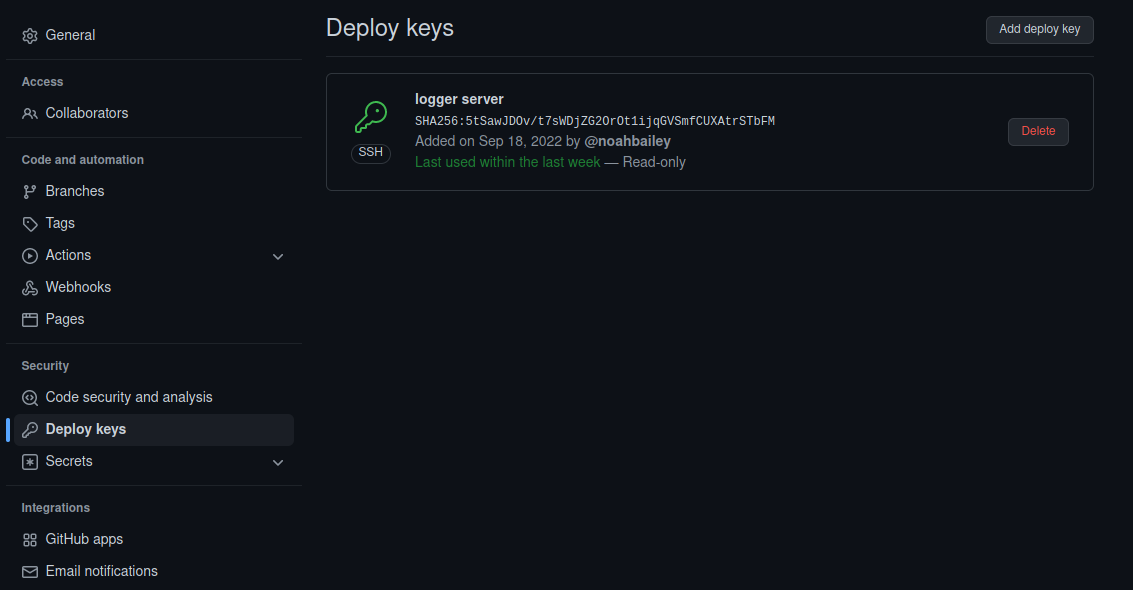
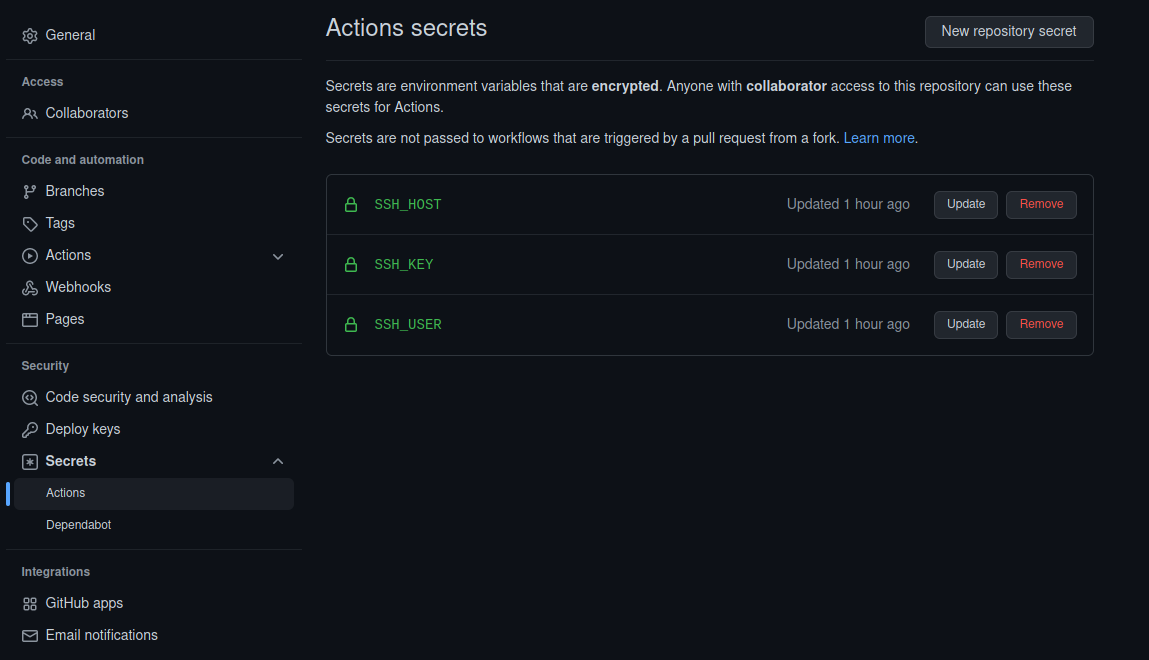
Next, click on ‘Secrets’ and ‘Actions’ on the left. Click “New repository secret”, and create three secrets:

  1. With the name “SSH_KEY”, enter the the contents of the file .ssh/id_ed25519 into the Secret field. It should begin with the line, “-----BEGIN OPENSSH PRIVATE KEY-----”.

  2. With the name “SSH_HOST”, add a secret containing the hostname or IP of your server.

  3. With the name “SSH_USER”, add the user created earlier, “deploy”, that is used to push updates to our server.
GitHub Actions Workflow

Next, a workflow file is created in the github repository. The filepath must be .github/workflows/deploy.yml

If you already have workflows, make sure this one runs at the end, or whenever in the sequence is appropriate.

The file deploy.yml:

name: Remote update execution
on:
  push:
    branches:
      - main
jobs:
  build:
    name: Build
    runs-on: ubuntu-latest
    steps:
    - name: executing remote ssh commands using password
      uses: appleboy/ssh-action@master
      with:
        host: ${{ secrets.SSH_HOST }}
        username: ${{ secrets.SSH_USER }}
        key: ${{ secrets.SSH_KEY }}
        script: |
          bash /opt/git/my-repository/update.sh          

Once connected, this will execute a script on the server, for example:

#!/bin/bash
cd /opt/git/my-repository
git pull
docker-compose pull && docker-compose up -d 

This script updates its repository before pulling any changes to the docker images and recreating any containers.

On a push, this will execute the following sequence:

  1. GitHub executes a script within their system after receiving a commit
  2. A GitHub worker uses the SSH_HOST, SSH_KEY, and SSH_USER variables to connect to the server remotely
  3. After successfully authenticating, the script on the server is executed,
  4. During execution, changes to the repository are pulled and the live system is updated.

Together, this has the effect of quickly updating the server immediately after a new commit is pushed to GitHub.

There are much more complex and sophisticated ways to perform the same operation, but this is relatively simple and easy to configure.