


It was a cold, rainy November night in 2013, and I was hunched up over my desk trying to get my sound card working.
In my teenage years, I had taken on a keen interest in “Hackintoshing”, that is, installing Apple’s Mac OS (then OSX) on regular non-Apple PC hardware. While my box was fairly well behaved, it had two quirks that were eluding me. My sound card didn’t work properly, and the graphics driver for my video card didn’t really work correctly until the system got all the way to the login screen.
The issue was that trying to install the update that would properly support my hardware was crashing the system on the subsequent reboot. It wasn’t a show-stopper exactly, but my perfectionism prevented me from fully “enjoying” the computer until everything was properly updated and worked correctly. Perhaps that was some foreshadowing for my future career…
In any case, I perched on the wooden chair, the PC’s side panel laying on the floor, deep in forum posts about similar hardware. After a few nights of false-starts and red herrings, I had finally found a recipe that worked.
After SL [Snow Leopard] install, we did 10.6.7 Combo Update, and were able to reboot into Safe Mode (-x) and install 10.6.8 patch and then EasyBeast (no kexts yet). Then was able to boot up in normal mode in 10.6.8 with iBoot from Hard Drive
In other words, to get everything working, this poster’s trick was to install the OSX patch while in “Safe Mode” instead of regular multi-user mode, waiting to the very end to install the kernel extensions and drivers to avoid a crash. It worked. After following this poster’s advice, I could correctly load up the newer Snow Leopard version and get my system working correctly. Hurrah!
It was truly a miracle that this forum poster had the same combination of hardware (i7-2600, Nvidia 9500GT, and ASUS P8Q67-M) as I had in front of me.
I scrolled down the thread absentmindedly, until part of the post peaked my attention:
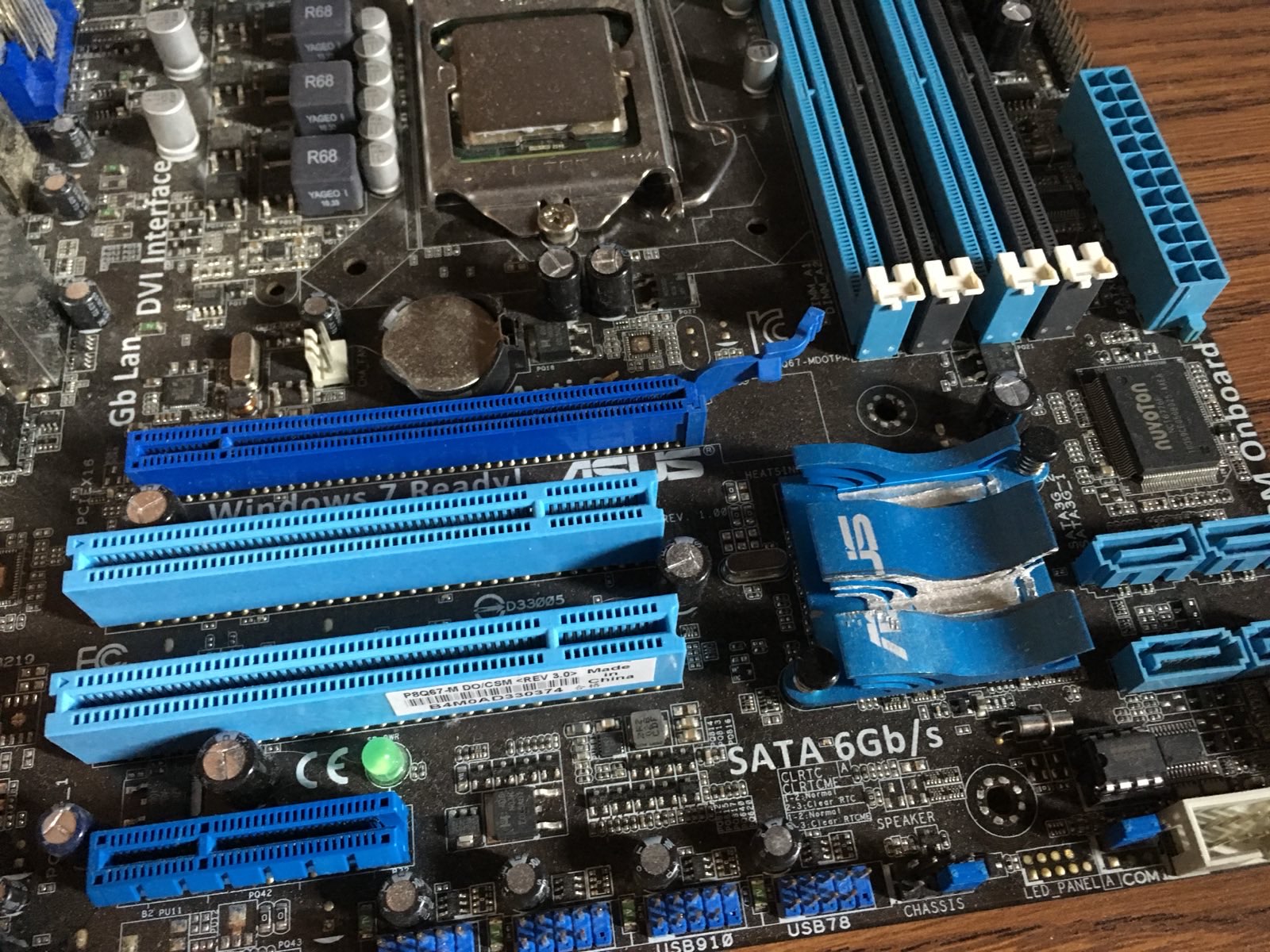
on the Chipset heatsink, the first PCI slot lines up with an already-separate chunk

I used a ruler and marked where the second [...] card goes across the chipset heatsink. Popped it off the motherboard, mounted it in the centre of a nice 18" long 2x4 offcut (with some plastic underneath to protect the surface and heat xfer compound that remained)

A hacksaw cut on either side down to just above the main part of the heat sink.

Using the chop saw, gently lowered blade down to clear out the middle of heatsink.

Smeared heat xfer compound around, wiggled the heatsink around to re-seat, popped clips back in to MB.
Wait…
I looked to the side, and noticed a strip taken out of my own motherboard’s aluminum heatsink, exactly to the right of the second and third slots on the board, exactly as the poster described.
Was this a common modification???
I slowly put the pieces together: specialized PCI hardware, mentions of Pro Tools, and a username that just had to be somebody I knew very well.
Indeed, I had solved the mystery of the gouge on my heatsink – it was my father’s strange modifications.
At that time, Pro Tools was in the midst of a strange hardware upgrade cycle for their DSP expansion cards. The older PCI cards and newer PCIe cards had essentially the same functionality and specs, but the ones with the newer PCI bus were substantially more expensive. However, Apple had just discontinued their PCI based Mac Pro and replaced it with the new PCIe-only generation without any backwards compatibility.
So, my father had done something clever and frugal: grab a low-end motherboard & high-end CPU to get two PCI slots for the old DSP cards, while having about the same power as the older Mac Pro system, while spending a whole lot less than replacing the cards.
Shortly after this debacle, hardware dealers had finally introduced a trade-in program that offered a more sensible upgrade path. The “hackintosh” rig no longer being needed, it ended up in my hands.
After a few months of “hackintoshing”, I gave in and installed Linux. It was a huge step up in stability, but I’ll always have a special place for my screwed-up Snow Leopard install.