


In my endless quest to essentially create a Cisco Firepower firewall for poor people, I found a bit of a gap in the open source security ecosystem. While we have great tools for detecting malicious network traffic patterns, we don’t have easy ways of detecting malicious files in transit. So, a bit of fiddling around later, and I have a fairly basic system for integrating Suricata’s ‘filestore’ functionality with ClamAV’s real time scanning, thereby producing a log containing the source and destination addresses of any malicious files detected.
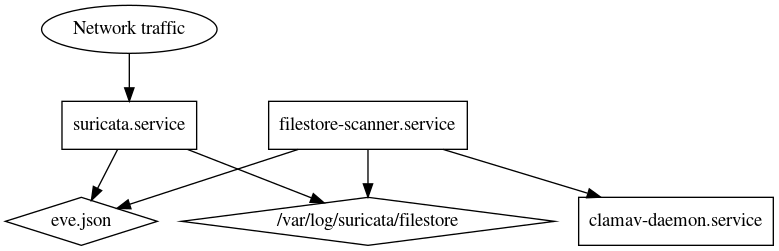
Example log outptut:
Jun 20 02:52:00 servername python3[4686]: 2020-06-20T02:52:00.431931+0000 src_ip=213.211.198.58 dest_ip=192.168.122.30 filename=eicar.com scan=/var/log/suricata/filestore/e0/e038b5168d9209267058112d845341cae83d92b1d1af0a10b66830acb7529494: Eicar-Signature FOUND
This system is largely a work in progress at this time. Someday I will build in some neat SIEM integrations, or at the very least some write up some quick-and-dirty OSSEC alert rules.
Setup
First of all, make sure the system has lots of storage available. Since this will catch all plaintext HTTP files, this server could quickly fill up. I would say at a minimum the box should have about 100GB of storage mounted at /var/log/.
Clam AV
First, install the ClamAV software on the system:
sudo apt install clamav clamav-base clamav-freshclam clamdscan clamav-daemon
Then, set the service to always start.
sudo systemctl enable --now clamav-daemon
To test the service, try scanning your favourite file.
sudo clamdscan /usr/games/cowsay --fdpass
Hopefully, the scan will look a little like this. If it’s already finding infected files… There could be some other problems.
/usr/games/cowsay: OK

----------- SCAN SUMMARY -----------
Infected files: 0
Time: 0.009 sec (0 m 0 s)
Suricata
First, install Suricata on the server. In this case, it’s a Ubuntu 18.04 system.
sudo add-apt-repository ppa:oisf/suricata-stable
sudo apt update
sudo apt install suricata
Then, update the basic rules and reload the service.
sudo suricata-update
sudo kill -USR2 `pidof suricata`
To catch files, we will be using the ‘filestore’ module of Suricata. This requires some modifications to the main configuration file, /etc/suricata/suricata.yaml:
...
outputs:
  ...
  - eve-log:
    enabled:    yes
    filetype:   regular
    filename:   eve.json
    ...
    types:
      ...
      - files:
        force-magic: yes
        force-hash: ["sha256"]
After editing the file, restart or reload the Suricata service.
sudo systemctl restart suricata
This enabled the ‘fileinfo’ logger to add information to the eve.json log file. To see it in action, generate a request that will return a plaintext file:
curl http://google.ca
Then, grep for an event:
sudo grep "fileinfo" /var/log/suricata/eve.json | jq
The result will be similar to this:
{
  "timestamp": "2020-06-14T03:36:07.150550+0000",
  "flow_id": 1495995546812515,
  "in_iface": "enp1s0",
  "event_type": "fileinfo",
  "src_ip": "172.217.10.67",
  "src_port": 80,
  "dest_ip": "192.168.122.30",
  "dest_port": 40998,
  "proto": "TCP",
  "http": {
    "hostname": "google.ca",
    "url": "/",
    "http_user_agent": "curl/7.58.0",
    "http_content_type": "text/html",
    "http_method": "GET",
    "protocol": "HTTP/1.1",
    "status": 301,
    "redirect": "http://www.google.ca/",
    "length": 218
  },
  "app_proto": "http",
  "fileinfo": {
    "filename": "/",
    "sid": [],
    "magic": "HTML document, ASCII text, with CRLF, LF line terminators",
    "gaps": false,
    "state": "CLOSED",
    "sha256": "c2655a9c494461170600f479ed0209ea087088d59f2a237c2e740396142cc2c0",
    "stored": true,
    "file_id": 35,
    "size": 218,
    "tx_id": 0
  }
}
Next, the filestore functionality must be enabled for the system. Once more, edit suricata.yaml
outputs:
  ...
  - file-store:
    version:         2
    enabled:         yes
    write-fileinfo:  yes
    force-filestore: yes
After reloading once more, another request can be made. This time, find the sha256 checksum from the fileinfo event, and locate the stored file:
sudo cat /var/log/suricata/filestore/c2/c2655a9c494461170600f479ed0209ea087088d59f2a237c2e740396142cc2c0

<HTML><HEAD><meta http-equiv="content-type" content="text/html;charset=utf-8">
<TITLE>301 Moved</TITLE></HEAD><BODY>
<H1>301 Moved</H1>
The document has moved
<A HREF="http://www.google.ca/">here</A>.
</BODY></HTML>
In this case, it’s pretty boring. That’s ok though, there will be plenty of interesting files to inspect later!
Scanning Malware Files
For the rest of this post, I’ll be using the EICAR test file. It’s a completely benign file, but is used as a benchmark for testing antivirus software. For more info, see the Wikipedia article.
To test what’s set up so far, go ahead and download the test file:
wget http://2016.eicar.org/download/eicar.com
Then, grep for the fileinfo event:
sudo grep "fileinfo" /var/log/suricata/eve.json | jq
There should be an entry similar to this:
{
  "timestamp": "2020-06-20T01:35:44.824301+0000",
  "flow_id": 966165374470776,
  "in_iface": "enp1s0",
  "event_type": "fileinfo",
  "src_ip": "213.211.198.58",
  "src_port": 80,
  "dest_ip": "192.168.122.30",
  "dest_port": 42134,
  "proto": "TCP",
  "http": {
    "hostname": "2016.eicar.org",
    "url": "/download/eicar.com",
    "http_user_agent": "Wget/1.19.4 (linux-gnu)",
    "http_content_type": "application/octet-stream",
    "http_method": "GET",
    "protocol": "HTTP/1.1",
    "status": 200,
    "length": 70
  },
  "app_proto": "http",
  "fileinfo": {
    "filename": "eicar.com",
    "sid": [],
    "magic": "EICAR virus test files",
    "gaps": false,
    "state": "CLOSED",
    "sha256": "e038b5168d9209267058112d845341cae83d92b1d1af0a10b66830acb7529494",
    "stored": true,
    "file_id": 3,
    "size": 70,
    "tx_id": 0
  }
}
Then, using the sha256 sum, we can inspect the file that Suricata intercepted:
sudo clamdscan --fdpass /var/log/suricata/filestore/e0/e038b5168d9209267058112d845341cae83d92b1d1af0a10b66830acb7529494
/var/log/suricata/filestore/e0/e038b5168d9209267058112d845341cae83d92b1d1af0a10b66830acb7529494: Eicar-Signature FOUND

----------- SCAN SUMMARY -----------
Infected files: 1
Time: 0.009 sec (0 m 0 s)
Neat! The system was able to extract a file from data flowing across it, then analyze it to check for malicious software!
Now it’s time to put all the pieces together.
Automating the scan with Python
This is a quick scanner script I threw together to extract information from the eve log and run it through clamav:
#!/usr/bin/env python3

import os
import json
import subprocess

filestore_base_path="/var/log/suricata/filestore/"

f = subprocess.Popen(['tail','-F','/var/log/suricata/eve.json'],\
        stdout=subprocess.PIPE,stderr=subprocess.PIPE)

while True:
    line = f.stdout.readline()
    eve  = json.loads(line)

    if eve['event_type'] == "fileinfo":

        shasum   = eve['fileinfo']['sha256']
        filename = eve['fileinfo']['filename']

        captured_file = filestore_base_path + shasum[:2] + "/" + shasum
        scan_result   = subprocess.run(\
            ['clamdscan', '--no-summary', '--stdout', '--stream', captured_file],\
            stdout=subprocess.PIPE).stdout.decode('utf-8').rstrip()

        logLine = str(eve['timestamp']) + \
            " src_ip=" +   eve['src_ip'] + \
            " dest_ip=" +  eve['dest_ip'] + \
            " filename=" + eve['fileinfo']['filename'] + \
            " scan=" + scan_result
        print(logLine)
When run, it will follow the logs until stopped. If any ‘infected’ files are found, the output will look somewhat like this:
2020-06-20T01:35:44.824301+0000 src_ip=213.211.198.58 dest_ip=192.168.122.30 filename=eicar.com scan=/var/log/suricata/filestore/e0/e038b5168d9209267058112d845341cae83d92b1d1af0a10b66830acb7529494: Eicar-Signature FOUND
Then, with some finesse this script can be loaded as a systemd service and run in the background.
The unit file is created at /etc/systemd/system/filestore-scanner.service
[Unit]
Description=Suricata malware detector
After=network.target

[Service]
Type=simple
User=root
Group=root
ExecStart=/usr/bin/python3 -u /opt/scripts/suricata/scanner.py
Restart=always
ProtectSystem=full
ProtectHome=yes
PrivateDevices=yes
NoNewPrivileges=yes
PrivateTmp=yes

[Install]
WantedBy=multi-user.target
Then, the filestore scanner service can be enabled.
sudo systemctl daemon-reload
sudo systemctl enable --now filestore-scanner
Once it’s up and running, we can create some network traffic to generate some log events. In this case, I upgraded some packages on the system.
sudo journalctl -xe -u filestore-scanner
Jun 20 02:48:59 servername python3[4686]: 2020-06-20T02:48:59.342957+0000 src_ip=91.189.91.39 dest_ip=192.168.122.30 filename=/ubuntu/pool/main/libd/libdrm/libdrm2_2.4.101-2~18.04.1_amd64.deb scan=/var/log/suricata/filestore/b2/b2c2c28c86ae2e0499f918f4566ed9e6d7a20552cf4bf66355daea7bceb1f120: OK
And, of course, we can generate some alerts the same way:
Jun 20 02:52:00 servername python3[4686]: 2020-06-20T02:52:00.431931+0000 src_ip=213.211.198.58 dest_ip=192.168.122.30 filename=eicar.com scan=/var/log/suricata/filestore/e0/e038b5168d9209267058112d845341cae83d92b1d1af0a10b66830acb7529494: Eicar-Signature FOUND
So, there it is. A basic integration to make a slightly more ‘aware’ security monitoring system. At this point, it’s still very much a Proof-of-Concept system, but with some more time behind the console it could become a very interesting addition to an existing threat protection device.