


Published: May 19, 2026
Agents are transforming development everywhere, and nowhere is that transformation happening faster than on the web. It's redefining what we build, how we build, and who builds. As we enter the era of the agentic web, we see a shift that bridges the gap between complex developer workflows, underlying platform capabilities, and everyday user experiences.
At Google I/O 2026, we unveiled a vision for this era. These ideas tie together three core areas of the web ecosystem: empowering AI agents to build and interact with websites through new capabilities, pushing the boundaries of web UI and performance, and transforming the browser into a powerful, proactive assistant for everyday users with Gemini in Chrome. By integrating efficient, built-in AI models directly to the browser and bringing powerful automation tools like auto browse to Chrome, we're making using the web smarter, faster, and more accessible for everyone.
Here are the 15 biggest updates we shared at Google I/O 2026 to help you build and thrive in the agentic era of web browsing.
Agents are changing how we interact with software, and we believe the web must be equipped to guide them. We are introducing powerful new capabilities and tools, like WebMCP and Modern Web Guidance, that allow you to build modern web experiences with greater clarity and velocity. We're also giving you the AI-assisted tools you need to build, debug, and optimize code faster and more accurately than ever before.
We're giving you a first look at WebMCP, a proposed open web standard that lets you expose structured tools like JavaScript functions and HTML forms to browser-based agents. By defining these tools, you can instruct agents exactly how and where to interact with your site. The result? An agent can now call machine-friendly functions to complete complex tasks in seconds with greater reliability, precision, and personalization. Imagine a user is planning a multi-city vacation. Instead of watching an agent click through travel forms, they can authorize it to query backend APIs directly to instantly build a personalized, weather-optimized itinerary for their approval.
The experimental WebMCP origin trial starts in Chrome 149. Gemini in Chrome will soon support WebMCP APIs. We're already seeing global consumer brands experimenting with WebMCP to create more delightful and engaging experiences for their users.

Modern Web Guidance, now available in early preview, is a set of evergreen and expert-vetted skills that guide your coding agents across many common use cases to build modern web experiences that are more accessible, performant, and secure. It integrates directly with Baseline, letting you focus on what you want to build while your tools automatically figure out the right features and fallbacks to use within your chosen Baseline target. Install with a single click in Google Antigravity, through npx or as an extension in a coding agent. Modern Web Guidance features support for over 100 use cases for dozens of the latest features with continuous updates added regularly.
Scale your workflow with Chrome DevTools for agents, which provides visibility to verify, debug, and optimize code in real time. By providing agents with direct access to DevTools' capabilities, such as console logs, network traffic, and accessibility trees, they can verify and automate fixes without manual oversight. Chrome DevTools for agents is available today for Antigravity and more than 20 other coding agents.
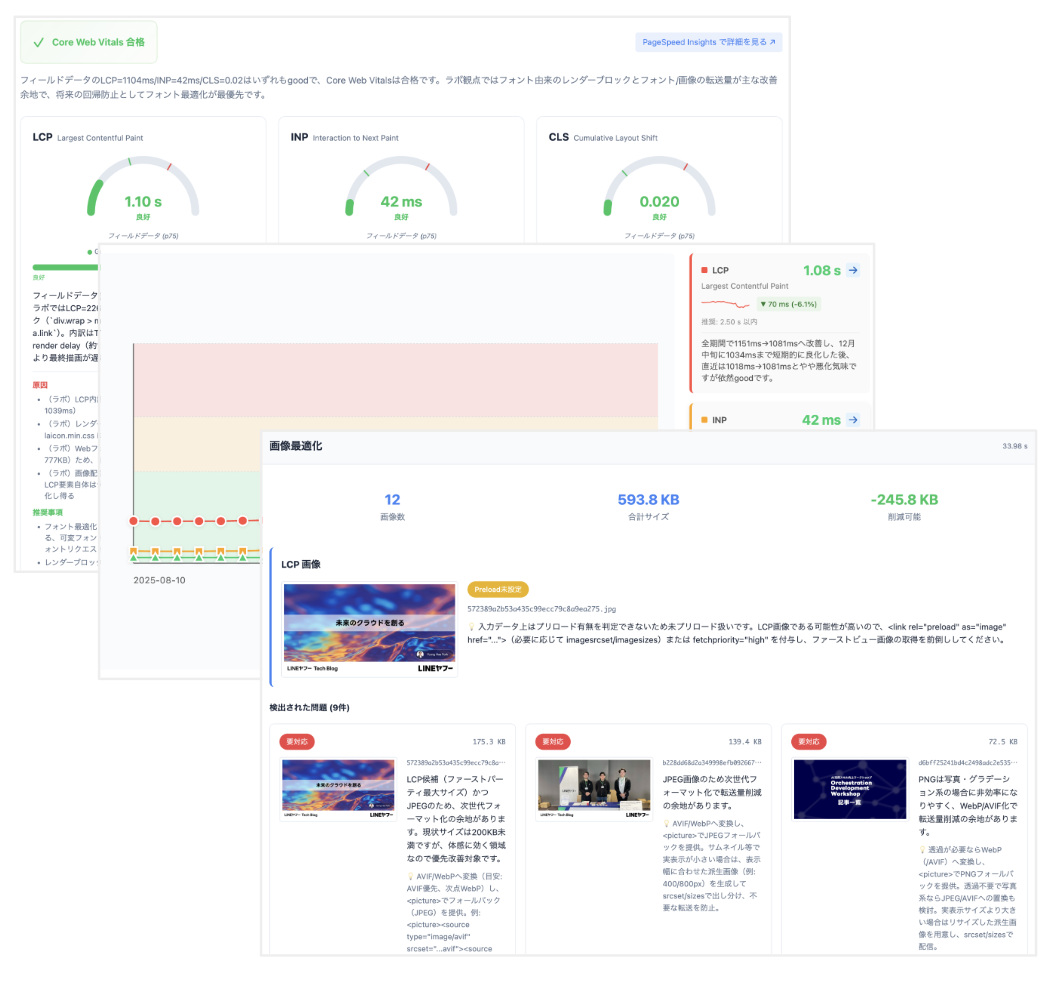
AI assistance in Chrome DevTools now has access to Lighthouse data, and can automatically search for context to answer more open-ended questions than were previously possible. Additionally, widgets give you full visibility into Gemini's reasoning to help you with debugging.
Running entirely in the browser, built-in AI lets you deploy personalized, proactive features that would be cost-prohibitive on the server. Skip the token bills and other obstacles to focus entirely on unique user value. Best of all, the browser manages and shares optimized models across sites, enabling more users to enjoy AI experiences on the web.
To help you build these frictionless AI enhancements, we're expanding the web AI toolkit:
Explore the full built-in AI suite, including our existing Translator and Language Detector APIs, and join the Early Preview Program to test upcoming APIs.
We're developing next-generation platform features that continue to blur the line between web and native apps. New declarative APIs, such as HTML-in-Canvas and Declarative Partial Updates, handle complex rendering and performance tasks for you, making it easier than ever to build beautiful, modern, high-fidelity, performant and interactive experiences on the web.
The new HTML-in-Canvas API and element-scoped view transitions enable previously impossible UIs that bring high-fidelity, app-like interactivity to the web. With the HTML-in-Canvas API, integrate real DOM elements directly into a canvas with WebGL and WebGPU to build an immersive 3D experience that is searchable, accessible, natively translatable, and interacts seamlessly with your built-in browser features. Combine this with view transitions—like element-scoped, available now in Chrome 147, and two-phase transitions, currently in testing—to create layered UI motion and animate intermediate states without blocking page interactivity. By turning complex interactions into declarative APIs, we deliver high-fidelity performance by default. The HTML-in-Canvas API origin trial is available now.
Chrome is enabling new ways to improve performance for modern app-like web experiences. New updates include the Soft Navigations API, available in an upcoming Chrome release, to bring Core Web Vitals measurement to Single Page Applications. We're also introducing new Declarative Partial Updates primitives bringing native out-of-order HTML updates to the platform as well as new streaming APIs to make it easier to insert HTML into the page without heavy DOM manipulation. These APIs are available for testing now.
As part of our identity updates, Immediate UI mode unifies passwords and passkeys into a single, browser-managed sign-in flow. When a user clicks "Sign In" on your site, Chrome automatically surfaces the available credentials—allowing for seamless authentication using saved passwords or passkeys. Get started with the Immediate UI mode implementation guide.
No more shuffling data around with exported TSV files! Use the new Baseline Checker tool to connect directly to the updated Google Analytics API and see exactly what percentage of your actual users support modern features. Pick a Baseline target and confidently ship the latest features to your users, while knowing when to use fallbacks.
With Gemini in Chrome on desktop, iOS and now Android, we're giving users powerful new ways to browse, create, and get things done. From automating complex, multi-step tasks with auto browse to intuitive multimodal interactions using your cursor or voice, Gemini in Chrome puts powerful productivity directly at the user's fingertips.
Coming in June, we designed Gemini in Chrome on Android to be your personal browsing assistant, helping you better understand content on the web. It lets you summarize long articles, ask specific questions, and get detailed explanations without having to switch apps. Beyond answering questions, it acts as a versatile productivity tool that connects with Google apps like Calendar, Keep, and Gmail to help you complete tasks quickly. And with Personal Intelligence, if you choose to connect apps like Gmail and Google Photos, this secure, context-aware browsing assistant can even provide tailored responses based on your unique interests, hobbies and more.
Already available on desktops, auto browse for Android lets you get the most out of Gemini in Chrome by automating your digital chores so you can focus on more important tasks. With auto browse, you can easily complete tasks from appointment booking to party planning, finding in stock items and more, all from your Android phone. For example, if you are about to head out to a comedy show, but forgot to book parking, auto browse has you covered. Just ask Gemini in Chrome, and it will gather event details from your ticket to find you a spot.
On desktop, we will be integrating auto browse with Gemini Spark in the coming months, so that your 24/7 personal AI agent can take actions in the browser on your behalf.
With Nano Banana, you can instantly create or customize images while browsing the web on your Android device. Just ask Gemini in Chrome to "turn this page into an informative infographic" while studying, or "alter the image to include modern living room essentials" when browsing for apartments.
Skills in Chrome let you save and reuse your most helpful AI prompts in Gemini in Chrome on desktop. Save a multi-tab workflow once, like generating side-by-side spec comparisons while shopping or scanning long documents for key information, and run it again instantly with a single click any time.
You can now use your mouse pointer to ask Gemini in Chrome about the specific parts of the webpage you are looking at, saving you from having to describe exactly what you mean. For example, you can select two products on a page and instantly compare their key features. Or if you want to edit an image with Nano Banana you can select exactly the part of the image you want to change
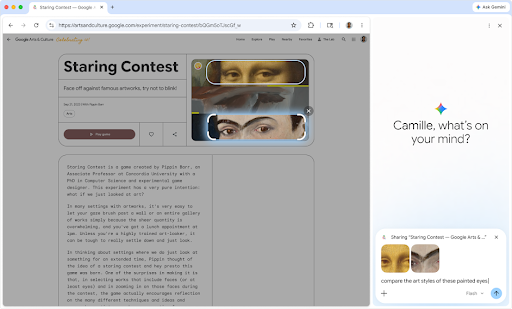
Soon it will be possible to use your voice to type into websites across Chrome on desktop. With voice, it will be easier and more natural to do things like drafting comments, filling in long fields on forms, or writing emails. This will use Gemini models to either clean up your transcription - removing the ums and ahs and fitting it to the context while keeping true to your voice - or fill in the field as you ask it to.
The transition to the agentic web is unfolding right in front of us. By bridging the gap between powerful underlying AI capabilities and everyday web development, we are removing the friction that has historically slowed down and constrained innovation.
We're moving away from a web that requires you to do all the heavy lifting, and towards a web that proactively works for you. Whether you are looking to seamlessly integrate with browser-based agents, push the absolute visual limits of what a webpage can do, or simply streamline your own debugging workflow, we're bringing you the tools to build the future of the web.
Explore the full guides and technical deep-dives at developer.chrome.com and web.dev We want to see what you build with these new features. So share your projects and be sure to connect with us X, LinkedIn, and YouTube.
See you at the next Google I/O!
此内容由惯性聚合(RSS阅读器)自动聚合整理,仅供阅读参考。 原文来自 — 版权归原作者所有。