







Ghengin
I’ve been working the past month or two in a game engine titled
Ghengin (pronounced /ɡɛn-ʤɪn/, never /ɡɛn-ɡɪn/). This is not yet a release,
and version 0.1.0 is far into the future. However, I’ve come a long way and I’d
like to share a few pictures of my progress. This post was migrated from the
discussion at the Haskell Discourse
The demo I’ve been working on is based on Sebastian Lague’s series Procedural Planets. It is a showcase of procedurally generated planets you can move around in and tweak the procedural generation parameters of the planets to create oceans and continents.
Bullets on Technical Details
I hope to, soon enough, write a more substantial explanation of the engine’s technical challenges and overall design decisions so far, and on the game developer’s facing side of the engine. In the meantime, here are a few key points regarding the technical feats of the engine along with the main libraries it currently depends on, which help create a picture of how it is working:
The renderer is written using the great bindings to the Vulkan API
The shaders are crucial in the overall design, and a lot of code depends on their definition (e.g. preparing render pipelines, allocating descriptor sets and textures, everything materials related …). The shaders are written using FIR, an amazing shader language embedded in Haskell!
The entity management, scene graph and render queue are done/created through the apecs entity component system.
Vectors and matrices are from geomancy
GLFW-b for window management and user input (used as the window backend for vulkan)
The dear-imgui bindings for the GUI
JuicyPixels for loading textures
FIR is a really cool shader library and unlike
any you’ve likely tried before (it’s embeded in Haskell, but that’s just the
start). The shader’s “interfaces” are defined at the type level, and in
ghengin that type information is used to validate the
game-developer-defined-materials. In short, if you define materials incompatible
with your shaders, the program will fail at compile time
The Small Victories
To give a general sense of progress, I put together a small roadmap of victories attained while developing the engine, both in words and in screenshots.
The very first achievement was rendering a triangle (Fig. 2). This is a given classic in graphics programming.
Then, I rendered a simple cube and was able to rotate it with a simple model transform matrix (Fig. 3).
Later, I got a perspective camera which could move around the world. I was generating spheres at this point and the colors show that I was getting closer to generating the normals right too (Fig. 4).
I managed to integrate dear-imgui into the renderer after that, and even fixed upstream a dreaded off by one error which kept making the GUI behave funny and crash. I was also experimenting with simple diffuse lighting here (Fig. 5).
With the GUI in place, I started focusing on developing planets by generating single sphere and modifying the height value of each point on the sphere by noise value: generating terrain and mountains (Fig. 6).
After the terrain generation I spent some long weeks on the internals of the renderer before achieving more visual results with the exception of the following color-based-on-height-relative-to-min-and-max-heights planet (Fig. 7). Those weeks were spent in internal technical challenges which I hope to describe on a subsequent post with the resulting design and implementation (and hopefully avoid to some extent the arduous process of understanding and reaching a design and implementation).
This week, with the material system working great for a first iteration, I spent finally some more time on the procedural planets: I added specular highlights to the lighting model (using the blinn-phong model) and added a (gradient based) texture to the planet that is sampled according to the height of each point in the planet. The result is a nicely lit planet with colors depending on the height: lower height -> blue for water, middle -> green for grass, higher -> brown for mountains (Fig. 8).
A peek into the code
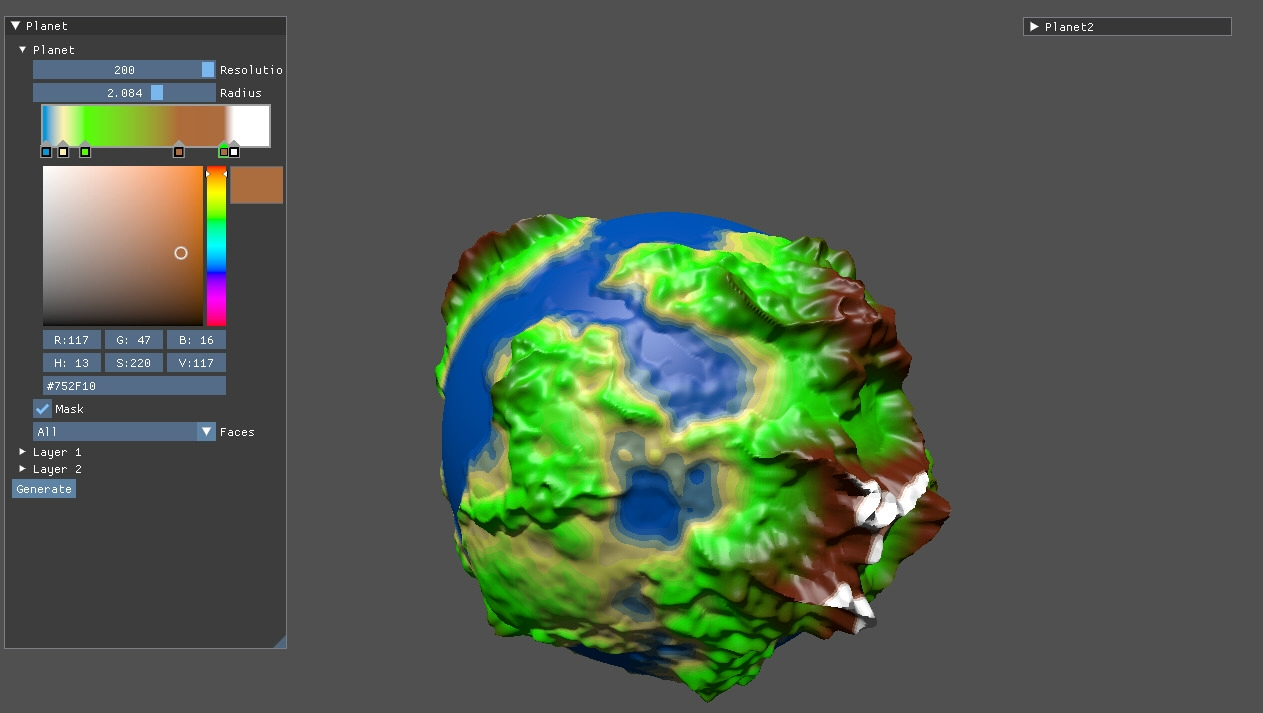
Unfortunately, I don’t expect it to be useful without a proper explanation, but nonetheless I’ll present a small snippet of the Main module of the procedural planets game. Additionally, the full source is avaliable1 – that’s also where engine development is happening. The next feature I’ve just completed, at the time of writing, is a gradient editor for the in game GUI (Fig. 1).
As promised, here’s a quick look at the Main module of the procedural planets game:
initG :: Ghengin World ()
initG = do

  -- Planet settings used to generate the planet and which are edited through the UI
  ps <- makeSettings @PlanetSettings
  (planetMesh,minmax) <- newPlanet ps

  -- Load the planet gradient texture
  sampler <- createSampler FILTER_NEAREST SAMPLER_ADDRESS_MODE_CLAMP_TO_EDGE
  tex         <- texture "assets/planet_gradient.png" sampler

  -- Create the render pipeline based on the shader definition
  planetPipeline <- makeRenderPipeline Shader.shaderPipeline

  -- Create a material which will be validated against the render pipeline at compile time
  m1 <- material (Texture2DBinding tex . StaticBinding (vec3 1 0 0) . StaticBinding minmax) planetPipeline

  -- Create a render packet with the mesh, material, and pipeline.
  -- All entities with a RenderPacket component are rendered according to it.
  let p1 = renderPacket planetMesh m1 planetPipeline

  -- Define our scene graph
  sceneGraph do

    -- A planet entity, with the planet render packet and a transform
    e1 <- newEntity ( p1, Transform (vec3 0 0 0) (vec3 1 1 1) (vec3 0 (pi/2) 0) )

    -- A camera
    newEntity ( Camera (Perspective (radians 65) 0.1 100) ViewTransform
              , Transform (vec3 0 0 0) (vec3 1 1 1) (vec3 0 0 0))

    -- The planet UI component based on the `ps` settings
    newEntityUI "Planet"  $ makeComponents ps (e1,tex)

  pure ()

updateG :: () -> DeltaTime -> Ghengin World Bool
updateG () dt = do

  -- Every frame we update the first person camera with the user inputs and the planet's rotation
  cmapM $ \(_ :: Camera, tr :: Transform) -> updateFirstPersonCameraTransform dt tr
  cmap $ \(_ :: RenderPacket, tr :: Transform) -> (tr{rotation = withVec3 tr.rotation (\x y z -> vec3 x (y+0.5*dt) z) } :: Transform)

  pure False

main :: IO ()
main = do
  -- Run the game with this init, update and end function
  ghengin w initG undefined updateG endG
If you are curious about the full source of the planets game, beware of dragons 🙂. It is not ready as a learning resource whatsoever.↩︎