






The enemy is back…
It’s so difficult this time. When I was preparing my resume, I found that my blog was gone. My dearest blog nsddd.top , which I had accompanied for a year and was well-received, was sacrificed. Wuwuwuwu
Don’t be impatient, don’t be impatient, learn a lesson, what is the first thing? I will definitely not use dynamic blogs anymore. I used workpress for my first blog in my freshman year. The server management tool I used at that time was the famous Pagoda. Although I still don’t use it now. I am using it, hahaha, but I will definitely never use it again in the future. Do you remember the second generation blog? The second generation blog is the blog I just sacrificed. It was built using docker and survived for two years (sophomore to junior year). The server was changed halfway through, but thanks to Docker’s elegant Portability haha, so my blog survives.
So why did it fail this time? ? ? The hanging date is September 1, 2023. The reason is that Java malfunctioned and it was found that the swtich space was insufficient. Then, I was ready to transplant and repair it, but I really felt that I couldn’t maintain it. I hope that my blog can survive for a few years, more than ten years, or even decades or hundreds of years.
So, start from scratch!!!
I have used vuepress to take notes before, but vuepress is not particularly suitable for what I am doing now, because I am already visually exhausted, hahaha, and it is very uncomfortable to watch, so I used an open source project that I like very much, and many of you are familiar with it. Top open source project: hugo, GitHub address is: https://github.com/gohugoio/hugo
The next step is to choose a suitable theme. I chose https://github.com/adityatelange/hugo-PaperMod based on several popular themes.
I am keen on source code. I can change the code and submit PR at any time, so I use the source code to build:
❯ git clone https://github.com/cubxxw/hugo.git
❯ cd hugo
❯ go build
❯ mv hugo /usr/bin
Choose the theme we use:
❯ git clone https://github.com/adityatelange/hugo-PaperMod themes/PaperMod --depth=1

# If you want to update the theme later
❯ cd themes/PaperMod
❯ git pull
Use git submodule with
The code may be submitted to Github, so the git of external modules containing subprojects can be managed with git submodule.
❯ git submodule add --depth=1 https://github.com/adityatelange/hugo-PaperMod.git themes/PaperMod
❯ git submodule update --init --recursive # needed when you reclone your repo (submodules may not get cloned automatically)
Note: You may use
--branch v7.0to end of above command if you want to stick to specific release.
Update theme using method 2:
❯ git submodule update --remote --merge
```
Add theme to hugo.toml:
It is recommended to use yaml or toml. I prefer to use yaml haha. Of course, you can use the tool https://tooltt.com/yaml2toml/ to convert it at will.
baseURL = 'https://nsddd.top'
languageCode = 'en-us'
title = 'cubxxw is blog'
theme = "PaperMod"

enableRobotsTXT = true
buildDrafts = false
buildFuture = false
buildExpired = false
googleAnalytics = "UA-123-45"
pygmentsUseClasses = true

[minify]
disableXML = true
minifyOutput = true

[params]
env = "production"
title = "ExampleSite"
description = "ExampleSite description"
keywords = [ "Blog", "Portfolio", "PaperMod" ]
author = "Me"
images = [ "<link or path of image for opengraph, twitter-cards>" ]
DateFormat = "January 2, 2006"
defaultTheme = "auto"
disableThemeToggle = false
ShowReadingTime = true
ShowShareButtons = true
ShowPostNavLinks = true
ShowBreadCrumbs = true
ShowCodeCopyButtons = false
ShowWordCount = true
ShowRssButtonInSectionTermList = true
UseHugoToc = true
disableSpecial1stPost = false
disableScrollToTop = false
comments = false
hidemeta = false
hideSummary = false
showtoc = false
tocopen = false

   [params.assets]
   favicon = "<link/abs url>"
   favicon16x16 = "<link/abs url>"
   favicon32x32 = "<link/abs url>"
   apple_touch_icon = "<link/abs url>"
   safari_pinned_tab = "<link/abs url>"

   [params.label]
   text = "Home"
   icon = "/apple-touch-icon.png"
   iconHeight = 35

   [params.profileMode]
   enabled = false
   title = "ExampleSite"
   subtitle = "This is subtitle"
   imageUrl = "<img location>"
   imageWidth = 120
   imageHeight = 120
   imageTitle = "my image"

     [[params.profileMode.buttons]]
     name = "Posts"
     url = "posts"

     [[params.profileMode.buttons]]
     name = "Tags"
     url = "tags"

   [params.homeInfoParams]
   Title = "Hi there 👋"
   Content = "Welcome to my blog"

   [[params.socialIcons]]
   name = "twitter"
   url = "https://twitter.com/"

   [[params.socialIcons]]
   name = "stackoverflow"
   url = "https://stackoverflow.com"

   [[params.socialIcons]]
   name = "github"
   url = "https://github.com/"

[params.analytics.google]
SiteVerificationTag = "XYZabc"

[params.analytics.bing]
SiteVerificationTag = "XYZabc"

[params.analytics.yandex]
SiteVerificationTag = "XYZabc"

   [params.cover]
   hidden = true
   hiddenInList = true
   hiddenInSingle = true

   [params.editPost]
   URL = "https://github.com/<path_to_repo>/content"
   Text = "Suggest Changes"
   appendFilePath = true

   [params.fuseOpts]
   isCaseSensitive = false
   shouldSort = true
   location = 0
   distance = 1_000
   threshold = 0.4
   minMatchCharLength = 0
   keys = [ "title", "permalink", "summary", "content" ]

[[menu.main]]
identifier = "categories"
name = "categories"
url = "/categories/"
weight=10

[[menu.main]]
identifier = "tags"
name = "tags"
url = "/tags/"
weight=20

[[menu.main]]
identifier = "example"
name = "example.org"
url = "https://example.org"
weight=30

[markup.highlight]
noClasses = false
Then create a file:
Sample
Page.md
---
title: "My 1st post"
date: 2020-09-15T11:30:03+00:00
# weight: 1
# aliases: ["/first"]
tags: ["first"]
author: ["Xinwei Xiong", "Me"]
# author: ["Me", "You"] # multiple authors
showToc: true
TocOpen: false
draft: false
hidemeta: false
comments: false
description: "Desc Text."
canonicalURL: "https://canonical.url/to/page"
disableHLJS: true # to disable highlightjs
disableShare: false
disableHLJS: false
hideSummary: false
searchHidden: true
ShowReadingTime: true
ShowBreadCrumbs: true
ShowPostNavLinks: true
ShowWordCount: true
ShowRssButtonInSectionTermList: true
UseHugoToc: true
cover:
     image: "<image path/url>" # image path/url
     alt: "<alt text>" # alt text
     caption: "<text>" # display caption under cover
     relative: false # when using page bundles set this to true
     hidden: true # only hide on current single page
editPost:
     URL: "https://github.com/<path_to_repo>/content"
     Text: "Suggest Changes" # edit text
     appendFilePath: true # to append file path to Edit link
---
It can be used by creating archetypes/post.md
❯ hugo new --kind post archetypes/Page.md
**All examples below use yml/yaml format, I recommend using yml instead of toml as it is easier to read. **
Of course, as a cloud-native configuration file, yaml is more loved by me than toml :love_letter:
Added content:
You can use the hugo new command to add new content, for example:
❯ hugo new growth/posts/my-first-post.md
This command will generate the content/growth/posts/my-first-post.md file,
Then, edit the content/growth/posts/my-first-post.md file to add your content.
Generate all content:
❯ hugo
The above command will generate all pages and place them in the
public/directory.
You can use the hugo server command to preview your website locally:
The -D parameter means including draft content. Then, visit http://localhost:1313 in your browser to view your site.
Define path
By default, the path is strongly related. For example, in which directory you define it, the path is the path of this directory, but this is not absolute.
For example, the above:
❯ hugo new growth/posts/my-first-post.md
The default access URL for this post will usually be:
Note the following points:
draft: false in the header information of the post). If you use hugo server to preview your site without adding the -D parameter, you will not see the draft. In order to preview draft content, you need to use hugo server -D.url attribute in the front matter of the post.In the next environment, we start our theme configuration. The configuration of the theme enriches hugo’s theme.
###Default theme dark/light
params:
     # defaultTheme: light
     # defaultTheme: dark
     defaultTheme: auto # to switch between dark or light according to browser theme
Create a page with archive.md in the content directory with the following content
.
├── config.yml
├── content/
│ ├── archives.md <--- Create archive.md here
│ └── posts/
├── static/
└── themes/
     └── PaperMod/
and add the following:
---
title: "Archive"
layout: "archives"
url: "/archives/"
summary: archives
---
NOTE: The Archives layout does not support multilingual month translations.
Start using hugo server:
Then visit: http://localhost:1313/
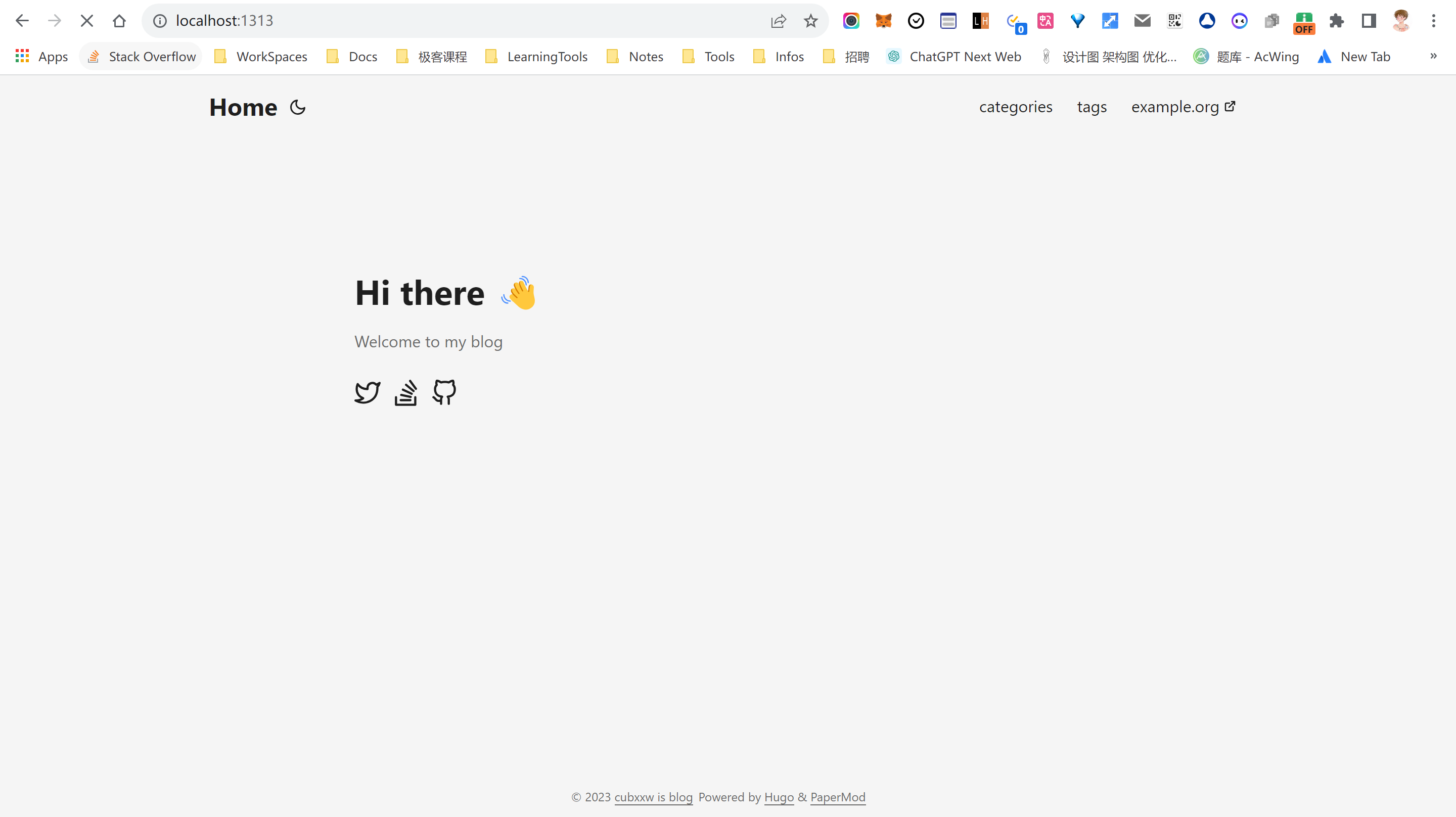
Click Moon to support setting Light and Dark.
Use the 1st entry as some information:
   homeInfoParams:
     Title: Hi there 👋
     Content: My name is Xinwei(bear) Xiong. My loyalty is to adventure 🤖
   socialIcons:
     - name: github
       url: https://github.com/cubxxw
     - name: zhihu
       url: https://www.zhihu.com/people/3293172751
     - name: bilibili
       url: https://space.bilibili.com/1233089591
     - name: youtube
       url: https://www.youtube.com/channel/UCd3qbRbMwYlh5uKneo_2m_w
     - name: email
       url: https://mail.google.com/mail/u/0/?fs=1&tf=cm&to=3293172751nss@gmail.com
Display Index/Home as a full page with social links and images
Add the following content to the configuration file:
params:
     profileMode:
         enabled: true
         title: "<Title>" # optional default will be site title
         subtitle: "This is subtitle"
         imageUrl: "<image link>" # optional
         imageTitle: "<title of image as alt>" # optional
         imageWidth: 120 # custom size
         imageHeight: 120 # custom size
         buttons:
             - name: Archive
             url: "/archive"
             - name: Github
             url: "https://github.com/"

     socialIcons: #optional
         - name: "<platform>"
             url: "<link>"
         - name: "<platform 2>"
             url: "<link2>"
Add BreadCrumb navigation above the article title to show subsections and home page navigation
params:
     ShowBreadCrumbs: true
It is possible to disable the cover page for specific pages:
---
ShowBreadCrumbs: false
---
Adds a button that suggests changes by linking to the edit destination using the article’s file path.
For site configuration purposes:
Params:
     editPost:
         URL: "https://github.com/<gitlab user>/<repo name>/tree/<branch name>/<path to content>/"
         Text: "Suggest Changes" # edit text
         appendFilePath: true # to append file path to Edit link
Modifications can be made for individual pages:
---
editPost:
     URL: "https://github.com/<path_to_repo>/content"
     Text: "Suggest Changes" # edit text
     appendFilePath: true # to append file path to Edit link
---
Use GitHub actions for deployment and integrate some advanced commands in Makefile
The following is the configuration of the Makefile:
##################################=> common commands <=######### ####################################
# ========================== Capture Environment ===================== ==========
# get the repo root and output path
ROOT_PACKAGE=github.com/cubxxw/blog
OUT_DIR=$(REPO_ROOT)/_output
# ================================================= =============================

# define the default goal
#

SHELL := /bin/bash
DIRS=$(shell ls)
GO=go

.DEFAULT_GOAL := help

#include the common makefile
COMMON_SELF_DIR := $(dir $(lastword $(MAKEFILE_LIST)))
# ROOT_DIR: root directory of the code base
ifeq ($(origin ROOT_DIR),undefined)
ROOT_DIR := $(abspath $(shell cd $(COMMON_SELF_DIR)/. && pwd -P))
endif
# OUTPUT_DIR: The directory where the build output is stored.
ifeq ($(origin OUTPUT_DIR),undefined)
OUTPUT_DIR := $(ROOT_DIR)/_output
$(shell mkdir -p $(OUTPUT_DIR))
endif

# BIN_DIR: The directory where the build output is stored.
ifeq ($(origin BIN_DIR),undefined)
BIN_DIR := $(OUTPUT_DIR)/bin
$(shell mkdir -p $(BIN_DIR))
endif

ifeq ($(origin TOOLS_DIR),undefined)
TOOLS_DIR := $(OUTPUT_DIR)/tools
$(shell mkdir -p $(TOOLS_DIR))
endif

ifeq ($(origin TMP_DIR),undefined)
TMP_DIR := $(OUTPUT_DIR)/tmp
$(shell mkdir -p $(TMP_DIR))
endif

ifeq ($(origin VERSION), undefined)
VERSION := $(shell git describe --tags --always --match="v*" --dirty | sed 's/-/./g') #v2.3.3.631.g00abdc9b.dirty
endif

# Check if the tree is dirty. default to dirty(maybe u should commit?)
GIT_TREE_STATE:="dirty"
ifeq (, $(shell git status --porcelain 2>/dev/null))
GIT_TREE_STATE="clean"
endif
GIT_COMMIT:=$(shell git rev-parse HEAD)

# COMMA: Concatenate multiple strings to form a list of strings
COMMA := ,
# SPACE: Used to separate strings
SPACE :=
# SPACE: Replace multiple consecutive Spaces with a single space
SPACE +=

## run-default: Run hugo server with default mode.
run-default:
@$(TOOLS_DIR)/hugo server -D --gc -p 13132 --config config.default.yml

## run-profile-mode: Run hugo server with profile mode.
run-profile-mode:
@$(TOOLS_DIR)/hugo server -D --gc -p 13133 --config config.profileMode.yml

## chroma-css: Generate chroma css.
chroma-css:
@$(TOOLS_DIR)/hugo gen chromastyles --style=dracula > assets/css/lib/chroma-dark.css
@$(TOOLS_DIR)/hugo gen chromastyles --style=github > assets/css/lib/chroma-light.css

## run: Run hugo server.
.PHONY: run
run: tools.verify.hugo
@$(TOOLS_DIR)/hugo
@$(TOOLS_DIR)/hugo server -D --gc -p 13131 --config config.yml

## build: Build site with non-production settings and put deliverables in ./public
.PHONY: build
build: tools.verify.hugo module-check
@$(TOOLS_DIR)/hugo --cleanDestinationDir --minify --environment development

## module-check: Check if all of the required submodules are correctly initialized.
.PHONY: module-check
module-check:
@git submodule status --recursive | awk '/^[+-]/ {err = 1; printf "\033[31mWARNING\033[0m Submodule not initialized: \033[34m%s\033[0m\n", $$2} END { if (err != 0) print "You need to run \033[32mmake module-init\033[0m to initialize missing modules first"; exit err }' 1>&2

## module-update: Updating themes
module-update: tools.verify.hugo
@git submodule update --remote --merge

## clean: Clean all builds.
.PHONY: clean
clean:
@echo "===========> Cleaning all builds TMP_DIR($(TMP_DIR)) AND BIN_DIR($(BIN_DIR))"
@-rm -vrf $(TMP_DIR) $(BIN_DIR)
@echo "============> End clean..."

## help: Show this help info.
.PHONY: help
help: Makefile
@printf "\n\033[1mUsage: make <TARGETS> ...\033[0m\n\n\\033[1mTargets:\\033[0m\n\n"
@sed -n 's/^##//p' $< | awk -F':' '{printf "\033[36m%-28s\033[0m %s\n", $$1, $$2} ' | sed -e 's/^/ /'

################################## Tools ############## #######################

BUILD_TOOLS ?= hugo

## tools.verify.%: Check if a tool is installed and install it
.PHONY: tools.verify.%
tools.verify.%:
@echo "===========> Verifying $* is installed"
@if [ ! -f $(TOOLS_DIR)/$* ]; then GOBIN=$(TOOLS_DIR) $(MAKE) tools.install.$*; fi
@echo "===========> $* is install in $(TOOLS_DIR)/$*"

## tools: Install a must tools
.PHONY: tools
tools: $(addprefix tools.verify., $(BUILD_TOOLS))

## tools.install.%: Install a single tool in $GOBIN/
.PHONY: tools.install.%
tools.install.%:
@echo "===========> Installing $,The default installation path is $(GOBIN)/$*"
@$(MAKE) install.$*

.PHONY: install.addlicense
install.addlicense:
@$(GO) install github.com/google/addlicense@latest

.PHONY: install.hugo
install.hugo:
@$(GO) install github.com/gohugoio/hugo@latest
Of course, Makefile is for local. If it is a remote server, you need to rely on github actions:
# Sample workflow for building and deploying a Hugo site to GitHub Pages
name: Deploy Hugo site to Pages

on:
   # Runs on pushes targeting the default branch
   push:
     branches: ["main"]

   # Allows you to run this workflow manually from the Actions tab
   workflow_dispatch:

# Sets permissions of the GITHUB_TOKEN to allow deployment to GitHub Pages
permissions:
   contents: read
   pages: write
   id-token: write

# Allow only one concurrent deployment, skipping runs queued between the run in-progress and latest queued.
# However, do NOT cancel in-progress runs as we want to allow these production deployments to complete.
concurrency:
   group: "pages"
   cancel-in-progress: false

# Default to bash
defaults:
   run:
     shell: bash

jobs:
   #Build job
   build:
     runs-on: ubuntu-latest
     env:
       HUGO_VERSION: 0.114.0
     steps:
       - name: Install Hugo CLI
         run: |
           wget -O ${{ runner.temp }}/hugo.deb https://github.com/gohugoio/hugo/releases/download/v${HUGO_VERSION}/hugo_extended_${HUGO_VERSION}_linux-amd64.deb \
           && sudo dpkg -i ${{ runner.temp }}/hugo.deb
       - name: Install Dart Sass
         run: sudo snap install dart-sass
       - name: Checkout
         uses: actions/checkout@v3
         with:
           submodules: recursive
       - name: Setup Pages
         id: pages
         uses: actions/configure-pages@v3
       - name: Install Node.js dependencies
         run: "[[ -f package-lock.json || -f npm-shrinkwrap.json ]] && npm ci || true"
       - name: Build with Hugo
         env:
           # For maximum backward compatibility with Hugo modules
           HUGO_ENVIRONMENT: production
           HUGO_ENV: production
         run: |
           hugo\
             --minify \
             --baseURL "${{ steps.pages.outputs.base_url }}/"
       - name: Upload artifact
         uses: actions/upload-pages-artifact@v2
         with:
           path: ./public

   # Deployment job
   deploy:
     environment:
       name: github-pages
       url: ${{ steps.deployment.outputs.page_url }}
     runs-on: ubuntu-latest
     needs: build
     steps:
       - name: Deploy to GitHub Pages
         id:deployment
         uses: actions/deploy-pages@v2
To add a comment, create an html file
layouts/partials/comments.html
and paste the code provided by your review provider
Also add this in config
I use: https://utteranc.es/ This is a plugin based on GitHub comments
Hugo supports the simultaneous creation of websites in multiple languages.
languages should define the available languages in a section of the site configuration.
Translate by file name
/content/about.en.md/content/about.fr.mdThe first file is specified as English and linked to the second file. The second file is specified in French and linked to the first file.
Their language is specified based on the language code added as a suffix to the file name.
Content fragments are linked together as translated pages by having the same path and base filename.
If the file does not have a language code, it will be assigned a default language.
Translation by content directory
Of course, you can also translate based on the file directory. The system uses a different content directory for each language. The content directory for each language is set using the contentDir parameter.
languages:
   en:
     contentDir: content/english
     languageName: English
     weight: 10
   fr:
     contentDir: content/french
     languageName: Français
     weight: 20
The value of contentDir can be any valid path - even an absolute path reference. The only restriction is that content directories cannot overlap.
The final example is as follows:
/content/english/about.md/content/french/about.mdThe first file is specified as English and linked to the second file. The second file is specified in French and linked to the first file.
Their language is specified based on the content directory in which they are located.
Content fragments are linked together as translation pages by having the same path and base name (relative to their language content directory).
Bypass default link
Any pages sharing the same translationKey set in the cover will be linked as the translated page, regardless of base name or location.
Consider the following example:
/content/about-us.en.md/content/om.nn.md/content/presentation/a-propos.fr.mdBy setting the translationKey front matter parameter to about in all three pages, they will be linked as translation pages.
hugo new content to generate multilingual contentGiven below are the translated files:
For the same directory:
hugo new content posts/my-hugo.en.md
hugo new content posts/my-hugo.de.md
For different directories:
hugo new content content/en/ai-technology/posts/test.md
hugo new content content/zh/ai-technology/posts/test.md
hugo new content content/en/growth/posts/test.md
hugo new content content/zh/growth/posts/test.md
hugo new content content/en/projects/test.md
We add the following parameters to our configuration file:
#config.yaml
languages:
   en:
     languageName: English
     weight: 1
   fr:
     languageName: Français
     weight: 2
   es:
     languageName: Spanish
     weight: 3
Now, our languages will be available using site.Languages and sorted by Weight. The lower…the higher the priority. As we will cover later, it is highly recommended to put the default language first.
此内容由惯性聚合(RSS阅读器)自动聚合整理,仅供阅读参考。 原文来自 — 版权归原作者所有。