







The story starts with this proposal idea~
🤖OpenIM cicd robot machine proposal
Prow is a CI/CD system based on Kubernetes. Jobs can be triggered by various types of events and report their status to many different services. In addition to job execution, Prow also provides GitHub automation in the form of policy enforcement, chat operations via /foo style commands, and automatic PR merging.
For Golang documentation, see GoDoc . Please note that these libraries are for prow use only and we do not attempt to preserve backwards compatibility.
Kubernetes provides web command query specifically for Prow:
For a brief overview of how Prow runs jobs, see Life of a Prow Job.
To see common usage and interaction flow of Prow, see the Pull Request Interaction Sequence Diagram.
The simplest example to get started is pull request .
Submit a pull request (hereinafter referred to as PR). In the PR body, feel free to add area tags (if appropriate), such as /area <AREA> . List of labels here
. Feel free to recommend a commenter /assign @theirname .
Once your reviewers are satisfied, they will say /lgtm , which will apply the lgtm tag, or if they are an OWNER, the approved tag will be applied. The approved tag will also be automatically applied to PRs opened by the owner. If neither you nor your reviewer are OWNERs, /assign an owner. If your PR has the lgtm and approved tags, does not have any do-not-merge/* tags, and all tests pass, the PR will be automatically merged.
**prow is very powerful, even more outstanding than actions. Job execution for testing, batch processing, and artifact release is possible. **
**Pluggable GitHub bot automation, implementing /foo style commands and enforcing configured policies/processes. **
::: details what is foo style
The /foo style usually refers to the command format used in chat applications such as Slack. Commands in this form begin with a slash /, followed by a keyword or phrase, such as /help or /status. GitHub bot automation can use this format to implement specific functionality, such as automatically creating issues or pull requests on GitHub and enforcing specific workflows or policies.
:::
Other features:
GitHub org/repo management configured in source control.The first consideration for any large-scale project should be stability. The stability of prow relies heavily on unit testing and integration testing.
Getting started: We are divided into three major sections
What we should learn here is how to deploy your own Prow instance to a Kubernetes cluster.
Prow can run in any Kubernetes cluster. The guidance below focuses on Google Kubernetes Engine, but should work on any Kubernetes distribution with no/only minimal changes.
Prow is done using webhook, which is relatively complicated.
That is, when you create a robot, you first create a webhook and then write the webhook link.
k8s has its own service, and prew needs to be built separately.
The address of the webhook is the public address of the service you wrote. Equivalent to github calling webhook
In fact, you write a webhook and then build the webhook on the cloud, and it is connected. Then you can automatically publish and change the image directly. The main thing is to write the webhook and parse the instructions.
If you don’t have your own server, you can also run it yourself with the help of actions. Reference: [https://github.com/labring/sealos/blob/main/.github/workflows/bot.yml](https://github.com /labring/sealos/blob/main/.github/workflows/bot.yml)
First, you need to Create a GitHub App . GitHub itself has documented this. Initially, setting up a dummy URL for the webhook is enough. The exact set of permissions required varies depending on the features you use. The following is the minimum set of permissions required.
⚠️ A user or organization can only have a maximum of 100 robots
Repository Permissions:
tide)tide)tide when using merge automation)projects plugin, otherwise noneOrganization Permissions:
peribolos)projects plugin, otherwise noneSelect all events in Subscribe to events.
After saving the app, click Generate Private Key at the bottom and save the private key along with the App ID at the top of the page.
sealos also integrates its own robot, which can be used as a distribution version or to solve ordinary PR
The bot warehouse address of sealos is hidden here
GitHub robot is an automation tool that can start an HTTP server based on Koa.js on the server and establish some project specifications, such as specifying the issue format. , pull request format, configure the owner of the specified label, unify the git commit log format, etc. By using GitHub Webhooks and [GitHub API](https://docs.github.com/en/ rest), the robot can automatically handle some things, such asAutomatically reply to issues, automatically merge pull requests, etc. Typically, the bot is a separate account, such as @kubbot . Using GitHub robots can achieve rapid response, automation, and the effect of liberating manpower, thereby improving the efficiency and quality of projects.
In fact, the most basic permissions of a robot are the permissions for issues and PRs.
name: Invite users to join our group
on:
   issue_comment:
     types:
       -created
jobs:
   issue_comment:
     name: Invite users to join our group
     if: ${{ github.event.comment.body == '/invite' }}
     runs-on: ubuntu-latest
     permissions:
       issues: write
     steps:

       - name: Invite user to join our group
         uses: peter-evans/create-or-update-comment@v1
         with:
           issue-number: ${{ github.event.issue.number }}
           body: |
#......

       - name: Close Issue
         uses: peter-evans/close-issue@v3
         with:
           issue-number: ${{ github.event.issue.number }}
           comment: auto-closing issue, if you still need help please reopen the issue or ask for help in the community above
           labels: |
             triage/accepted
github address:
Finally, I thoughtfully added labels.
Translate actions containing Chinese issues into English issues in real time.
name: 'issue translator'
on:
   issue_comment:
     types: [created]
   issues:
     types: [opened]

jobs:
   build:
     runs-on: ubuntu-latest
     steps:
       - uses: usthe/issues-translate-action@v2.7
         with:
           # it is not necessary to decide whether you need to modify the issue header content
           IS_MODIFY_TITLE: true
           BOT_GITHUB_TOKEN: ${{ secrets.BOT_GITHUB_TOKEN }}
           # Required, input your bot github token One thing that’s amazing here is that we don’t need to specify the user @kubbot of the BOT in GitHub. GitHub can know and parse it out in the environment key.
After using the above template, GitHub can automatically analyze the issue and translate it.
There is another translation using chatgpt:
Create a comment with /gpt-translate or /gt in an issue or pull request.
[On issue] The converted file will be created as a pull request.
[On pull request] The converted files will be added to the pull request via a new commit.
In other words, if you continue to comment on an issue, new PRs will keep being created. If you keep commenting on a PR, new commits will constantly be added to that PR.
/gpt-translate README.md README_zh-CN.md traditional-chinese
actions file:
# .github/workflows/gpt-translate.yml
name: GPT Translate

on:
   issue_comment:
     types: [created]

jobs:
   gpt_translate:
     runs-on: ubuntu-latest

     steps:
       - uses: actions/checkout@v3

       - name: Run GPT Translate
         if: |
           contains(github.event.comment.body, '/gpt-translate') ||
           contains(github.event.comment.body, '/gt')
         uses: 3ru/gpt-translate@v1.0
         with:
           apikey: ${{ secrets.OPENAI_API_KEY }}
           token: "${{ secrets.BOT_GITHUB_TOKEN }}"
Every time I see GitHub actions, I feel that they don’t look pleasing to the eye, so I might as well build my own robot.
But I accidentally got two of them 😒
Lighthouse is a lightweight ChatOps based webhook handler that can trigger Jenkins X Pipelines, Tekton Pipelines or Jenkins Jobs based on webhooks from multiple git providers such as GitHub, GitHub Enterprise, BitBucket Server and GitLab.
Lighthouse was also originally based on prow, and started from a copy of their base code.
Currently, Lighthouse supports the standard Prow plugin and handles pushing the webhook to the branch and then triggering the pipeline execution on the agent of your choice.
Lighthouse uses the same config.yaml and plugins.yaml as Prow for configuration.
As the basic guarantee of kubernetes, test-infra is very powerful.
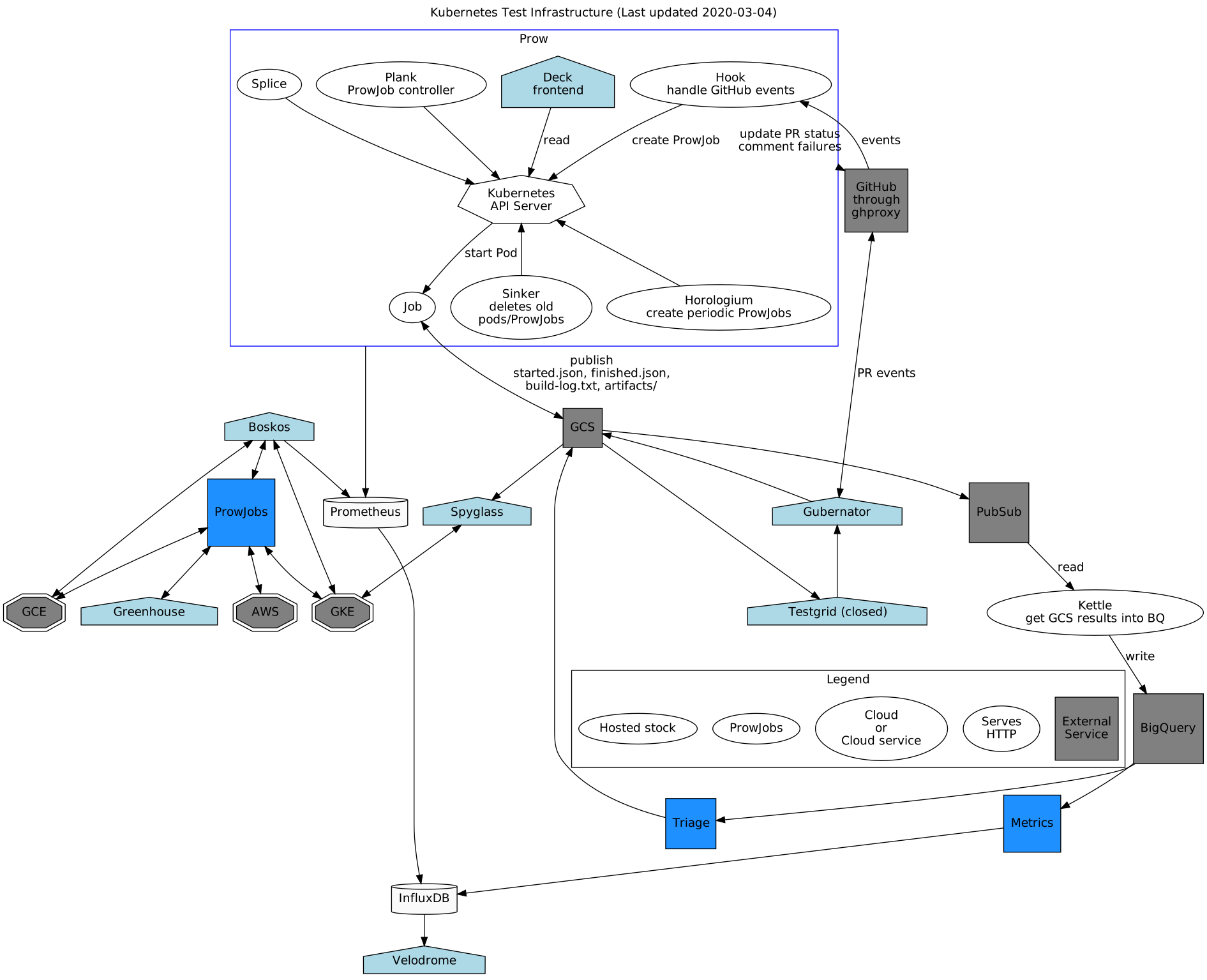
Architecture Explanation:
Regarding the architecture of test-infra, we can first find that it is relatively complex and contains many microservice components. It is worth noting that the interaction between the microservices in test-infra and other microservices does not use the traditional way we are familiar with. For example, it is not called through grpc, which is different from traditional microservices such as OpenIM. .
The core component of test-infra’s architecture is Hooks, which are responsible for receiving different types of events. Then, test-infra will distribute it to different plug-ins according to the event type through a plug-in system for processing. For example, if we consider an instance, then in the prow directory of the kubernetes test-infra repository, we can find a collection of plugins named plugins, and one of the plugins is named transfer-issue. This plugin is responsible for handling PR requests.
On the other hand, for unit requests it will do unit tests and for merge requests it will do merge tests. In this system, we also have a CRD resource called prowjob, which provides a high-level abstraction, as well as a custom controller.
All test results will be posted back to the GitHub test panel. Status updates will be made through the crier and then transferred to the corresponding organization and warehouse addresses.
For visualization, test-infra provides a component called deck. The corresponding website is prow.k8s.io, which provides a front-end view so that users can understand and control the entire testing process more intuitively.
This design makes the test-infra architecture complex and flexible, but also brings a high degree of customization and scalability.
Basic components:
I heard two sentences in kubesphere before:
Prow currently only supports Github and Gerrit. It is difficult to see support for gitlab in the short term.
But we can support it through
Lighthouse
prow’s persistent storage only supports GCP, but you can use Jenkins X, which uses Knative to run Job
This sentence is wrong. We can find it through prow and it can support other clouds. Prow does not only use GCP, as long as it is an SDK compatible with s3, it will work.
https://github.com/settings/tokens
(Need to be configured in .env)
All events in the warehouse need to be monitored through webhooks.
https://github.com/username/projectname/settings/hooks/new
npm install
cp env .env
vim.env
npm start
This project uses pm2 for service management. Please install pm2 globally before publishing.
npm install pm2 -g
npm run deploy
After starting the service in the background, you can use pm2 ls to view the running status of the service name github-bot. For specific usage of pm2
, please visit: https://github.com/Unitech/pm2
The logger service of this system is based on log4js
. There is a parameter LOG_TYPE in the .env file in the root directory, which defaults to console. Parameter value description:
console - output log via console.
file - Output all relevant logs to the `log` folder in the root directory.
Contains prow:
Does not contain prow:
Prow: Keeping Kubernetes CI/CD Above Water - Kurt Madel
[Prow, Jenkins X Pipeline Operator, and Tekton: Going Serverless With Jenkins jenkins-x)
Jenkins X replaces Prow with Lighthouse for better source control compatibility • DEVCLASS
Prow + Kubernetes - A Perfect Combination To Execute CI/CD At Scale
此内容由惯性聚合(RSS阅读器)自动聚合整理,仅供阅读参考。 原文来自 — 版权归原作者所有。