惯性聚合 高效追踪和阅读你感兴趣的博客、新闻、科技资讯
阅读原文 在惯性聚合中打开

推荐订阅源

T
Tenable Blog
Last Week in AI
Last Week in AI
P
Proofpoint News Feed
Engineering at Meta
Engineering at Meta
H
Help Net Security
F
Fortinet All Blogs
MyScale Blog
MyScale Blog
宝玉的分享
宝玉的分享
让小产品的独立变现更简单 - ezindie.com
博客园 - 司徒正美
量子位
N
Netflix TechBlog - Medium
Apple Machine Learning Research
小众软件
小众软件
Recorded Future
Recorded Future
博客园 - 三生石上(FineUI控件)
Vercel News
Vercel News
aimingoo的专栏
aimingoo的专栏
I
InfoQ
Microsoft Security Blog
Scott Helme
Scott Helme
The Last Watchdog
The Last Watchdog
cs.AI updates on arXiv.org
IT之家
IT之家
AI
AI
WordPress大学
WordPress大学
Security Archives - TechRepublic
Google Online Security Blog
U
Unit 42
V2EX - 技术
V2EX - 技术
MongoDB | Blog
MongoDB | Blog
Schneier on Security
博客园 - Franky
H
Heimdal Security Blog
奇客Solidot–传递最新科技情报
奇客Solidot–传递最新科技情报
Jina AI
Jina AI
W
WeLiveSecurity
P
Privacy & Cybersecurity Law Blog
Cloudbric
Cloudbric
B
Blog RSS Feed
N
News | PayPal Newsroom
S
Securelist
Threat Intelligence Blog | Flashpoint
I
Intezer
Hacker News - Newest:
Hacker News - Newest: "LLM"
CTFtime.org: upcoming CTF events
博客园_首页
罗磊的独立博客
H
Hackread – Cybersecurity News, Data Breaches, AI and More
雷峰网
雷峰网

BB酱 の Blog

半监督分割 in CVPR2022 | BB酱 の Blog 半监督分割 in CVPR2022 | BB酱 の Blog 数字水印的简单思考 | BB酱 の Blog 数字水印的简单思考 | BB酱 の Blog Regional Semantic Contrast and Aggregation for Weakly Supervised Semantic Segmentation 笔记 Regional Semantic Contrast and Aggregation for Weakly Supervised Semantic Segmentation 笔记 论文阅读: AppProp: All-Pairs Appearance-Space Edit Propagation 核心内容翻译 论文阅读: AppProp: All-Pairs Appearance-Space Edit Propagation 核心内容翻译 论文阅读: Rectangling Panoramic Images via Warping 核心内容翻译 论文阅读: Rectangling Panoramic Images via Warping 核心内容翻译 浅谈功利主义与绝对主义下的道德标准 | BB酱 の Blog 语义分析&实现篇 | BB酱 の Blog 简单函数绘图语言解释器 Python实现—-语法分析篇 简单函数绘图语言解释器 Python实现—-语法分析篇 简单函数绘图语言解释器 Python实现—-概述&词法分析篇 简单函数绘图语言解释器 Python实现—-概述&词法分析篇 浅谈功利主义与绝对主义下的道德标准 | BB酱 の Blog 决策树基本原理和简单例子 | BB酱 の Blog 决策树基本原理和简单例子 | BB酱 の Blog
语义分析&实现篇 | BB酱 の Blog
BBChan · 2020-01-09 · via BB酱 の Blog

目录和相关资源

简单函数绘图语言解释器 Python实现—-概述&词法分析篇
简单函数绘图语言解释器 Python实现—-语法分析篇
GitHub开源完整代码

前言

在之前的文章里,我们实现了词法分析器和语法分析器,那么对于我们来说,最开始的代码文件,已经被我们转换成了有实际意义的语法树,也就是从单纯的字符流转化成了记号流(token流),又从记号流转化成立语法树。于是,我们终于可以来到这个解释器的最后一部分,为每一个语法树赋予其实际的语义,让语句转化成python代码的运行结果,并最终完成绘图工作。

其实,有了之前语法分析器里GetValue方法的铺垫,再加上Python的matplotlib库对于图形绘制有较好的支持,对我们来说,语义分析的过程会变的相对简单。核心难点已经不在于解析原有的代码文件,而是转向如何根据已有参数绘制对应图形了。

语义分析器实现

由于该解释器基于python环境,且在语法分析过程中已经构造了GetValue方法,因此在语义分析阶段,我们仅需关注画图部分的内容。由于在语法分析器中,Statement方法并未给出画图过程,因此在semantic类中,应重载该方法,在保留基本功能的同时,在For语句执行后进行绘图操作。

1

2

3

4

5

6

7

8

9

10

11

12

13

14

15

16

17

18

19

20

21

22

23

24

25

26

27

28

29

30

31

32

33

34

35

36

37

38

39

40

41

42

43

44

45

46

47

48

49

50

51

52

53

54

55

56

57

58

import parserprocess

import scanner_token

import numpy as np

import sys

import matplotlib.pyplot as plt

class Semantic(parserprocess.Parser):

    def init(self):

        self.fig = plt.figure()

        # plt.ylim(0, None)

        # plt.xlim(0, None)

        self.ax = self.fig.add_subplot(111)

    def calc(self, x, y):

        x *= self.x_scale

        y *= self.y_scale

        temp1 = x * np.cos(self.rot) + y * np.sin(self.rot)

        y *= np.cos(self.rot) - x * np.sin(self.rot)

        x = temp1

        x += self.x_origin

        y += self.y_origin

        return x, y

    def Draw(self):

        x, y = self.calc(self.x_ptr, self.y_ptr)

        self.ax.scatter(x, y)

    def Statement(self):

        self.enter("Statement")

        if self.token.type == scanner_token.Token_Type.ORIGIN:

            self.OriginStatement()

        elif self.token.type == scanner_token.Token_Type.SCALE:

            self.ScaleStatement()

        elif self.token.type == scanner_token.Token_Type.FOR:

            self.ForStatement()

            self.Draw()

        elif self.token.type == scanner_token.Token_Type.ROT:

            self.RotStatement()

        else:

            print(self.token.type)

            print("出错行号:", self.scanner.LineNo, " 与期望记号不符 ", self.token.lexeme)

            self.scanner.CloseScanner()

            sys.exit(1)

        self.back("Statement")

    def Parser(self):

        self.enter("Parser")

        if self.scanner.f_ptr is None:

            print("文件打开失败")

        else:

            self.FetchToken()

            self.Program()

            plt.show()

            self.scanner.CloseScanner()

            self.back("Parser")

结果展示阶段

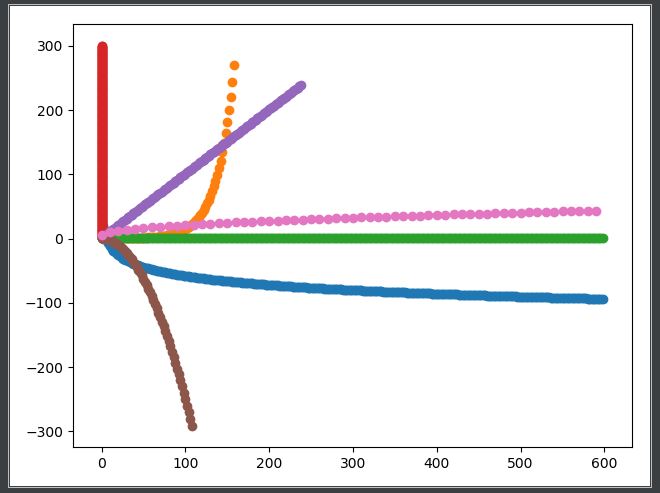
至此,我们的整个解释器的核心部分已经构造完毕,接下来的工作就是如何使用该解释器实现绘图功能了,对于第一篇博客中提到的实例代码,将其保存在garphic.txt中,我们的实现代码如下:

import scannerprocess

import semantic

file_name = 'graphic.txt'

scanner = scannerprocess.Scanner(file_name)

semantic = semantic.Semantic(scanner)

semantic.init()

semantic.Parser()

运行结果如下所示: