


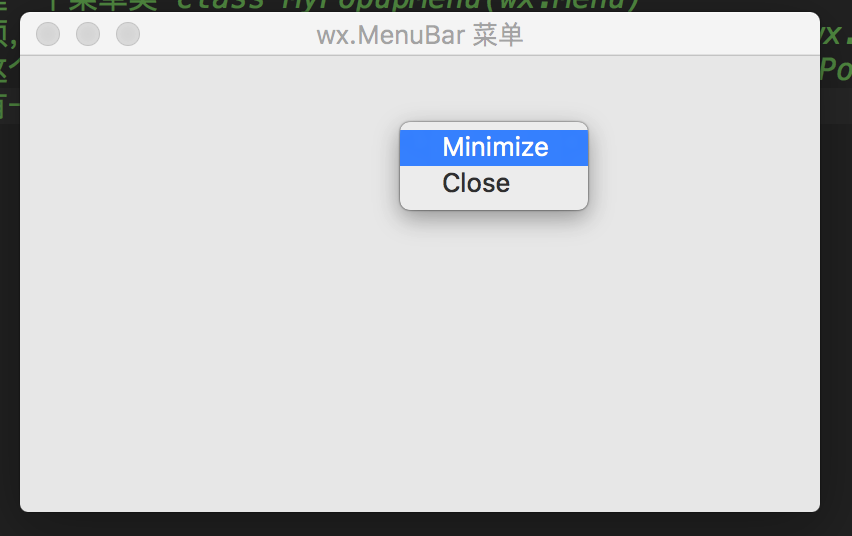
菜单是程序经常用到的小部件,我们来看看如何创建。
    self.menubar = wx.MenuBar()#创建一个程序菜单
    self.fileMenu = wx.Menu()#创建一个一级菜单,这个菜单里可以继续加入菜单,就可以产行二级菜单
    self.new = wx.MenuItem(self.fileMenu,9,"new")#创建菜单项
    self.fileMenu.Append(self.new)#添加菜单项
以上这几个操作就可以创建一个菜单及菜单项了
创建方法,可以先创建一个菜单类class MyPopupMenu(wx.Menu)
然后再类中添加菜单项,最后在窗口程序中添加右键绑定一个事件:self.Bind(wx.EVT_RIGHT_DOWN, self.OnRightDown)
然后事件函数中生成这个菜单self.PopupMenu(MyPopupMenu(self), e.GetPosition())
这样,窗口程序中就有一个右键菜单了,完整的代码再下边,可以跑跑试试
import wx

class MyPopupMenu(wx.Menu):

    def __init__(self, parent):
        super(MyPopupMenu, self).__init__()

        self.parent = parent

        mmi = wx.MenuItem(self, wx.NewId(), 'Minimize')
        self.Append(mmi)
        self.Bind(wx.EVT_MENU, self.OnMinimize, mmi)

        cmi = wx.MenuItem(self, wx.NewId(), 'Close')
        self.Append(cmi)
        self.Bind(wx.EVT_MENU, self.OnClose, cmi)


    def OnMinimize(self, e):
        self.parent.Iconize()

    def OnClose(self, e):
        self.parent.Close()

class HelloFrame(wx.Frame):
    def __init__(self, *args, **kw):
        #调用父类的创建方法
        super(HelloFrame, self).__init__(*args, **kw)

        self.menubar = wx.MenuBar()#创建一个程序菜单
        self.fileMenu = wx.Menu()#创建一个一级菜单,这个菜单里可以继续加入菜单,就可以产行二级菜单
        self.new = wx.MenuItem(self.fileMenu,9,"new")#创建菜单项
        self.fileMenu.Append(self.new)#添加菜单项

        self.editMenu = wx.Menu()
        self.copyItem = wx.MenuItem(self.editMenu, 100, text="copy", kind=wx.ITEM_NORMAL)
        self.editMenu.Append(self.copyItem)
        self.cutItem = wx.MenuItem(self.editMenu, 101, text="cut", kind=wx.ITEM_NORMAL)
        self.editMenu.Append(self.cutItem)
        self.pasteItem = wx.MenuItem(self.editMenu, 102, text="paste", kind=wx.ITEM_NORMAL)
        self.editMenu.Append(self.pasteItem)

        self.fileMenu.Append(22, "Edit", self.editMenu)
        self.fileMenu.AppendSeparator()
        self.fileMenu.AppendSeparator()#分隔线
        self.qmi = wx.MenuItem(self.fileMenu, 1, '&Quit\tCtrl+Q')
        self.fileMenu.Append(self.qmi)

        self.Bind(wx.EVT_MENU, self.OnQuit, id=1)

        self.menubar.Append(self.fileMenu, '&File')
        self.SetMenuBar(self.menubar)

        self.Bind(wx.EVT_RIGHT_DOWN, self.OnRightDown)

    def OnRightDown(self, e):
        self.PopupMenu(MyPopupMenu(self), e.GetPosition())

    def OnQuit(self, e):
        self.Close()

def main():
    app = wx.App(False)
    frm = HelloFrame(None, title='wx.MenuBar 菜单',)
    frm.Show()#显示窗口
    app.MainLoop()#持续更新窗口


if __name__ == '__main__':
main()此内容由惯性聚合(RSS阅读器)自动聚合整理,仅供阅读参考。 原文来自 — 版权归原作者所有。