惯性聚合 高效追踪和阅读你感兴趣的博客、新闻、科技资讯
阅读原文 在惯性聚合中打开

推荐订阅源

S
Security Affairs
freeCodeCamp Programming Tutorials: Python, JavaScript, Git & More
CTFtime.org: upcoming CTF events
Jina AI
Jina AI
P
Palo Alto Networks Blog
GbyAI
GbyAI
大猫的无限游戏
大猫的无限游戏
A
Arctic Wolf
Hugging Face - Blog
Hugging Face - Blog
小众软件
小众软件
Y
Y Combinator Blog
T
The Blog of Author Tim Ferriss
Blog — PlanetScale
Blog — PlanetScale
S
Schneier on Security
V
Vulnerabilities – Threatpost
C
Cybersecurity and Infrastructure Security Agency CISA
雷峰网
雷峰网
T
Tenable Blog
人人都是产品经理
人人都是产品经理
T
Tor Project blog
C
Cyber Attacks, Cyber Crime and Cyber Security
AWS News Blog
AWS News Blog
Microsoft Security Blog
J
Java Code Geeks
Scott Helme
Scott Helme
SecWiki News
SecWiki News
C
CERT Recently Published Vulnerability Notes
Recorded Future
Recorded Future
I
InfoQ
Security Archives - TechRepublic
Help Net Security
Help Net Security
Cloudbric
Cloudbric
C
Check Point Blog
Engineering at Meta
Engineering at Meta
TaoSecurity Blog
TaoSecurity Blog
B
Blog
Cyber Security Advisories - MS-ISAC
博客园_首页
N
News and Events Feed by Topic
云风的 BLOG
云风的 BLOG
MyScale Blog
MyScale Blog
腾讯CDC
量子位
Application and Cybersecurity Blog
K
Kaspersky official blog
Vercel News
Vercel News
F
Full Disclosure
T
Troy Hunt's Blog
Forbes - Security
Forbes - Security
S
Security @ Cisco Blogs

夏的博客

边狱巴士迁移下载工具箱-资源迁移下载工具 – 夏的博客 京东云雅典娜AX6600喂饭级免拆机刷机教程,以及刷回原厂系统的教程 – 夏的博客 [梦灯花]Mod“超级祝福之花”无限COST/解除祝福之花的装备上限/SuperBlessings – 夏的博客 [梦灯花]Mod“X超级视角”自由视角Mod /XSuperCamera – 夏的博客 1核更比2核强,RackNerd超高性价比高性能AMD Ryzen9 7950X3D VPS评测 – 夏的博客 边狱巴士一键迁移文件工具箱-C盘文件资源迁移/路径更改/检测工具 – 夏的博客 使用Docker+Uptime-kuna,自建一个服务在线监测网站! – 夏的博客 RackNerd申请免费IPv6模板/以及教程 – 夏的博客 RackNerd老用户个人评测购买推荐,讲那些评测博主没讲的 – 夏的博客 如何正确的备份 /迁移Microsoft Authenticator (MSA)应用的数据到新的设备 – 夏的博客
RackNerd免费更换服务器机房以及IP教程 – 夏的博客
Xia · 2026-06-01 · via 夏的博客

前言

RackNerd每台机器都有一次免费的迁移机房次数,之后每次迁移需要收五美元管理费,服务器迁移后IP会重置

推荐迁移的机房

目前推荐迁移的机房只有三个,LA-DC2,LA-DC3,San Jose,这三个机房对大陆的延迟基本上都是160~200ms上下,其他的机房对大陆延迟都是高的上天的

开始迁移

创建工单

点击这个链接:Submit Ticket – RackNerd LLC,然后再次点击Support,创建一个技术支持工单,主题就写

Hello I want to migrate my hosting server room to [这里写你要迁移的机房位置]

内容就写

Hello
I want to migrate my hosting server room to [这里写你的要迁移的机房]

This is my server information

My server information
hostname:(这里写你的主机名)[这里写你的机房位置]
IP:[这里写你的IP]

Thank you

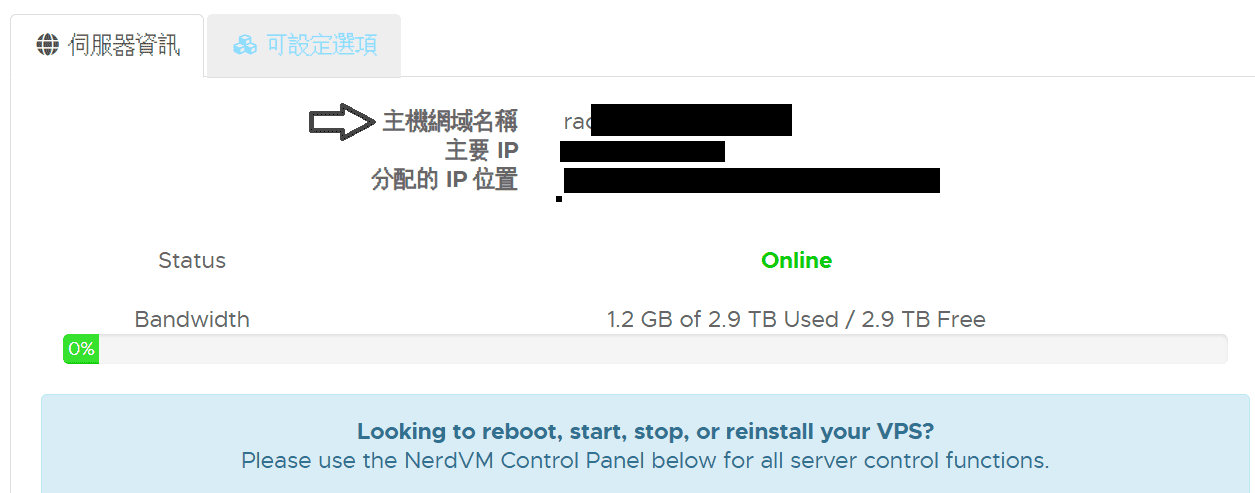
其中的主机名,你可以在主机的管理页面的“Server Information”或者“伺服器資訊”看到,叫“hostname”或者“主機網域名稱”,IP也在这里看
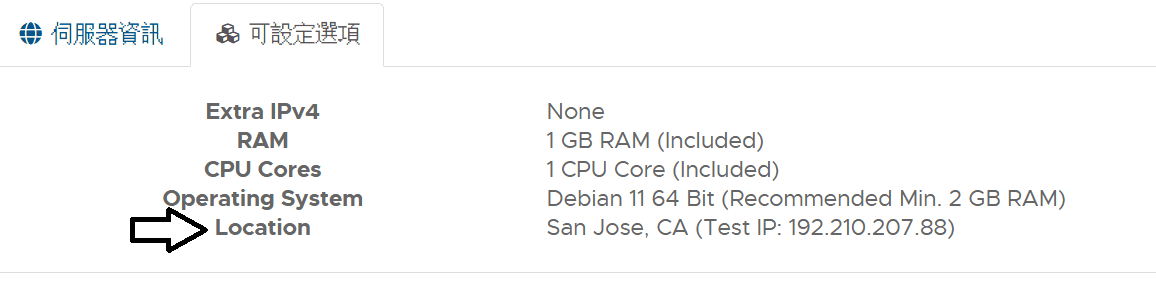
至于机房位置嘛,点击旁边的”Configurable Option”或者”可設定選項”可以看到”Location”也就是机房位置
发送工单后,等一会

选择迁移方式

过一段时间,操作员就会回复你一段这样的消息
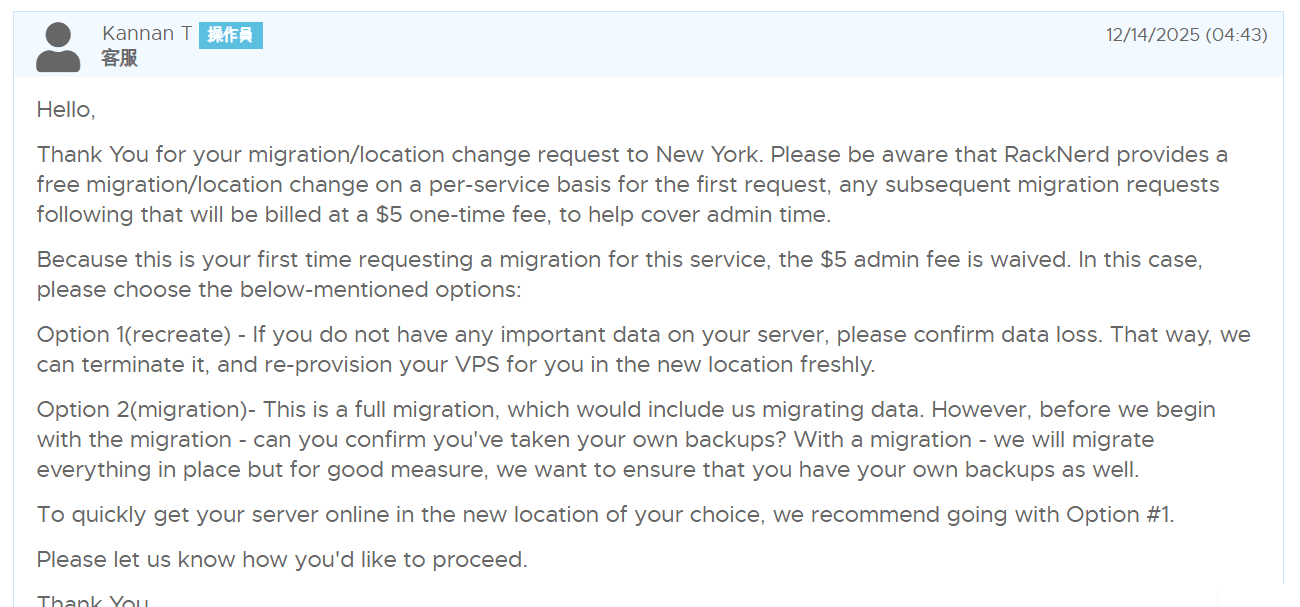
问你要如何迁移,这里详细说一下两种迁移方式的区别

  • Option 1(重建),选择Option 1 会直接删除你的旧机房的机器,在新机房创建一个新机器,选择此方法速度最快,但是你会失去你旧机器上的所有数据
  • Option 2(完整迁移),选择Option 2,操作员会手动把你旧机房的VPS复制到新机房,你不会损失任何数据,迁移后除了IP重置不会有其他任何改变,代价是耗时较长,选择完整迁移大概要30~60分钟完成

你想要怎么做就怎么回复,这里我想要保留我主机的所有数据,所以我选择了option 2,进行完整迁移,我回复了

“I want Option 2(migration), I need data.”

如果你不需要数据,可以选择Option 1 节约时间,这样子回复就可以了

“I want Option 1(recreate), I don't need data.”

二次确认

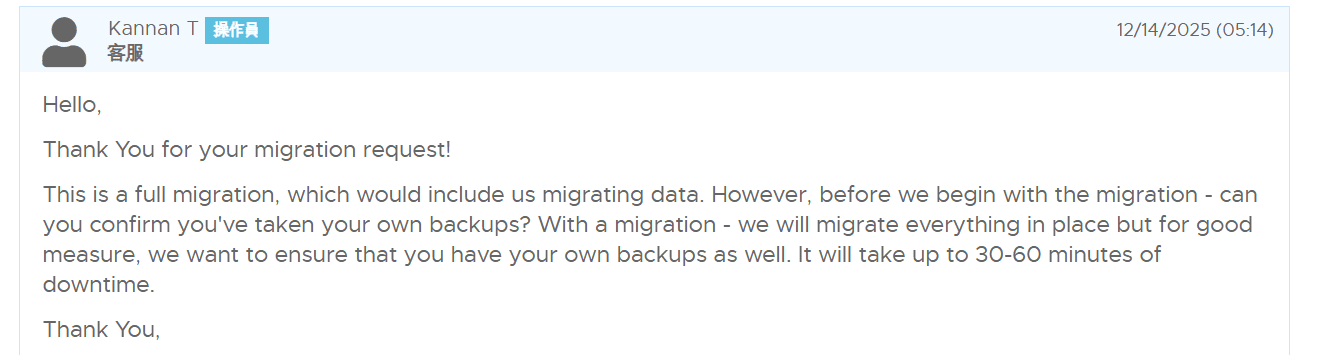
过段时间,操作员会发来这样的消息

意思就是要跟你二次确认,他们希望你完全备份了主机的数据

这里回复

I backed up the data.

确认完全备份了主机的数据,这时操作员就会开始迁移你的主机了

完成

过段时间后操作员就会,把你主机迁移后的信息发给你
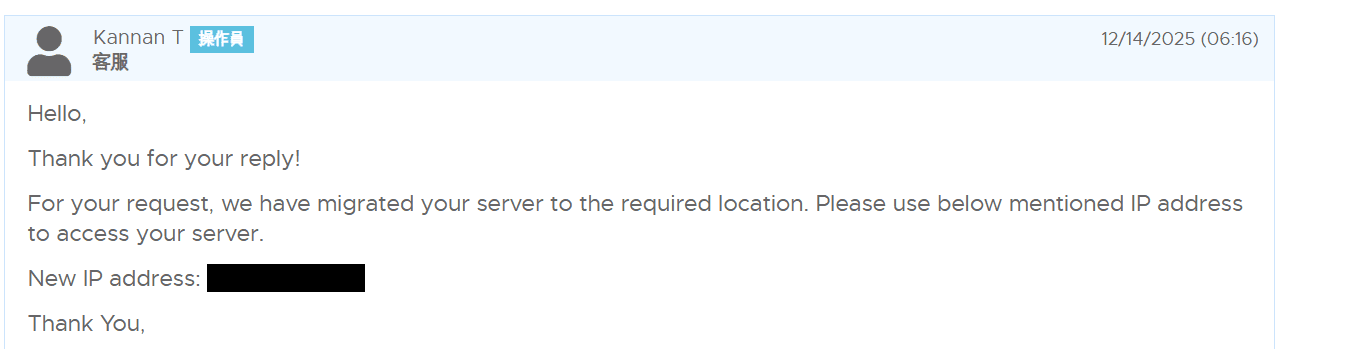
我这里因为选择的是完整迁移,所有数据都还在,所以只给我发了个新的IP地址,如果你选的是放弃所有数据的重建,应该还会给你发ROOT账户的密码,现在你的主机已经成功迁移到新机房啦

ヾ(✿゚▽゚)ノ

本文标题:RackNerd免费更换服务器机房以及IP教程
本文链接:https://xiau.net/2094.html/
转载需注明出处(*σ´∀`)σ

|´・ω・)ノ

ヾ(≧∇≦*)ゝ

(☆ω☆)

(╯‵□′)╯︵┴─┴

 ̄﹃ ̄

(/ω\)

∠( ᐛ 」∠)_

(๑•̀ㅁ•́ฅ)

→_→

୧(๑•̀⌄•́๑)૭

٩(ˊᗜˋ*)و

(ノ°ο°)ノ

(´இ皿இ`)

⌇●﹏●⌇

(ฅ´ω`ฅ)

(╯°A°)╯︵○○○

φ( ̄∇ ̄o)

ヾ(´・ ・`。)ノ"

( ง ᵒ̌皿ᵒ̌)ง⁼³₌₃

(ó﹏ò。)

Σ(っ °Д °;)っ

( ,,´・ω・)ノ"(´っω・`。)

╮(╯▽╰)╭

o(*////▽////*)q

>﹏<

( ๑´•ω•) "(ㆆᴗㆆ)

😂

😀

😅

😊

🙂

🙃

😌

😍

😘

😜

😝

😏

😒

🙄

😳

😡

😔

😫

😱

😭

💩

👻

🙌

🖕

👍

👫

👬

👭

🌚

🌝

🙈

💊

😶

🙏

🍦

🍉

😣

Source: github.com/k4yt3x/flowerhd