








By now you’ve got your Visual Editor and your Content Editor set up just the way you want them: you’ll be able to build pages from visual components, and write longer articles and posts without distractions. But what about adding content to the page that lets your audience actually find it?
Your developer can set up all the vital SEO fields you’ll need to ensure your pages are visible to search engines, and look great when they’re shared on social sites.
These fields might seem like small details, but they actually pack a big punch when it comes to how your webpage performs online. You can think of these fields as your webpage's first impression on the internet. They give Google and others a clearer idea of what your page is about, which can help them show it to the right people at the right time.
Front matter in a webpage refers to a section of metadata at the beginning of a file (in the <head> element). It contains structured information about the page or post, and is separated from the main content.
In CloudCannon we can easily edit front matter on our pages or posts using the sidebar.
On our own site, we use several customized front matter fields, including a ‘Breadcrumb Title’ that allows us to define a shorter title for pages that use breadcrumb links.

Our pages sidebar, pictured above, include fields for the SEO essentials: title, permalink, and description, as well as fields for the featured image, and its accompanying alt text.
Our blog sidebar, pictured below, is a lot more detailed. Here we also include fields for post author(s), the option to show or hide the publish date, and prefilled fields for calls to action (CTAs) at the end of each post. Depending on the content of the post, we can choose to edit these or use the default messages.
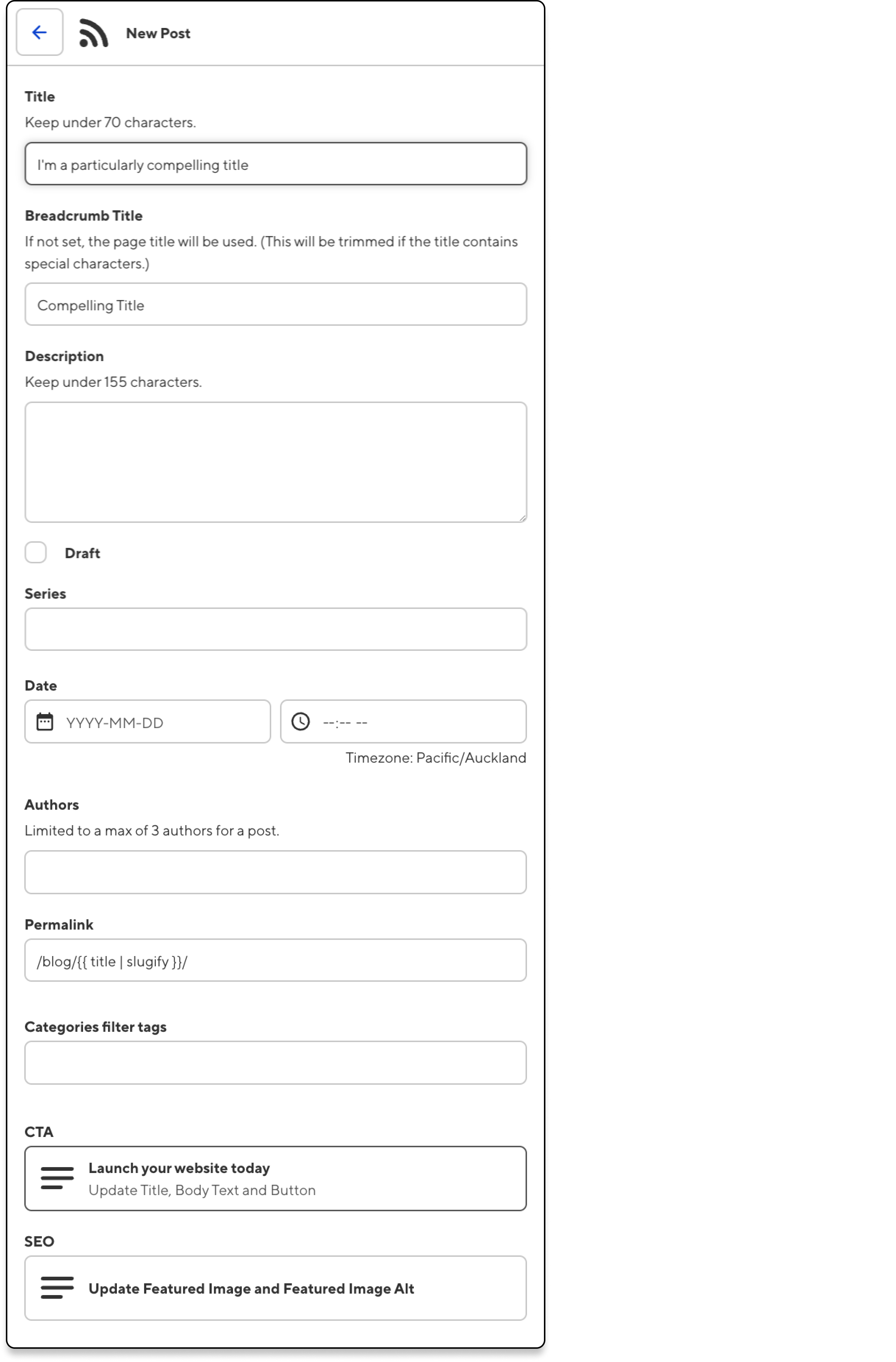
It’s worth noting that all of these front matter fields can be defined by your developer with CloudCannon’s schemas. Schemas are essentially blueprints for your pages and posts, meaning every time you create a new piece of content for your site, it will already have the essential SEO fields you’ll need — all the author or content editor needs to do is fill them in.
Developers can also add customized (and non-public) comments for site editors about how best to fill in the important SEO fields, including advice on character length and content, and even a character counter so editors know how much room they have.
The following fields are all configurable on CloudCannon via schemas and global configuration.
This is the main text that describes your webpage. It will appear as the clickable headline in search engine results and at the top of web browsers. It's your chance to make a great first impression and entice users to click through to your site.
Title tags should be concise (ideally under 70 characters), include your main keyword, and accurately describe the page content.
The meta description is like a sneak peek of what's on your page. When someone searches for something related to your content, that description pops up in the search results. A good one can be the difference between someone clicking on your link or scrolling right past it.
Meta descriptions should be under 155 characters, as anything longer will be truncated. You should choose whether a summary or a teaser of your page’s content is more appropriate.
These are specific meta tags that control how your content appears when shared on social platforms. They include things like og:title and og:description for Facebook and Open Graph, and similar tags for Twitter/X Cards. By optimizing these, you can ensure your content looks great and is more likely to be engaged with when shared on social media.
As for og:image (that's "Open Graph image" for the curious), it's all about making your content look good when it's shared on social media. You know how when you share a link on Facebook or Twitter, it usually shows a preview image? That's the og:image at work. A catchy, relevant image can really boost engagement and make your content stand out in a crowded social media feed.
Most social services — like X, pictured below — will show a preview of the og:image and its alt text when you enter a link.

Open Graph and social mages should have an aspect ratio of 1.9:1, with the suggested dimensions of 1200x630 pixels. If you want a square image, then go for 1200x1200.
This is a description of an image that appears if the image fails to load and is read by screen readers for visually impaired users. From an SEO perspective, it's an opportunity to include relevant keywords and help search engines understand what your images are about.
Alt text should be descriptive but concise.
A well-structured URL is both user and SEO-friendly. Clean URLs help users understand where they are on your site and can improve your search rankings.
Permalinks should be relatively short, use hyphens to separate words, and include relevant keywords. For example, "www.yoursite.com/category/article-title" is much better than "www.yoursite.com/page?id=123".
Depending on the type of content your site has, you can further fine-tune your SEO with fields for canonical tags, specific schema markup, and — optionally — meta keywords for minor search engines.
These are used to prevent duplicate content issues. If you have multiple pages with similar content, the canonical tag tells search engines which version is the "original" or preferred version. This helps consolidate ranking signals to the preferred page and avoid potential penalties for duplicate content.
This is a type of structured data that provides extra information to search engines. It can lead to rich snippets in search results, like star ratings for product reviews or recipe information. While it doesn't directly improve rankings, it can significantly increase click-through rates by making your search results more appealing and informative.
Meta keywords are a list of keywords relevant to your page content, included in your HTML. Once a crucial part of SEO, they’ve largely fallen out of favor with major search engines like Google. However, some smaller search engines — like Yandex and Baidu — might still use them. While not harmful, they're generally considered low priority in modern SEO strategies.
These tasks are largely automated, though developers can make changes to them for specific use cases.
This text file sits in your website's root directory and provides instructions to search engine crawlers. It can tell crawlers which pages or sections of your site to crawl and which to ignore. This is useful for preventing crawlers from accessing private or duplicate content, or for managing crawler traffic on large sites.
CloudCannon automatically generates and serves a robots.txt file for all testing domains, to ensure that these sites aren’t indexed. Users can create and edit their own robots.txt file to control search engine access to their published content.
This is a file that lists all the important pages on your website. It helps search engines discover and crawl your content more efficiently. An XML sitemap can be especially useful for large sites or those with complex structures, ensuring that no important pages are overlooked by search engine crawlers.
By default, CloudCannon generates an updated sitemap every time you save your changes and rebuild your site, ensuring that search engines always have access to your most recent site structure.
Optimizing your website for search engines and social sharing is crucial for online success, but it can be a complex and time-consuming process. While this article provides a solid foundation for understanding key SEO elements, implementing them effectively often requires technical expertise.
If you're feeling overwhelmed or want to confirm your site is fully optimized, we can help with a range of web services. Our team of solutions specialists is ready to help you set up customized schemas, configure essential SEO fields, and implement advanced optimization techniques tailored to your specific needs. With CloudCannon's support, you can focus on creating great content while we ensure your web projects are primed for maximum visibility and engagement online.
此内容由惯性聚合(RSS阅读器)自动聚合整理,仅供阅读参考。 原文来自 — 版权归原作者所有。